Chapter 4 Assigning Tasks: Messages, Attachments, and a Good Handoff
If requirements are given too briefly, it easily searches dozens of irrelevant web pages and messes up files. Sending a message is handing off work to a cloud computer.
- Set strict task boundaries and explain attachment purposes to prevent it from acting on its own
- Give clear instructions to get back deliverables that can be directly accepted
- Interrupt and steer it at any time during execution, or use voice to supplement context
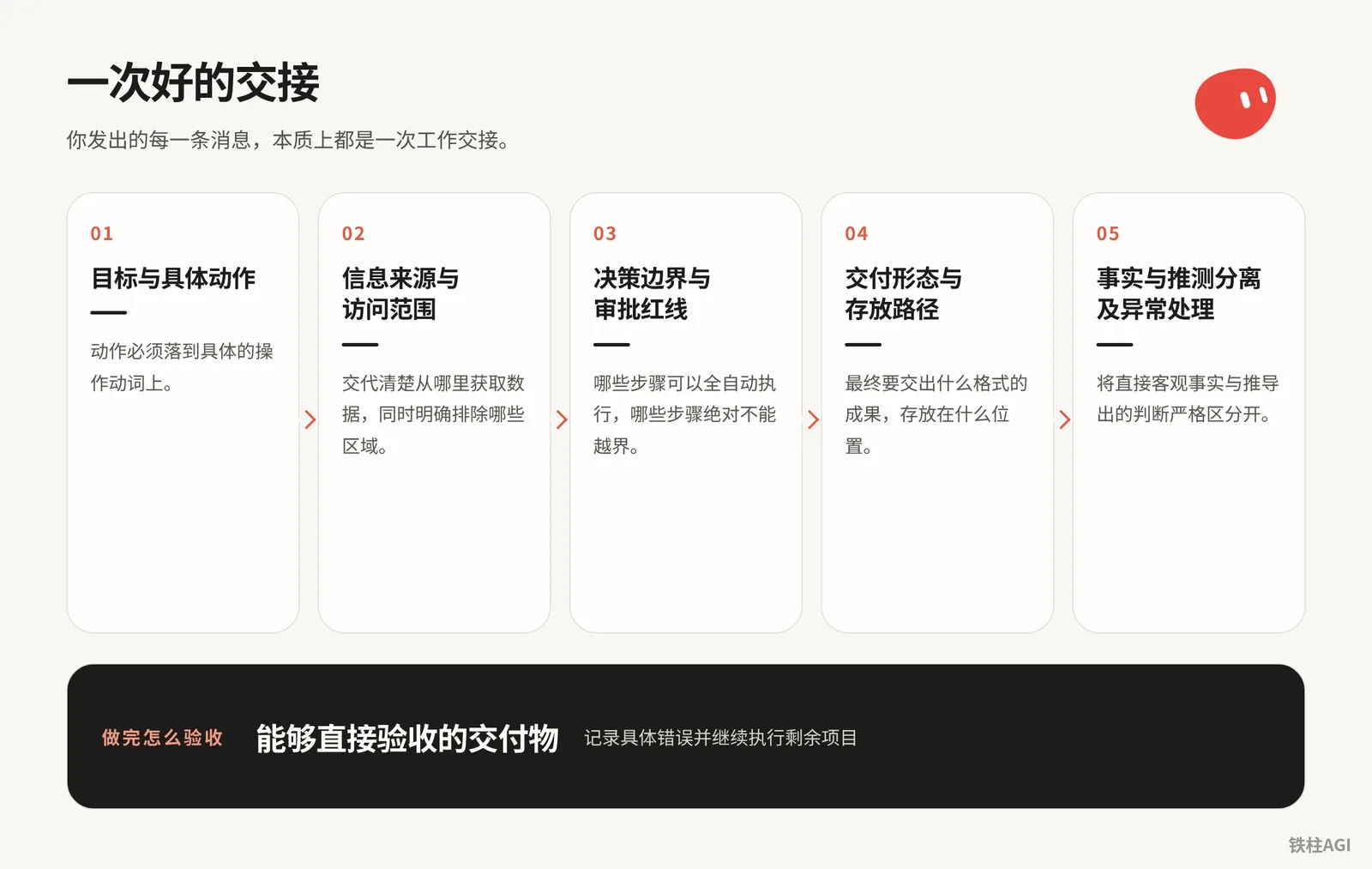
Five Elements of a Good Request
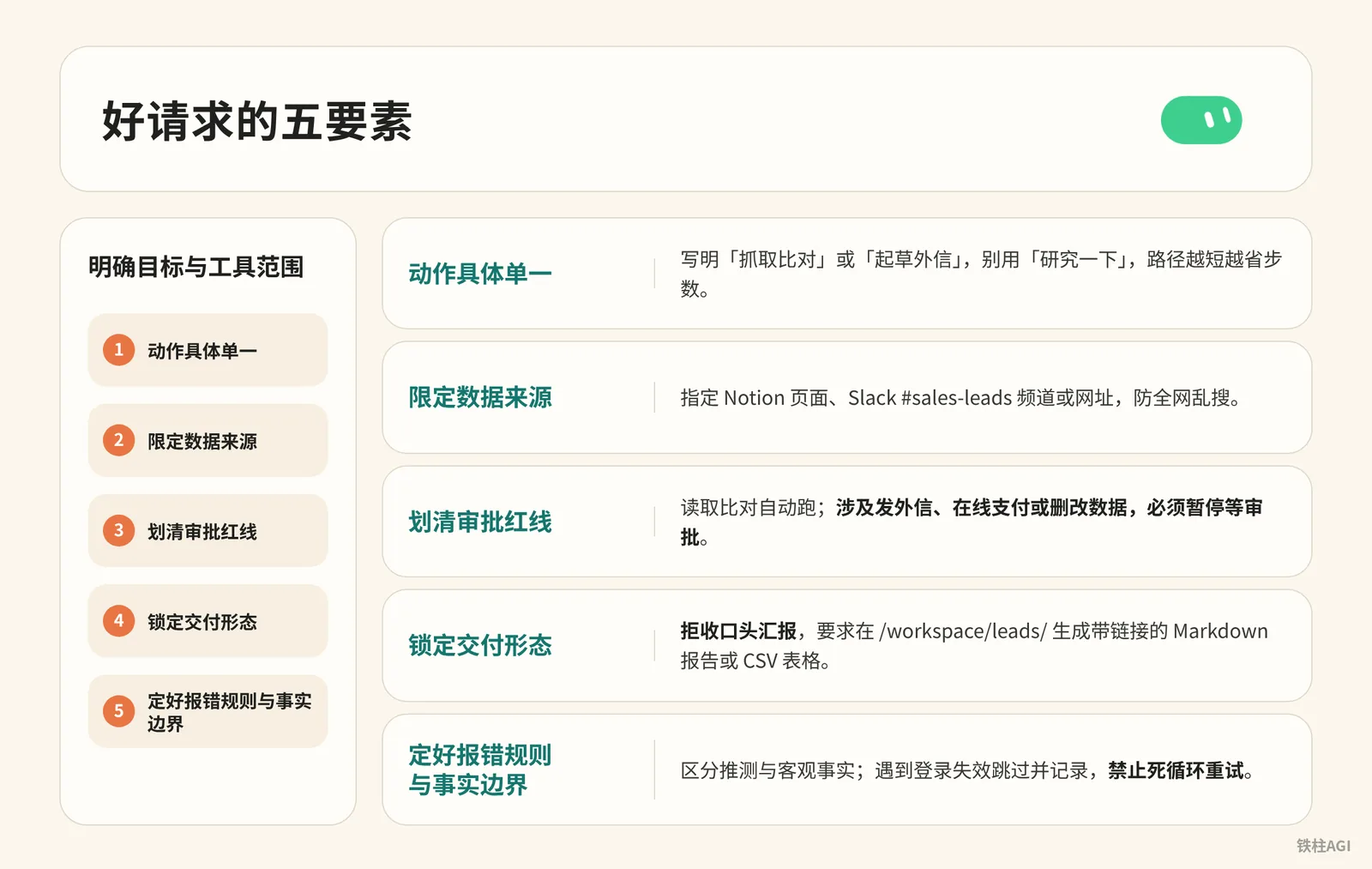
When assigning tasks to Grok Bot, instructions must clearly specify the objective and tool scope; see the Grok Bot documentation for specifications.
- Specific and singular action. Clearly write "scrape and compare" or "draft an outbound email", don't use "research it"; shorter paths save steps.
- Limit data sources. Specify Notion pages, Slack #sales-leads channel, or specific URLs to prevent wandering searches across the entire web.
- Draw clear approval red lines. Reading and comparing run automatically; when sending outbound emails, making online payments, or modifying/deleting data is involved, it must pause and wait for approval.
- Lock down the delivery format. Reject verbal reports; require generating a Markdown report with links or a CSV spreadsheet in
/workspace/leads/. - Define error handling rules and factual boundaries. Distinguish speculation from objective facts; skip and log when encountering expired logins, and infinite retry loops are strictly forbidden.
Attachment Specifications and Limits Checklist
For upload rules, see Using Grok Bot.
Specification Limits
- Desktop client is limited to 6 files per message (put excesses in the workspace); images, documents, and audio are capped at 25MB, video at 200MB.
- When encountering blockers or errors, convert files locally to PDF, CSV, or images before uploading.
Handoffs and Group Chats
- Do not press Enter immediately after dragging files in; clearly state each file's identity, relational logic, and protection statements.
上传的 PDF 是已经签署的标准采购合同模板。上传的 Excel 是本月供应商提交的实际报价清单。
请对照合同模板中第 4 条关于各类物料的基准单价,逐行核验 Excel 里的实际报价。
标出单价超出基准价的所有条目,在附带的备忘中引用合同中的对应条款编号。
将核验结果另存为一份新的 Excel 表格,并输出一份简短的异常摘要。
请勿改动原始上传文件。- Between Bots in group chats, only plain text is supported. Downstream Bots needing attachments must receive them via direct message.
Practical Prompt Library for Task Delivery
For common scenarios, apply templates directly; just tweak and use.
- Research & Outreach: Look up leads and prepare materials, do not send directly.
从我们的 CRM 系统中获取本周销售管道的重点评审列表。
请跳过当前已经处于活跃跟进序列中的联系人。
在指定公开网页和已授权的 Slack 相关频道中,深入调研排名前五的重点账户,找出负责采购或技术的对口联系人。
参考我在系统中历史邮件的口吻,为这五位联系人分别起草个性化的初次外联邮件。
将草稿保存在系统草稿箱中,并在明天上午 9 点前在此对话中列出清单供我审批。未经我的明确确认,绝不向外发送任何邮件。- Attachment Verification: Align multiple tables and check income and expenses.
附件中的 PDF 为《2026 年度差旅与报销政策细则》,CSV 表格为本月部门提交的待审批费用报销流水。
请逐项核对 CSV 中的每一笔申报项目:
1. 检查报销金额是否超过对应城市级别的住宿与餐饮标准。
2. 检查单笔超过 500 元的支出是否有对应的发票类别标记。
3. 提取所有不符合政策规定的异常申报,列明行号、申报人、金额、超标原因及违背的政策条款。
最后生成一份 Markdown 格式的核查报告,并列出通过与未通过的统计汇总。保持原始 CSV 文件不被改动。- Website Inspection: Inspect pages and retain evidence.
Practical Prompt Library for Task Delivery
你负责检查我的网站运行状态。本次只访问我提供的以下三个页面:首页、最新更新日志页、用户注册页。
逐一核验各页面是否能正常打开、关键按钮是否响应、文本信息是否存在断链或明显过期内容。
排查过程中必须执行以下要求:
1. 发现任何显示异常或报错时,保存完整的页面 URL、检查时间戳以及当时的屏幕截图。
2. 区分页面直接看到的事实与你的推测,事实写在证据栏,分析写在备注栏。
3. 检查受阻或遇到需要验证码时,记录阻碍原因并继续检查下一个页面,不要重复尝试。
4. 检查结果报告保存在 /workspace/site-check/ 目录下,命名为 check-report.md。
你仅有只读检查与生成报告的权限,严禁更改后台设置或提交任何表单。- Plan Troubleshooting: Review logic before complex operations to prevent deviation.
Practical Prompt Library for Task Delivery
我准备让你整理过去一个季度跨 Notion、Gmail 和 GitHub 的客户产品缺陷反馈。
在正式开始执行数据读取与整理之前,请先不要调用任何批量工具,先在对话中向我提交一份执行计划:
1. 列出你准备按顺序访问的系统、模块与具体检索词。
2. 说明你打算提取哪些关键字段,以及如何去重。
3. 标明整个流程中哪些环节可能涉及对外部状态的更改。
4. 说明你打算将阶段性文件保存在云电脑的哪个路径,以及遇到权限不足时如何处理。
我确认并批准你的计划后,你再开始执行。- Inbox Briefing: Extract key points and categorize for handover.
Practical Prompt Library for Task Delivery
使用已连接的邮箱插件,读取收件箱过去 24 小时内收到的全部新邮件。
按照以下业务逻辑进行分类处理:
1. 属于系统续费、订阅扣款账单的邮件,提取服务商、扣款金额与下次续费时间。
2. 属于用户直接提问或反馈 Bug 的邮件,提取发件人邮箱、问题概括与紧急程度。
3. 属于营销推广、垃圾资讯的邮件,直接归入忽略清单。
在当前会话中输出一份分栏概览:仅展示需我关注的账单与紧急反馈,并在每条记录后附带邮件主题与时间。
所有邮件保持未读或已读原状,未经审批严禁归档、删除或起草回复。
Long-term Rules vs. One-off Tasks: Don't Confuse House Rules with Chores
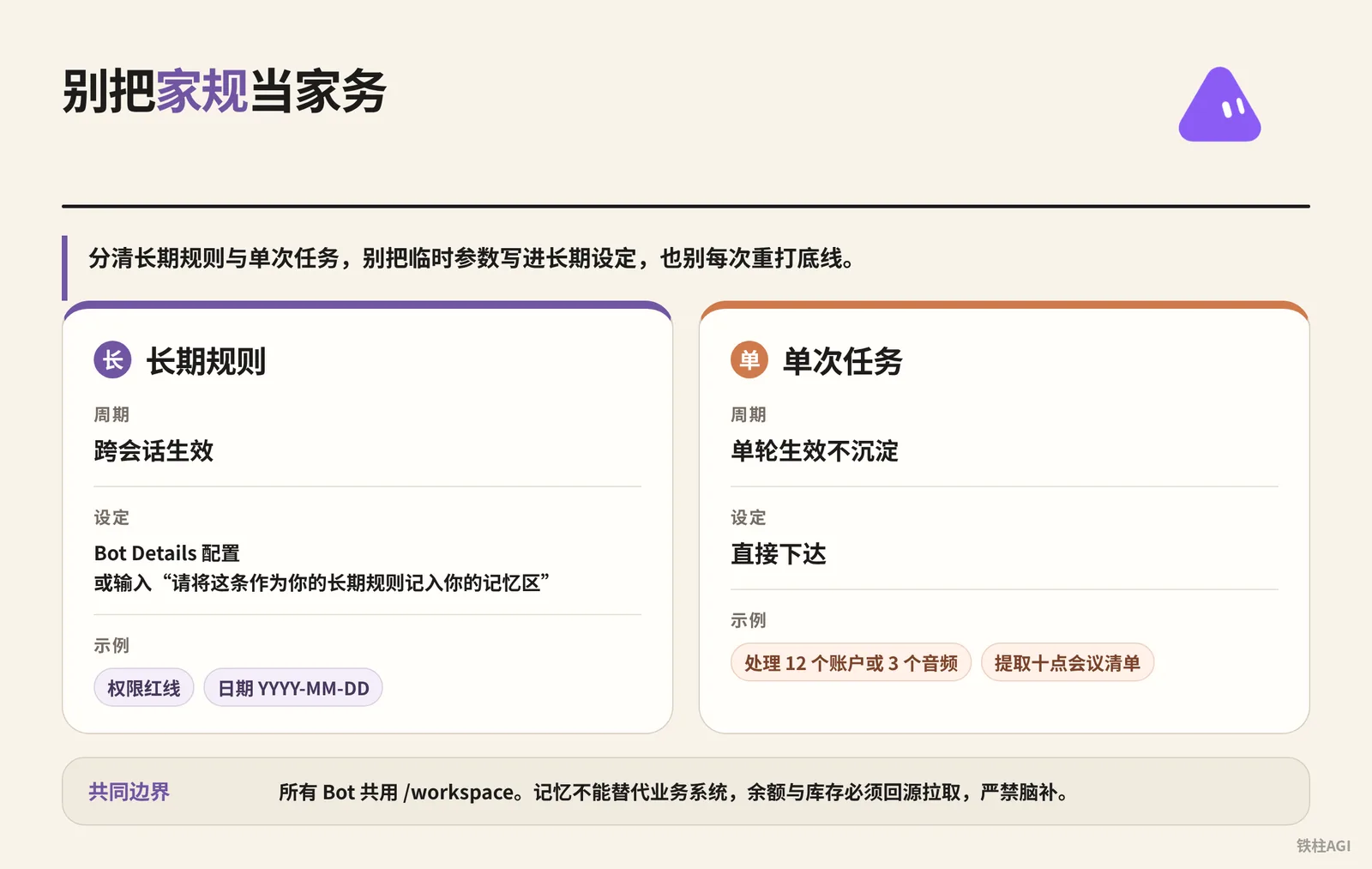
Distinguish between long-term rules and one-off tasks (see Using Grok Bot); don't put temporary parameters into long-term settings, and don't re-enter baseline rules every time.
| Type | Lifespan & Configuration | Examples & Constraints |
|---|---|---|
| Long-term Rules | Effective across sessions; configure in Bot Details or enter "Please record this into your memory area as your long-term rule" | Permission red lines, dates YYYY-MM-DD |
| One-off Tasks | Effective for a single turn without persisting; assign directly | Process 12 accounts or 3 audios, extract the 10 o'clock meeting checklist |
All Bots share /workspace (refer to 10 Essential Tips to Make Your Grok Bot Work Better).
Memory cannot replace business systems; balances and inventory must be fetched from the source, and hallucination is strictly forbidden.
Interventions During Task Execution: Stop, Interruption, and Approval
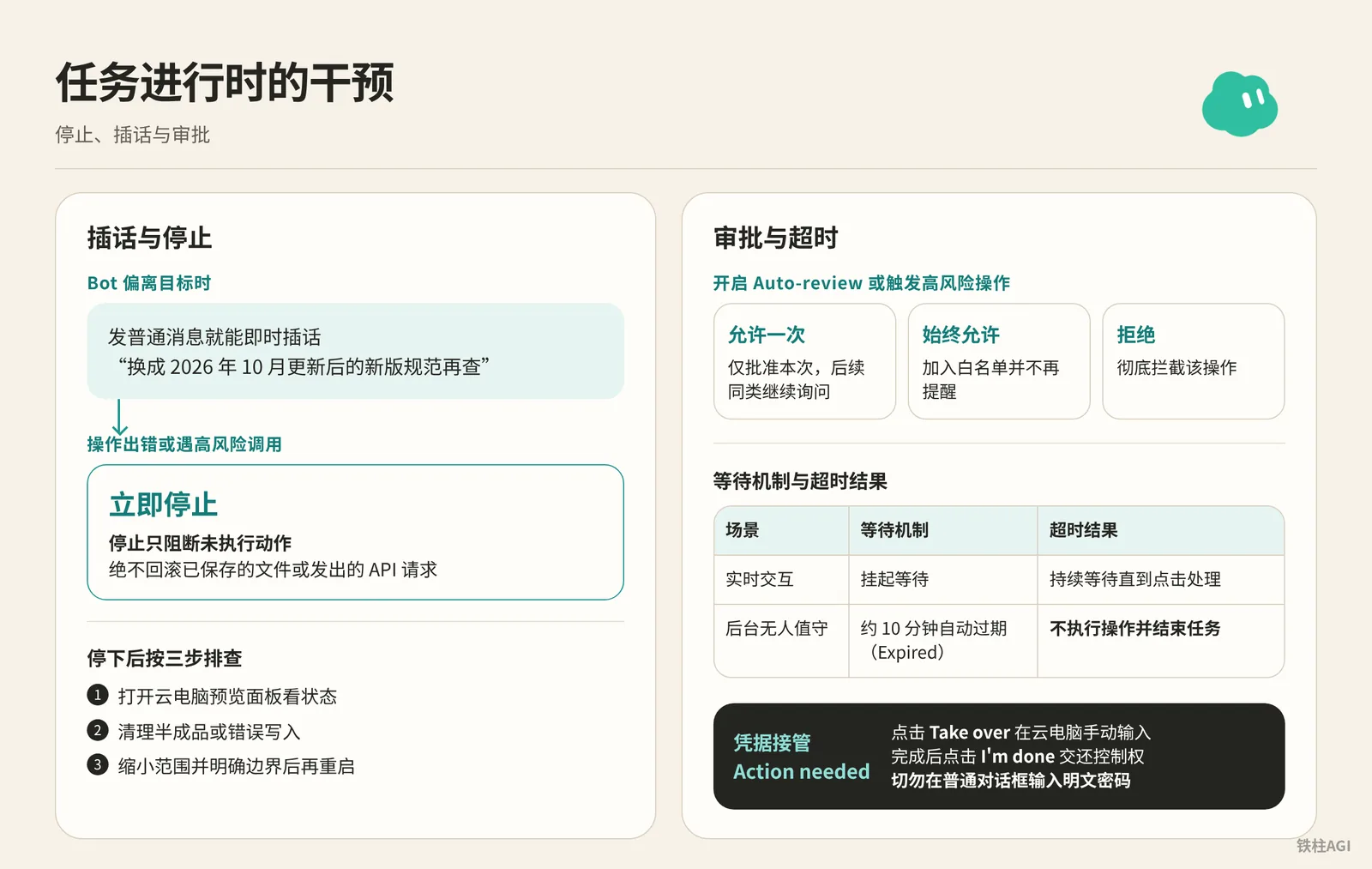
Interruption and Stopping
When the Bot deviates from the goal, sending a normal message allows for an immediate interruption, such as sending "Switch to the updated specifications from October 2026 and search again".
If an operation goes wrong or encounters high-risk calls, send four characters in the input box to stop:
立即停止Stopping only interrupts unexecuted actions; it never rolls back saved files or dispatched API requests. After stopping, troubleshoot in three steps:
- Open the cloud computer preview panel to inspect the status.
- Clean up half-finished files or erroneous writes.
- Narrow the scope and clarify boundaries before restarting.
Approvals and Timeouts
Enabling Auto-review or triggering high-risk operations will pop up a "Review Action" card (see Grok Bot How-to Guide), containing three options:
- Allow Once: Approves only this instance; subsequent similar actions will continue to ask.
- Always Allow: Adds to whitelist and stops prompting.
- Reject: Completely blocks the operation.
| Scenario | Waiting Mechanism | Timeout Result |
|---|---|---|
| Real-time Interaction | Suspended waiting | Waits continuously until clicked and handled |
| Background Unattended | Automatically expires after ~10 minutes (Expired) | Does not execute the operation and terminates the task |
Credential Takeover (Action needed)
When passwords, 2FA, CAPTCHA, or real payments are involved, a takeover card pops up; follow these three steps:
- Click Take over to enter credentials manually in the cloud computer.
- Once completed, click I'm done to return control.
- Never enter plaintext passwords in the regular chat box.
Voice Interaction: Differentiating Between Real-time Voice Calls and Voice Dictation
Grok Bot includes two distinct voice features: dictation and voice calls. For details, refer to Voice Chat with Bot and Grok Bot How-to Guide.
Comparison of the Two Modes
| Mode | Trigger & Shortcuts | Output & Scenarios |
|---|---|---|
| Voice Input (Dictation) | Click "Start Voice Input" on desktop, press Cmd+D on Mac, Ctrl+D on Win/Linux, or tap "Start Dictation" on mobile | Inserts text into the input box; ideal for refining prompts or adding parameters |
| Real-time Voice Chat | Click the waveform icon (Start voice chat) after clearing the input box | Two-way real-time voice call; ideal for sorting out thoughts or quick handoffs |
Steps to Start and Pitfalls to Avoid
- Open a direct chat with an individual Bot.
- The input box must be completely cleared; any lingering spaces or drafts will hide the waveform icon.
- Click the waveform icon; microphone permission must be granted upon first use.
- Displays Connecting… (Calling… on mobile); connection is established once the Bot speaks.
Controls and Hard Limits
- During calls, you can mute, view scrolling subtitles, and adjust speech rate and voice timbre; when switching screens to check materials, click "Return to Voice Chat" on the top bar to switch back.
- Only one-on-one direct chats are supported; it cannot be initiated in group chats, multi-bot groups, or "Team Bots".
- Only one voice call can be maintained at a time; switching to a new Bot requires confirming "End and Chat".
- After hanging up, a Voice chat card is automatically generated recording total duration; click to review the full transcript, and subsequent tasks continue in the text thread.
Common Pitfalls and Optimization Comparisons
- Narrow down the path: Without a defined scope and methodology, the Bot will click around consoles randomly, or even modify production environment code.
帮我维护一下网站,看看有没有什么 Bug。Change to limiting pages and troubleshooting steps:
  对站点清单(/workspace/sites.txt)中的三个静态展示页进行巡检。
  用云浏览器打开每个页面,检查控制台是否有 404 或 500 报错,检查顶部导航栏链接是否全部有效。
  将报错信息、对应页面 URL 及当时的屏幕截图写入 /workspace/logs/err-20261014.md。
全程仅做只读检查,严禁点击任何带有提交或删除性质的表单按钮。- Approval boundaries: Do not grant external sending permissions; once misunderstanding occurs, it is easy to send incorrect content to key clients.
读取 Gmail 里的未读邮件,重要的直接帮我回一下。Place human approval at critical checkpoints:
  读取 Gmail 中过去 12 小时的未读邮件。
  仅筛选出发件人属于我们现有企业客户、且正文包含售后或咨询诉求的邮件。
  根据产品常见问题手册,为每封邮件起草回复草稿并存入 Gmail 草稿箱。
在当前对话中列出客户名称、邮件摘要与草稿正文,等待我的审批。未经我的明确确认,绝不点击发送。- Separate facts from assumptions: Do not embed bias in prompts, preventing the Bot from pandering to assumptions and mistaking a minor promotion for a price war.
去看看竞品今天的动态,总结一下他们是不是要跟我们打价格战。Separate objective data from speculation:
  访问竞品官网的公开定价页与首页横幅,获取他们当下的方案价格表。
  对照我们在 /workspace/competitor/last-month-price.json 中记录的旧价格:
  1. 事实列:标出哪些 SKU 的标价发生了变动,变动金额是多少,附带页面截图与访问时间。
  2. 推测列:基于该降价是限时促销还是永久调价,给出你的分析理由。
两部分内容必须分开分栏呈现,不得将分析推论当作已知事实。- Read-only protection: Without specifying master-detail tables and retained fields, raw data is very prone to being overwritten and corrupted.
(直接拖入三个 Excel 表格)把这几个表整理一下。Must clarify which table takes precedence and set it to read-only:
  上传的三个表格分别是 7 月、8 月和 9 月的销售明细。
  以「订单编号」为唯一主键进行数据去重合并:
  1. 字段统一保留:订单号、成交日期、客户名称、销售代表、成交金额。
  2. 生成一份全新的 Q3_sales_summary.csv 文件,保存在当前工作区。
3. 保持我上传的原始 7、8、9 月表格内容与文件名完全不变。- Single mission: Do not stuff multiple tasks into one Bot; this confuses memory and quickly drains weekly quotas.
你帮我写一篇关于新产品的推文,顺便把昨天的账目算了,然后再帮我看看竞品推特。Break down into single-task division of labor:
  遵循一个 Bot 负责一项核心任务的原则。当前 Bot 仅承担社媒文案起草职责:
  依据 /workspace/product/spec.md 中的新功能说明,为 X 平台起草三条不同风格的发布文案。
  要求突出性能提升数据,字数控制在 280 字符以内。
  账目核算与竞品调研交由对应的专用 Bot 负责,不要在此会话中处理。
Real-World Business Handoff Case Studies
Routine Website Inspection and Evidence Retention
Webmaster yishan wrote inspection requirements directly as acceptance criteria. The working directory was strictly limited to /workspace/site-check/, permitting checks only on the homepage, latest posts, and subscription entry points, while strictly forbidding roaming crawls.
- Reports must retain complete links, timestamps, and screenshots taken at the time. Directly observed errors count as facts, while root cause investigations count as speculation; they must be logged separately.
- When encountering expired logins or dead links, log the deficiency and skip directly; stubborn retrying is strictly prohibited. For specific methods, see How to Master Grok Bot in One Hour.
Inbox Relay and Business Triage
一泽Eze specifically set up an inbox Bot to take over Gmail, without granting individual mailbox permissions to downstream Bots.
Feedback emails received are forwarded via direct message to the "Product Feedback Bot", and billing statements to the "Subscription Management Bot".
Pure numerical comparisons are delegated directly to command-line scripts to run. Syncing only incremental data to the Bot saves weekly usage quota.
Avoid connecting high-privilege tools everywhere; using a dedicated entry point for initial screening is the safest approach.
For a summary of experiences, see 10 Essential Tips to Make Your Grok Bot Work Better.
Chief of Staff Assessment and Bot Building
CyrilXBT first had a Chief of Staff Bot read the team's Notion and Slack to identify the top three tasks that were most time-consuming, highly repetitive, and had the most bottlenecks, advancing in three steps:
- The Chief of Staff Bot runs manually under human supervision to oversee output quality.
- Once verified, crystallize them into skills and build independent dedicated Bots.
- Finally, configure scheduled automatic runs. Nodes involving sending, purchasing, publishing, or modifying online systems must strictly retain human approval.
For the full tutorial, see How to master Grok Bot in 16 minutes - Full Course|CyrilXBT.
Common Pitfalls
- Include descriptions when uploading attachments: When uploading multiple images or more than two spreadsheets, be sure to explain their purposes, otherwise it is easy to invert master-detail relationships.
- Save long-term rules to memory: One-off instructions are lost when switching sessions; bottom-line standards should be written into Bot Details under About/Instructions or saved to memory.
- Prevent sleep during local linkage: Pure cloud tasks can run with the lid closed, but linking with a local computer will disconnect upon sleep; remember to check power and sleep settings.
- Transfer images across Bots via file paths: Between Bots in a group, only plain text is supported; transferring images must be done by saving to the
/workspace/shared path for the other to read. - Clear the input box first if the voice button disappears: The waveform button is hidden when uncleared text or spaces remain in the input box; completely clearing the input box will restore it.
- Select Allow Once for high-risk operations: Do not select "Always Allow" for sending emails or modifying/deleting data; before it runs stably for several weeks, insist on selecting "Allow Once".
How to Verify After Completion
- Go to
/workspace/or the specified directory to verify files, confirming they preview properly without garbled text; don't just look at temporary text. - Spot-check 2 to 3 core data points by opening links or screenshots to prevent the model from hallucinating out of thin air.
- Review execution logs to confirm no unauthorized outbound communications were sent, and no configurations were modified or original files overwritten.
- Distinguish between facts and speculation: place original page quotes in the facts section and inferences/recommendations in the notes section, correcting any confusion immediately.
- Check the exception list: when encountering invalid web pages or missing fields, log the reasons and finish running, rather than aborting as soon as an error occurs.
Further Reading
- Official Documentation: Grok Bot
- Official Documentation: Using Grok Bot
- Official Support: Grok Bot How-to Guide
- Official Support: Voice Chat with Bot
- Community Article: How to Master Grok Bot in One Hour
- Community Article: 10 Essential Tips to Make Your Grok Bot Work Better
- Community Article: How to master Grok Bot in 16 minutes - Full Course|CyrilXBT