Chapter 15 Case Studies: E-commerce and Daily Life in Practice
Opening a single web chat dialog makes it easy to lose records and requires switching back and forth across multiple software tools. This chapter walks you through ready-to-use solutions to run end-to-end workflows.
- Daily Life & Content: Use battle-tested prompts to generate Xianyu listings, Xiaohongshu layouts, and SVG graphic cards—no more manual alignment.
- Cross-Border E-commerce: Starting from single-machine routine inspections, build a "1 Captain + 12 Roles" team, using approval checklists for human review.
Case 1: Xianyu Listing Assistant (Secondhand Item Info Board & Inquiry Drafts)
Miles Ma (@miles_mazy, inspired by @0xlangeai) built this Bot. When selling secondhand items, directly handing things over to AI often leads to hallucinated brand-new specs. This Bot separates real item conditions from official specs, generating a two-column info board and response drafts.
Steps and Acceptance Criteria
- Take clear photos of the front, close-ups of flaws, and the nameplate/label, and clarify accessories, pickup options, and price.
- In the Grok Bot sidebar, click
+, select "New Bot", and name it "Xianyu Listing Assistant". - Upload real photos and send the prompt, taking a secondhand Logitech K380s keyboard priced at 89 RMB as an example.
帮我做一份闲鱼上架资料。商品是罗技 K380s,黑色,用了 8 个月,空格键有轻微磨痕,逐键输入正常,没拆过机;附两节在用电池,无包装,卖 89 元,支持自提,邮费待确认。查官方型号资料,整理标题、商品描述、需要补拍的照片和常见咨询回复,做成可打开的资料板,并附可复制的上架正文。没提供的信息标为待确认。- The Bot browses the web for official specs and generates an HTML info board alongside a plain text draft.
Source: Grok Bot Practical Guide Cases: Xianyu Listings, Xiaohongshu Graphics, Finding Tools, Short Videos, Organizing Bookmarks
Author: Miles Ma @miles_mazy
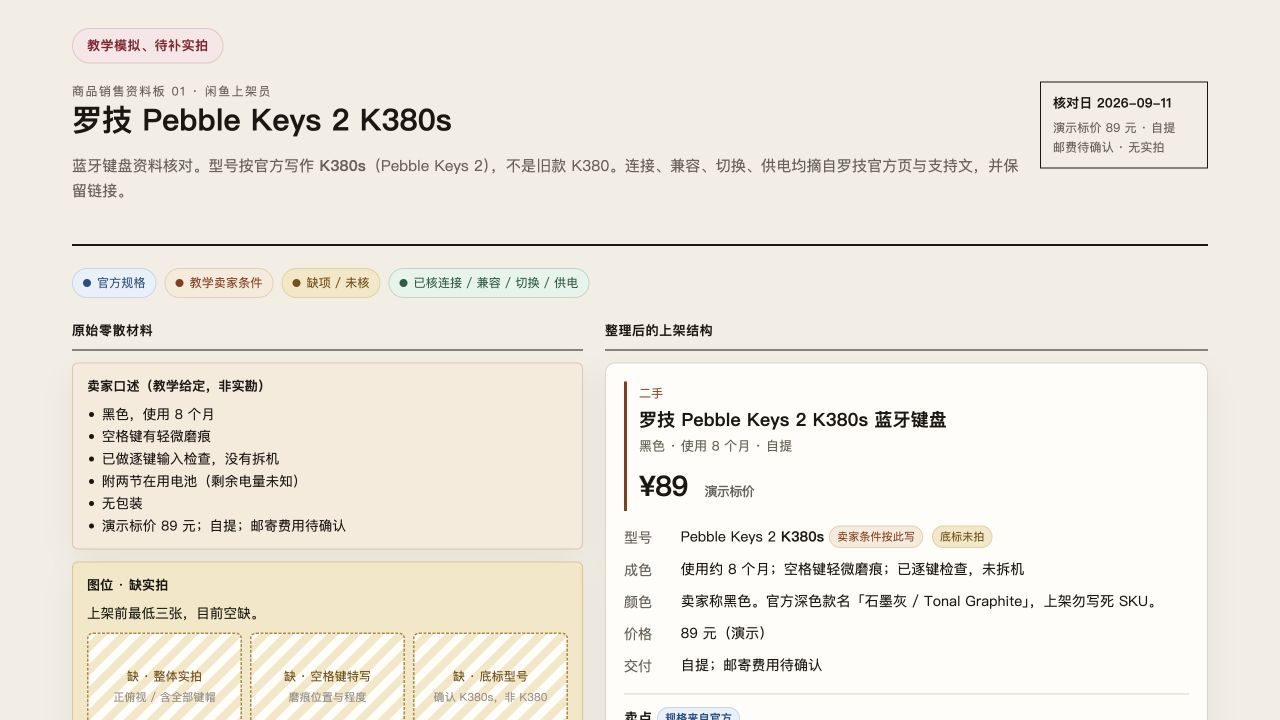
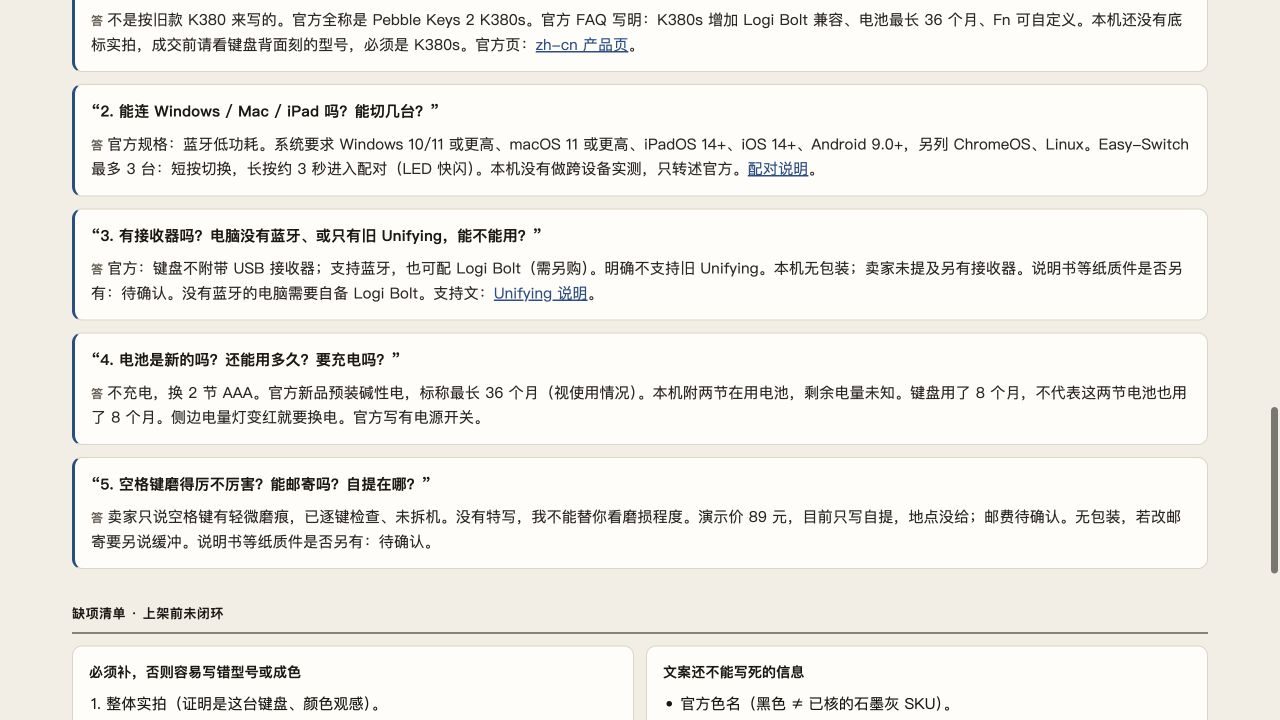
- The left side displays the seller's actual condition; the right side displays the price, condition, and accessories.
- Specifications and wear-and-tear are listed separately; any unprovided information must be marked as "To be confirmed", with zero hallucination.
- The photo checklist outlines missing camera angles, while customer service replies cover connectivity, device switching, and local pickup.
- Case reference: "Grok Bot Practical Guide Cases: Xianyu Listings, Xiaohongshu Graphics, Finding Tools, Short Videos, Organizing Bookmarks | Miles Ma".
Case 2: Xiaohongshu Editor (From Topic Selection to Six Knowledge Cards and Gallery)
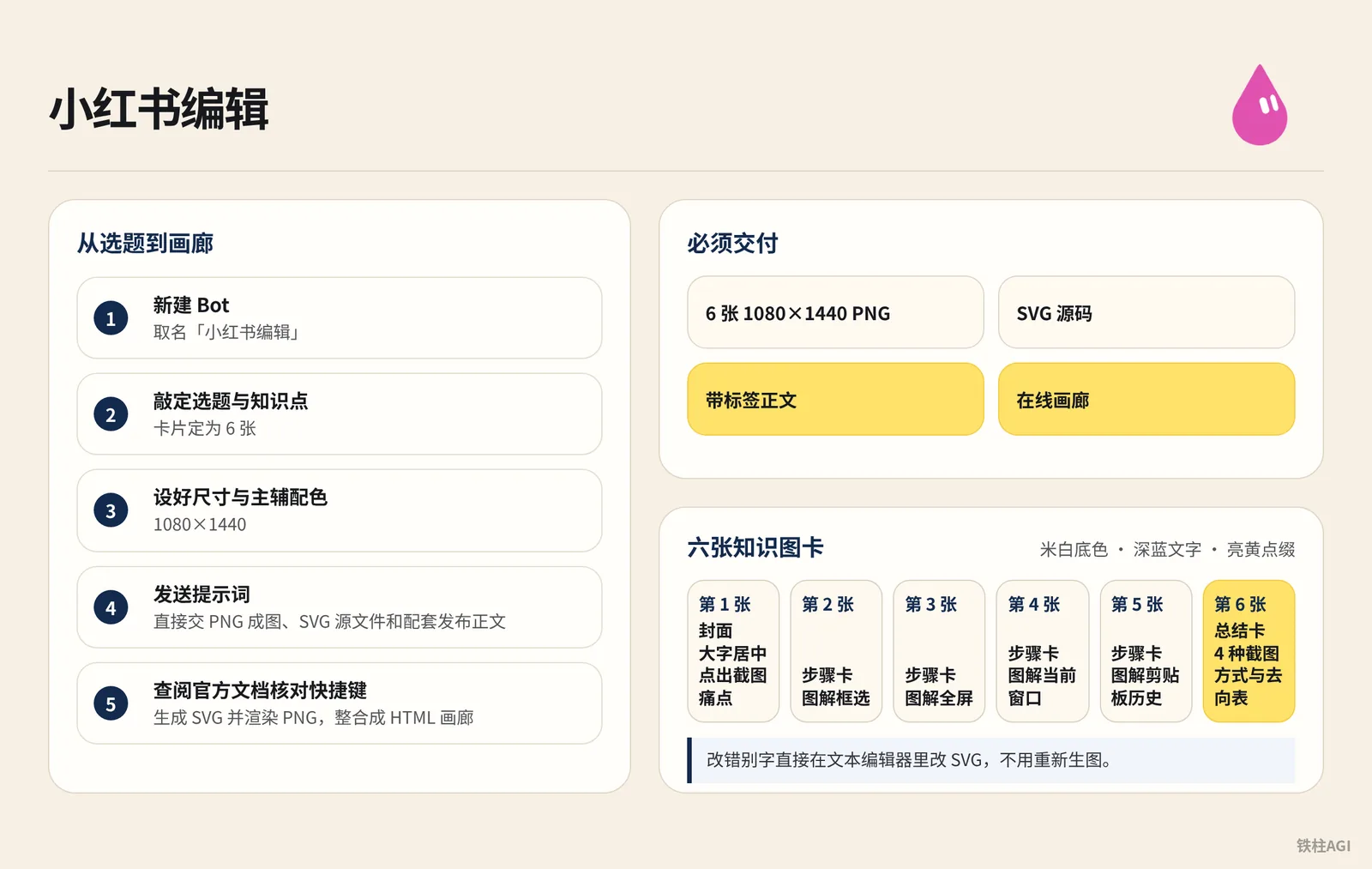
Creation Steps
- In the Grok Bot sidebar, create a new Bot named "Xiaohongshu Editor".
- Finalize the topic and key takeaways, set the number of cards to 6, and configure the 1080×1440 resolution along with primary and accent color schemes.
- Enter the chat interface and send the prompt:
给电脑新手做一套小红书图文,主题是“Windows 截图后,图片去哪了”。查微软官方资料,做 6 张 1080×1440 的图:封面、框选截图、整屏保存、当前窗口、剪贴板历史、快捷键对照表。用米白、深蓝和亮黄,文字清楚,配操作示意。直接交 PNG 成图、SVG 源文件和配套发布正文,再做一个能看全套图片的画廊。- The Bot will check official documentation to verify shortcut keys, generate SVGs, render PNGs, and assemble everything into an HTML gallery.
Acceptance and Pitfalls to Avoid
| Card | Content & Layout |
|---|---|
| Card 1 | Cover, highlighting the screenshot pain point with prominent centered text |
| Cards 2–5 | Step-by-step cards, illustrating screenshot methods like area selection, fullscreen, etc. |
| Card 6 | Summary card, featuring a table of 4 screenshot methods and destination locations |
- The entire card set uses an off-white background with dark blue text and bright yellow accents. Must deliver 6 PNGs (1080×1440), SVG source files, tagged copy, and an online gallery.
- Automatic screenshot saving depends on system folder/Photos settings; viewing history with
Win + Vrequires toggling the switch on beforehand, and records must not have been overwritten. - To fix typos, simply edit the SVG directly in a text editor—no need to regenerate images.
Reference case: "Grok Bot Practical Guide Cases: Xianyu Listings, Xiaohongshu Graphics, Finding Tools, Short Videos, Organizing Bookmarks | Miles Ma"
Case 3: Tool Intelligence Officer (Software Analysis Brief Filterable by Use Case)
The "Tool Intelligence Officer" Bot built by Miles Ma specializes in fetching open-source repositories and documentation to generate web card briefs with category filtering.
Tool Limitations and Recommended Tasks
| Tool | Barrier & Dependencies | Main Limitations | Recommended Tasks |
|---|---|---|---|
| PowerToys | Direct execution via Windows installer | Windows only; certain experimental features may be occasionally unstable | Extract text via shortcuts or pin windows to top |
| MarkItDown | Requires Python or CLI | Limited recognition accuracy for complex text-and-image layouts | Batch convert Word and PDF to Markdown |
| changedetection.io | Requires Docker or a server environment | Requires ops knowledge; subject to anti-scraping restrictions | Monitor e-commerce price tag changes |
Operating Steps
- In the Grok Bot sidebar, create a new Bot named "Tool Intelligence Officer".
- Determine target audience and target tool list for research.
- Enter the chat interface and send the prompt:
帮内容工作室整理 PowerToys、MarkItDown 和 changedetection.io,查官方仓库和文档。每个工具写清能帮忙做什么、上手需要什么、主要限制,再给一个具体使用例子。做成能按用途筛选的网页简报,附来源链接。- The Bot fetches repository READMEs and dependencies, writes an HTML brief containing filtering scripts, and saves it to the workspace.
Acceptance Criteria and Pitfalls to Avoid
- Each card contains 6 core elements, covering tool positioning, onboarding dependencies, main limitations, practical tasks, and official website links.
- Category buttons are placed at the top of the webpage for smooth card filtering.
- Limitation notes must be objective, clearly stating that changedetection.io requires Docker or a server, without exaggerating it as zero-barrier.
- This serves as desktop screening; the Bot does not run full-workflow live tests, primarily functioning to quickly rule out candidates that do not meet requirements.
Case 4: Video Tutorial Instructor (Interactive Learning Tool & Subtitled Short Video)
This is an approach by Miles Ma (@miles_mazy, inspired by @0xlangeai Brother Lan AI). Clockwise/counter-clockwise rotations and four-cycle resets on a Rubik's cube are hard to explain in text, while manual filming is time-consuming. Grok Bot can write interactive web pages in the cloud and automatically record the screen while hardcoding subtitles.
How to Do It
- In the sidebar, create a new Bot named "Video Tutorial Instructor".
- Explain only one fundamental movement at a time, avoiding the full solve algorithm.
- Send the prompt:
给孩子做一个魔方入门小工具,能认识六个面、点按钮演示右面顺转和逆转,再展示右面连续转四次回到原位。把实际操作录成一分钟左右的教学视频,加中文配音和字幕,交付视频和工具文件。- The Bot automatically writes the web page, simulates clicks, records the screen, and generates a video with Chinese subtitles.
What Counts as Done Well
| Deliverable | Acceptance Criteria |
|---|---|
| Interactive Webpage | Preserves HTML/JS source code; clicking R changes color, clicking R' reverses it, reset button returns to original state after four turns, openable offline |
| Final Video | Approx. 51-second MP4 with SRT subtitles, visual actions aligned with subtitles |
This pattern can be applied to backend demos or single-feature tutorials.
Case reference: "Grok Bot Practical Guide Cases: Xianyu Listings, Xiaohongshu Graphics, Finding Tools, Short Videos, Organizing Bookmarks | Miles Ma".
Case 5: Bookmark Curator (Transforming Social Media Bookmarks into a Topic Idea Library)
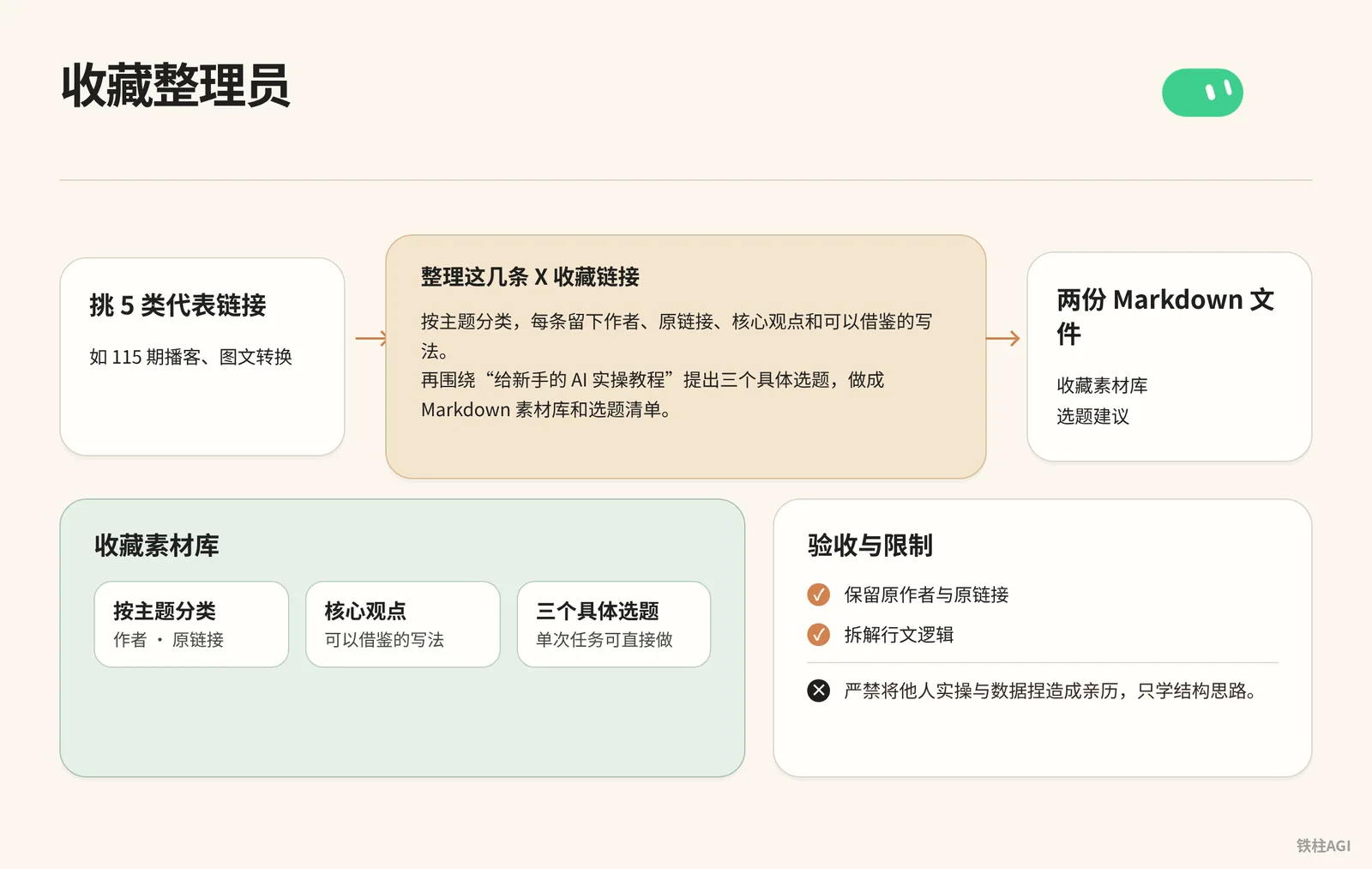
Miles Ma (@miles_mazy) created this Bot to convert bookmarks into a topic library.
Operating Steps
- In the sidebar, create a new Bot named "Bookmark Curator".
- Select 5 representative link types (e.g., episode 115 podcast, image-to-text conversion).
- Send the prompt:
整理这几条 X 收藏链接,按主题分类,每条留下作者、原链接、核心观点和可以借鉴的写法。再围绕“给新手的 AI 实操教程”提出三个具体选题,做成 Markdown 素材库和选题清单。- The Bot organizes and generates two Markdown files: "Bookmark Material Library" and "Topic Suggestions".
Acceptance and Limitations
- Acceptance: Preserve original authors and links, deconstruct writing logic, and converge the 3 topics into single actionable tasks ready for immediate execution.
- Limitation: Strictly forbidden to fabricate others' real-world experiences and data as personal firsthand accounts; only learn their structural thinking.
Case 6: Amazon Team Building (From Storefront Inspections to "1+12" Multi-Role Collaboration)
Background and Role Positioning
- Who: Zach (@1999Zach22).
- What was done: Migrated Skills originally running locally on Claude/Codex completely to Grok Bot, building an Amazon cross-border e-commerce AI operations team consisting of "1 Cross-Border Captain + 12 Business Roles" on a shared cloud computer.
What It Is
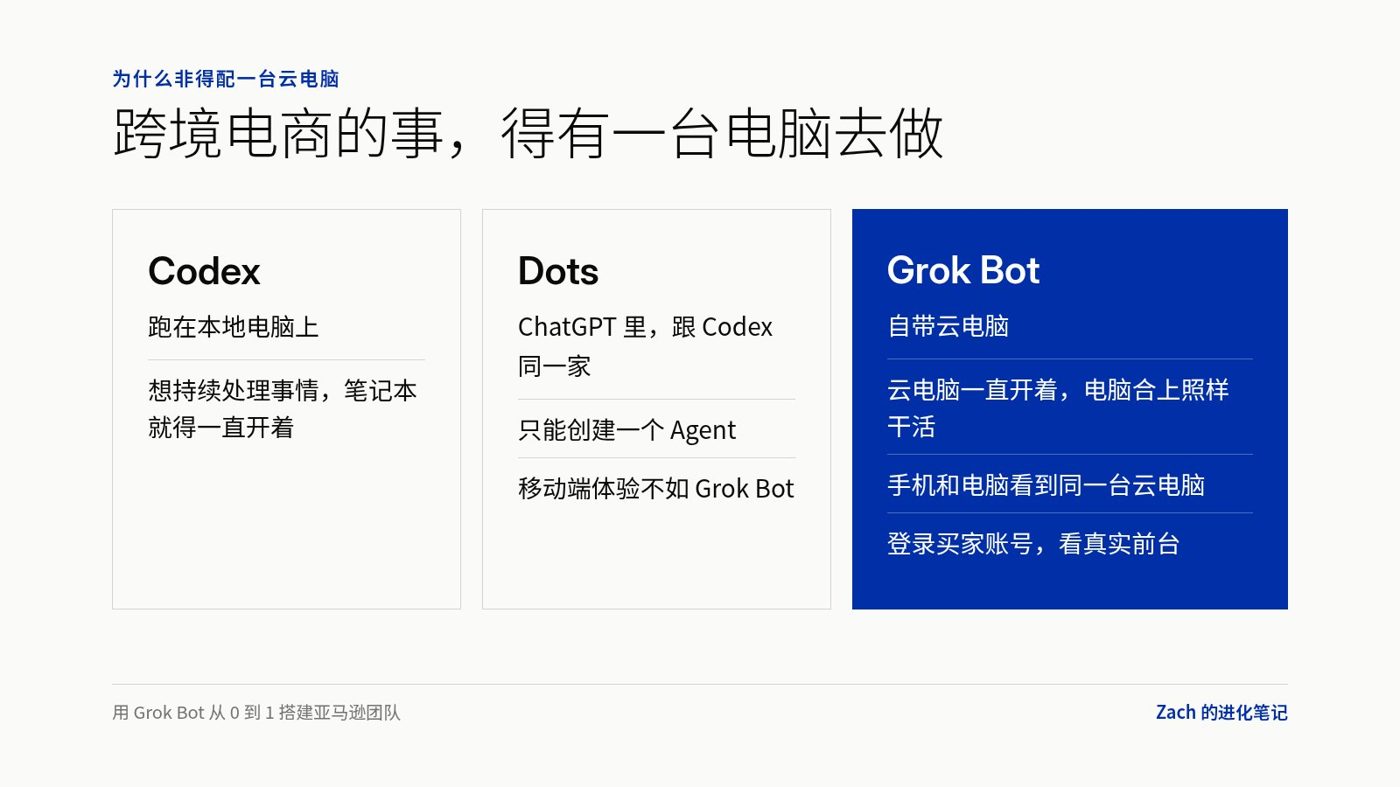
Local tools like Codex CLI require keeping a machine running continuously and cannot be monitored on the go. Grok Bot comes with a 24/7 US cloud computer, syncs seamlessly between mobile and desktop, and can even browse and query the Amazon storefront using a real buyer account.
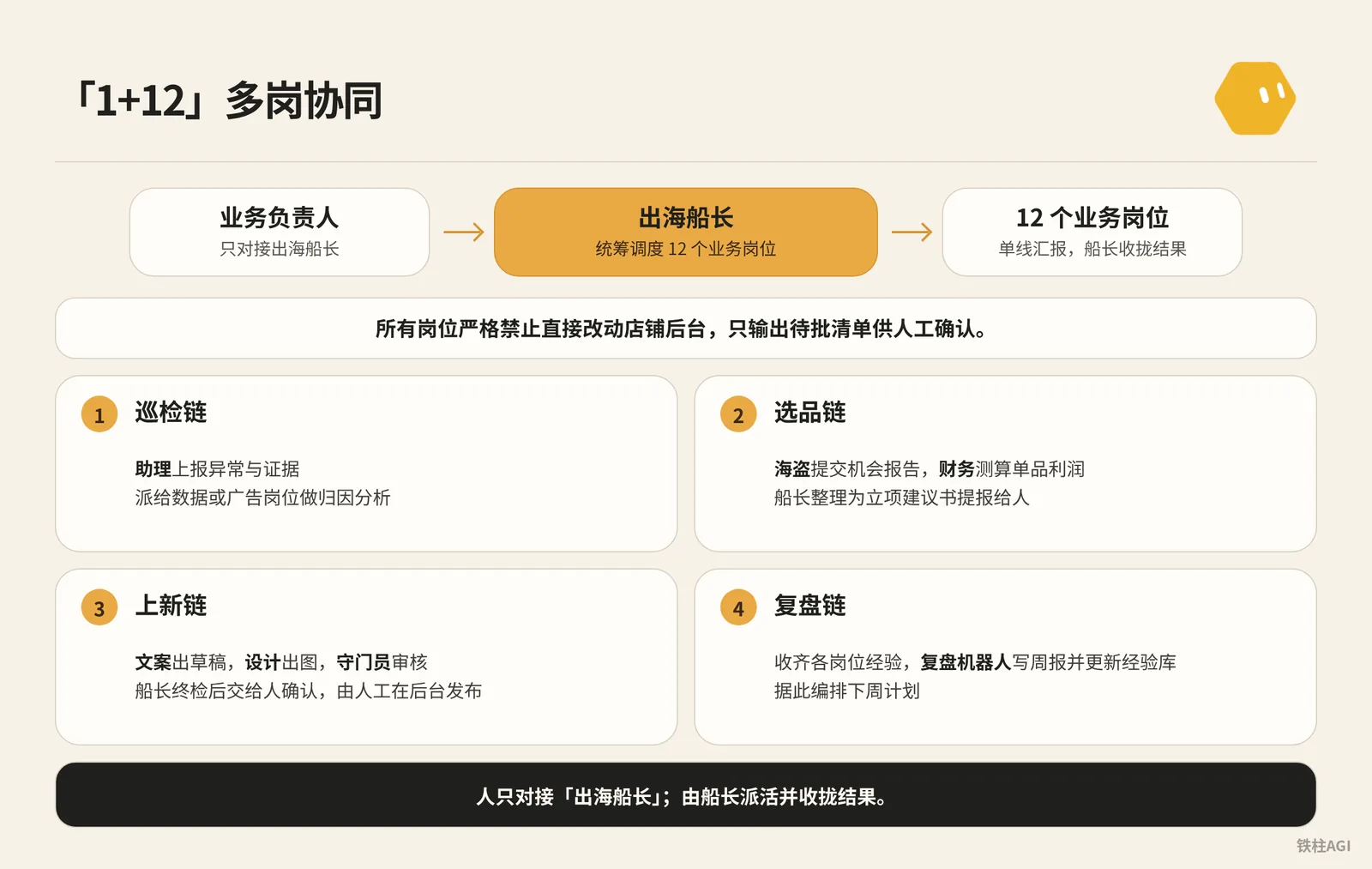
Zach adopted a "1 Captain + 12 Business Roles" architecture. You interface only with the Cross-Border Captain, who orchestrates and schedules all roles.
All roles are strictly prohibited from directly modifying the store backend; they only output approval checklists for manual verification.
| Role | Responsibilities | Strict Boundaries |
|---|---|---|
| Cross-Border Captain | Coordinates and dispatches subordinate roles, reports weekly reviews and checklists | Never makes business decisions bypassing humans |
| Assistant / Pirate / VOC | Inspects hijackers (listing follow-ons), researches product selection, and analyzes negative reviews | Never logs into Seller Central; never initiates projects without authorization |
| Finance / Media Buyer | Calculates single-item profit margins and provides advertising suggestions | Absolutely never logs into the backend to change bids or add negative keywords |
| Copywriter / Designer / Gatekeeper | Produces copy, graphics, and conducts final compliance review | Never publishes directly online; never makes final calls on behalf of humans |
| Review Bot | Aggregates weekly output and updates the knowledge base | Never whitewashes operational issues; never fabricates performance numbers |
How to Do It
1. Subscription Plan and Environment Preparation
- Start with the $30/month Premium tier (the $8/month Plus tier has no Bot access at all), upgrading to the $100 Super tier or $200 Ultra tier as needed.
- Log in with the same account across desktop and mobile, verifying that the cloud computer runs normally. See Grok Bot Plans and Usage Guide for details.
2. Validate Three Tasks with a Single Bot First
Run three validations using the cloud computer's US IP and browser:
- Daily routine inspection of own listings: Check main images, prices, variations, and hijackers (unauthorized sellers), reporting anomalies with comparative evidence.
- Test Alexa shopping Q&A: Log into a buyer account to ask questions; tested to cover 8 scenario categories and query 30-day price history in approximately 8 minutes.
- Scheduled competitor monitoring: Track prices and coupons, sending notifications only when changes occur—no disturbance if unchanged.
每天固定时间去前台检查自家 Listing:主图和价格是否正确,变体是否正常挂载,核心关键词是否能搜索到,是否存在跟卖。只记录指定商品和关键词,有异常才发提醒,并附带与前一日的对比数据和页面截图证据。不登录店铺后台,不执行任何写操作。从消费者的角度,尽可能多地把 Alexa for Shopping 体验一遍,最后给我一份报告。3. Deconstruct Functions and Role Boundaries
- Once validated, break down tasks across the 12 business roles.
- Sensitive roles such as advertising and new listings are explicitly forbidden from writing to the backend, delivering only "approval checklists" and defining clear consultation boundaries.
你是合理烧钱的广告投手。负责分析广告效率、搜索词转化率、出价与预算建议。
边界约束:
1. 绝对不登录广告后台,不直接修改出价,不调整预算,不添加否定关键词,不新建广告活动;
2. 所有优化建议必须生成「待批清单」,每条建议必须附带调整依据和预期影响;
3. 待批清单单线交付给出海船长,由船长提报给业务负责人审核,严禁自主执行。
4. Orchestrate the "1+N" Handover Chain
- Never create multi-Bot group chats; group chats repeatedly ingest context, burning tokens at an extreme rate.
- Adopt a 1+N architecture; humans interact only with the "Cross-Border Captain", who assigns tasks and consolidates results.
你是出海船长,负责统筹 12 个业务岗位。日常接收业务负责人的目标,拆解为具体子任务派发给对应岗位。所有下属岗位向你单线汇报,由你汇总结果、审核质量;不达标的打回重做,需要人工决策的整理为带选项和依据的待批清单汇报给人。严格遵守交接链规则:
1. 巡检链:助理上报异常与证据,派给数据或广告岗位做归因分析;
2. 选品链:海盗提交机会报告,财务测算单品利润,由你整理为立项建议书提报给人;
3. 上新链:文案出草稿,设计出图,守门员审核,你做终检后交给人确认,由人工在后台发布;
4. 复盘链:收齐各岗位经验,复盘机器人写周报并更新经验库,据此编排下周计划。
所有岗位严禁直接登录店铺后台或执行未授权的修改操作。
5. Shared Assets and Local Takeover
All Bots share the same cloud computer and disk; scripts copied into the workspace become accessible to the entire team.
To read local files, go to the "Computer" settings page and enable "Execution on Local Computer", specifying the directory to copy.
For details, see Grok Bot Computer and App Documentation and Grok Bot Settings Guide.
What Counts as Done Well
Source: Practical Sharing on Using Grok Bot for Cross-Border E-commerce: Building an Entire Amazon Team from 0 to 1
Author: Zach @1999Zach22
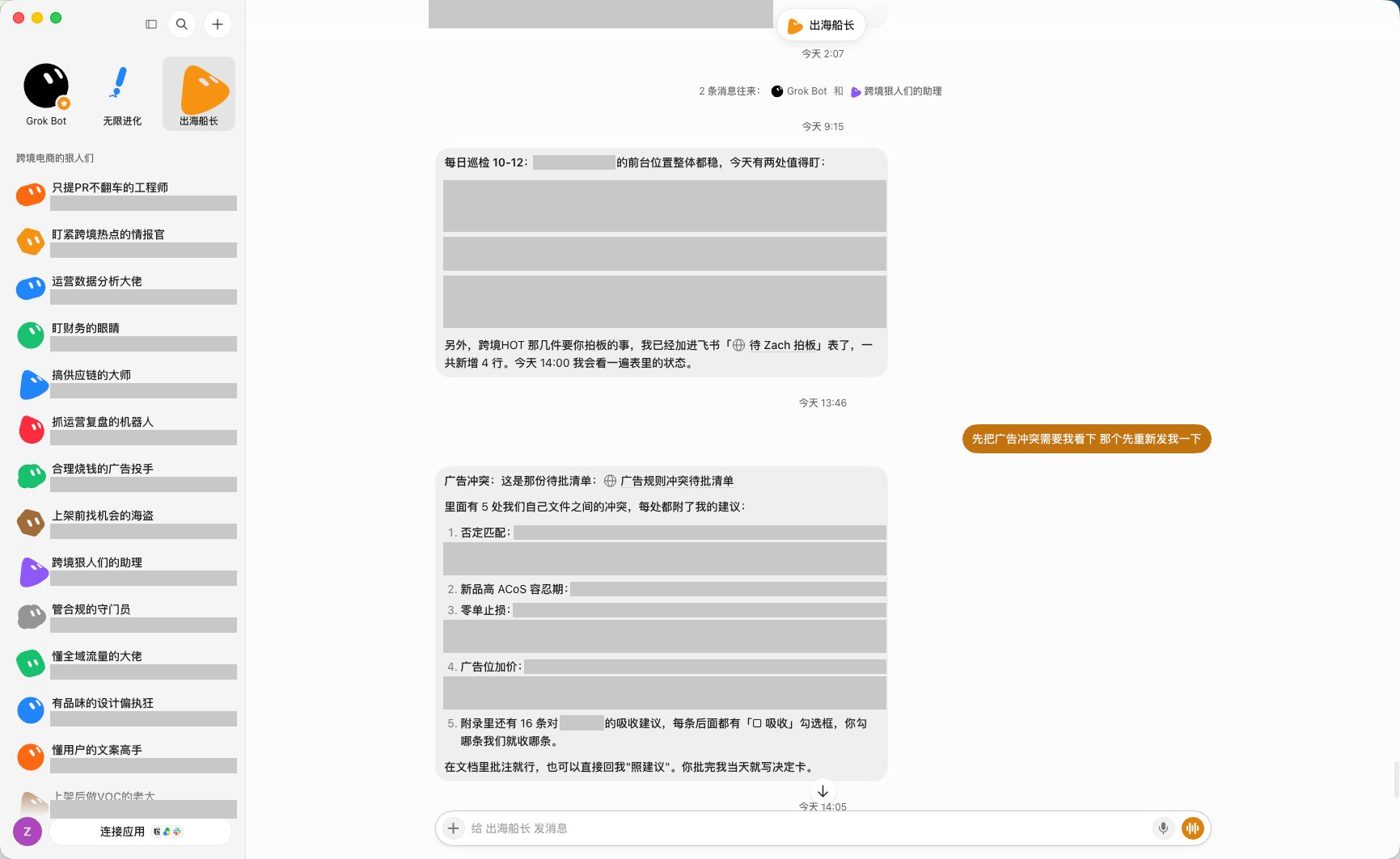
- Interface exclusively with the Captain, without juggling 12 individual bots.
- Price adjustments and restocking flow through approval checklists, preventing unauthorized actions.
- Receive anomaly alerts on mobile; routine inspections continue running even with the laptop lid closed.
Case reference: "Practical Sharing on Using Grok Bot for Cross-Border E-commerce: Building an Entire Amazon Team from 0 to 1".
Key Takeaways
- Streamline the SOP with a single Bot before splitting responsibilities.
- Use a "1+N" primary-secondary dispatch architecture to prevent group chats from blowing up token budgets.
- Output approval checklists only; changes must be confirmed manually in the backend.
Common Pitfalls
- Never grant modification permissions to Seller Central: Require the Bot to produce an "approval checklist" for sensitive actions to be executed manually, preventing pricing errors or store bans.
- Prevent hallucinating secondhand condition on Xianyu: Mandate "strictly base details on what the seller provided, marking missing items as 'To be confirmed'", avoiding mixing in brand-new official specs that trigger returns.
- Never pull 12 Bots into a single group chat: A few rounds of dialogue will drain your entire weekly quota. Switch to a "1+N" master-agent architecture, using disk files as intermediate relays.
- Limit competitor scraping to once daily: Polling every few minutes easily triggers IP bans and burns quotas; use official APIs or MCP for high frequencies.
- Look specifically for the $30/month Premium tier: The $8/month Plus tier does not have a Bot entry point; look for The X Subscription starting from 2026-10-12.
- Restrict paths strictly for local takeover: Avoid enabling "always allow"; specify file paths and retain pop-up confirmation before takeover to prevent accidental modification of personal files.
How to Verify After Completion
Check against the standards item by item after delivery—do not be careless.
- Xianyu Info Board: Flaws and official specifications are listed separately, unknown items are marked as "To be confirmed"; strictly forbid fabricating pickup addresses or falsely labeling battery condition.
- Xiaohongshu Post: Deliver 6 image cards (1080×1440) alongside SVG source code; steps should highlight shortcut keys and system prerequisites; avoid messing up the color scheme.
- Tool Brief: Single-page HTML must include filtering and official links, factually noting Docker environment requirements; never hype deployment as zero-barrier.
- Tutorial Video: Final video is around 1 minute with synchronized audio and visuals, and must include web tool source code; do not let subtitles fall out of sync with the video.
- Material Library: Retain original authors and post links, converging topics into single practical tasks; avoid vague summaries or claiming others' cases as your own.
- E-commerce Collaboration: Under the 1+N architecture, interface solely with the Captain; price adjustments and listings must produce an approval checklist; strictly prohibit unauthorized price changes or burning quota in infinite loops.
Further Reading
- "Grok Bot Practical Guide Cases: Xianyu Listings, Xiaohongshu Graphics, Finding Tools, Short Videos, Organizing Bookmarks | Miles Ma"
- "Practical Sharing on Using Grok Bot for Cross-Border E-commerce: Building an Entire Amazon Team from 0 to 1"
- Grok Bot Computer and App Documentation
- Grok Bot Plans and Usage Guide
- Grok Bot Scheduled Routines Configuration Guide
- Grok Bot Settings Guide
- Grok Bot Core Features User Guide