Chapter 20 Reliable Automation: Scheduled, Webhook, and Event Triggers
A Routine wakes up dozens of times a day only to reply "No changes today," while quota is still deducted. Tasks lacking specifications easily fail silently.
- Timezone discrepancies (running at 3:00 AM instead of 9:00 AM)
- Cycle misjudgments (defaulting to weekdays causes weekends to slip through)
- Lack of fallbacks (errors proceed with empty data and corrupt production)
A two-stage architecture combined with Linux cron can eliminate over 80% of idle runs. By defining boundary contracts, setting up human-in-the-loop safety gates, and integrating Shortcuts and X event streams, automation can remain stable and cost-effective.
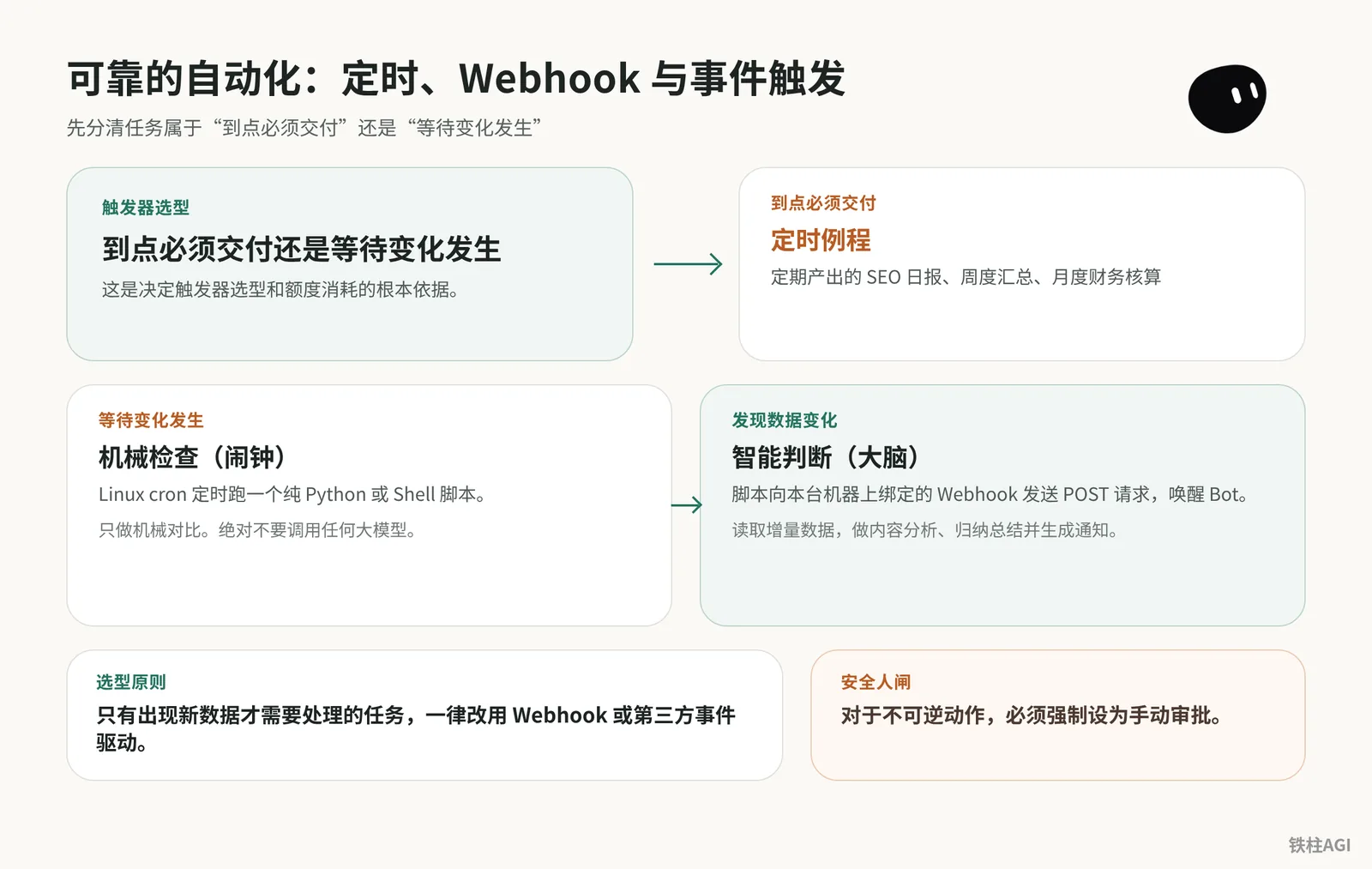
Trigger Selection: Scheduled Delivery vs. Waiting for Changes
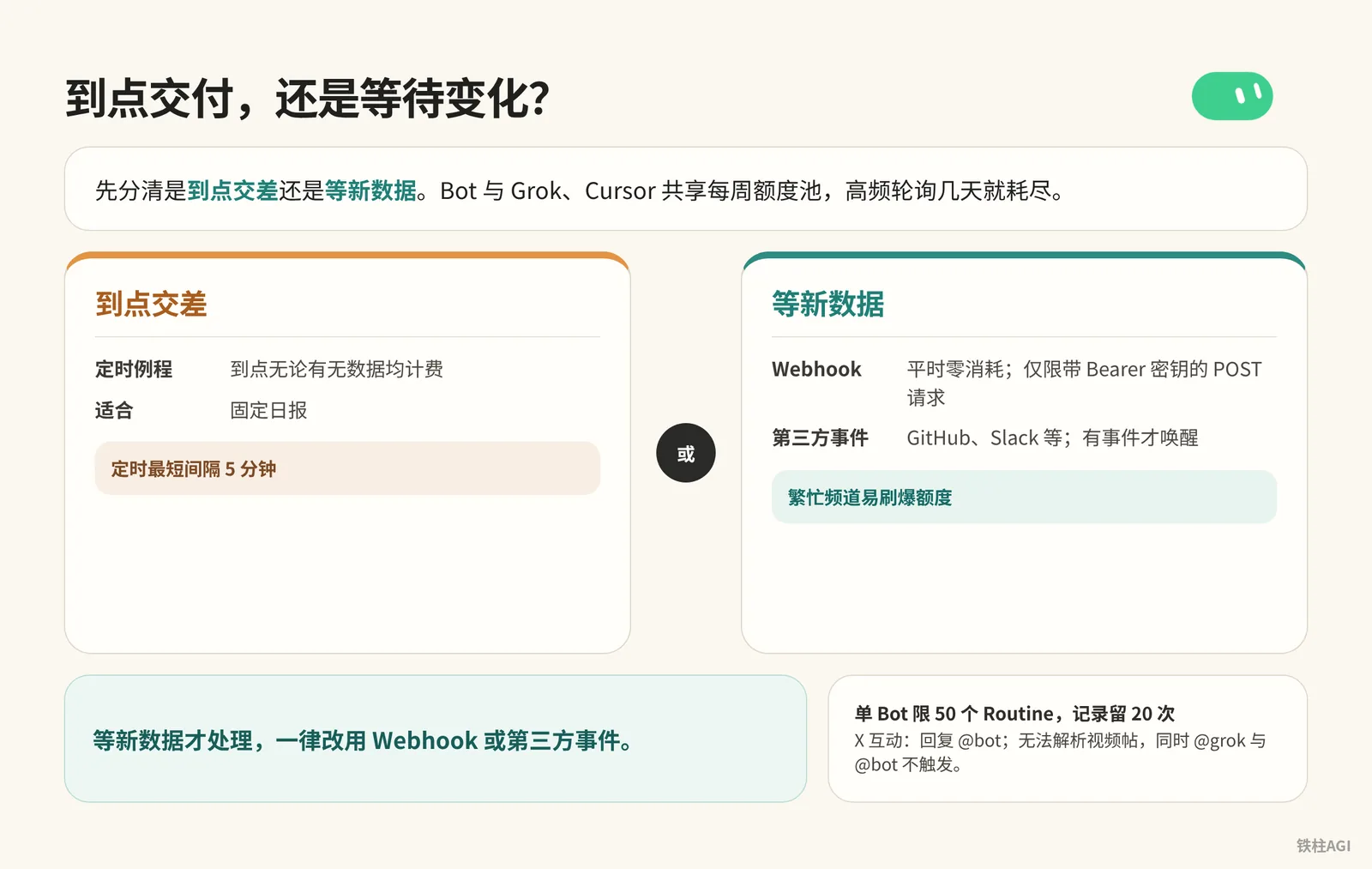
First determine whether you are delivering on a schedule or waiting for new data. The Bot shares a weekly quota pool with Grok and Cursor, and high-frequency polling can deplete it within a few days.
Subscriptions and Quota Limits
In The X Subscription (2026-10-12), Plus does not include Bot. Supported tiers are Premium ($30/month or $300/year, 4x), Super ($100/month or $1000/year, 15x), and Ultra ($200/month or $2000/year, 50x).
Each Bot is limited to 50 Routines and retains 20 run history records, with a minimum schedule interval of 5 minutes.
Trigger Types and Selection
- Scheduled Routines: Billed at scheduled intervals regardless of whether there is data; suitable for fixed daily reports.
- Webhook: Zero consumption normally; limited to POST requests with a Bearer key.
- Third-party Events (GitHub, Slack, etc.): Wakes up only when an event occurs; busy channels can easily blow through quota.
- X Interactions (Replying @bot): Cannot parse video posts; mentioning both @grok and @bot will not trigger.
If you only process when new data arrives, always switch to Webhooks or third-party events.
Routine Design Template: Write Contracts, Not Job Titles
Prompts that only specify job titles tend to break down; production routines must explicitly define an execution contract.
Source: 4.3 Triggers and Automation: Scheduled, Webhooks, and Dispatching Tasks on X. Four elements must be prepared, covering data sources, output formats, missing data error handling, and manual approval policies.
Writing Contracts and Configuring Routines
- Send the contract constraining inputs and outputs to the Bot and have it remember it; for shared Bots, write it into the Description in Details > About.
负责范围:监控指定数据源并生成标准化 Markdown 摘要。
允许读取的数据源:工作区目录下的 data/incoming/ 文件夹及指定公开 RSS 链接。
输出格式规范:必须输出包含“标题、核心要点(最多3条)、影响评估、原始链接”的 Markdown 结构,存入 docs/daily/ 目录。
数据异常策略:若数据源无更新或文件为空,仅在工作区追加一行日志“[时间戳] NO_NEW_DATA”,严禁编造或推测新闻内容,严禁在聊天窗口发送刷屏提示。
权限边界:只读外部内容与本地写入。禁止调用外部发帖、转账、发送邮件或删除文件操作。- Save the workflow in chat as a Skill with self-check logic, and directly send instructions to create a scheduled routine.
每个工作日上午 8:30,运行“晨间资讯归档”Skill。如果数据源没有更新,记录日志后保持沉默。In the "Routines" list under Details, use the toggle switch to Pause or Resume.
Click into the panel to modify Instruction, When to run, or Webhook. The bottom supports Pause/Resume, Test, Edit, and Delete routine (trash can icon).
Pre-launch Dry Run Testing
Routines run real operations in a cloud virtual machine. All Bots share the underlying runtime environment by default without sandbox isolation, and losing control may alter real files. Run a dry run verification via chat instructions before enabling.
针对即将上线的例程“晨间资讯归档”,进行一次干跑验证:
1. 复述你理解的执行触发条件与完整业务流程。
2. 列出本次执行涉及读写操作的路径,以及可能产生风险的 3 个最高风险步骤。
3. 说明如果源文件损坏或格式错误,你的具体兜底动作。
现在不要执行任何实际写文件和网络请求操作,仅输出分析报告。
Locking Down Human-in-the-Loop Safety Gates
Go to Custom Rules (or Auto-review) in Settings, and enforce manual approval for irreversible actions.
| Intercepted Command | Action Scope |
|---|---|
send / post | Outbound messages, emails, or social media |
buy / transfer | Payment and transfer interfaces |
delete / permissions | File/database deletion, permission changes |
When an instruction is triggered, the system will pop up an approval card to halt execution, waiting for manual confirmation and never sending outbound automatically.
Webhook Integration: Connecting Mobile and External Pipelines
Source: Grok Bot Webhook + Shortcuts: Building an Automated Knowledge Ingestion Pipeline
Credentials and Status
When selecting "When Webhook is triggered" for a routine, you must click Save to generate the URL, secret key, and Headers. In v0.68.1, if the card cuts off the URL, ask the Bot to send the link in chat to copy it; do not send the secret key to public groups.
Returning 200 only means the cloud task has started, not that execution is complete. Check the chat window for results; for non-200 responses, check if the routine is Paused and verify the secret key.
Shortcuts
With Share Sheet (Browsers, etc.):
- Check "Show in Share Sheet" to accept URLs and text.
- Use "Get Contents of URL" to send a POST request, fill the request header with
Authorization: Bearer <key>, and addcontentin the JSON body with the Shortcut Input.
接收端 Bot 的配套 Instruction 模板:
收到 Webhook 传入的 JSON 数据后,提取 content 字段中的链接。
如果是普通网页,抓取正文,提炼核心结论与知识点。
整理完成后,以 Markdown 格式追加写入知识库目录下的 inbox.md,包含收录时间、原文链接、核心观点与分类标签。
处理完毕后在聊天中输出一句话确认回执。
Without Share Sheet (WeChat, etc.):
- Use "Ask for Input" followed by "Run Shortcut" to forward.
- Bind to the iPhone 15 Pro Action button or Home Screen to submit via popup after copying.
Large files cannot be placed directly into the request body. Upload audio, video, and images to cloud storage to obtain a public URL before sending to the Bot.
Incremental Checking to Avoid Idle Runs: Two-Stage Inspection Architecture
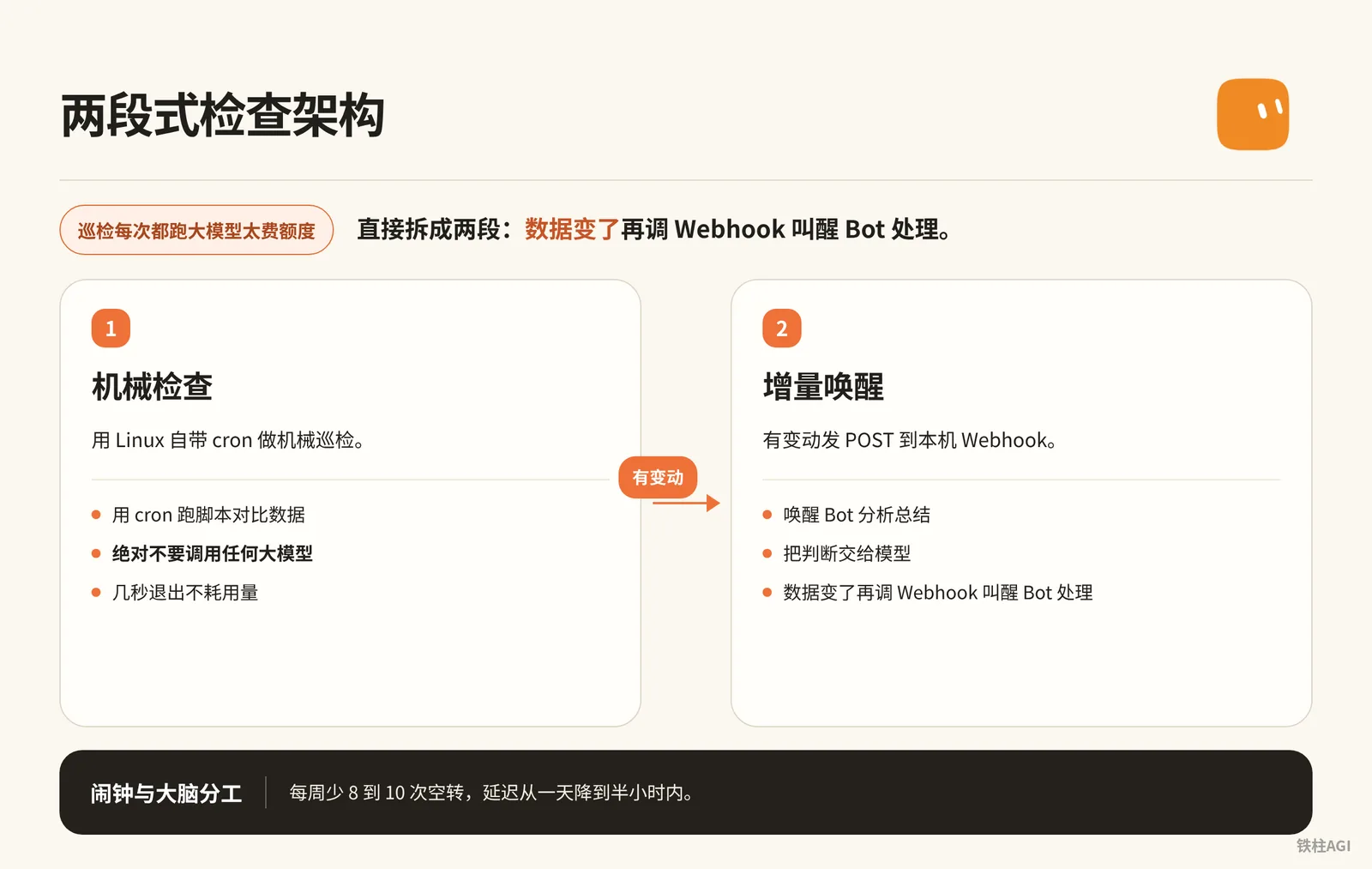
Running LLMs for every inspection check consumes too much quota; split it directly into two stages instead.
- Use Linux's built-in cron for mechanical checks.
- Only when data changes, call the Webhook to wake up the Bot for processing.
Source: Save More Grok Bot Quota: Extreme Optimization of Scheduled Tasks.
1. Decoupling Principle: Dividing Labor Between Alarm Clock and Brain
Behind Grok Bot is an always-on Linux cloud computer.
- Mechanical Check: Run a script via cron to compare data. Never invoke any LLM during this process; exiting within seconds consumes no quota.
- Incremental Wakeup: When changes occur, send a POST request to the local Webhook to wake up the Bot for analysis and summarization.
Converting the wait-type routines out of 6 routines took about 23 minutes, reduced idle runs by 8 to 10 times per week, and lowered latency from one day to within half an hour.
2. VM Implementation and Configuration Steps
- Add an "Incremental Processing Center" routine on the Bot, select Webhook as the trigger, and save the Webhook URL and Bearer key.
- Open the terminal and create the script
check_update.shin the workspace:
2. VM Implementation and Configuration Steps
   #!/bin/bash
   # 监测目标 API 或页面是否有增量变化,纯机械对比,严禁调用 LLM

   TARGET_URL="https://api.example.com/v1/feed"
   STATE_FILE="/home/user/workspace/last_state.hash"
   WEBHOOK_URL="https://your-bot-webhook-url.com/api/v1/run"
   WEBHOOK_KEY="Bearer YOUR_SECRET_KEY"

   # 获取最新数据的哈希值或时间戳
   CURRENT_HASH=$(curl -s "$TARGET_URL" | md5sum | awk '{print $1}')

   if [ ! -f "$STATE_FILE" ]; then
       echo "$CURRENT_HASH" > "$STATE_FILE"
       exit 0
   fi

   OLD_HASH=$(cat "$STATE_FILE")

   # 比对是否有变化
   if [ "$CURRENT_HASH" != "$OLD_HASH" ]; then
       echo "检测到数据更新,正在唤醒 Bot..."
       echo "$CURRENT_HASH" > "$STATE_FILE"

       # 叫醒 Bot 进行智能分析
       curl -X POST "$WEBHOOK_URL" \
            -H "Authorization: $WEBHOOK_KEY" \
            -H "Content-Type: application/json" \
            -d '{"event": "data_changed", "source": "feed_monitor"}'
   else
       # 无变化,保持沉默,零额度消耗
       echo "无新变化,退出。"
fi- Install and start the cron service in the terminal:
   sudo apt-get update && sudo apt-get install -y cron
   sudo service cron start
Run crontab -e to set the schedule (every 30 minutes between 9:00 AM and 7:00 PM on weekdays):
*/30 9-19 * * 1-5 /bin/bash /home/user/workspace/check_update.sh >> /home/user/workspace/cron_check.log 2>&1- Clicking "Update computer" in the client resets the system: Although workspace scripts persist, cron installed via
apt-getwill be wiped, so you must reinstall and start it once after updates. - Do not call LLM APIs in the script: Keep it to lightweight checks only; delegating evaluation to a model will not save costs—it merely shifts expenses to API billing.
Third-Party Events and X Platform Integration
Slack Triggers
Slack triggers are part of the routine system; bind Slack to your account before use, referring to Routines Help.
- Never configure "Any new message" trigger in public channels; one day of casual chatter will exhaust your entire weekly quota.
- Only monitor dedicated notification channels like
#alerts-p0or#deploy-status. - A trigger prefix must be required, such as
!bot reviewor@bot summary. - Only responds to new messages generated after setup, without retroactive execution.
X Platform Integration Boundaries
Starting with v0.70.2, searching tweets no longer requires binding a personal account.
Replying to a tweet with @bot will notify the starred primary Bot for dispatch; refer to 4.3 Triggers and Automation: Scheduled, Webhooks, and Dispatching Tasks on X.
- Limitations: Cannot parse video tweets; comments containing both
@grokand@botwill conflict and fail to trigger. - Injection Prevention: The primary Bot is only permitted to perform summarization, classification, and ingestion; automatic posting, liking, or modifying the cloud computer is strictly prohibited. All external actions must be routed back to the desktop client for manual confirmation.
Failure Fallback and Fault Tolerance Strategies
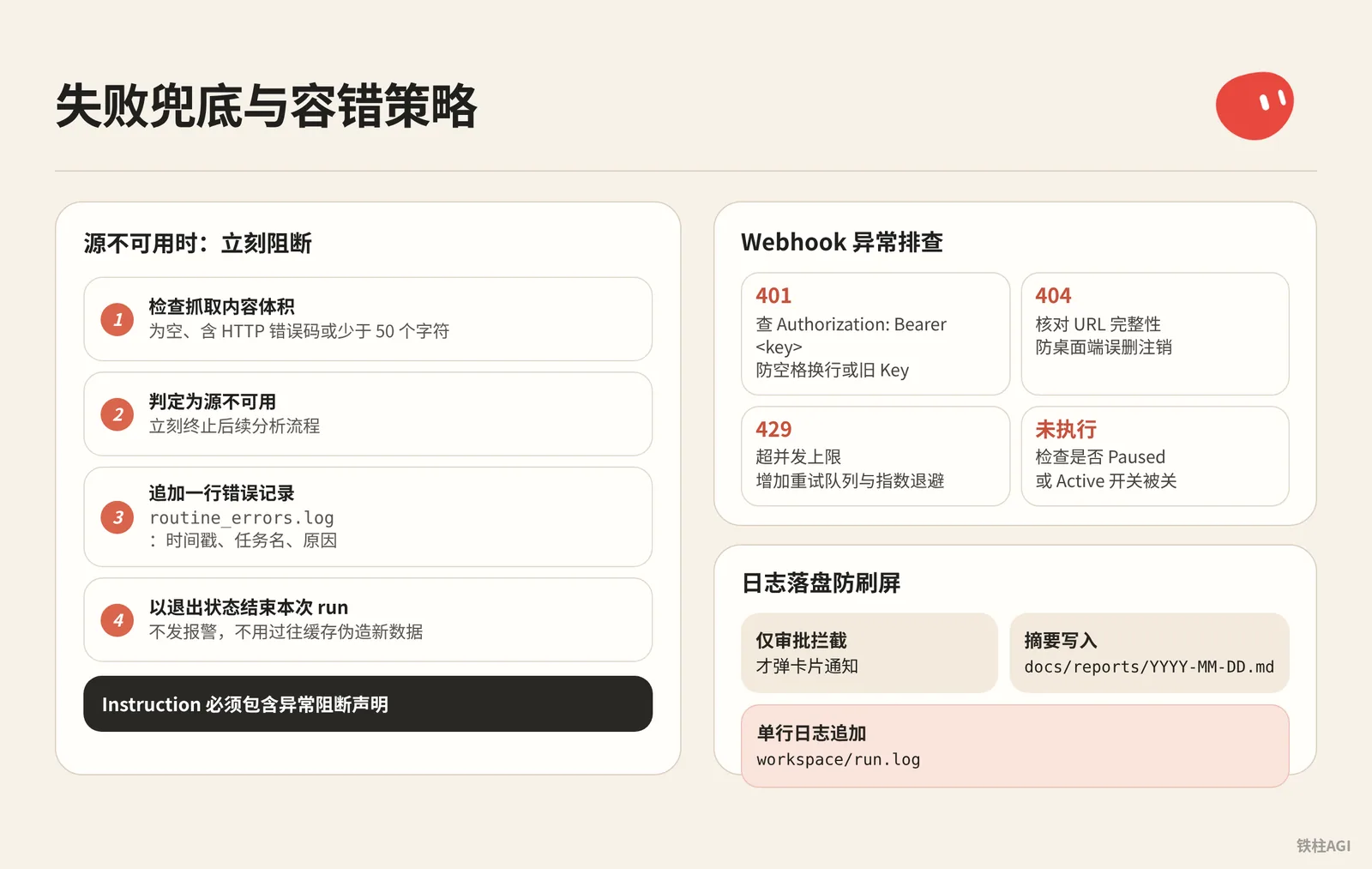
Interface timeouts or empty responses easily lead to hallucinations; the Instruction must include an exception blocking statement:
前置校验步骤:
1. 检查抓取到的内容体积。如果内容为空、包含 HTTP 错误码(如 403、404、500)或少于 50 个字符,判定为源不可用。
2. 源不可用时,立刻终止后续分析流程。
3. 在 workspace/logs/routine_errors.log 中追加一行错误记录,格式:[ISO时间戳] [任务名] SOURCE_UNAVAILABLE [原因]。
4. 不得在公开聊天窗口发送报警消息,不得使用过往缓存伪造新数据,直接以退出状态结束本次 run。
Webhook Troubleshooting:
- 401: Check
Authorization: Bearer <key>in Headers to prevent stray spaces, newlines, or using an outdated key. - 404: Verify URL integrity to prevent accidental deletion or unregistration on the desktop client.
- 429: Concurrency limit exceeded; a retry queue with exponential backoff must be added.
- Not Executed: Check whether it is Paused, or if the Active toggle on mobile is turned off.
Persist logs to disk to prevent spam: Only approval interceptions pop up card notifications; summaries are written to docs/reports/YYYY-MM-DD.md, and single-line logs are appended to workspace/run.log.
Monitoring and Daily Maintenance
View routines in Details on desktop or in configuration profiles on mobile; click on Failed to view error stack traces.
Check Usage & Billing weekly (v0.70.2 fixed usage display); a sudden spike in consumption indicates routines idling or retrying repeatedly.
Dedicate 15 minutes every Friday to clean up routines:
- Bring up
workspace/run.logto review actual output. - First Pause any routine with zero increments for 7 consecutive days.
- Delete routine after it has been stopped for two weeks without dependencies; deletion is irreversible and invalidates the Webhook simultaneously.
Common Pitfalls
- Weekday Mechanism: Setting "Every day at 8:00 AM" is often treated as weekdays only. For 24/7 tasks, the prompt must explicitly state "including Saturday and Sunday".
- Timezone Discrepancies: Before creating a Routine, check your timezone in Settings -> Bot -> Timezone. Cloud environments default to UTC, so setting 9:00 AM might run in the middle of the night.
- Plus Icon Bot Creation Failure: Creating a new Bot via the sidebar (+) frequently gets stuck; if it fails to run, have an established Bot derive a new Bot via conversation.
- Unsaved Credentials: When configuring a Webhook, you must click Save at the bottom to issue it; navigating away directly will result in ungenerated secret keys.
- System Update Reset: "Update computer" initializes the image, wiping cron installed via
apt-get; check cron in the terminal after updating. - Key Leaks: Do not paste Webhook secret keys into regular chats. If sent by mistake, delete the message immediately and reset it in the routine.
- Test Performs Real Execution: Clicking Test consumes quota and modifies files; testing on production data is strictly prohibited.
Acceptance Verification
- Check the English schedule in When to run on the desktop client (e.g., "Every day at 8:00 AM CST"), aligning it with your local timezone and weekends.
- New routines wait until the next cycle to run; check whether the Next run time is accurate.
- Rename or clear the data source and click Test once to confirm that a "data source exception" log is output and execution stops gracefully without hallucinating information.
- Inject instructions to send emails, make posts, or delete directories, and confirm the operation is intercepted with a popup card rather than sending packets outbound directly.
- Send a POST request to the Webhook using curl in the terminal:
   curl -i -X POST "你的_WEBHOOK_URL" \
        -H "Authorization: Bearer 你的_KEY" \
        -H "Content-Type: application/json" \
        -d '{"test": "ping"}'
Check that a 200 status code is received within 1 second, and within 30 seconds the Bot in the client transitions to Running and outputs a confirmation receipt along with structured results.
Extended Reading
- Related Chapter: Chapter 8 Skills and Routines: Turning a Single Success into Daily Automation
- Related Chapter: Chapter 10 Quotas and Costs: Making One Week of Usage Last the Full Week
- Official Documentation: Cursor Help: Routines
- Community Source: 4.3 Triggers and Automation: Scheduled, Webhooks, and Dispatching Tasks on X
- Community Source: Grok Bot Webhook + Shortcuts: Building an Automated Knowledge Ingestion Pipeline
- Community Source: Save More Grok Bot Quota: Extreme Optimization of Scheduled Tasks