Chapter 5 Shared Cloud Computer: Files, Browser, and Takeover
Users new to Grok Bot often have several common misconceptions. These misconceptions often lead to obstacles in subsequent development and maintenance:
- Mistakenly believing that creating a new Bot adds an independent virtual machine.
- Mistakenly believing that when multiple Bots work together, they can directly read each other's chat histories.
- Pasting account credentials or even API Tokens directly into the chat window when third-party tool logins are required.
Only when the cloud computer is abruptly wiped due to system maintenance or underlying updates, wiping out installed environments and scripts, do people realize they know nothing about how this cloud computer works under the hood.
All Bots under the same account work on the same cloud computer, sharing the same disk and filesystem. They cannot see each other's conversation logs; collaboration relies entirely on transferring files via disk.
When encountering login verifications, the proper approach is to take over the screen directly in the cloud browser to enter credentials, rather than handing passwords to the model. At the same time, this cloud computer is essentially an ephemeral container that can be rebuilt at any time; manually installed packages will be lost during platform updates or administrator maintenance.
This chapter walks you through how this cloud computer really works. You will learn how to safely hand off files and screens between multiple Bots, how to route network traffic through your local desktop to handle whitelist restrictions, and how to use a lightweight, standardized backup pipeline to systematically and quickly restore the entire environment after a reset.
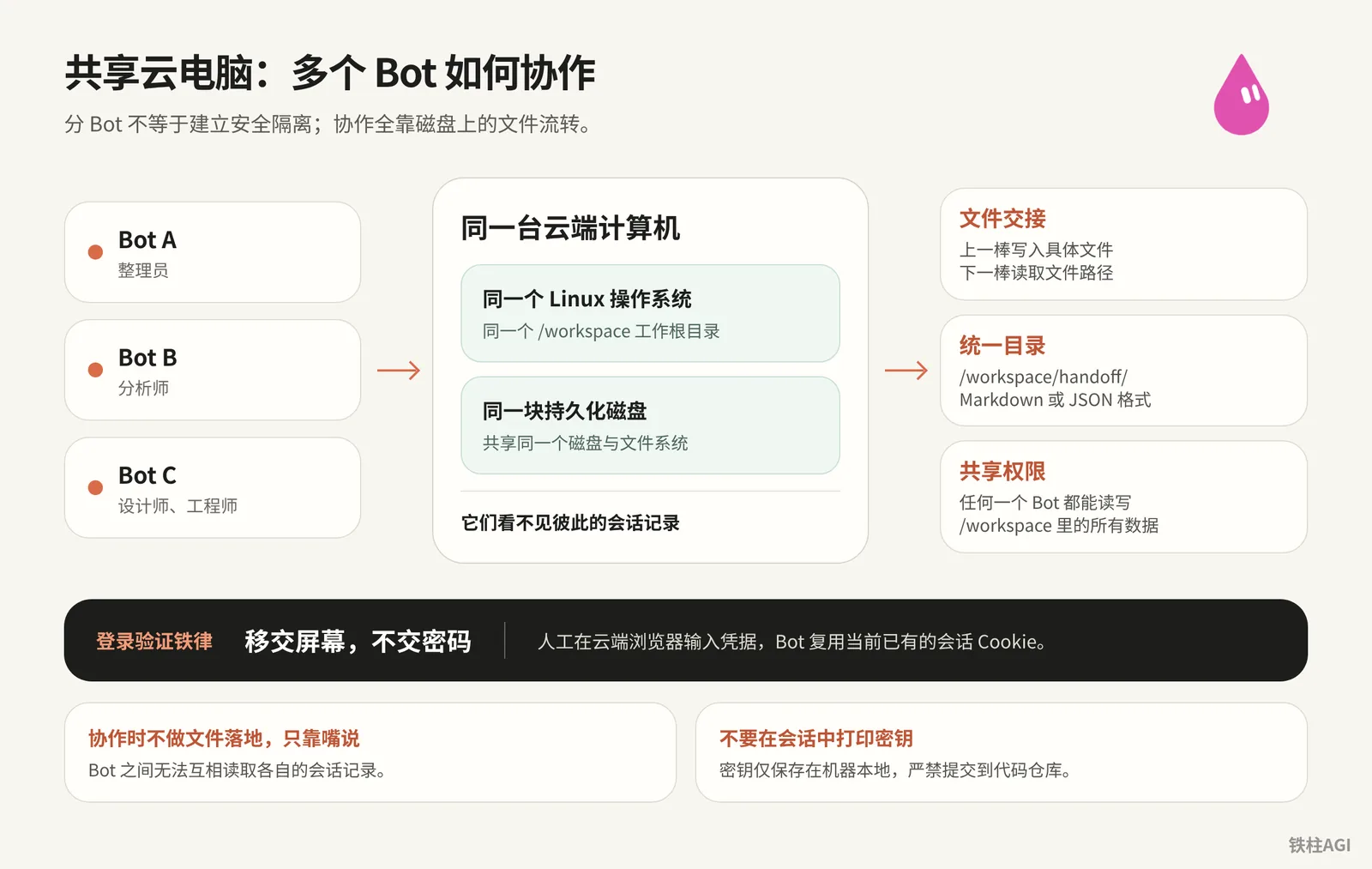
Underlying Mechanism of the Shared Computer: One Machine and Multiple Bots
All Bots under your account share the same hosted Linux computer. No matter which Bot you switch to, you are facing the exact same /workspace root directory and persistent disk.
Chat records are saved independently off-machine; even if you run rm -rf to wipe everything inside the machine or if the system crashes and restarts, conversations and lists remain intact.
Creating a new Bot does not mean security isolation. Any Bot with command-line privileges can read and write all data in /workspace; never store unencrypted sensitive information inside.
Version evolution:
- v0.68.0: Added support for removing other computers in settings
- v0.68.1 (Released 2026-10-07): Screen resolution upgraded from 1280×800 to 1920×1200, with faster action and screenshot responsiveness
- v0.70.2: Added dedicated email address; supported saving web pages directly as PDFs
For underlying details, see 4.6 Virtual Machines, Memory, and Backup.
Multi-Bot Screen and Work Status Monitoring
Status and Configuration
Three status types reside permanently in the sidebar.
- Needs Attention: Waiting for answers, approvals, or handoffs.
- Unread Activity: Tasks completed, waiting for review.
- Working: Currently running scripts, scraping web pages, or invoking tools.
Click the name at the top to access "View Conversation Details", where you can edit the current Bot's name, tags, and avatar. Personal Bots have no separate description box; simply send a message to adjust its persona.
Monitoring and Notifications
Cloud operations support real-time screen viewing.
Notifications are automatically suppressed when in focus, marking items as unread only in the sidebar and Dock; when offline, notifications can be enabled in configuration files to push alerts to desktop or mobile.
Browser Takeover: Hand Over the Screen, Not Passwords
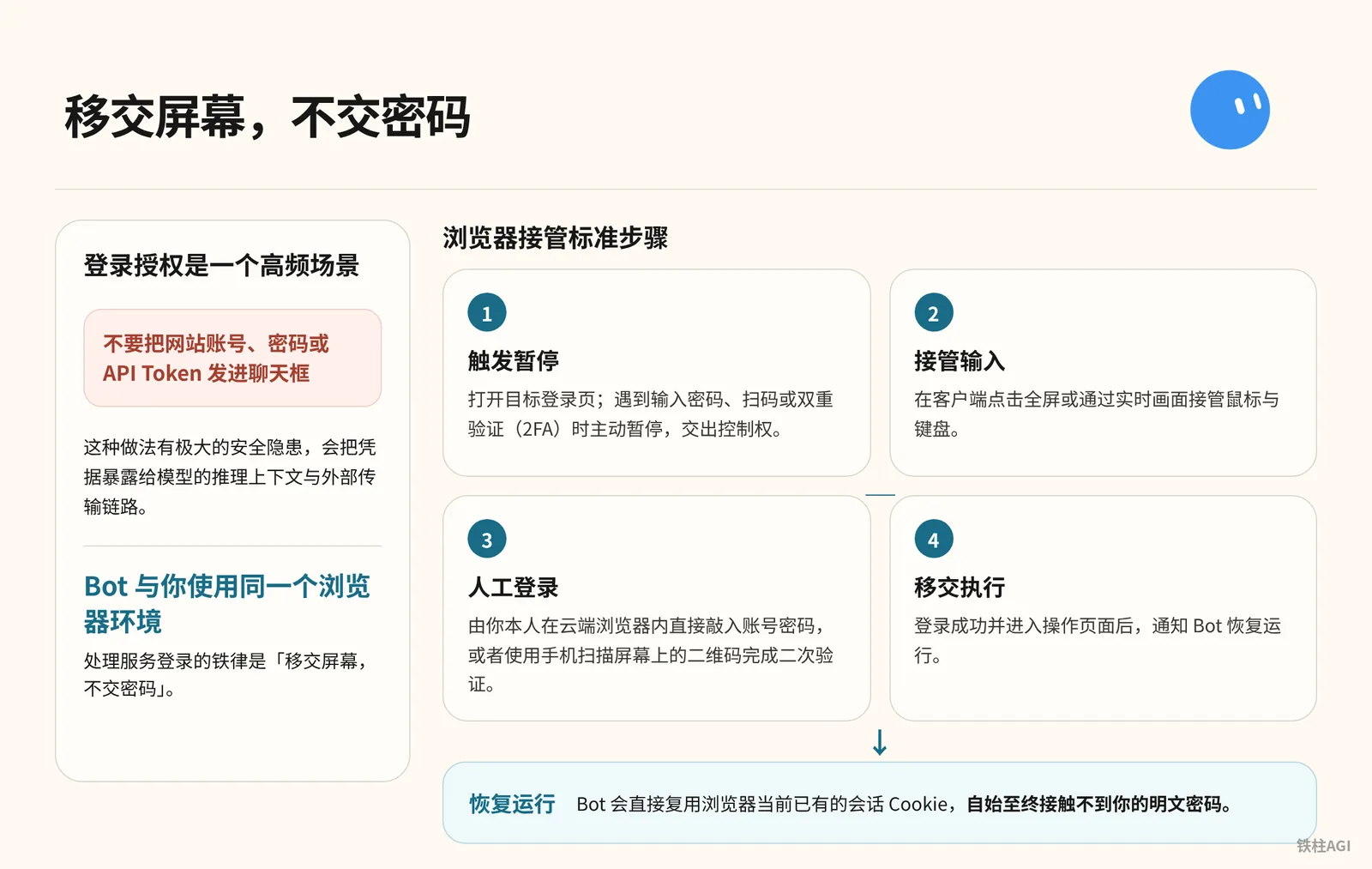
Do not send credentials into the chat box. You and the Bot share a browser: hand over the screen, not passwords.
Takeover Steps
- Trigger Pause: The Bot opens a login page and pauses when encountering credential inputs, QR code scanning, or 2FA.
- Take Over Input: Click full-screen to take over the keyboard and mouse.
- Manual Login: Enter credentials or scan QR code to verify yourself.
- Hand Over Execution: Notify the Bot to resume using the session cookies after login, preventing exposure of plaintext passwords.
Approval Gates
Press Cmd+, to configure under "General" - "Bot".
- Rule conflicts default to "Ask first".
- Enterprise rules displaying
Required by your admin. You can't edit or delete this rule.cannot be modified. - v0.70.2 reinforced confirmations before sending emails/posts, processing payments, and modifying production environments.
See Settings and Notifications for details.
Multi-Bot File Handoff Conventions and Directory Planning
File Collaboration Patterns
Bots cannot read each other's chat histories; the only channel for multi-Bot collaboration is shared disk files.
Prompts only need to pass the file path of the previous stage; see 4.6 Virtual Machines, Memory, and Backup for details.
- Curator scrapes and generates
tweets.md - Analyst refines and outputs
profile.md - Designer creates
design.mdbased on profile - Engineer reads design and builds code
Directory Planning
Establish directory conventions right after provisioning the machine to avoid clutter across multiple Bots.
| Directory Path | Contents | Writing Standards |
|---|---|---|
/workspace/handoff/ | Intermediate artifacts | Unified Markdown or JSON, prefixed with task identifiers |
/workspace/projects/ | Project code and assets | Organized into independent subdirectories per project, linked to Git repos |
/workspace/tools/ | Custom local scripts | Keep only secret-free source code, synced to backup repo after inspection |
~/.env or local files | API keys | Stored locally only; strictly prohibited from committing to repos or printing in chats |
Disk Cleanup and Disk Saver
When the system warns Computer is low on disk space or Computer is critically low on disk space, go to the sidebar and click "Go to Disk Saver" under Disk Saver to review cleanup recommendations.
It never deletes files without confirmation; if you reject cleaning up, existing files remain untouched.
Local Network Egress: Routing and Accessing Private Networks
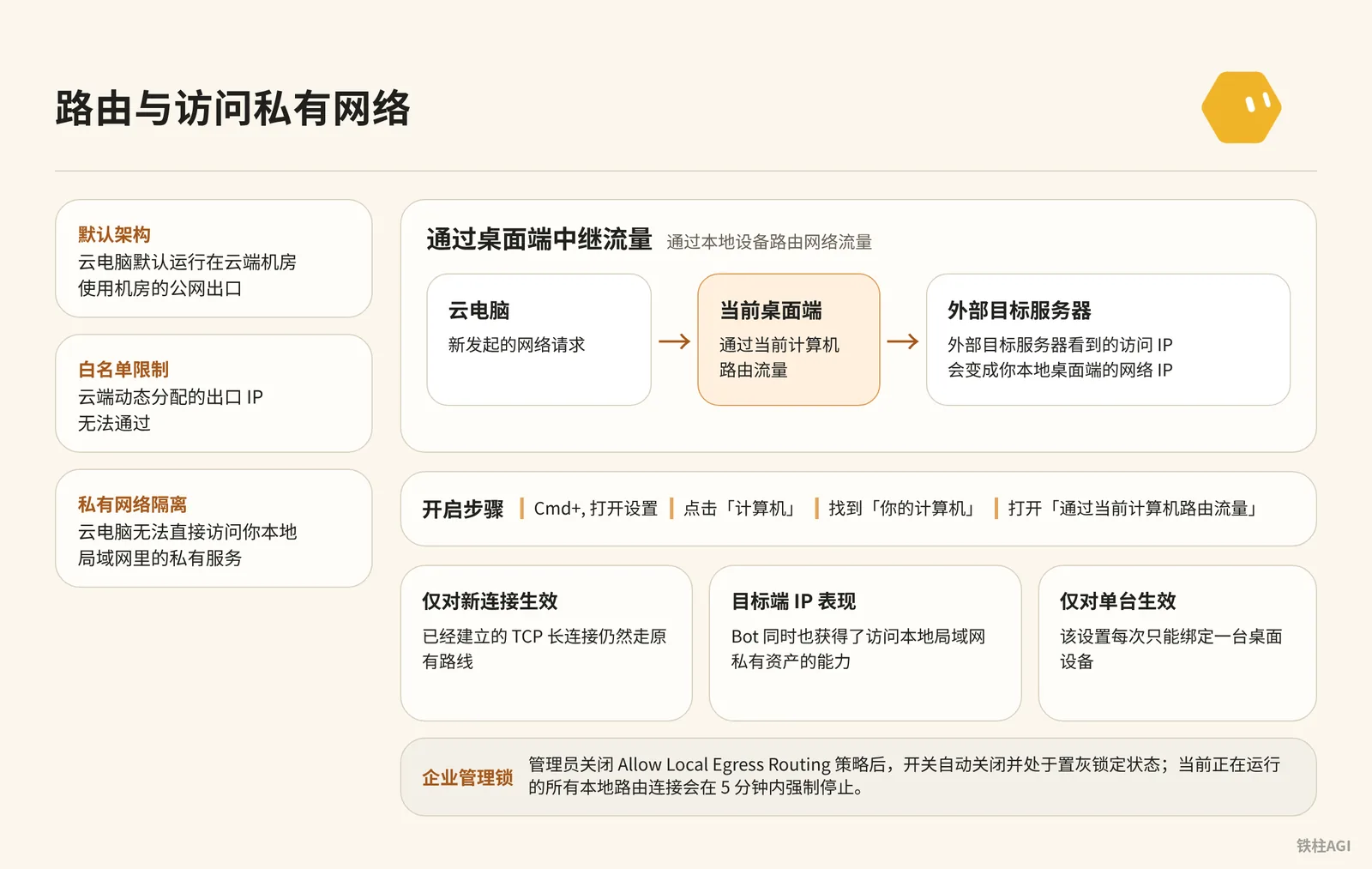
To resolve WeChat official account access, corporate intranet IP whitelisting, or LAN access, simply relay traffic through your local device.
Setup Steps
- Press
Cmd+,to enter Settings and click Computers. - Locate the current computer under Your Computers and enable Route traffic through this computer.
Limitations and Pitfalls
- Limited to a single computer at a time. Outbound traffic is identified as your local IP, and the Bot can also directly access your LAN.
- Applies only to new requests; existing long-lived TCP connections will continue along their original routes.
- If an administrator disables
Allow Local Egress Routing, the toggle is grayed out withDisabled by your admin. You can't turn this on., and connections are forcefully terminated within 5 minutes; see Settings and Notifications. Execution on this computercontrols the local shell and requires confirmation step-by-step by default; do not enable fully automatic mode carelessly.
Rebuild, Update, and Terminate: The Cloud Computer Lifecycle
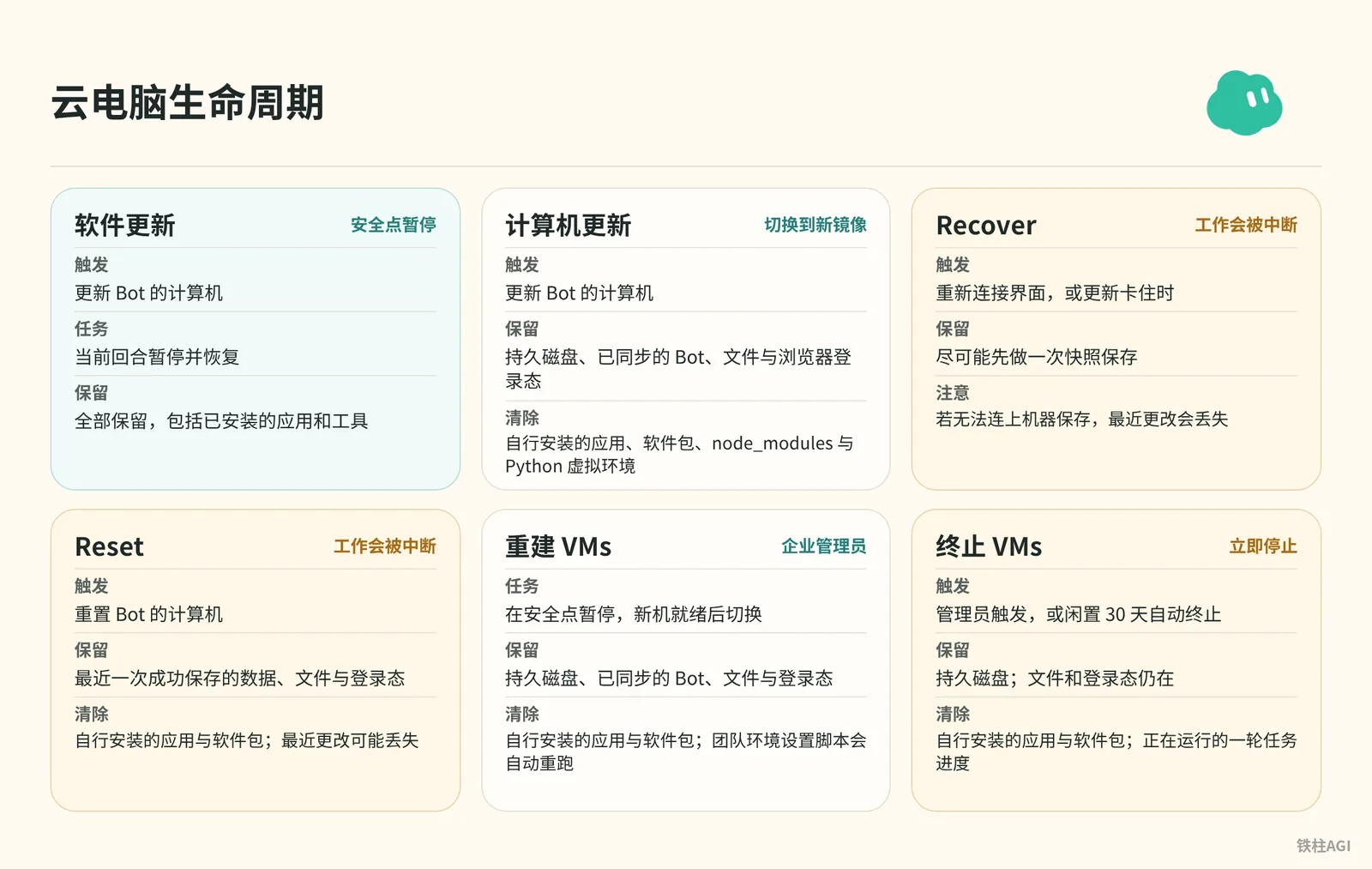
Rebuilding clears manually installed environments, while preserving disk data and login states.
See Grok Bot Computers and Manage Grok Bot Computers.
| Operation | Preserved | Cleared / Pitfalls |
|---|---|---|
| Software Update | Everything | None |
| Update / Rebuild | Disks and files | Clears manually installed environments; must re-run scripts |
| Terminate VMs | Disk | Shuts down after 30 days of inactivity, losing unsaved progress |
| Recover / Reset | Saved data | Interrupts tasks, loses unsaved code |
When Reconnecting is displayed, do not blindly click Reset; troubleshoot in this order:
- Click Retry. Disk remains intact during reconnection; rash actions disrupt the troubleshooting state.
- Fully Quit. On macOS, use
Cmd+Qto quit and restart rather than just closing the window. - Check for Updates. Go to "Settings" > "Computers"; update only when the Bot is idle.
- Prioritize Recover. When options pop up, choose Recover first to capture snapshots where possible.
- Reset as Last Resort. Reset only after confirming there is no unsaved code and everything else has failed.
Disaster Recovery Pipeline: Service Registry and Idempotent Recovery Scripts
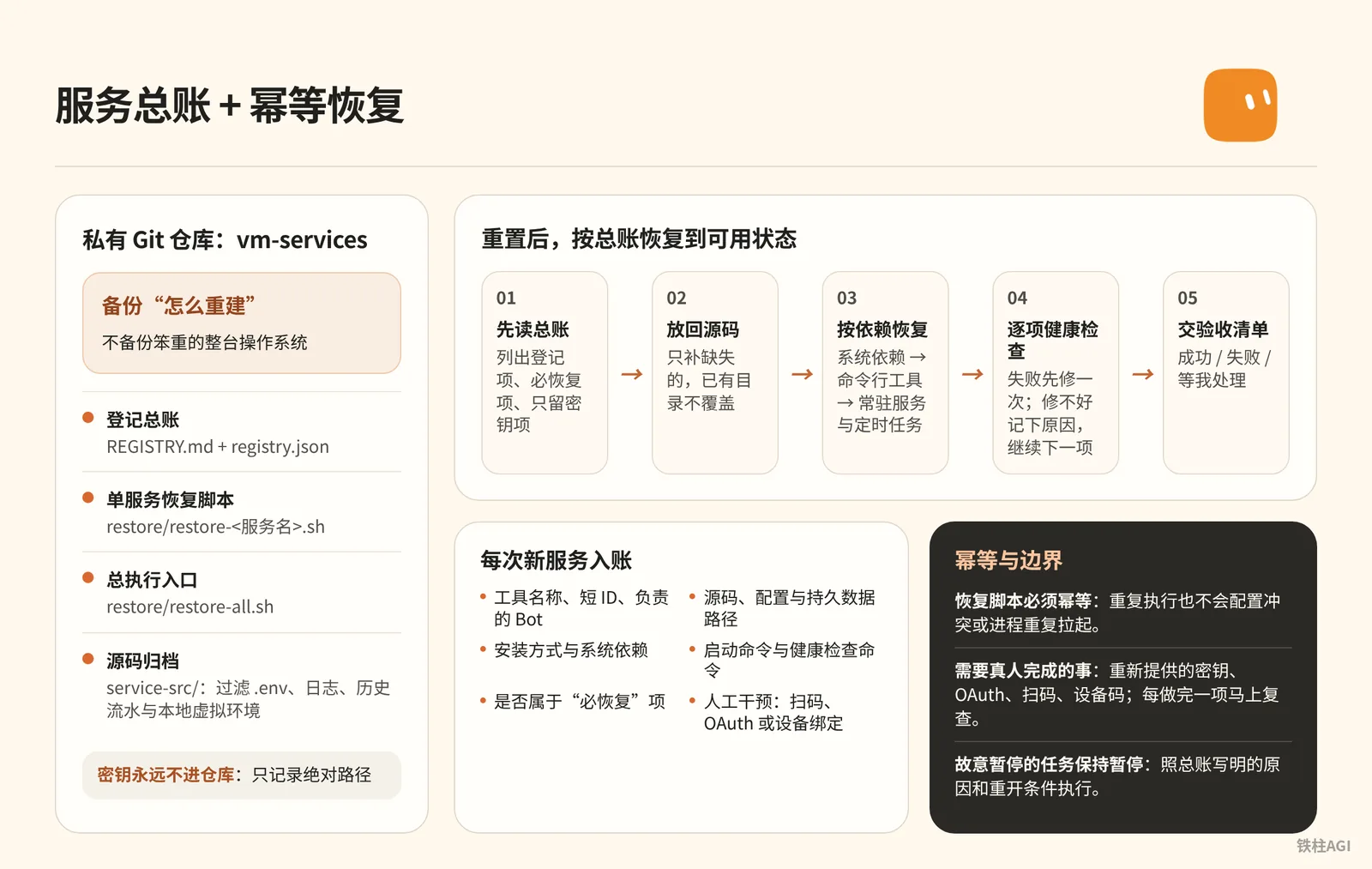
Updates or resets will wipe the environment. 铁柱AGI (@cgnot996) proposed a solution on 2026-10-10: back up provisioning procedures, not the whole machine.
Using a 5.1 MB private repository, he manages 20 services across 10 Bots (18 essential-to-recover items, including 4 resident, 14 on-demand, and 2 secret-path items); see Tutorial for details.
Standardized Structure and Registry Entry
The vm-services repository contains four components:
REGISTRY.mdandregistry.json: Master registry and configurations.restore/restore-<服务名>.sh: Per-service scripts, which must be idempotent.restore/restore-all.sh: Installs libraries and CLIs sequentially, launches background services, and tallies failures.service-src/: Source code archives, excluding.env, logs, and virtual environments.
Registering a new service requires these fields: short ID and assigned Bot; code and data paths; installation method (apt/pip/npm/Docker) and system dependencies; start and health check commands (--version or port); whether recovery is required; absolute path to secrets (strictly forbid recording plaintext secrets); manual steps such as QR scanning or OAuth.
Two Sets of Prompts
Send this to the "VM Service Butler" Bot; other Bots report deployments according to this standard.
Deployment and Registration Prompt
你是「虚拟机服务管家」,只管一件事:记下这台虚拟机上部署过的所有第三方服务,并在电脑更新或换账号之后,按记录把它们原样恢复。

你维护的东西:
1. 一份登记总账,人和机器各读一份:REGISTRY.md(表格)和 registry.json(给脚本读)。
2. 每个服务一个恢复脚本 restore/restore-<服务>.sh,必须幂等,重复跑也不会出错。
3. 一个总入口 restore/restore-all.sh,按依赖顺序调用各个恢复脚本,最后汇总哪些失败了。
4. 一份源码备份 service-src/:各 Bot 自己写的服务代码和脚本,同步时排除密钥、日志、运行状态、虚拟环境和个人数据,并先扫一遍明文密钥,命中就停。
5. 以上全部跟着一个私有 Git 仓库存(「你的备份仓库地址」)。总账、恢复脚本、源码都在仓库里,密钥永远不进仓库。

登记规则(其他 Bot 部署任何服务都必须来找你登记):
每项必须包含:
- 名称和短 id、用途、负责的 Bot
- 路径:代码、配置、数据分别在哪
- 安装方式和依赖(apt / pip / npm / Docker / 系统定时任务)
- 启停命令、健康检查命令
- 更新后的恢复步骤,或者对应的恢复脚本
- 是否必恢复:是 / 否
- 密钥:只写存放路径,绝不写明文
- 需要真人完成的步骤(OAuth 登录、扫码、导入 cookie)单独标出来

你的工作方式:
- 先弄清哪些会丢、哪些能留:电脑更新一般保留工作目录,但系统包、常驻进程、全局安装的命令行工具会丢;重置则什么都不留。所以要记的是“怎么重建”,不是去拷整台机器。
- 能从公开渠道重装的(apt、pip、npm、上游 Git 仓库)只记安装命令;自己写的代码必须进源码备份,否则重置后就找不回来。
- 收到登记先核对:路径是否真实存在、健康检查能不能过。登记写的和实际不一样时,以实际为准,并告诉负责的 Bot。
- 多个定时任务合并成一份 crontab 真源时,检查每一条是不是都在真源里,不在的要靠恢复脚本补回去。
- 故意停掉的服务要写清楚“为什么停、什么条件下重开”,免得被当成漏装。
- 只有主人说“电脑更新完了”才跑总恢复,不盲跑。跑完交验收:每项是成功、失败,还是要真人处理。
- 每次有服务新增、删除或源码大改,先重新同步源码备份,再把总账、脚本、源码一起提交推送到备份仓库。换账号或重置时,就靠这份备份把整套设定带走。
- 删掉的服务要彻底清除:总账只反映现在真实的状态。
After a reset, configure Git credentials and send this to the recovery Bot. The acceptance criteria report results, elapsed time, and check status against the checklist.
One-Click Recovery Prompt After Reset
这台电脑刚重置过(或者是换了新账号),之前部署的服务都没了。请按我的备份把它们恢复到可用状态,规则如下。

备份在哪:
- 备份仓库:<你的备份仓库地址>,分支 <分支名>
- 仓库里有:登记总账(REGISTRY.md 和 registry.json)、每个服务的恢复脚本(restore/)、自写服务的源码备份(service-src/)
- 仓库里没有密钥,这是故意的

请按这个顺序做:
1. 把备份仓库拉到工作目录,先读总账,告诉我一共登记了几项、哪些标了「必恢复」、哪些只留密钥不用恢复。先列出来,不要动手。
2. 把自写服务的源码从 service-src/ 放回总账写的原位置。只补缺失的,已经存在的目录不要覆盖。
3. 按总账的依赖顺序逐项恢复:先装系统依赖(比如 cron、ffmpeg),再装命令行工具,最后拉起常驻服务和定时任务。每项都用它自己的恢复脚本,脚本要能重复跑。
4. 每装完一项就跑它登记的健康检查。失败了先看日志、试着修一次;修不好就记下原因,接着做下一项,不要卡住。
5. 把需要我本人做的事汇总成一张清单:要重新提供的密钥(只说放哪个路径、叫什么名字,别让我把密钥贴进聊天)、要重新登录授权的工具(OAuth、扫码、设备码)。然后一项一项带我做,每做完一项马上复查。
6. 故意暂停的任务保持暂停,总账里写了原因和重开条件的照办。别因为“看起来漏装了”就自作主张打开。
7. 最后交验收清单,每项一行:服务名、结果(成功 / 失败 / 等我处理)、健康检查输出摘要、花了多久。再告诉我总共用了多少时间、成功了几项。

不要做的事:
- 不要把任何密钥写进仓库、日志或聊天
- 不要跑总账没登记的安装
- 不要用“重置电脑”当修复手段
- 恢复完如果有任何改动(路径变了、版本升级了),更新总账,提交推回备份仓库
Common Pitfalls
Credentials and Permissions
- Never paste secrets into the chat box: Enter them manually in web interfaces; write CLI Tokens into
~/.envand have scripts read environment variables. - No isolation between Bots: Shared
/workspaceand permissions. Sensitive assets rely on private repositories and manual approvals; creating multiple Bots provides no isolation.
Collaboration and Dependencies
Handoffs must be written to disk: Bots cannot read each other's conversations. Save Bot A's results as Markdown or JSON; relying solely on verbal handoffs causes Bot B to hallucinate.
Dependencies are non-persistent: Updates, Recover, or Reset will clear packages from
apt installandnpm install -g;node_modulesand.venvare also not backed up.Recovery scripts must include
npm installandpip install -r requirements.txt.
Operations and Networking
- Do not click Reset when seeing Reconnecting: This will discard unsaved changes and force a rebuild; retry or restart the client first.
- Centrally manage scheduled tasks: crontab entries must be maintained centrally in a Git repository.
- Restart required when enabling local routing: If the IP doesn't change after enabling "Route traffic through this computer", restart the process.
Verification After Completion
- Bot A writes a timestamp to
/workspace/handoff/test.json. Bot B reads and accurately reports it, verifying smooth communication. - In "Settings" > "Computers", enable "Route traffic through this computer", then run
curl -s https://api.ipify.orgin the terminal. The public IP must match your local IP, not the data center IP. - Have the Bot open the GitHub login page; it must pause before the password field and prompt for takeover. Resume after logging in manually and verify that no plaintext passwords appear in the logs.
- Confirm that
REGISTRY.md,registry.json, and the scripts have been committed to the private Git repo. Pull and run in a test directory:
bash restore/restore-all.shAll health checks must pass, with no conflict errors, and registry services must listen normally.
Further Reading
Official Documentation and Knowledge Base
- Manage Grok Bot Computers: Official comprehensive rules on batch rebuilding, terminating, and 30-day inactivity cleanup for enterprise multi-computer environments.
- Settings and Notifications: Official explanations regarding desktop client settings, local command execution, traffic relay routing, and Auto-review mode.
- Grok Bot Computers: Official differences between Update, Recover, and Reset, along with a troubleshooting checklist.
Community Practical References
- 4.6 Virtual Machines, Memory, and Backup: Detailed breakdown of cloud computer underlying architecture, context organization maps, and multi-Bot file collaboration.
- Lost All Tools After Grok Bot VM Reset? Backup & Recovery Tutorial (with Prompts): Practical guide shared by community author 铁柱AGI (@cgnot996) covering VM Service Butler design, master registry ledger, and one-click recovery.