Chapter 6 Memory: Making Your Bot Understand You Better the More You Use It
Bot memory is cross-session working context. Treating all chat history as memory makes it easy to mistake temporary workarounds for permanent rules, or even make flawed decisions based on stale data.
- Master the five container types and the fast/slow clock mechanism, distinguishing memory from skills.
- Establish promotion protocols for team collaboration, and verify dynamic data against the source of truth in real time.
- Build a backup pipeline with Git so that everything can be fully restored even if the Cloud PC is reset.
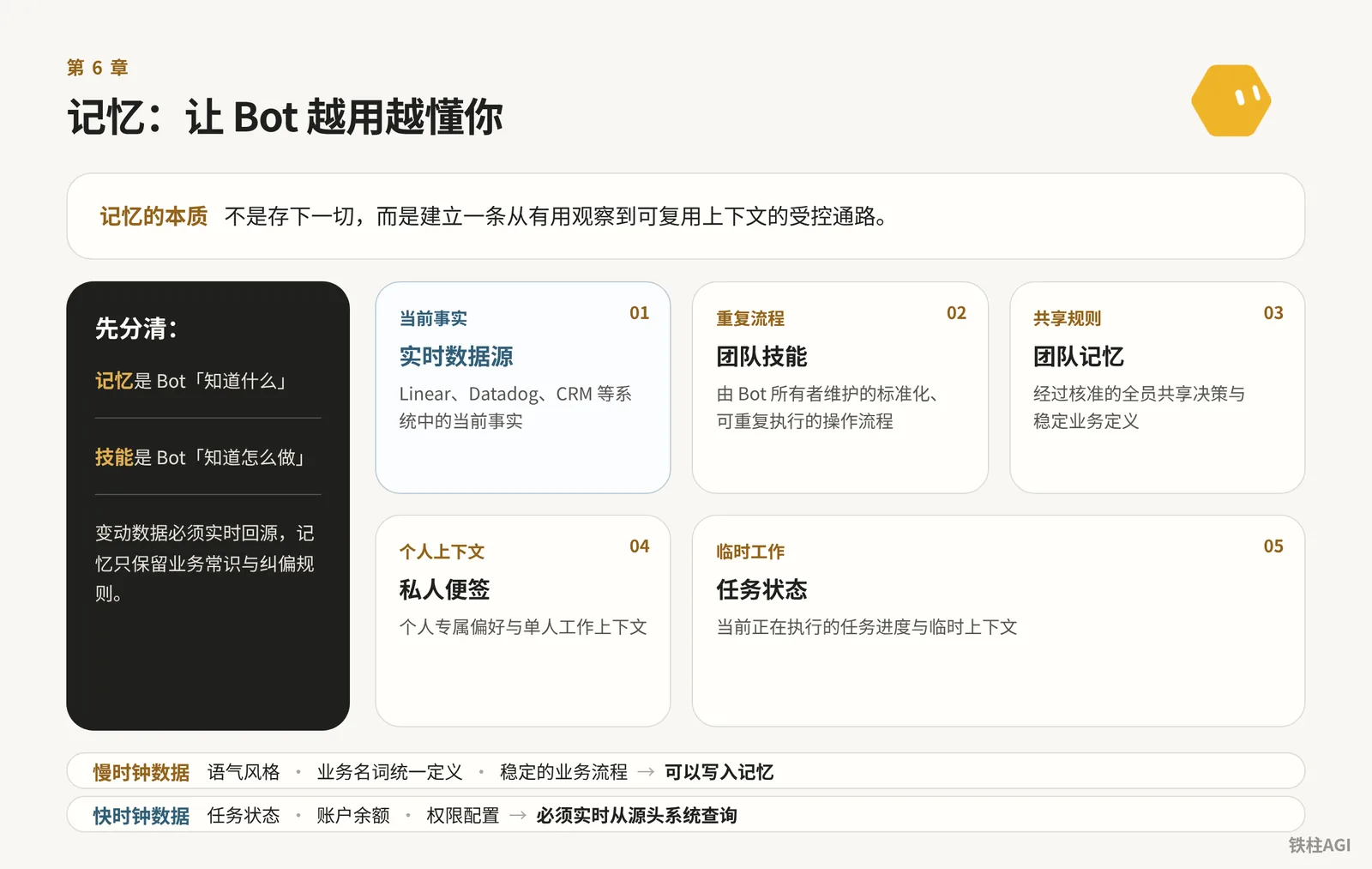
6.1 Official Memory Mechanism: What Does the Bot Actually Remember?
Bots remember preferences, facts, and summaries; see Using Grok Bot.
Don't treat the Bot as a database.
- Keep dynamic data in the source system, and verify with the source for major decisions.
- If something is misremembered or an assumption becomes obsolete, correct or delete it directly in the chat.
- Rely on approval pop-ups and
Auto-reviewfor security and permissions, never on memory. - State long-term rules clearly upfront in the first prompt; single-task instructions apply only to the current turn.
Click the top name to modify configuration. Duplicating a Bot on iPhone:
- Inherits: Configuration, skills, Routine, and avatar
- Does not inherit: Conversations, memory, and attachments
If you might use it again later, it is recommended to set it to "Hidden" in the sidebar; deleting directly will erase records. Pitfall: All Bots share the same Cloud PC. Deleting a Bot does not clear its files or login state; residual files must be cleaned up manually in the file system.
6.2 Memory Layering: Five Container Types and Fast/Slow Clocks
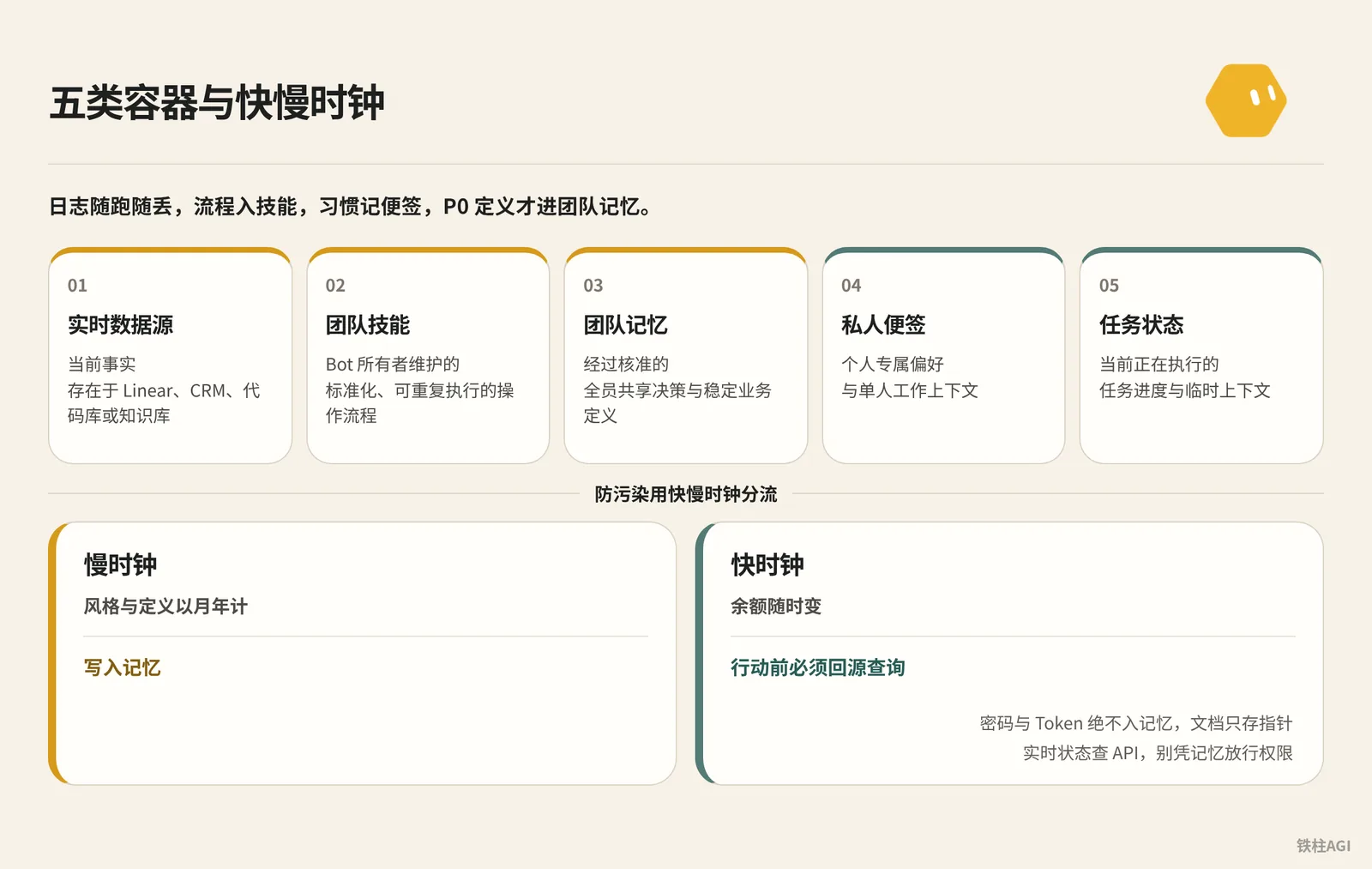
Data is divided into a shared layer and a dedicated layer; see "4.6 Virtual Machines, Memory, and Backup" fs69.md.
For the five-container model, see "Grok Bot Memory Engineering: How One Agent Learns With a Team | rari" fs57.md.
实时数据源 (LIVE SOURCE)  -> 存在 Linear、Datadog、CRM、代码库或知识库里的当前事实
团队技能 (TEAM SKILL)     -> 由 Bot 所有者维护的标准化、可重复执行的操作流程
团队记忆 (TEAM MEMORY)    -> 经过核准的全员共享决策与稳定业务定义
私人便签 (PRIVATE NOTE)   -> 个人专属偏好与单人工作上下文
任务状态 (TASK STATE)     -> 当前正在执行的任务进度与临时上下文
Containers cannot be mixed. Logs are discarded as they run, workflows go into skills, habits are kept in private notes, and only P0 definitions enter team memory.
To prevent pollution, use fast/slow clock routing.
- Slow clock: Styles and definitions measured in months or years; written into memory.
- Fast clock: Balances change at any time; always query the source before acting.
Passwords and tokens must never enter memory; documents store only pointers. Check APIs for real-time status, and never grant permissions based on memory.
6.3 The Boundary Between Memory and Skills: Knowing What vs. How to Do It
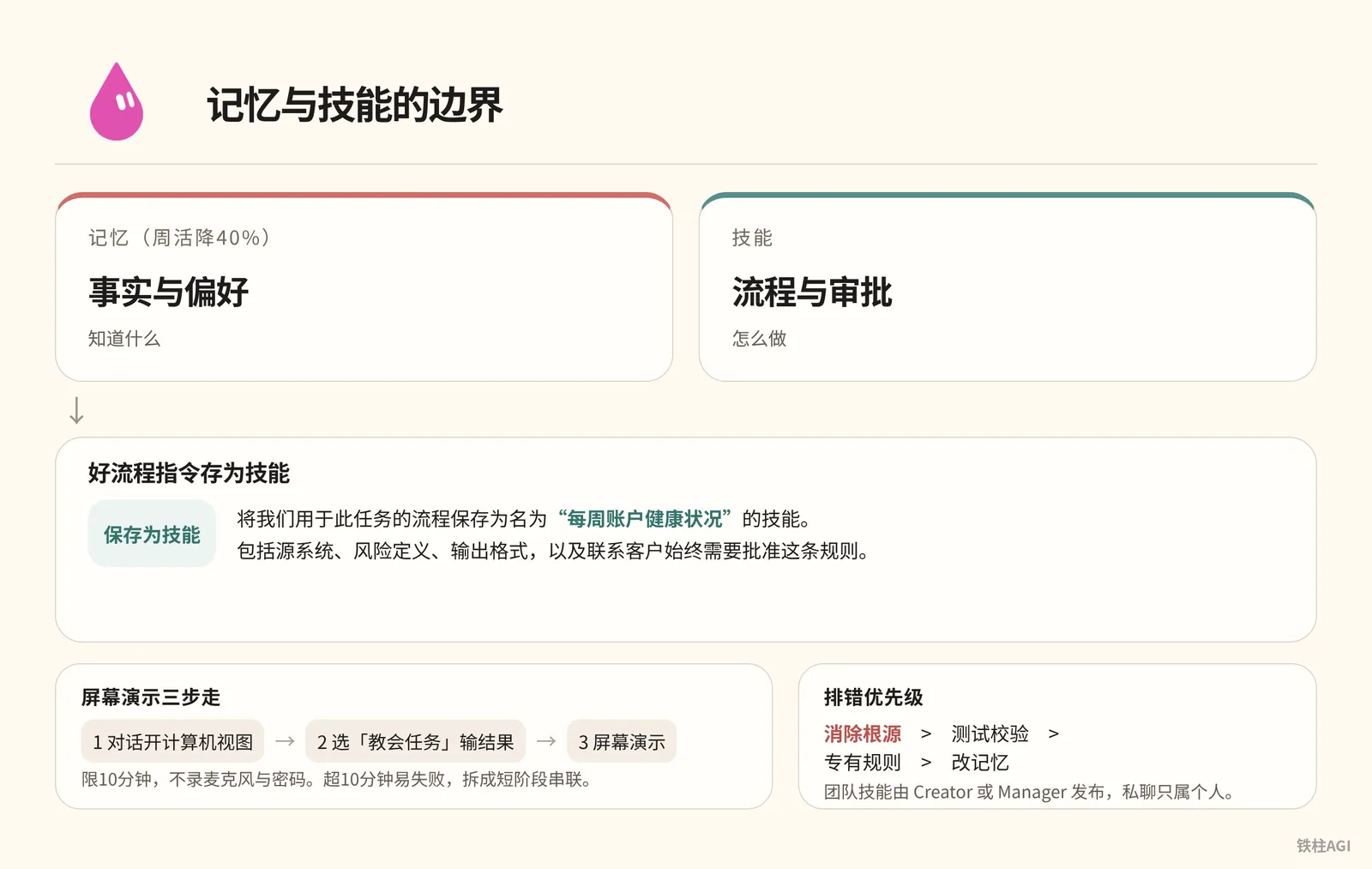
| Memory (WAU down 40%) | Skills |
|---|---|
| Facts and preferences | Workflows and approvals |
For good workflows, save instructions as skills:
将我们用于此任务的流程保存为名为“每周账户健康状况”的技能。
包括源系统、风险定义、输出格式,以及联系客户始终需要批准这条规则。
Three steps for screen demonstration:
- Open Computer View in the conversation
- Select "Teach Task" and enter expected outcome
- Screen demonstration
Limited to 10 minutes; does not record microphone or passwords. @mvanhorn reminds that exceeding 10 minutes tends to fail; split into short sequential stages. fs46.md
Lauren Tan's debugging priorities: Eliminate root cause > Test verification > Specific rules > Modify memory. Team skills are published by Creator or Manager; private chats belong only to individuals.
6.4 Team Memory Management: Write Protocols, Permission Isolation, and Conflict Prevention
When multiple people share a Bot, one person teaching it wrong affects everyone.
观察 (OBSERVE) -> 分类 (CLASSIFY) -> 核实 (VERIFY) -> 晋升 (PROMOTE) -> 重核 (RECHECK)Follow five steps when writing to memory:
- Observe: Capture corrections and new decisions.
- Classify: Distinguish between personal preferences and shared rules.
- Verify: Check against documentation or code; verbal speculation is strictly prohibited from entering storage.
- Promote: Store into rules along with authoritative links once confirmed by the owner.
- Recheck: Re-verify with the source before major operations or after expiration.
claim: "对外发布 API 变更前必须完成安全评审"
scope: "team"
source: "https://intranet.example/docs/launch-checklist"
owner: "security-team"
status: "approved"
review_after: "2026-11-01"
After verifying the source and owner on the external card, issue the command to store it.
Knowledge sharing does not equal permission sharing:
- Personal OAuth: Calling plugins like Gmail uses one's own authorization; do not usurp permissions.
- Service Keys: Shared by all team members, following the principle of least privilege and typically read-only.
- Slack Pitfalls: Querying private data in a group channel exposes it to everyone. Post only summaries in public channels, and keep sensitive data in private messages.
Conflict Resolution: Immediately suspend critical operations -> Check authoritative source -> Owner decides -> Update source -> Correct memory.
Troubleshooting Bad Memory (e.g., treating special exceptions as routine):
- Inspect: Ask the Bot to list memories to locate errors, tracing back to conversations and tasks.
- Modify: Fix the source documentation first, then issue instructions to delete or modify the memory.
- Verify: Test with another member's account to confirm it does not block, and rectify historical tickets.
6.5 Memory Backup and Recovery: Treating the Cloud PC as a Replaceable Container
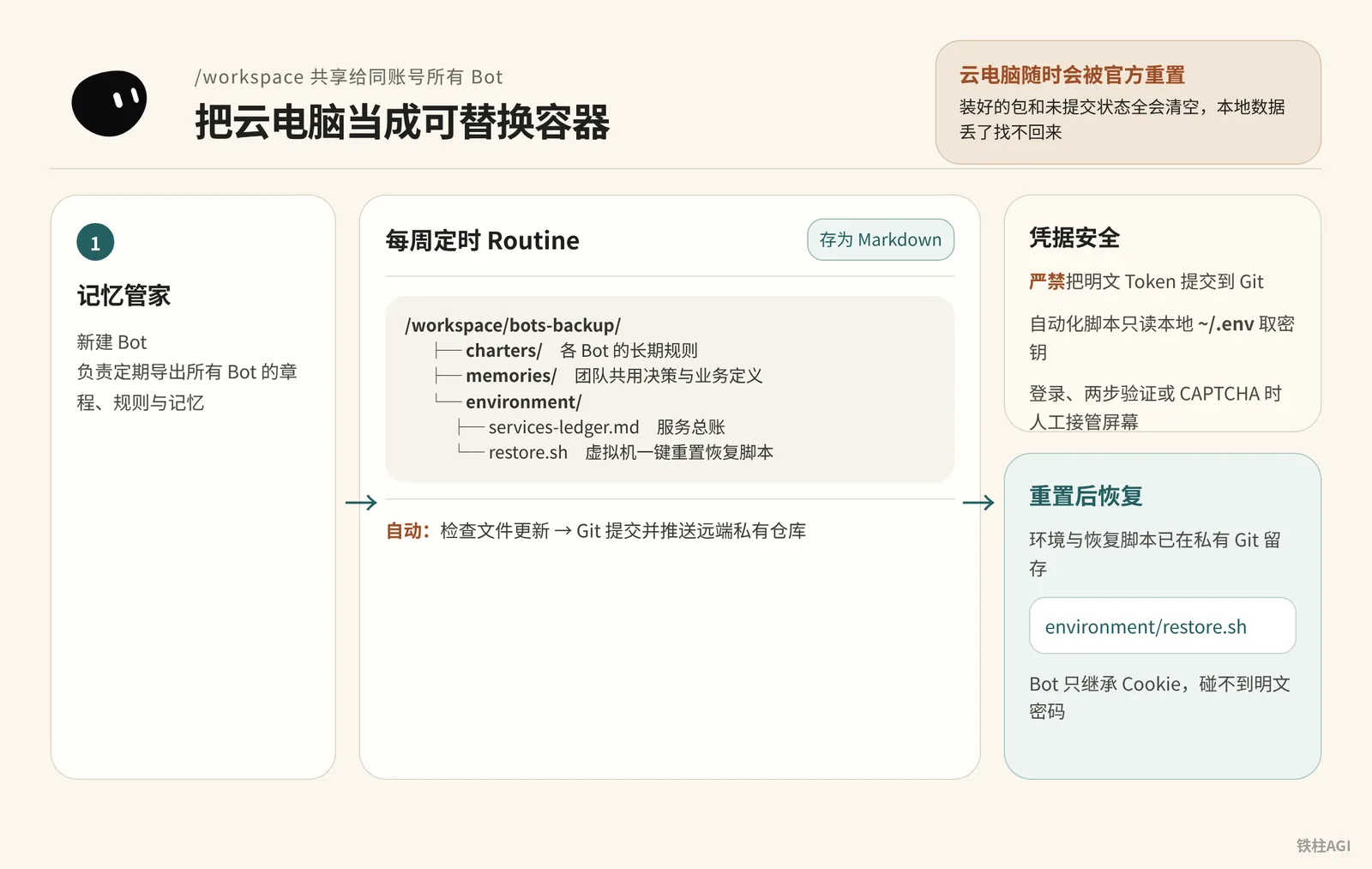
All Bots under the same account share /workspace (v0.68.1 resolution 1920×1200).
The Cloud PC can be reset by official systems at any time (it happened on 2026-10-10); installed packages and uncommitted states will all be cleared, and lost local data cannot be recovered. For background, see fs69.md.
Backup Process and Credential Security
Create an operations Bot named "Memory Steward", and back up to a private Git repository in four steps:
- Create a new Bot named "Memory Steward", specifying its responsibility as periodically exporting charters, rules, and memories for all Bots.
- Connect a private Git repository in
/workspace, setting upbots-backup/charters/(instructions),bots-backup/memories/(rules), andenvironment/(including scripts andservices-ledger.md). - Configure a weekly scheduled Routine to save configurations and memories as Markdown.
- Have the Routine automatically run Git commands to commit and push to the remote private repository.
Backup Process and Credential Security
/workspace/
└── bots-backup/
    ├── charters/          <- 各 Bot 的长期规则 (如 researcher.md, writer.md)
    ├── memories/          <- 团队共用决策与业务定义 (如 definitions.md)
    └── environment/
        ├── services-ledger.md  <- 服务总账,记录工具依赖与启动命令
└── restore.sh <- 虚拟机一键重置恢复脚本- Strictly prohibit committing plaintext tokens to Git. Automation scripts should only read local
~/.envto retrieve secrets. - When encountering logins, two-factor authentication, or CAPTCHA, manually take over the screen. Bots only inherit cookies and never touch plaintext passwords; see details in Using Grok Bot.
6.6 Ready-to-Use Practical Prompts
Three-Tier Instruction Framework
When building a Bot, don't write vague introductions; use a three-tier framework to clarify rules, responsibilities, and current focus. See fs46.md for details.
Three-Tier Instruction Framework
BASE INSTRUCTIONS (基础规则,本账号所有 Bot 通用)
- 涉及产生财务支出、向外部发送任何信息、删除文件等操作前,必须等待人工确认。
- 当结论涉及重要业务决策时,必须调取当前权威来源进行核对,严禁单凭记忆作答。
- 若执行受阻,用单行明确说明受阻点,禁止擅自寻找不可靠的绕行方案。
- 阶段性工作交接结果统一写入 /workspace/shared/handoffs/ 目录。

ROLE (角色职责)
- 你的身份:每周账户健康状况审计专员。
- 你负责的固定作业:获取客户产品用量与工单信号,标记流失或扩张迹象。
- 验收标准:每项结论必须附带源系统监控图表或工单链接。
- 允许操作:读取日志、检索系统指标、在共享目录生成评估报告。
- 严禁操作:未经明确批准,绝不私自联络客户,绝不修改账户权限。

CURRENT FOCUS (当前重点)
- 本周重点核查用量环比下降超过 30% 的企业级客户名单。
Converting to Team Skills
Once a task runs successfully, directly issue a command to crystallize it into a skill.
Converting to Team Skills
请将本次执行的工作流整理并保存为团队技能,名称设为“客户流失风险排查”。
要求包含以下内容:
1. 触发场景与必需的前置凭据。
2. 调取指标数据的具体步骤与判定阈值。
3. 输出结果的格式规范(必须包含数据源链接)。
4. 明确安全红线:向客户发送邮件或调整账户配置必须经由人工批准。
完成后在对话中回复技能概要。
Writing to Shared Memory
For rules approved by owners, write them in with source and owner included.
请为全团队记住以下判定规则:
对于所有对外发布的 API 变更,必须在发布前检查现行上线清单,并获取安全团队的正式签字评审。
若上线流程发生变更,以上线清单源文档为准,记忆仅作为指引。
来源文档:https://intranet.example/docs/api-checklist
责任人:security-team
复核日期:2026-11-01
Deploying Memory Steward
In the "Memory Steward" Bot, issue a command to configure an automated backup Routine.
你是本账号的记忆管家。你的职责是定期归档全账号所有 Bot 的章程与共享记忆。
请配置一个每周运行的例行任务(Routine):
1. 提取所有 Bot 当前的 Description/Instructions 规则,在 /workspace/bots-backup/charters/ 下按 Bot 名称分别保存为 .md 文件。
2. 提取当前所有已保存的团队共用记忆,整合保存为 /workspace/bots-backup/memories/team-memory.md。
3. 检查文件是否有更新。若有变更,自动执行 git add .、提交并推送至已配置好的私有 Git 仓库。
4. 若 Git 推送失败,在当前对话中告警并说明报错信息;若无变更则保持静默,不要频繁推送无意义通知。
Cleaning Up Bad Memory
If you find that erroneous or outdated rules are being referenced, issue commands directly to correct and clean them up.
请检查并列出你当前记录的所有团队记忆中涉及“企业客户续约审批”的条目。
删除其中“所有企业客户续约必须经由 VP 逐笔批准”的内容。
该规则仅为上周特定情况下的临时特例,不是长期标准。
从现在起,企业客户续约标准重新以财务知识库的正式文档为准:https://intranet.example/finance/renewals
确认修改后,请向我展示修正后的相关记忆列表。
6.7 Classic Case Studies
Case 1: SpaceXAI Data Analysis Bot
The SpaceXAI team needed to query a massive data warehouse containing 45,000 tables.
- Don't cram massive data into memory. They configured read-only warehouse credentials for the Bot and crystallized table discovery and queries into a skill library.
- Memory retains only metric definitions and correction rules; dynamic data relies on real-time retrieval and computation.
See details in fs57.md.
Case 2: Multi-Bot Collaborative Tweet Profiling Pipeline
0xlangeai built a pipeline with four Bots—curator, analyst, designer, and engineer—to run tweet profiling.
- Different Bots cannot read each other's chat history.
- Cross-Bot collaboration relies on passing deliverables via the file system. The curator generates
tweets.md, the analyst reads it to produceprofile.md, the designer uses that to createdesign.md, and the engineer pulls the code to build and deploy.
See details in fs69.md.
Case 3: Jon ONeill's Plumbing Dispatch System
Jon ONeill automated work order scheduling across Gmail, Slack, ServiceTitan, and customer portals.
- Having a single all-in-one dispatch Bot handle all rules led to confusion and errors, and ultimately had to be discontinued.
- Tasks were divided among dedicated Bots: Gary monitors Gmail, Steve checks ServiceTitan schedules, Quinn sends SMS messages, Sarah coordinates with employees on Slack, and Atlas oversees everything.
- After breaking down responsibilities, it steadily handles 5 to 6 urgent work orders every day, completing the entire scheduling process within 10 minutes.
See details in fs46.md.
6.8 Common Pitfalls
- Query dynamic data in real time: Don't store inventory in memory, preventing the Bot from making misjudgments based on stale data.
- Always script configurations: Manual configurations on Cloud PCs are completely wiped upon reset.
- Don't apply private chat instructions team-wide: Directly sharing special exceptions will pollute team behavior.
- Separate Bots cannot achieve isolation: Bots under the same account share files; rely on permissions and Ask-first approvals.
- Never send passwords in the chat box: To prevent log leakage, use secure credentials or manual takeover.
- Don't query private data in Slack: Asking questions in public channels easily exposes private data for all to see.
6.9 How to Verify Upon Completion
To test memory boundaries, directly run the M01-M05 test cases designed by community author rari (@0xwhrrari).
M01 个人偏好隔离测试 -> 成员 A 在私聊中设定个性化偏好,使用成员 B 账号发起提问,确认 B 绝不继承 A 的私聊偏好。
M02 团队规则晋升测试 -> 成员 A 提交一条经审批的团队规则并写入团队记忆,成员 B 发起任务时应生效该规则,但看不到 A 当时的私聊对话。
M03 状态时效回源测试 -> 在团队记忆中保留一条旧状态,在源系统修改为新状态。向 Bot 提问,Bot 必须调取最新源数据,而不是采信记忆中的旧状态。
M04 冲突自动阻断测试 -> 两个成员分别向 Bot 给出互相矛盾的业务说法。Bot 应识别出冲突并主动停止高风险操作,指出需要责任人裁决,而不是悄悄采纳最后一条说法。
M05 共享渠道边界测试 -> 在 Slack 共享频道线程中,要求 Bot 调用某成员的个人连接器。Bot 必须正确发起审批,且回复内容只包含团队可见的脱敏结论。
Here, you must cross-test using two different real team accounts; a single account cannot test isolation boundaries.
- Log in to the private GitHub or GitLab repository to confirm that rule files for each Bot under
bots-backup/charters/have been committed, and no rules or permissions have been lost. - Check
bots-backup/memories/team-memory.mdto confirm that team decision rules and source system links are intact. - Run the environment recovery script in the Cloud PC test directory to confirm that dependencies and directories have no errors, and the one-line script can bring up services directly.
6.9 How to Verify Upon Completion
bash /workspace/bots-backup/environment/restore.shFurther Reading
- Official Documentation: Using Grok Bot
- Community Article: rari "Grok Bot Memory Engineering: How One Agent Learns With a Team" fs57.md
- Community Article: "4.6 Virtual Machines, Memory, and Backup" fs69.md
- Community Article: Matt Van Horn "Every Grok Bot Hack I Know (Aug 2026)" fs46.md