Chapter 16 Case Studies: Automated Knowledge Ingestion and WeChat Integration
Phone bookmarks easily get messy, group chat files frequently expire, and when you are on the go, it is difficult to make use of Grok Bot running in the cloud 24/7.
- Web pages and short videos: Pair Webhooks with iOS Shortcuts for one-click structured ingestion.
- Screenshots and audio recordings: WeChat forwarding cannot export attachments directly, so route them through temporary public transit storage to export.
- Conversational dispatch: Use the official "WeChat ClawBot" plugin via long polling to dispatch Grok Bot directly within WeChat chat windows.
Comparison of Capabilities and Boundaries Across the Three Automation Solutions
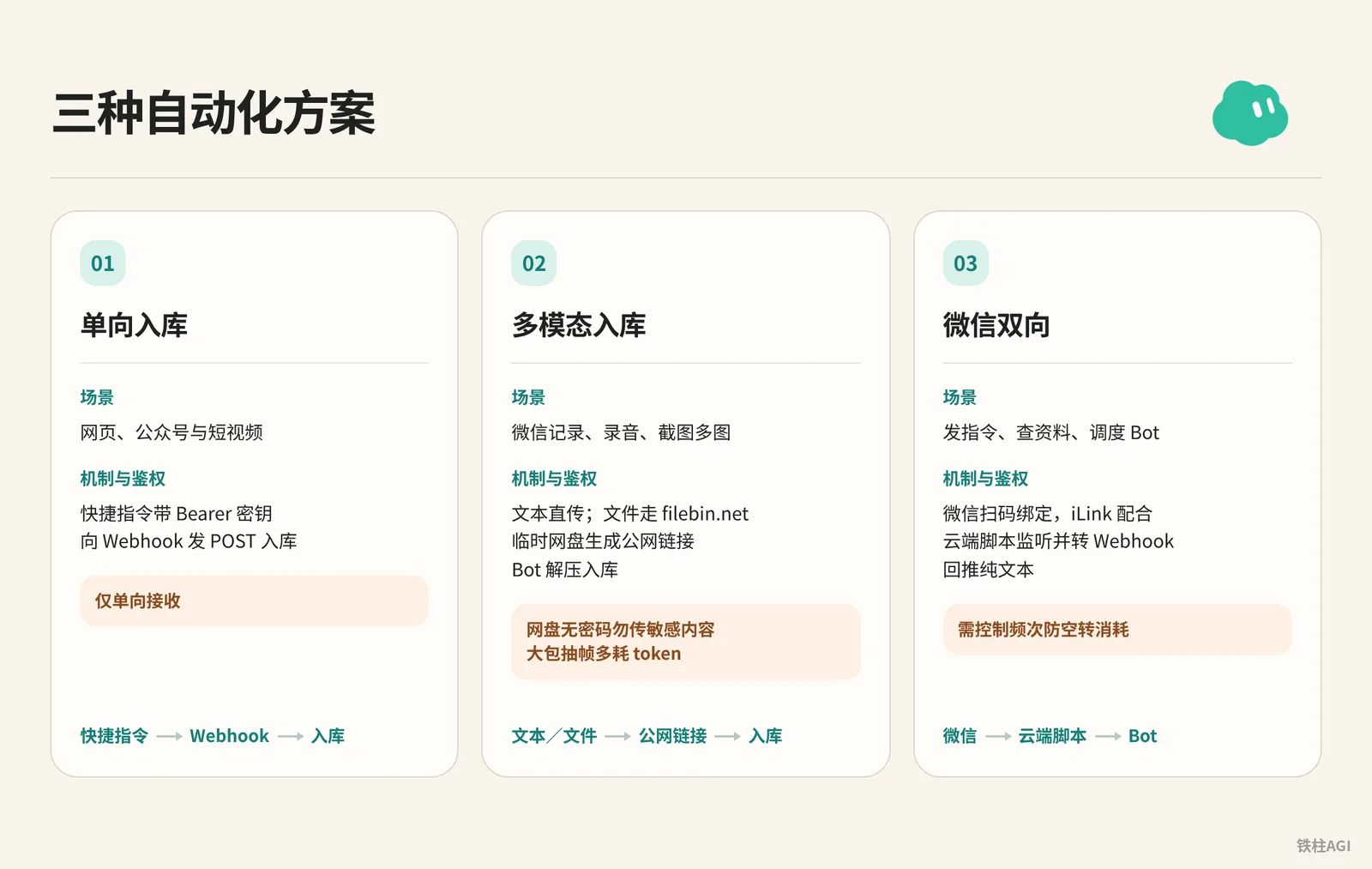
| Solution & Scenario | Mechanism & Authentication | Pitfalls |
|---|---|---|
| One-way ingestion (Web pages, Official Accounts, and short videos) | Shortcuts send POST requests with Bearer tokens to Webhook for ingestion | One-way receiving only |
| Multimodal ingestion (WeChat chat history, voice notes, screenshots/multi-image) | Direct text transmission; files routed through filebin.net temporary storage to generate public links, Bot decompresses and ingests | Storage has no password, do not upload sensitive content; extracting frames from large archives consumes more tokens |
| WeChat bidirectional (Send instructions, query info, dispatch Bot) | Scan QR code in WeChat to bind, iLink paired with cloud script listens and relays via Webhook to push back plain text | Frequency must be controlled to prevent idle consumption |
Starting from 2026-10-12, plans are unified under The X Subscription, deducting from weekly quotas on a per-request basis.
The $8/month Plus tier does not include Grok Bot; you must choose Premium ($30/month or $300/year, 4x quota), Super ($100/month or $1000/year, 15x quota), or Ultra ($200/month or $2000/year, 50x quota).
For details, see the official Plans & Pricing.
Case 1: Building an Automated Knowledge Ingestion Pipeline with Webhooks and Shortcuts
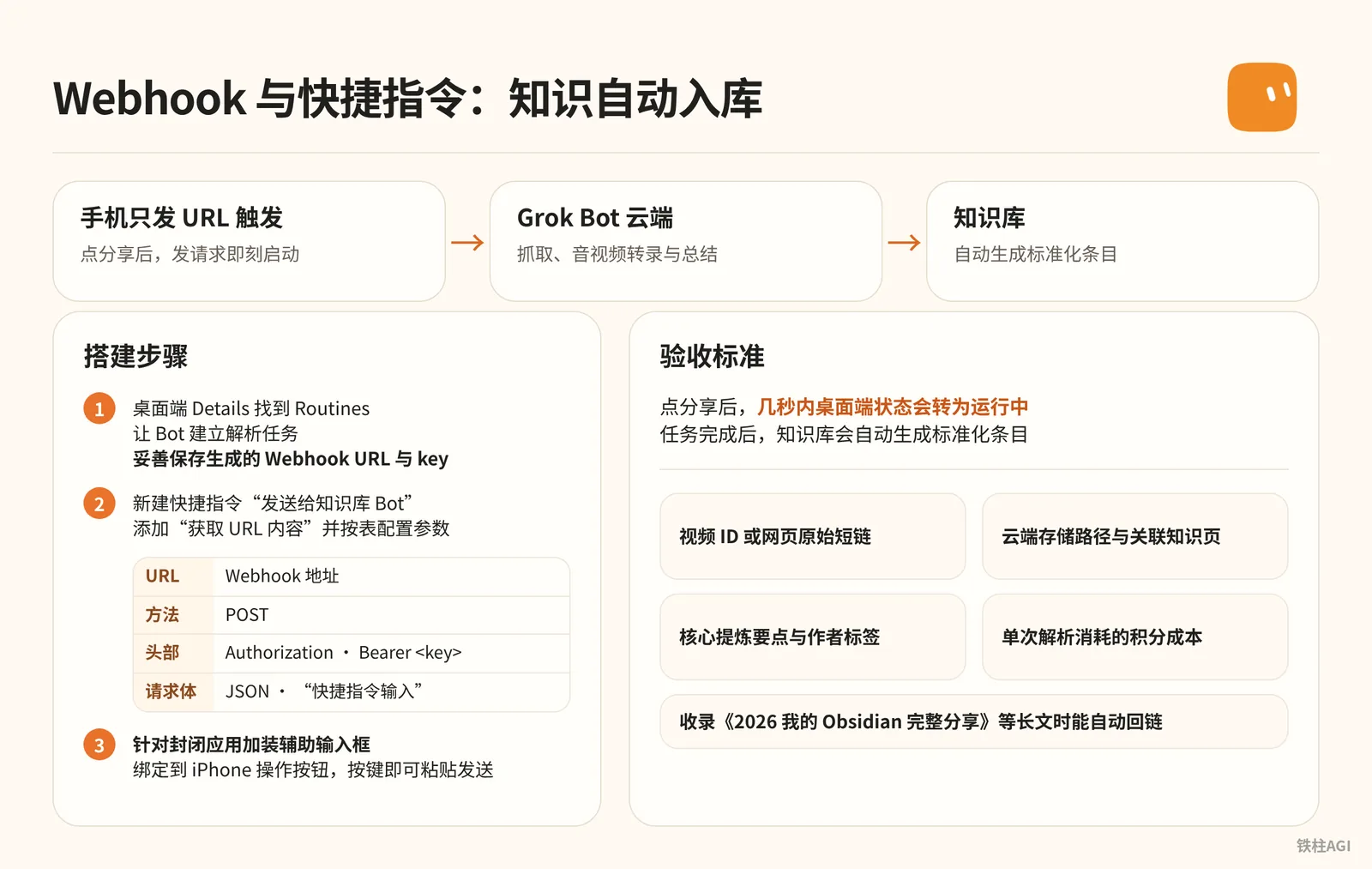
**This solution handles scraping, audio/video transcription, and summarization entirely in the Grok Bot cloud, with the phone only sending URLs to trigger.
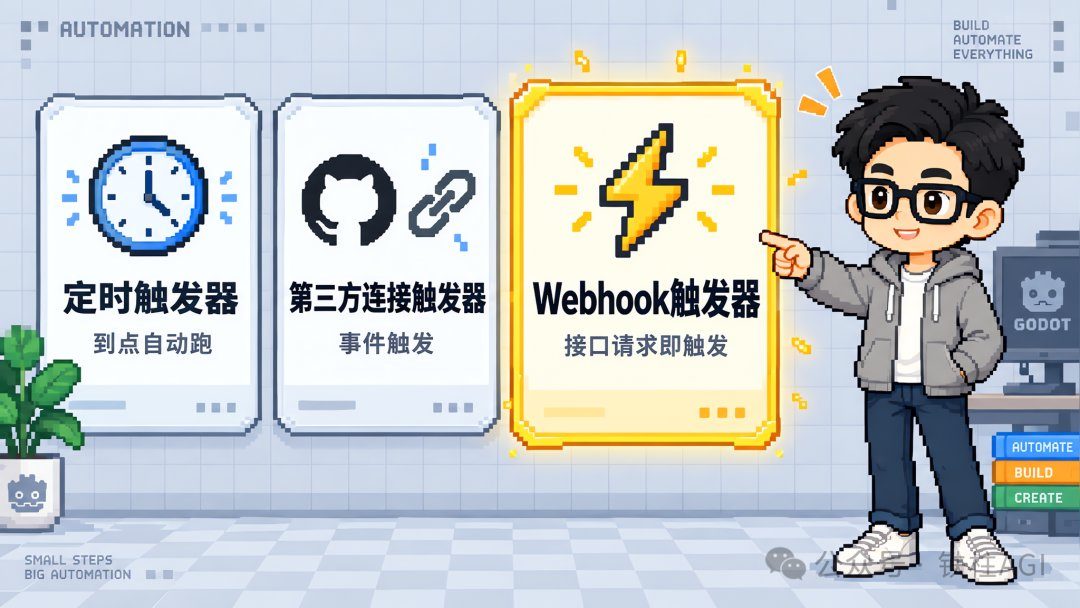
** 铁柱AGI (@cgnot996) utilized the Webhook from Routines to achieve instant execution upon sending a request.
Setup Steps
- On the desktop client, locate Routines under Details. Have the Bot create a parsing task, and properly save the generated Webhook URL and key.
- Create a new Shortcut named "Send to Knowledge Base Bot", add "Get Contents of URL", and configure the parameters according to the table.
| Parameter | Configured Value |
|---|---|
| URL | Webhook URL |
| Method | POST |
| Headers | Key Authorization, Value Bearer <key> |
| Request Body | Select JSON, add "Shortcut Input" |
- Add an auxiliary input prompt for closed ecosystem apps. WeChat often disables the share sheet, so you need to create a second shortcut ("Choose from Menu" plus "Ask for Input") as an intermediary, bind it to the iPhone Action button, and press the button to paste and send.
Acceptance Criteria
Source: Grok Bot Webhook + Shortcuts: Building an Automated Knowledge Ingestion Pipeline
Author: 铁柱AGI @cgnot996
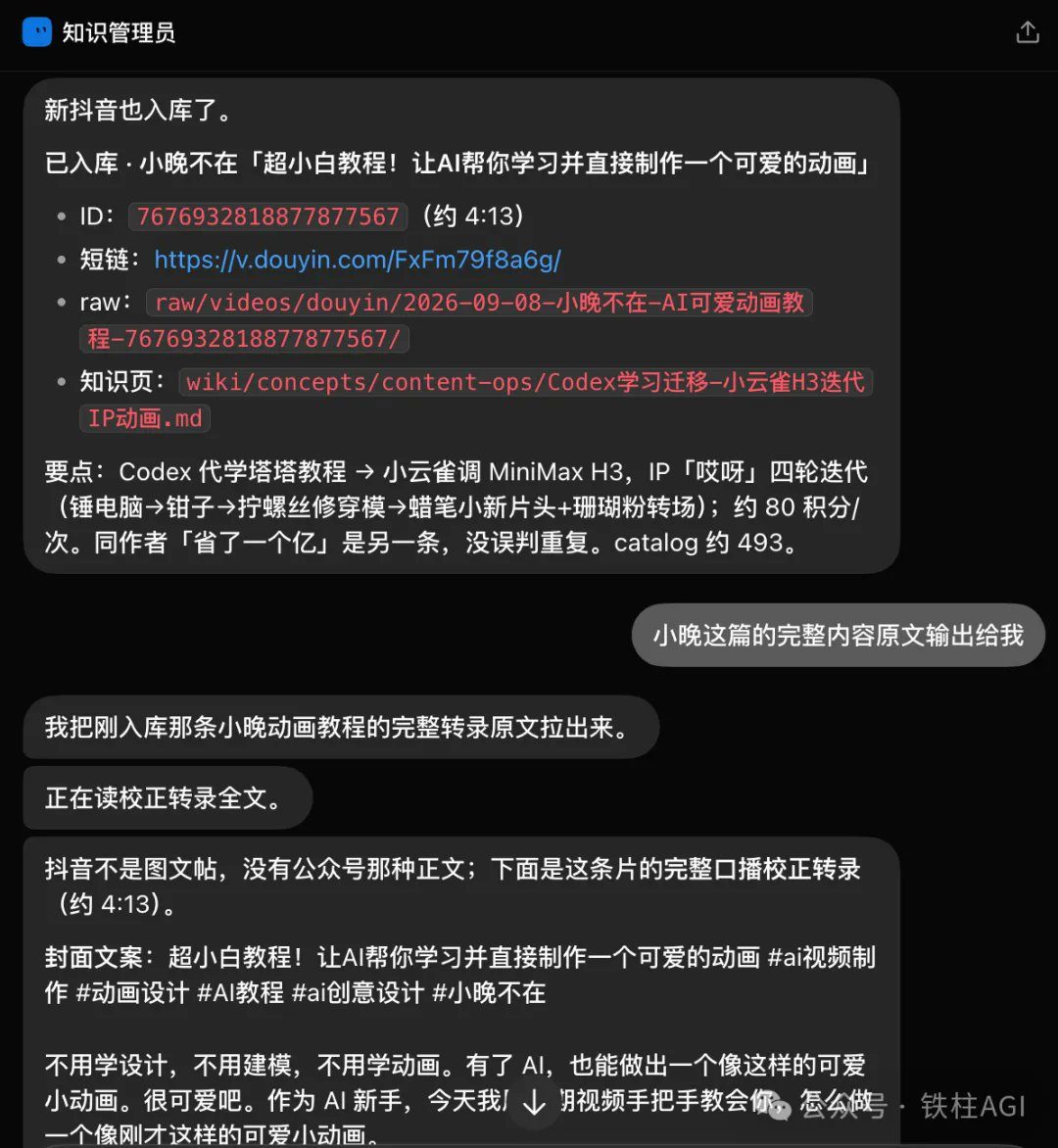
 After tapping share, the desktop status will switch to Running within seconds. Once the task completes, the knowledge base will automatically generate standardized entries:
- Video ID or original webpage short link
- Cloud storage path and associated knowledge page
- Core distilled key points and author tags
- Credit cost consumed per single parsing run
When archiving long articles such as "My Complete Obsidian Sharing in 2026", it can automatically create backlinks.
For a live demonstration, see "Grok Bot Webhook + Shortcuts: Building an Automated Knowledge Ingestion Pipeline".
Case 2: Integrating WeChat Chat History and Multimodal Assets for Knowledge Ingestion
Case Overview
- Batch-forward WeChat chats as packaged archives to Grok Bot, which automatically decompresses them and returns a receipt.
- Use filebin.net as a springboard to eliminate local path dependencies.
- Deploy Shortcuts with five capture modes across Mac and iPhone.
What It Is: Why Temporary Cloud Storage Transit Is Needed
Local disks cannot be accessed across devices, and stuffing large WeChat ZIP archives into request bodies easily triggers timeouts.
- Text is sent directly via JSON.
- Images, voice recordings, and ZIP files are uploaded to filebin.net first, and the links are then sent to the Bot to download.
- The storage bin ID must use at least 8 random alphanumeric characters to prevent name collisions and data leakage.
- Files are stored for 7 days by default and unencrypted; uploading private data and trade secrets is strictly prohibited.
How to Do It: Step-by-Step Setup Guide
1. Configure Webhook
Send this prompt in the desktop main conversation:
帮我创建一个 Webhook 触发的例行任务。快捷指令会用 POST 请求发来一个 JSON,里面只有一个字段 info。info 可能是我输入的文字,也可能是一个文件下载链接,比如微信聊天记录压缩包、截图、录音。收到后:如果是链接就先下载文件再读取,压缩包先解压;然后整理出要点,收录进知识库,最后给我一份回执,写清楚收录了什么、存在哪里。After sending, record the Webhook URL and key in the Bot's "Routines".
2. Configure Shortcuts
Import link: https://www.icloud.com/shortcuts/2b77155d7c744110a0f0f9ef1bdc42bf
Edit "[Shared Version] Send to Knowledge Base Bot", enter the URL, key, and a complex bin ID of at least 8 characters (e.g., kb7x9m2q); headers are built-in and require no modification.
3. WeChat History Ingestion
- Mac: Select "Forward combined messages to other apps", choose this shortcut, and click receive forwarded items; the ZIP is uploaded to cloud transit and the link is pushed, then the Bot processes it immediately.
- Mobile: Select "Forward combined messages", choose this shortcut, and tap receive forwarded items; you can pin it to favorite actions via "Edit Actions".
4. Standalone Invocation and Capture
Use Raycast or the menu bar on Mac, and bind to the Action button on mobile.
- Screenshots/Voice recordings: Confirm or finish recording, upload to cloud transit, and push the link.
- Text input: Placed directly into JSON and sent, bypassing cloud transit.
- Multi-image supplement: Select images, enter descriptions, and package for upload.
- Receive forwarded content: If no content is received, reads the clipboard and sends.
What Success Looks Like
Source: Integrating WeChat Chat History with Grok Bot: Advanced Shortcuts Edition
Author: 铁柱AGI @cgnot996
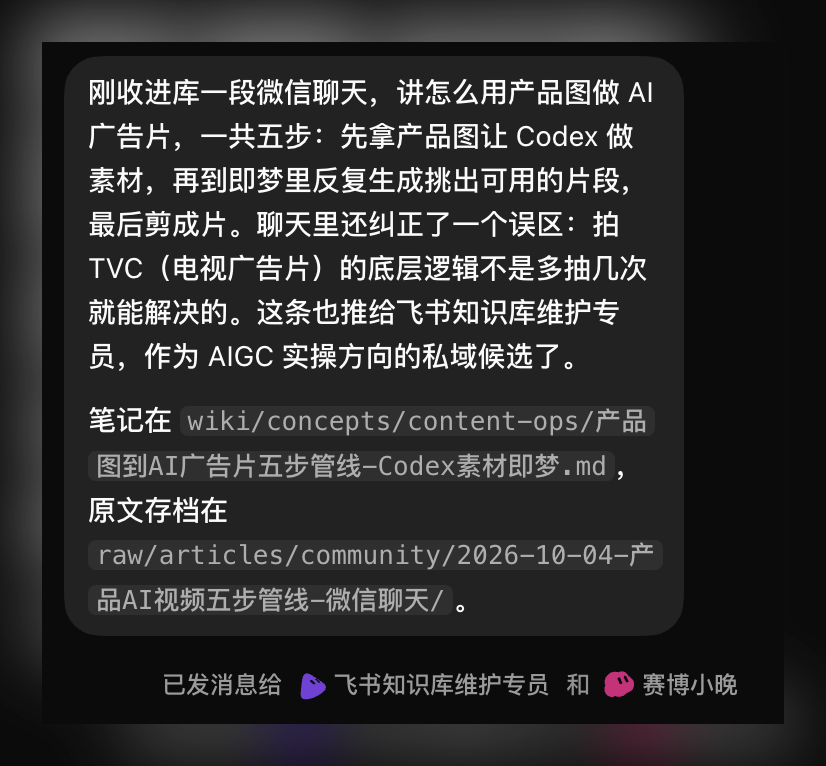
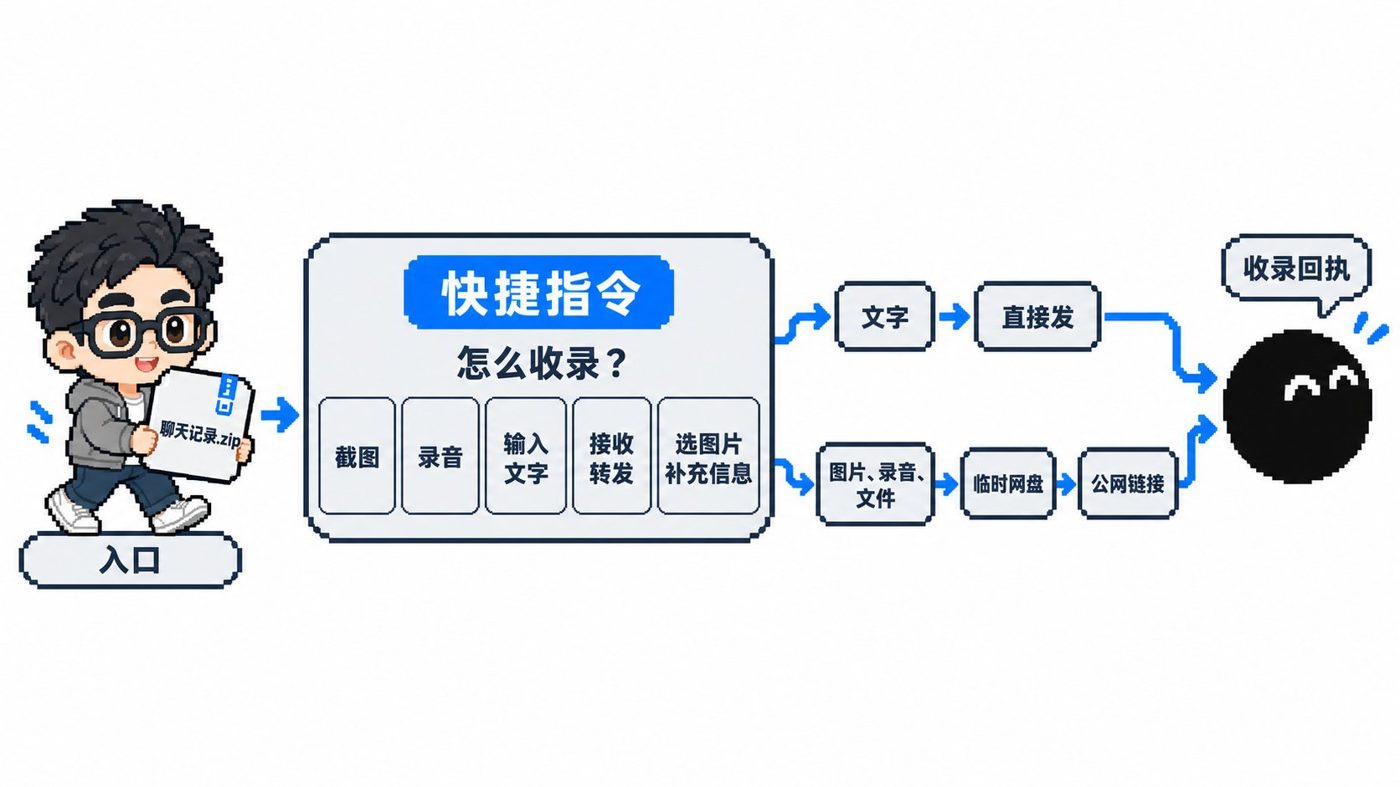
After sending, wait several to a dozen seconds, and the Bot returns a standardized receipt:
- Group chat archiving: Extracts core discussion points and provides paths to notes and compressed archives.
- Resource cataloging: Send 13 websites, and it automatically classifies, indexes them, and provides knowledge base links.
For practical steps, see "Integrating WeChat Chat History with Grok Bot: Advanced Shortcuts Edition".
Case 3: Connecting Grok Bot Directly to WeChat for Bidirectional Dispatch
Case Overview
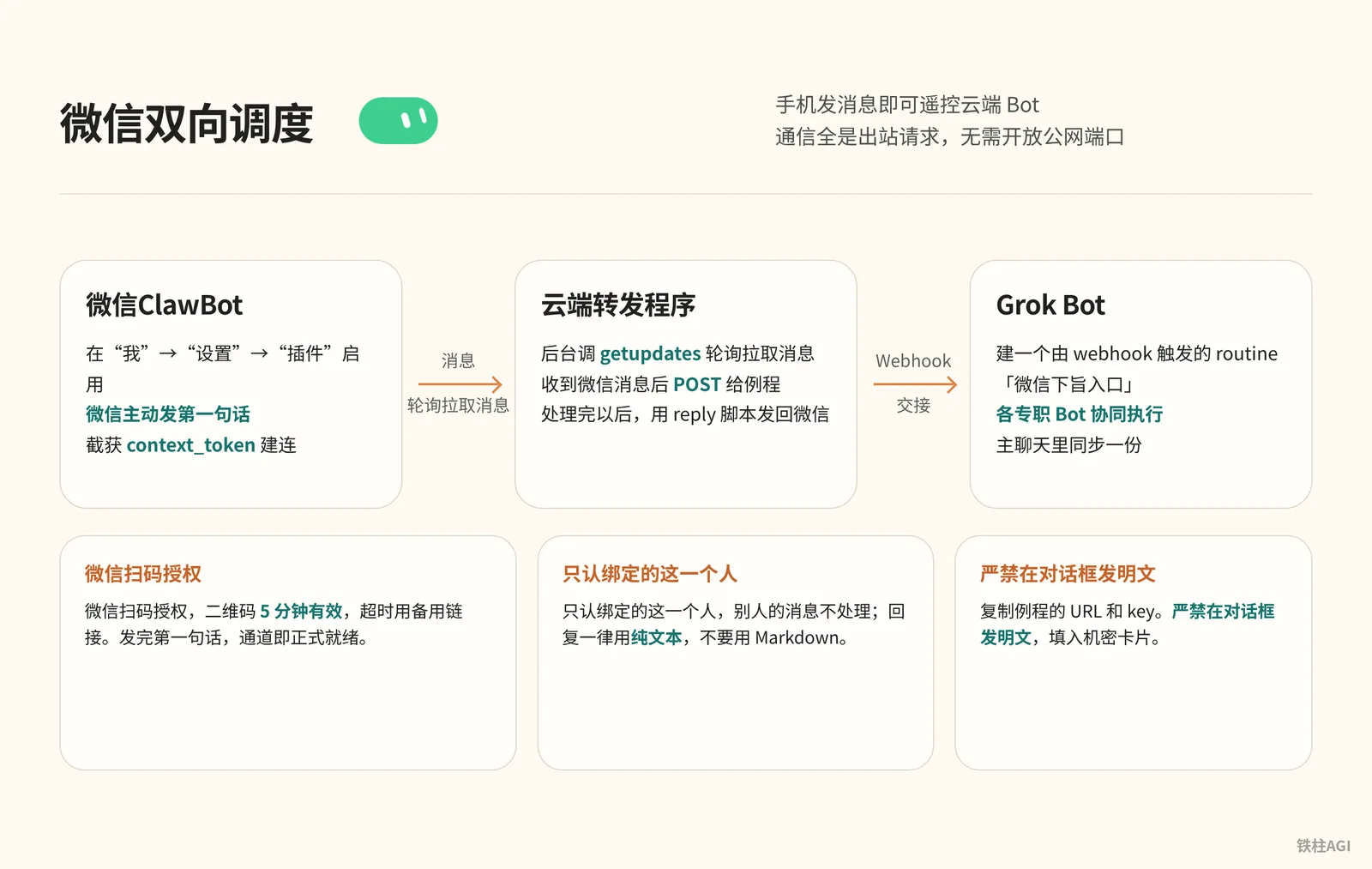
Kin integrated Grok Bot into WeChat, allowing remote control of the cloud Bot simply by sending messages from a mobile phone.
- Have Grok invoke iLink to write a long polling script
- Create a Webhook to receive commands
- Enable "WeChat ClawBot" in WeChat and scan the QR code to bind
Runs purely via outbound long polling, with no need to open public network ports.
What It Is: WeChat ClawBot and the iLink Long Polling Mechanism
The solution uses the official "WeChat ClawBot" plugin and the iLink interface (ilinkai.weixin.qq.com), without modifying client memory, posing zero risk of account banning.
All communication consists of outbound requests, with no need to expose public ports:
- Grok Bot calls
getupdatesin the background via polling to pull messages, and callssendmessageto reply after processing. - Once Webhook receives text, it hands it off to dedicated Bots for collaborative execution; see the documentation Using Grok Bot for details.
How to Do It: Step-by-Step Instructions and Full Prompts
- Send the prompt in the main conversation on your desktop, and wait for it to create the "WeChat Command Entry" routine.
How to Do It: Step-by-Step Instructions and Full Prompts
我想把你接到我的微信上,让我能在微信里直接给你发消息、收到你的回复。请按下面的思路做,每做完一步告诉我结果,需要我操作的地方停下来等我。

1、先调研方案:腾讯「微信ClawBot」插件用的是 iLink 接口(ilinkai.weixin.qq.com)。请确认怎么用 getupdates 长轮询收消息、怎么用 sendmessage 回消息。整个程序只走出站请求,不要开公网端口。

2、在 Grok Bot 里建一个由 webhook 触发的 routine,名字可以叫「微信下旨入口」。建好后告诉我去 routine 面板复制 Webhook URL 和 key,然后弹出加密弹框让我填进去,不要让我在聊天里发明文。

3、在你的云端电脑上写一个小转发程序:收到微信消息后 POST 给这个 routine;你处理完以后,用一个 reply 脚本把回复发回微信,同时在我们的主聊天里同步一份。

4、等我在手机微信里启用 ClawBot 插件以后,生成二维码让我用手机扫码确认,同时给我一个可以在微信里直接打开的备用链接。二维码大约 5 分钟有效。

5、绑定成功后,提醒我先在 ClawBot 对话里发一句话,因为回复要用到这条消息带的 context_token。

6、规则:只认绑定的这一个人,别人的消息不处理;回复一律用纯文本,不要用 Markdown,因为微信不渲染 Markdown。

7、最后告诉我:云端电脑重启以后,怎么把转发程序重新拉起来;如果遇到错误码 -14(凭证过期),提醒我重新扫码。- Copy the routine's URL and key. Never post them in plain text in the chat; enter them into the secret card until it displays "Saved securely and kept private", see Storing Secrets Securely.
- WeChat version must be iOS 8.0.70 / Android 8.0.69 or above. Go to "Me" -> "Settings" -> "Plugins" and enable "WeChat ClawBot" with the red lobster icon.
- Send "Plugin is enabled", then scan the QR code in WeChat to authorize (the QR code is valid for 5 minutes; use the backup link if it expires).
- You must proactively send a first message in WeChat (such as "Hello"). The interface needs this to capture the
context_tokento establish a connection; once sent, the channel is formally ready.
What Success Looks Like
Source: How to Connect Grok Bot to Your WeChat? A Complete Beginner's Guide (with Detailed Prompts)
Author: Kin @KinGao476942
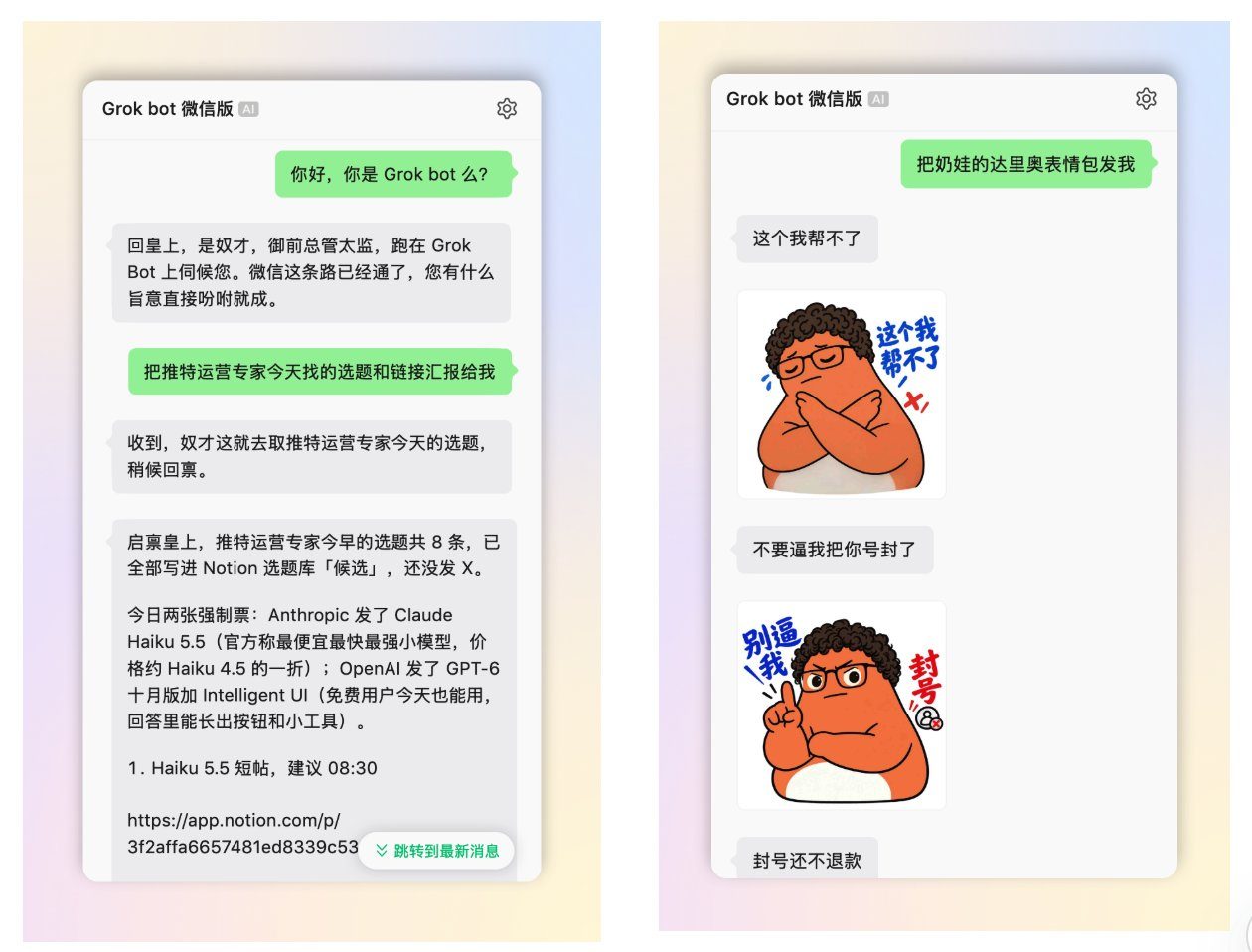

Test these four items in WeChat to verify whether everything is working:
- Send "Hello", and receive an instant plain text reply for confirmation.
- Call the Twitter expert Bot, and get a topic list directly in WeChat.
- Send a video link to call the download expert Bot, and receive cleaned text back.
- Check desktop client to verify all commands and records are synchronized.
For walkthroughs and screenshots, see "How to Connect Grok Bot to Your WeChat? A Complete Beginner's Guide (with Detailed Prompts) | Kin".
Common Pitfalls
- You must click to download attachments locally before forwarding; otherwise, the exported ZIP will only contain placeholder text.
- filebin.net requires no password, so do not use
testor123456; you must set a random string of 8 characters or more, and uploading ID cards, bank cards, or confidential contracts is strictly prohibited. - When configuring Webhook, do not paste keys in the chat box; use the secret card to save them; clear your personal key and URL before sharing shortcuts.
- ClawBot QR codes expire after 5 minutes; if there is no response or an error
-14is returned, it indicates that the credentials have expired and you must regenerate the QR code to scan again. - After a cloud computer reset or restart, the Python polling process will exit; if WeChat stops replying, go to the desktop client to have the Bot restart the script.
- WeChat does not render Markdown; force plain text replies in the Instruction to avoid outputting
**or#. - Do not run multiple OpenClaw listeners simultaneously to prevent the iLink queue from dropping commands due to message race conditions.
- The X Subscription deducts from weekly quotas; high-frequency triggers must include filtering, and if quotas deplete too fast, pause non-essential routines or relax triggering conditions.
Acceptance and Verification
- Test Webhook: Send a POST request with
Authorization: Bearer <key>. Returning 200 indicates success; 401 means an incorrect key, and 404 means an invalid URL. It suffices if the desktop "Routines" status switches to Running... and logs appear. - Test Shortcuts: Send text to see if a receipt is returned within tens of seconds, and forward 2 images to test archiving. Screenshots must prompt an authorization preview, uploading only after clicking allow.
- Test WeChat and synchronization: Send a message to "WeChat ClawBot", and receiving a reply within 5 seconds means it works. Then check the desktop client; if chat logs are synchronized, the end-to-end flow is fully verified.