Chapter 21 Backup and Recovery: No Panic When Your Computer Resets
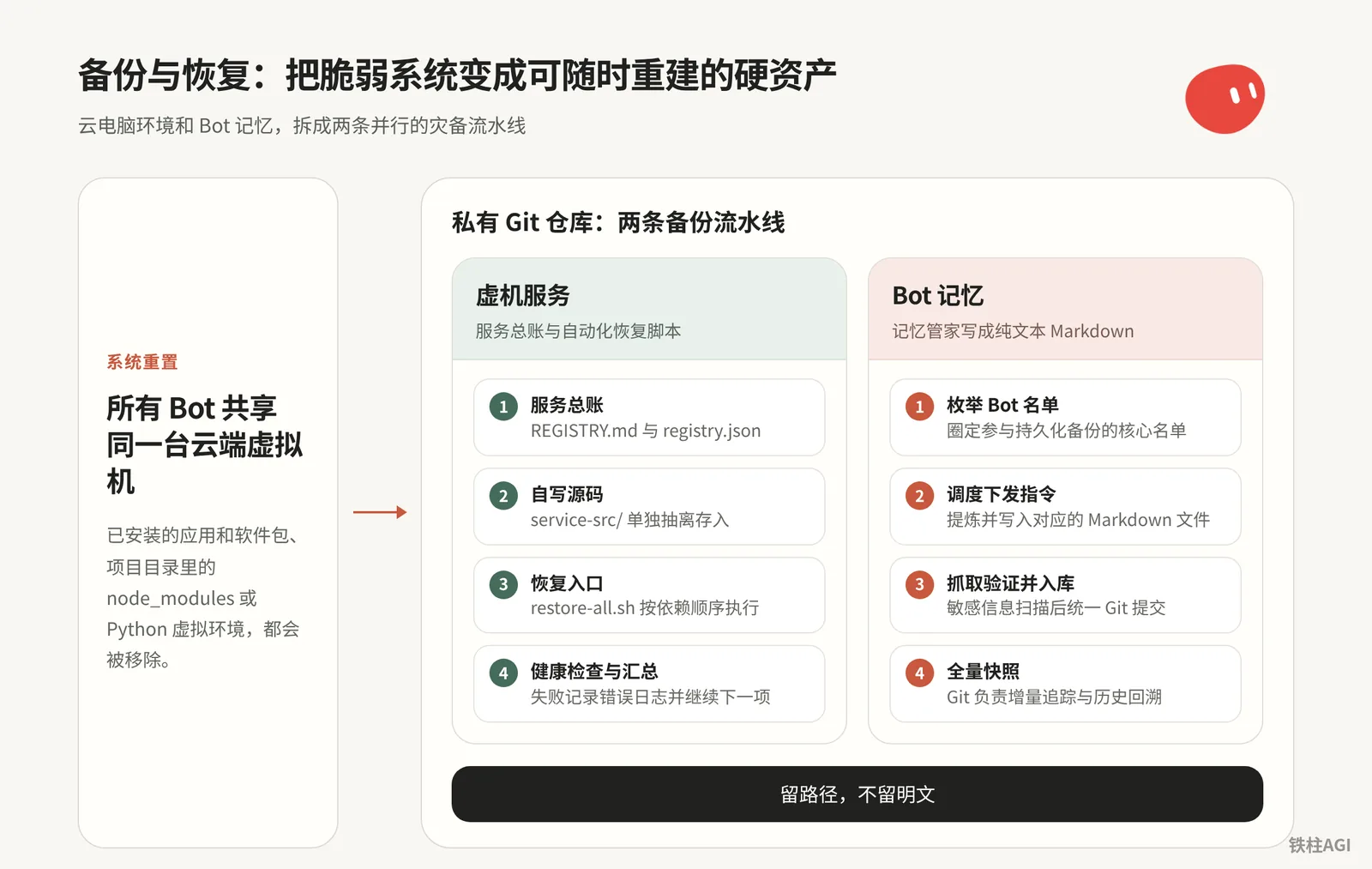
When the cloud computer is reset, the environment is wiped clean immediately. Relying on memory to run apt-get and pip install makes it easy to miss dependencies or environment variables, and tuned Bot memories lack an export button. The solution is to split disaster recovery into two parallel pipelines.
- VM Services: Take over system dependencies using a registry ledger and automated recovery scripts.
- Agent Memory: A dedicated memory steward writes configurations and dynamic facts into Markdown and pushes them to a private Git repository.
Once established, even if the system is reset or migrated, all services and memories can be restored with minimal manual intervention.
21.1 Understand the Cloud Computer's Inner Workings: Differences Between Update, Recover, and Reset
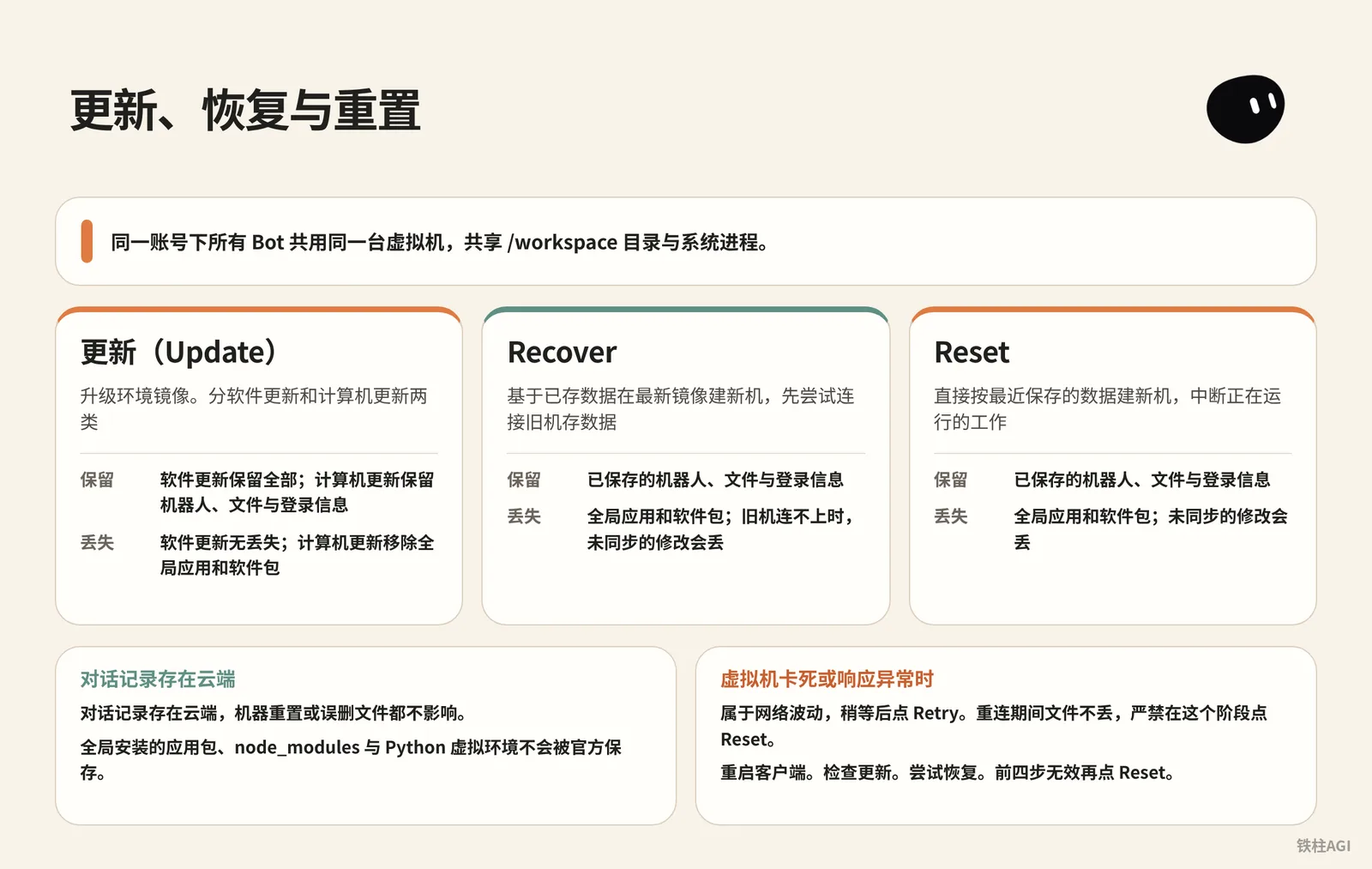
All Bots under the same account share the same virtual machine, sharing the /workspace directory and system processes. When global tools are installed on a machine, other Bots can call them; once the machine is reset, all dependency environments will fail at the same time.
Reference: 4.6 Virtual Machines, Memory, and Backup.
The client provides controls under Settings > Computer under Bot's Computer. The differences among the three are as follows:
| Action | Mechanism | Preserved Content | Lost Content |
|---|---|---|---|
| Update | Upgrades the environment image. Divided into software updates and computer updates | Software updates preserve everything; computer updates preserve bots, files, and login information | No loss with software updates; computer updates remove global applications and packages |
| Recover | Creates a new machine on the latest image based on saved data, attempting to connect to the old machine first to save data | Saved bots, files, and login information | Global applications and packages; if the old machine cannot be reached, unsynced changes will be lost |
| Reset | Directly creates a new machine based on the most recently saved data, interrupting running work | Saved bots, files, and login information | Global applications and packages; unsynced changes will be lost |
Conversation histories are stored in the cloud, unaffected by machine resets or accidental file deletions. However, globally installed application packages, node_modules, and Python virtual environments are not officially saved, and will be wiped upon computer updates, Recover, or Reset.
For details, see Grok Bot Computer.
When the virtual machine freezes or responds abnormally, troubleshoot in this order:
Displays Reconnecting or Couldn't Reach Grok Bot's Computer: This is caused by network fluctuations. Wait a moment and click Retry. Files are not lost during reconnection; never click Reset during this stage.
Restart the client. Mac users must select Quit from the top menu bar; simply clicking the red close button on the window does not work.
Check for updates. Go to Settings > Computer, and if an update is available, click Update first. If prompted that the agent is not paused, wait until the current task finishes before clicking.
Try recovering. If it still cannot connect or the update is stuck and shows Recover Computer, click Recover. If it says Update is still running, select Keep waiting.
Perform a Reset. Only click Reset if the first four steps do not work. If it fails, retry with Retry Recover or Retry Reset; if errors persist, contact official support.
Handle disk alerts.
When receiving Computer is low on disk space or Computer is critically low on disk space, do not manually delete files. Click Go to Disk Saver in the sidebar to view options; the system will not delete files without confirmation.
For details, see Grok Bot Computer.
The cloud computer is merely a disposable container; do not manually fine-tune the environment. Script the entire setup process, and make sure configurations and custom source code are stored in an external private Git repository.
21.2 VM Service Ledger and Automated Recovery Pipeline
4.6 Virtual Machines, Memory, and Backup
Cloud computers do not provide underlying snapshots, so turning the rebuilding process into a one-click script has the lowest cost.
Service Ledger and Anti-Pollution Backup
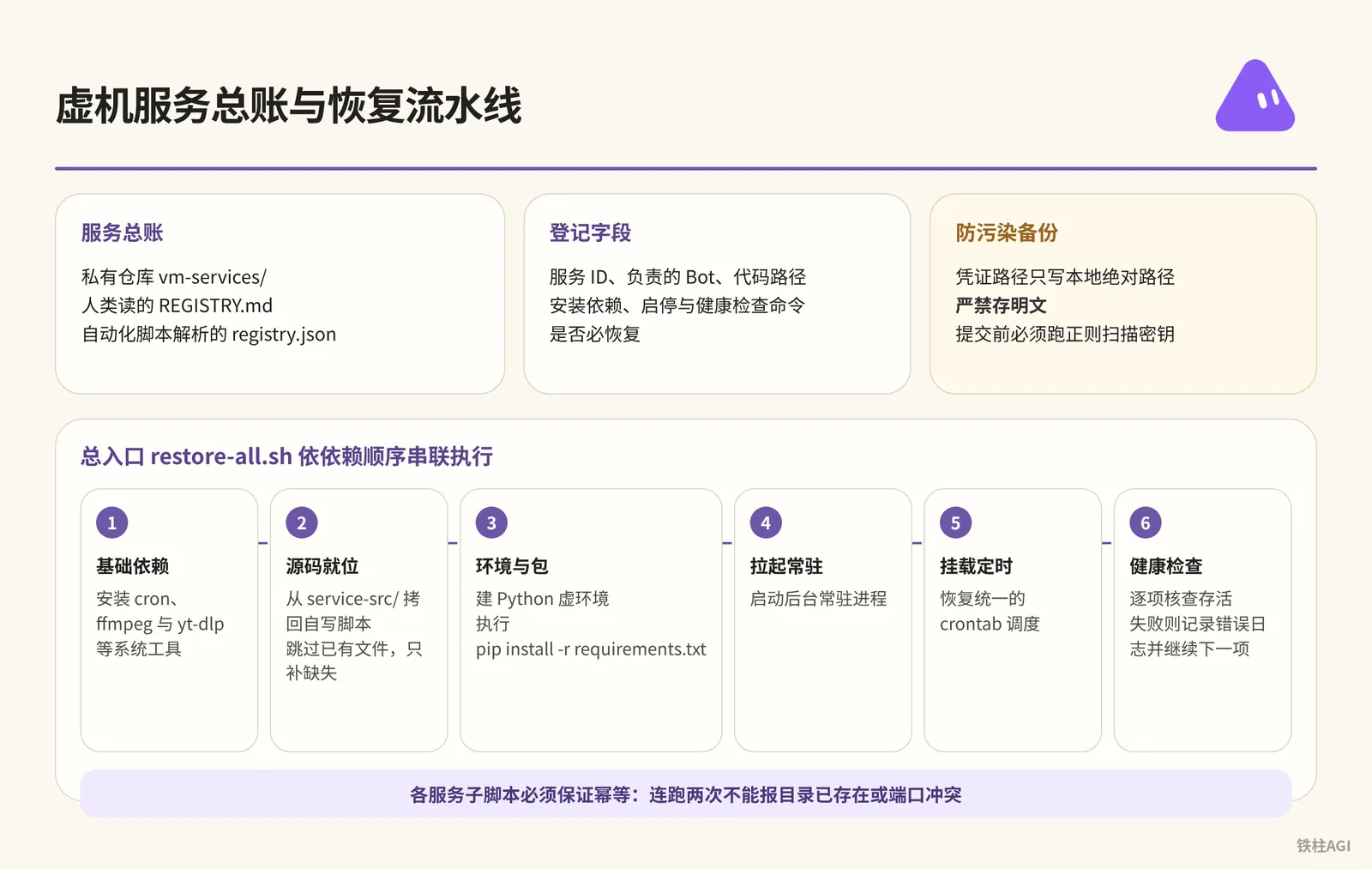
Create a vm-services/ directory in a private repository to store the human-readable REGISTRY.md table and the registry.json parsed by automated scripts.
The ledger and backup must adhere to several strict rules.
- Registered fields include Service ID, responsible Bot, code path, installation dependencies (apt/pip/Docker/cron), start/stop and health check commands, and whether recovery is mandatory.
- Credential paths should only use local absolute paths (such as
~/.env); storing plaintext is strictly forbidden; manually required steps such as QR scanning and OAuth should be highlighted separately. - Custom scripts should be stored separately in
service-src/, excludingvenv/,node_modules/, and logs; a regex scan for secrets must be run before committing.
Automated Recovery Pipeline
Write separate sub-scripts for each service in vm-services/restore/. Scripts must guarantee idempotency; running them twice in a row must not report directory already exists or port conflict errors.
The main entry point restore-all.sh executes sequentially based on dependency order.
- Base Dependencies: Install system tools such as
cron,ffmpeg, andyt-dlp. - Source Code in Place: Copy custom scripts back from
service-src/, skipping existing files and only filling in missing ones. - Environment and Packages: Create a Python virtual environment and run
pip install -r requirements.txt. - Launch Daemons: Start background daemon processes.
- Mount Scheduled Tasks: Restore unified crontab scheduling.
- Health Checks: Check survival item by item; if an item fails, log the error and proceed to the next item without blocking or interrupting.
Tools Gone After Grok Bot VM Reset? Backup & Recovery Tutorial (with Prompts)
21.3 Memory Steward: Packing Bot Core Memories into a Private Repository
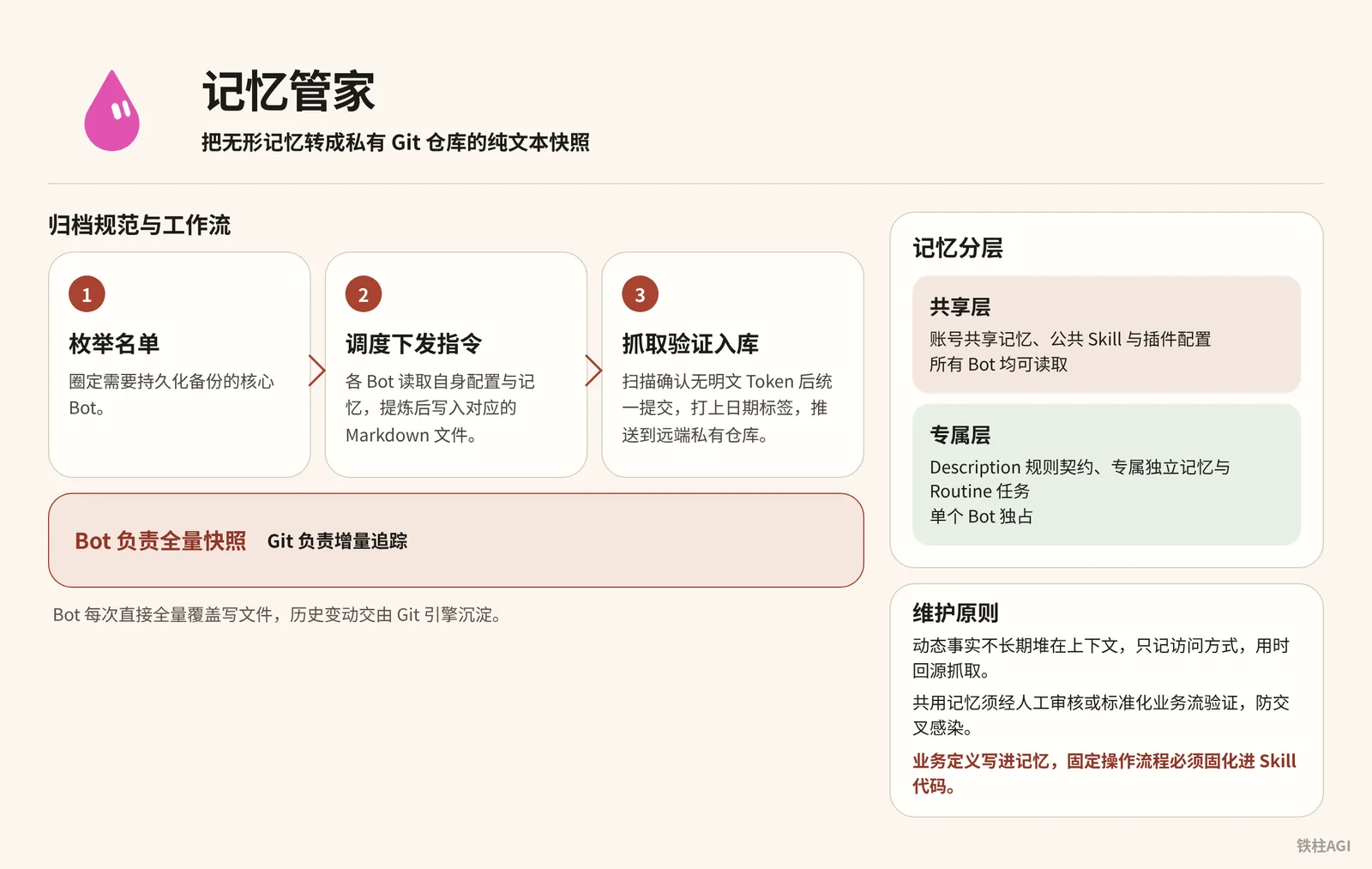
The official platform does not provide a full memory export button, making preferences very easy to lose during account changes or system migrations. Setting up a dedicated "Memory Steward" Bot to turn intangible memories into plaintext snapshots in a private Git repository is the most reliable approach.
Grok Bot Million Evacuation: A Complete Agent System Backup Plan
Memory Layering and Maintenance Principles
| Layer | Included Content | Description & Permissions |
|---|---|---|
| Shared Layer | Account-shared memory, public Skill and plugin configurations | Readable by all Bots |
| Exclusive Layer | Description rule contracts, exclusive independent memory, and Routine tasks | Exclusive to a single Bot |
- Do not pile dynamic facts in context long-term; only record the access method and fetch from the source when needed.
- Shared memory must undergo manual review or standardized workflow verification to prevent cross-contamination.
- Write business definitions into memory, and fixated operational workflows must be solidified into Skill code.
4.6 Virtual Machines, Memory, and Backup
Archival Specification and Workflow
Archival Specification and Workflow
├── bots/                     # 各 Bot 独立配置与记忆
│   ├── cyber-xiaowan/        # 单个 Bot 文件夹
│   │   ├── agent-spec.md     # 身份设定、名称、bot-id、slug、description
│   │   ├── MEMORY.md         # 核心记忆全量快照
│   │   ├── profile.md        # 角色信息与权限边界
│   │   └── archive/          # 历史版本与过往日志
│   └── ...                   # 其他 Bot 目录
├── meta/                     # 全局元数据与多 Bot 拓扑关系
├── shared-user-memory/       # 账号级共享记忆
├── vm-services/              # 虚拟机服务总账与恢复脚本(见 21.2 节)
├── README.md                 # 仓库使用说明与最新状态
├── RESTORE.md                # 跨环境恢复操作 SOP
└── registry.md               # 登记索引
The MEMORY.md under each Bot's directory contains three layers: identity & permissions, decision-making responsibilities, and on-site snapshots.
- Enumerate List: Identify core Bots requiring persistent backup.
- Dispatch Instructions: Each Bot reads its own configuration and memory, extracts them, and writes them to the corresponding Markdown file in
/workspace. - Fetch, Verify, and Store: Commit collectively after scanning to confirm no plaintext Tokens, tag with a date (e.g.,
tag-2026-10-15), and push to the remote private repository.
Bots handle full snapshots, while Git handles incremental tracking. Bots directly overwrite files in full each time, leaving historical changes to be tracked by the Git engine without needing to calculate diffs in the prompts.
21.4 Practical Case: 铁柱AGI's Million Evacuation and Service Steward
Memory Steward Backup
铁柱 (@cgnot996) maintains 21 Bots. To prevent losing memories due to account bans, he set up a "Memory Steward" Bot and paired it with a private Gitee repository for archiving.
- Identify the Core: Pick 7 core Bots out of 21 for a trial run.
- Export and Verify: Notify the 7 Bots to export settings and memories. Some Bots remain silent after exporting; instructions must require "report upon completion," while the steward scans the
/workspacedirectory to verify. - Commit and Tag: The first batch of 73KB was archived and stored, tagged with
tag 2026-09-10, and passed secret scanning. - Single-Profile Structure: Like "Cyber Xiaowan",
MEMORY.md(approx. 21KB) stores identity and snapshots, whileagent-spec.mdstores the bot-id and description. - Enable Scheduling: Set to archive automatically on a regular schedule.
When importing to a new account, memory recovery fidelity is around 80%. Unbacked-up local files, conversation histories, and third-party login states cannot be restored.
When migrating to Hermes or OpenClaw, place MEMORY.md into the memory directory and change the description in agent-spec.md to the system prompt to get it running.
Grok Bot Million Evacuation: A Complete Agent System Backup Plan
Virtual Machine Service Steward
Cloud computer crashes and resets cause all tools to be lost. The author records the rebuilding ledger in the vm-services directory of the Gitee grok-bot-memory repository.
- Record in Ledger: As of 2026-10-10, 20 items across 10 Bots were registered (4 daemons, 14 on-demand tools, and 2 secret items), with 18 items marked as "mandatory recovery".
- Categorize Services: Daemons include scraping services, Muse API wrappers, email engines, and egress tunnels; on-demand tools (ffmpeg, Chrome, etc.) only record installation commands; Metaso and TikHub only record credential paths.
- Clean Source Code Backup: Custom source code is about 5.1MB, excluding secrets, logs, and state runtime streams.
- Chained Recovery: The steward maintains the
restore/directory andrestore-all.sh. The steward does not execute autonomously during normal times; it waits for manual instructions to spin up services in dependency order and delivers an acceptance checklist.
Tools Gone After Grok Bot VM Reset? Backup & Recovery Tutorial (with Prompts)
21.5 Credential Security and Manual Approval Gates: Hand Over the Screen, Not the Password
Multiple Bots share the virtual machine's disk and browser sessions; creating a new Bot cannot isolate sensitive data at all. Once plaintext is written in scripts or chat, other Bots or external logs can read it.
4.6 Virtual Machines, Memory, and Backup
Keep Only Paths for Credentials, Never Plaintext
- Tokens and private keys should be stored in
~/.env(which is excluded from Git) or a global secrets directory. - In
REGISTRY.md,registry.json, and memory files, whenever credentials are involved, record only absolute disk paths. - Never send passwords in the chat box, and run a regex desensitization scan before pushing.
Hand Over the Screen, Not the Password
- When the Bot encounters 2FA, QR code scanning, or device verification popups, it immediately pauses and notifies you to take over.
- You open the cloud computer in full screen in the client and enter the password or scan the QR code yourself.
- Once completed, hand control back; the Bot inherits the session Cookie and continues running without ever touching the plaintext password.
Set Ask-First for High-Risk Operations
- Irreversible operations such as posting, payments, deleting data, or modifying the underlying environment must prompt a popup to await manual approval. v0.70.2 optimized this type of confirmation logic.
- Bot autonomous permissions are restricted to reading, public searching, and reading/writing within
/workspace; when rules conflict, Ask-first takes precedence.
21.6 Three Ready-to-Use Prompt Templates
Below are three battle-tested prompt templates that you can directly copy and send to corresponding Bots for deployment and use.
Prompt 1: Configure "VM Service Steward" for Cloud Computer
Create a "VM Service Steward" Bot and paste into settings:
Prompt 1: Configure "VM Service Steward" for Cloud Computer
你是「虚拟机服务管家」,只管一件事:记下这台虚拟机上部署过的所有第三方服务,并在电脑更新或换账号之后,按记录把它们原样恢复。

你维护的东西
1. 一份登记总账,人和机器各读一份:REGISTRY.md(表格)和 registry.json(给脚本读)。
2. 每个服务一个恢复脚本 restore/restore-<服务>.sh,必须幂等,重复跑也不会出错。
3. 一个总入口 restore/restore-all.sh,按依赖顺序调用各个恢复脚本,最后汇总哪些失败了。
4. 一份源码备份 service-src/:各 Bot 自己写的服务代码和脚本,同步时排除密钥、日志、运行状态、虚拟环境和个人数据,并先扫一遍明文密钥,命中就停。
5. 以上全部跟着一个私有 Git 仓库存(「你的备份仓库地址」)。总账、恢复脚本、源码都在仓库里,密钥永远不进仓库。

登记规则(其他 Bot 部署任何服务都必须来找你登记)
每项必须包含:
- 名称和短 id、用途、负责的 Bot
- 路径:代码、配置、数据分别在哪
- 安装方式和依赖(apt / pip / npm / Docker / 系统定时任务)
- 启停命令、健康检查命令
- 更新后的恢复步骤,或者对应的恢复脚本
- 是否必恢复:是 / 否
- 密钥:只写存放路径,绝不写明文
- 需要真人完成的步骤(OAuth 登录、扫码、导入 cookie)单独标出来

你的工作方式
- 先弄清哪些会丢、哪些能留:电脑更新一般保留工作目录,但系统包、常驻进程、全局安装的命令行工具会丢;重置则什么都不留。所以要记的是“怎么重建”,不是去拷整台机器。
- 能从公开渠道重装的(apt、pip、npm、上游 Git 仓库)只记安装命令;自己写的代码必须进源码备份,否则重置后就找不回来。
- 收到登记先核对:路径是否真实存在、健康检查能不能过。登记写的和实际不一样时,以实际为准,并告诉负责的 Bot。
- 多个定时任务合并成一份 crontab 真源时,检查每一条是不是都在真源里,不在的要靠恢复脚本补回去。
- 故意停掉的服务要写清楚“为什么停、什么条件下重开”,免得被当成漏装。
- 只有主人说“电脑更新完了”才跑总恢复,不盲跑。跑完交验收:每项是成功、失败,还是要真人处理。
- 每次有服务新增、删除或源码大改,先重新同步源码备份,再把总账、脚本、源码一起提交推送到备份仓库。换账号或重置时,就靠这份备份把整套设定带走。
- 删掉的服务要彻底清除:总账只反映现在真实的状态。
Prompt 2: Have Bot Execute Full Recovery After Computer Reset
Configure the Git access token, replace the bracketed content, and send it to the Bot.
Prompt 2: Have Bot Execute Full Recovery After Computer Reset
这台电脑刚重置过(或者是换了新账号),之前部署的服务都没了。请按我的备份把它们恢复到可用状态,规则如下。

备份在哪
- 备份仓库:<你的备份仓库地址>,分支 <分支名>
- 仓库里有:登记总账(REGISTRY.md 和 registry.json)、每个服务的恢复脚本(restore/)、自写服务的源码备份(service-src/)
- 仓库里没有密钥,这是故意的

请按这个顺序做
1. 把备份仓库拉到工作目录,先读总账,告诉我一共登记了几项、哪些标了「必恢复」、哪些只留密钥不用恢复。先列出来,不要动手。
2. 把自写服务的源码从 service-src/ 放回总账写的原位置。只补缺失的,已经存在的目录不要覆盖。
3. 按总账的依赖顺序逐项恢复:先装系统依赖(比如 cron、ffmpeg),再装命令行工具,最后拉起常驻服务和定时任务。每项都用它自己的恢复脚本,脚本要能重复跑。
4. 每装完一项就跑它登记的健康检查。失败了先看日志、试着修一次;修不好就记下原因,接着做下一项,不要卡住。
5. 把需要我本人做的事汇总成一张清单:要重新提供的密钥(只说放哪个路径、叫什么名字,别让我把密钥贴进聊天)、要重新登录授权的工具(OAuth、扫码、设备码)。然后一项一项带我做,每做完一项马上复查。
6. 故意暂停的任务保持暂停,总账里写了原因和重开条件的照办。别因为“看起来漏装了”就自作主张打开。
7. 最后交验收清单,每项一行:服务名、结果(成功 / 失败 / 等我处理)、健康检查输出摘要、花了多久。再告诉我总共用了多少时间、成功了几项。

不要做的事
- 不要把任何密钥写进仓库、日志或聊天
- 不要跑总账没登记的安装
- 不要用“重置电脑”当修复手段
- 恢复完如果有任何改动(路径变了、版本升级了),更新总账,提交推回备份仓库
Prompt 3: Memory Steward Periodic Archival Instructions
Send this for Routine or manual archiving:
Prompt 3: Memory Steward Periodic Archival Instructions
请开始执行本周的智能体记忆与设定归档任务。

执行步骤:
1. 枚举当前工作区内所有处于活跃状态的 Bot 名单,核对 bots/ 目录下的已有目录。
2. 逐个通知名单内的 Bot:读取各自的 Description、人设规则与当前核心记忆,按三层结构(身份profile、历史决策与职责、当前现场快照)提炼并覆盖写入 /workspace/bots/<bot-slug>/MEMORY.md。同时将身份元数据更新至 agent-spec.md。
3. 检查各 Bot 回执,并在 /workspace 目录核对文件生成情况,确保所有目标 Bot 的 Markdown 均已写出。
4. 提取账号级共享记忆,更新至 shared-user-memory/ 目录下的 Markdown 文件中。
5. 对本次生成的所有 Markdown 文件进行敏感信息正则扫描,检查是否存在明文 API Token、密码或私钥。如果发现疑似凭证,立即中断并报警。
6. 扫描无异常后,执行 Git 操作:将所有更新文件暂存,提交信息标记为「memory snapshot YYYY-MM-DD」,推送到远端私有 Git 仓库,并打上对应日期的 Git Tag。
7. 完成后向我汇报:本次归档了哪几个 Bot、总文件大小、是否有失败或超时的 Bot。
21.7 Common Pitfalls
- Do not click Reset when Reconnecting is displayed; it is only a network fluctuation or maintenance. Clicking it will overwrite unsaved data with an old snapshot.
- Sharing Codex authorization across multiple devices will kick each other offline; configure independent sub-accounts or dedicated credentials.
- Scheduled tasks must be unified into a crontab configuration file and committed to Git to prevent omissions upon machine resets.
- The service ledger must be based on actual executable commands; missing Docker in the environment will cause recovery scripts to hang.
- Bots often export silently; the steward must actively inspect the disk, and instructions must strictly require "must report upon completion".
- Backup repositories must be set to private with regex scanning added to prevent Tokens from being pushed into public repositories via Git push.
21.8 How to Verify After Completion
Services and Scripts
- Reconciliation: Check against
vm-services/REGISTRY.md, inspect processes usingps aux, and inspect ports usingnetstatorss; paths must not be over-recorded or omitted. - Dry Run: Run
restore-<service-name>.shindividually to see if it can execute repeatedly without errors. - Full Drill: Clone into a temporary directory and run
bash restore/restore-all.sh, ensuring all "mandatory recovery" items pass, and steps requiring manual intervention are listed.
Repository and Memory
- Check Structure: Inspect
bots/on the web interface; each Bot must have independentagent-spec.mdandMEMORY.md. - Spot Check: Open
MEMORY.mdto confirm the three layers—"identity profile", "historical decisions & responsibilities", and "current on-site snapshot"—are complete, without empty templates or garbled text. - Secret Search: Globally search for
sk-,Bearer, orpassword; credentials must only keep local absolute paths, and plaintext Tokens are strictly forbidden.
Extended Reading
- Official Guides and Support Pages:
- Community Practical Reference Articles:
- 铁柱AGI @cgnot996: Tools Gone After Grok Bot VM Reset? Backup & Recovery Tutorial (with Prompts)
- 铁柱AGI @cgnot996: Grok Bot Million Evacuation: A Complete Agent System Backup Plan
- Knowledge Base Synthesis: 4.6 Virtual Machines, Memory, and Backup