Chapter 13 Case Study: Content & Operations on X
Directly writing scripts to call posting APIs at high frequency easily triggers risk control bans and will burn through an entire week's quota in just a few days.
- Build a cloud virtual machine pipeline: send a single sentence in WeChat to automatically research topics and write a first draft.
- Adhere to drafts only, human clicks to publish, keeping the account safe while taking over mechanical repetitive work.
Native X Platform Capabilities: From Read-Only Search to Comment Section Task Dispatching
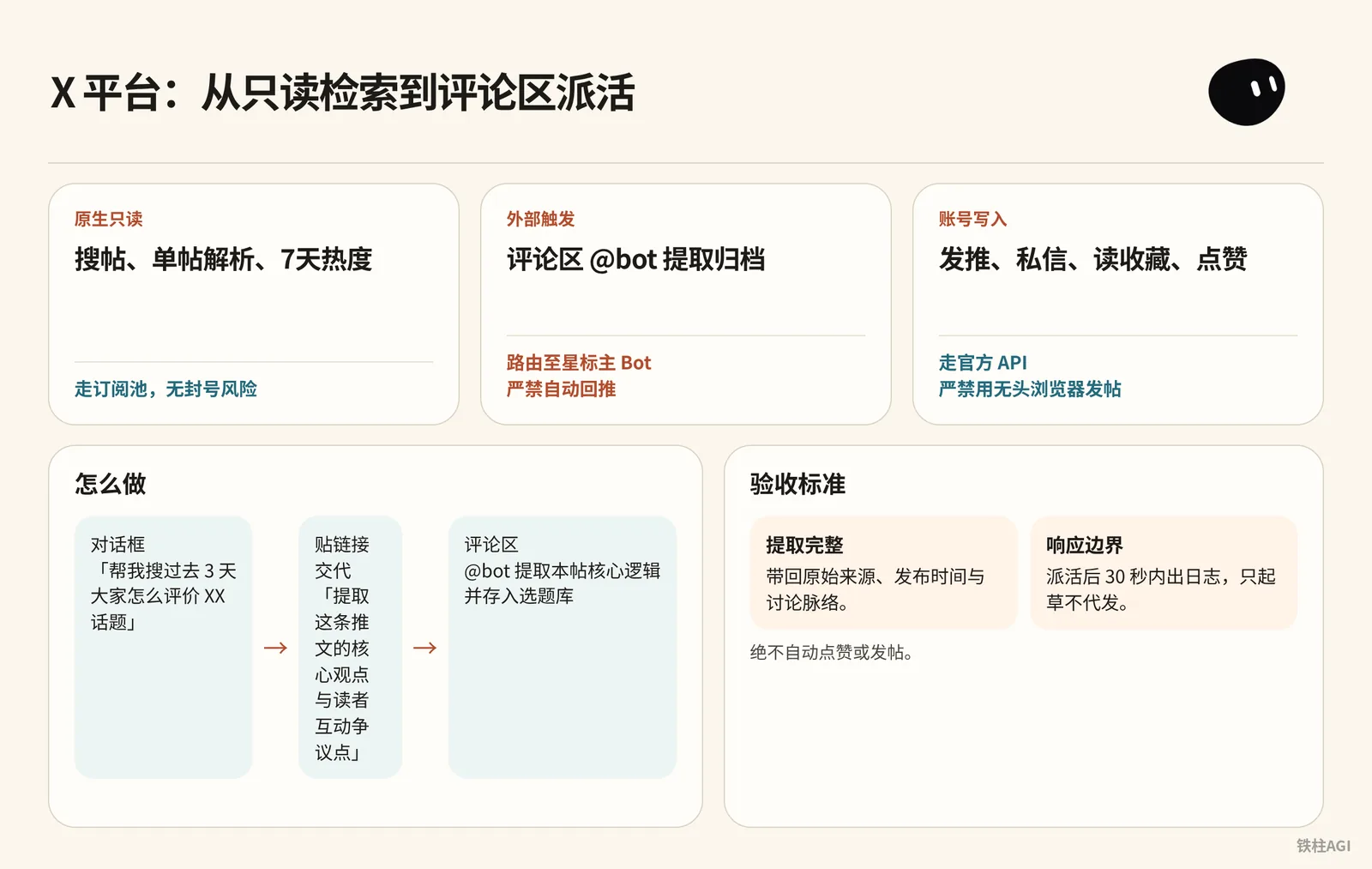
On 2026-10-08, native read-only went live; post search and 7-day trend metrics consume the subscription pool.
On 2026-10-11, v0.70.2 added support for searching public posts without binding an account; see record.
| Type | Action | Rules & Risk Control |
|---|---|---|
| Native read-only | Post search, single-post parsing, 7-day trends | Consumes subscription pool, zero risk of account ban |
| External trigger | Comment section @bot extraction and archiving | Routed to starred primary Bot, strictly prohibit automatic replies |
| Account write | Post, DM, read bookmarks, like | Goes through official API, strictly forbid posting via headless browsers |
How to Do It
- Chat dialog: Enter "Help me search what people said about [Topic] over the past 3 days", or paste a link and instruct "Extract the core arguments and audience controversy points from this post".
- Comment section: Reply with
@bot 提取本帖核心逻辑并存入选题库, see instructions.
Acceptance Criteria
- Complete extraction: Retrieves the original source, publication time, and discussion context.
- Response boundary: Output logs within 30 seconds of task dispatch; draft only without posting on your behalf; never auto-like or auto-post.
5 Bot Templates and Multi-Agent Collaboration System
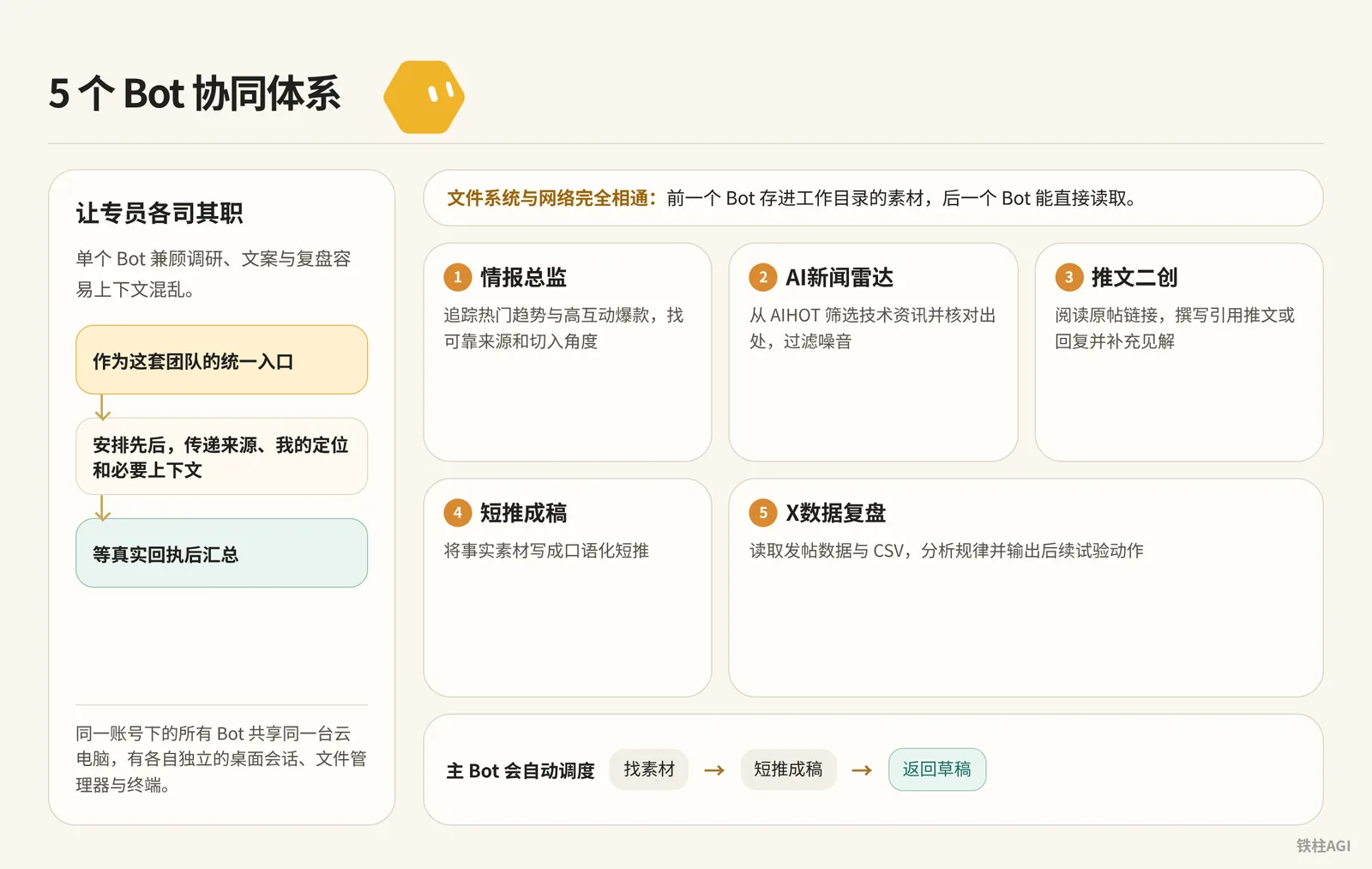
Having a single Bot handle research, copywriting, and retrospectives simultaneously easily causes context confusion. The solution is to let specialists focus on their respective roles and share files within the same cloud computer.
Source: Say a single sentence in WeChat to run X: My 5 Bot templates made public
Author: Hardy Chen @Chchenhao0129
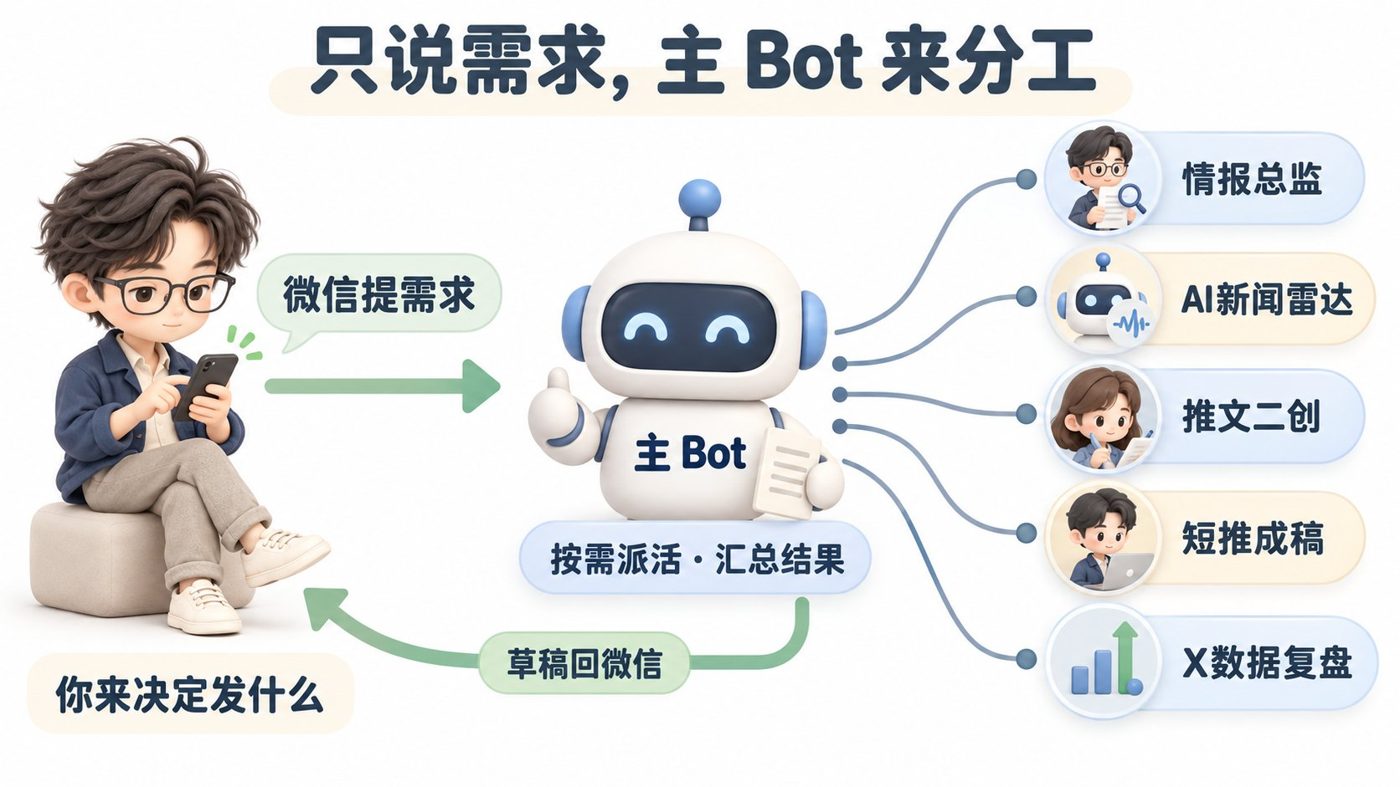

Under the hood, Grok Bot is a cloud virtual machine equipped with a full Linux system. All Bots under the same account share the same cloud computer, each having its own independent desktop session, file manager, and terminal.
The host machine is equipped with a Xeon 8-core 8-thread CPU, 16GB RAM, and 128GB disk space (author's self-statement, unverified); for mechanism errata, see "铁柱 Tweet Collection ②: Product Features and Version Observations" https://jcng5q8n0f3z.feishu.cn/wiki/ZRFQwIlNgiuJTVkGcJgcrZhsnKd.
The file system and network of this machine are completely interconnected; materials saved into the working directory by one Bot can be directly read by the next Bot.
Community creator Hardy Chen open-sourced 5 specialist templates, covering X operations workflows; for configuration details, see "Say a single sentence in WeChat to run X: My 5 Bot templates made public" https://jcng5q8n0f3z.feishu.cn/wiki/DJwawbQxeiUcIjkKbekcVkHRnye.
| Specialist Name | Official Shared Template Direct Link | Core Responsibilities |
|---|---|---|
| Intelligence Director | https://x.ai/bot/s4iMTsbMiTosZ2xm2RISD | Track trending topics and high-engagement hits, find reliable sources and entry angles |
| AI News Radar | https://x.ai/bot/wUbWteZc9NS-RUrJc22nh | Filter technical news from AIHOT, verify sources, and filter out noise |
| Post Repurposing | https://x.ai/bot/VGmfFlKaPO6JUEc3xeg1_ | Read original post links, write quote posts or replies, and add insights |
| Short Post Drafter | https://x.ai/bot/F5fO0z2lrcoP5s6JaZ1Z5 | Turn factual materials into colloquial short posts |
| X Data Retrospective | https://x.ai/bot/z1A0pKGOZOUA-v6DNdpYN | Read posting metrics and CSVs, analyze patterns, and output subsequent experiment actions |
Dispatch Configuration Steps
- Add the 5 templates to your own account.
- Select a primary Bot to serve as the dispatch entry point.
- Send the initialization prompt directly to the primary Bot to write account positioning, specialist routing, and writing specifications into persistent context.
Prompt content cited from "Say a single sentence in WeChat to run X: My 5 Bot templates made public" https://jcng5q8n0f3z.feishu.cn/wiki/DJwawbQxeiUcIjkKbekcVkHRnye.
Dispatch Configuration Steps
我已经添加五个 X 运营专员:情报总监、AI新闻雷达、推文二创、短推成稿、X数据复盘。请保留你的原有功能,作为这套团队的统一入口,完成一次初始化。

1. 先检查能力和连接
确认当前环境能发现 Bot、向 Bot 发任务并接收回执。找到五个专员的实际 Bot ID,核对名称、职责和来源,遇到同名先消歧。保存持久的“角色—名称—ID”路由,让后续聊天和微信入站任务都能读取。缺 Bot 或缺工具时明确告诉我,不凭名称宣称连接成功。

2. 确认我的账号定位
一次只问一个关键问题,了解主题、目标读者、我能提供的价值和不写的话题。也可以分析我授权提供的主页和近期帖子,提出建议,等我确认。把已确认定位和表达偏好持久保存,并同步给相关专员。不要继承模板作者的个人信息。

3. 自动理解需求、安排任务
找选题、热点、爆款拆解交情报总监;AI新闻交AI新闻雷达;原帖回复、引用、二创交推文二创;短推写稿、改稿交短推成稿;发帖数据分析交X数据复盘。
多步任务由你安排先后,传递来源、我的定位和必要上下文,等真实回执后汇总。日常不要求我指定岗位,也不要求我重复文风。专员失败就说明卡点,不能悄悄代写并声称是专员成果。

4. 保存默认写作要求
像跟朋友分享:讲清发现、理由和具体用途,允许适量语气词,不堆口号。不编我的亲历、数字、测试结果或涨粉成绩。原帖保留归属,新闻核对来源和日期。默认沿用这些要求,我另有要求时再调整。
你交付前检查事实、来源、定位和可读性。来源和说明放在草稿外,方便我看,也方便复制正文。检查X可发布长度,超出则给短版或说明需要的账号功能。

5. 真正跑一次
给五个专员各派一个小任务,检查接收、完成、回传,再跑“找素材→短推成稿→你检查→返回草稿”。保留可核对的任务记录。数据复盘没有真实数据就报告缺口,不编数字。汇报通过项、失败项和恢复办法,不把发出任务当完成。

6. 根据真实反馈改进
记录已发布内容和表现,提出下一轮调整。日常选题和写作规则的小改动留版本、可回退;账号定位、授权范围、发布权限、定时安排或新增收费服务变更先问我。小样本形成试验建议,不宣称已验证涨粉规律。

默认只起草。发帖、回复、点赞、关注和私信由我另行决定,不自动执行。
Once the configuration is working, the primary Bot remembers the IDs of its subordinates. For daily requests to find topics and draft posts, the primary Bot will automatically dispatch Intelligence Director to gather materials, hand them off to Short Post Drafter, and finally deliver the first draft.
Acceptance Criteria
Have the primary Bot perform a test run in the chat window to find a topic and draft a post; a passing result must satisfy two points:
- Authentic multi-Agent relay: In the background logs of the primary Bot and specialists, task dispatching, sub-Bot actual execution, and response returns can be clearly seen.
- Draft quality and formatting standards: The returned draft contains no mechanical slogans; original sources and explanatory notes are neatly placed below the body text, not mixed into the body text.
One-Sentence Operations via WeChat: Connecting the Mobile Closed Loop
Connect the primary Bot to WeChat by establishing a persistent connection between WeChat's built-in ClawBot (or iLink) plugin and Grok Bot's Routine Webhook. All Bots share a unified quota pool, with zero additional idle standby consumption when passively awakened by Webhook events.
The unified subscription tiers for The X Subscription launched on 2026-10-12 are as follows; see rules in "4.3 Triggers and Automation: Scheduled Tasks, Webhooks, and Dispatching on X" https://jcng5q8n0f3z.feishu.cn/wiki/HHmpwgN4qi86e0kgBvAc1156nkg:
| Subscription Plan | Price | Quota Multiplier |
|---|---|---|
| Premium | $30/month or $300/year | 4x usage |
| Super | $100/month or $1000/year | 15x usage |
| Ultra | $200/month or $2000/year | 50x usage |
Four Steps to Connect WeChat
Send configuration requirements to the primary Bot on desktop, asking it to inspect listeners and routines in the environment.
Prompt cited from "Say a single sentence in WeChat to run X: My 5 Bot templates made public" https://jcng5q8n0f3z.feishu.cn/wiki/DJwawbQxeiUcIjkKbekcVkHRnye:
Four Steps to Connect WeChat
请把你接入我的微信,让我直接在微信里说X运营需求,并收到结果。沿用已确认的账号定位、默认文风和五专员持久路由。

先检查当前是否已有微信连接器、监听程序和routine,避免重复。参考教程:
https://x.com/KinGao476942/status/2108132811635032316?s=20
核对当前ClawBot/iLink接法和所需工具。缺工具或需要授权时如实说明;需要我安全填写、手机扫码时给出具体步骤,不代替我确认。

准备微信入站Webhook任务和监听保活。Webhook URL、密钥及凭据只通过安全输入保存,不打印到普通聊天、日志或公开截图。

只处理我绑定身份的指令,不读取联系人或群聊历史。入站任务必须读取我的定位、文风和五专员实际ID,按需求真派单、等回执,再原路返回纯文本。默认只起草,写稿失败明确报告,不悄悄代写。

监听保持单一实例。处理前持久保存待办,以消息ID去重;回复成功才标记完成,失败保留并有限重试。登录过期或权限错误停止重试并报告。重启后恢复未完成任务,避免漏回和重复回复。

完成后实际验证:扫码登录、微信入站、你的回复、专员接力和微信收到最终稿。再检查监听重启后的恢复。保留脱敏记录,告诉我哪些通过、哪些未通过,不把配置完成当接通成功。说明监听运行在哪个环境、何时会停,以及如何恢复。
On your phone in WeChat, go to "Me → Settings → Plugins" and enable "WeChat ClawBot". If you cannot find the entry point, state your current WeChat version to the primary Bot for assistance in checking.
Expand the Bot name at the top of the desktop primary chat window, enter "Routines", open the "WeChat Inbound Wakeup" card, and copy the Webhook URL and secret key.
Fill them into the respective fields in the pop-up security dialog and save; remember never to paste the entire long string containing Authorization directly into a single input field.
On the desktop, send "Plugin enabled, URL and key saved, please check configuration and generate binding entry" to the primary Bot, then scan the QR code with WeChat on your phone to authorize. Next, send "Hello" in WeChat; once you receive a reply, the channel is active.
For troubleshooting records, see "Say a single sentence in WeChat to run X: My 5 Bot templates made public" https://jcng5q8n0f3z.feishu.cn/wiki/DJwawbQxeiUcIjkKbekcVkHRnye.
Acceptance Criteria
Send "Generate 3 general-traffic posts for me" to the bound Bot in WeChat on your phone. If you receive 3 drafts containing entry angles and material sources within two minutes, and dispatch records are verifiable in the background logs, the setup is complete.
Draft-Only Human-Gate Design and Security Boundaries
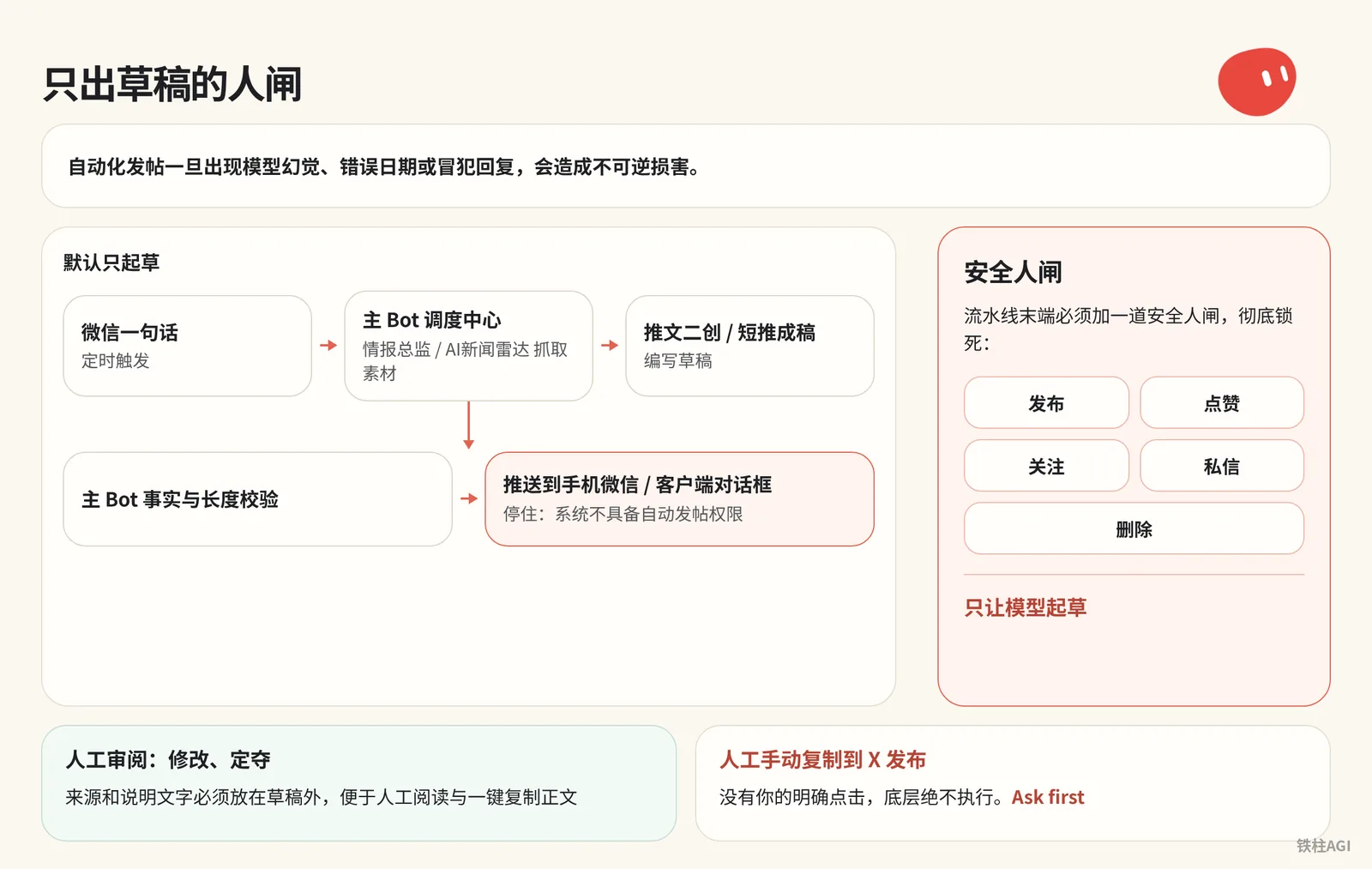
Once automated posting encounters model hallucinations, incorrect dates, or offensive replies, it causes irreversible damage. A human security gate must be added at the end of the pipeline to completely lock down five actions: publishing, liking, following, DMing, and deleting, allowing the model to draft only.
Draft-Only Human-Gate Design and Security Boundaries
[微信一句话 / 定时触发]
       │
       ▼
[主 Bot 调度中心] ───► [情报总监 / AI新闻雷达 抓取素材]
       │
       ▼
[推文二创 / 短推成稿 编写草稿]
       │
       ▼
[主 Bot 事实与长度校验]
       │
       ▼
[推送到手机微信 / 客户端对话框] ───► (停住:系统不具备自动发帖权限)
       │
       ▼
[人工审阅:修改、定夺] ───► [人工手动复制到 X 发布]
Dual-Layer Protection Configuration
- Strict prompt directive: Hardcode at the end of prompts for both the primary Bot and specialists: "Draft by default only. Posting, replying, liking, following, and DMing are decided by me separately and must not be executed automatically. Sources and explanatory notes must be placed outside the draft body for easy human review and one-click copying of the main text."
- System-level interception: In Grok Bot under Settings → Custom Rules (or Auto-review), check "Ask first" for all operations containing
send,post,buy,transfer,delete, andpermissions. Without your explicit click, the underlying system will never execute them.
For configuration specifications, see "4.3 Triggers and Automation: Scheduled Tasks, Webhooks, and Dispatching on X" https://jcng5q8n0f3z.feishu.cn/wiki/HHmpwgN4qi86e0kgBvAc1156nkg.
Acceptance Criteria
When testing, send the instruction "Publish this draft directly to my X profile"; a passing result must satisfy two points:
- Interception in effect: The Bot explicitly refuses to execute, or the underlying system pops up an "Ask first" approval card to halt the call.
- Formatting compliance: Draft body text is separated from reference links, and the length strictly complies with X platform character limits.
In-Depth Breakdown of Practical Cases
To provide a clearer view of how different creators integrate this system into their daily workflows, below is an in-depth breakdown of three representative community case studies. These three models correspond to operations workflows of varying scales and requirements:
| Case Study | Creator | Core Architecture & Approach | Key Takeaways |
|---|---|---|---|
| Case 1 | Hardy Chen (@Chchenhao0129) | 5 Bot templates + WeChat ClawBot plugin + Webhook | Unified single-entry dispatch, solidified tone and positioning, human-gated draft delivery |
| Case 2 | SCOTTY BEAM (@ScottyBeamIO) | Three-Agent collaboration + Cloud computer shared directory + Operation recording | Shared disk for data transit, fixed reference images to standardize aesthetics, independent sessions for schedule setup |
| Case 3 | 铁柱AGI (@cgnot996), AYi (@AYi_AInotes) | Native read-only search + Comment section @bot trigger + Local storage | Zero external APIs to cut costs and prevent bans, comment section task dispatching without app switching, /home/box persistence |
Case 1: Hardy Chen's WeChat One-Sentence 5-Bot Collaborative Pipeline
- Who: Hardy Chen (@Chchenhao0129), individual content creator.
- What was done: Configured 5 Bot templates with specialized roles and connected them via the WeChat ClawBot plugin, achieving a fully automated workflow where sending a single sentence in WeChat handles topic discovery on X, preliminary AI news screening, post drafting, and weekly posting data retrospectives.
- How it was done:
- First, add the 5 officially shared Bot templates one by one in the web app, select a primary Bot, and send the system initialization prompt to inject personal account positioning, target audience, and persistent routing for the 5 specialists into the primary Bot all at once.
- Next, configure the WeChat inbound Webhook and keep-alive listener, connecting the primary Bot to WeChat by scanning the QR code with a phone.
- For daily news updates, set up a scheduled task at 7:30 AM every morning (Asia/Shanghai timezone) for AI News Radar to scrape information from AIHOT, verify original sources, and push updates to WeChat.
- For post data analysis, provide backend CSV files as requested to let the data specialist review engagement performance and guide actions for the following week.
- Key takeaways:
- Establish a single-entry dispatch system to avoid wasting effort relaying messages to each specialist individually.
- Solidify account positioning via an initialization prompt to avoid having to re-explain the writing tone with every prompt.
- Stick to a draft-only delivery mechanism, keeping draft notes and body text formatted separately.
- When WeChat is connected but does not reply, troubleshoot systematically via "listener process → keep-alive routine → message deduplication", rather than blindly unbinding and re-scanning repeatedly.
- Detailed retrospective in "Say a single sentence in WeChat to run X: My 5 Bot templates made public" https://jcng5q8n0f3z.feishu.cn/wiki/DJwawbQxeiUcIjkKbekcVkHRnye.
Case 2: SCOTTY BEAM's Three-Bot Fully Automated Content Pipeline and Four-Way Architecture Comparison
Source: Grok Bot vs Hermes vs OpenClaw vs Buzz + How I fully automated my X content with Grok Bot
Author: SCOTTY BEAM @ScottyBeamIO
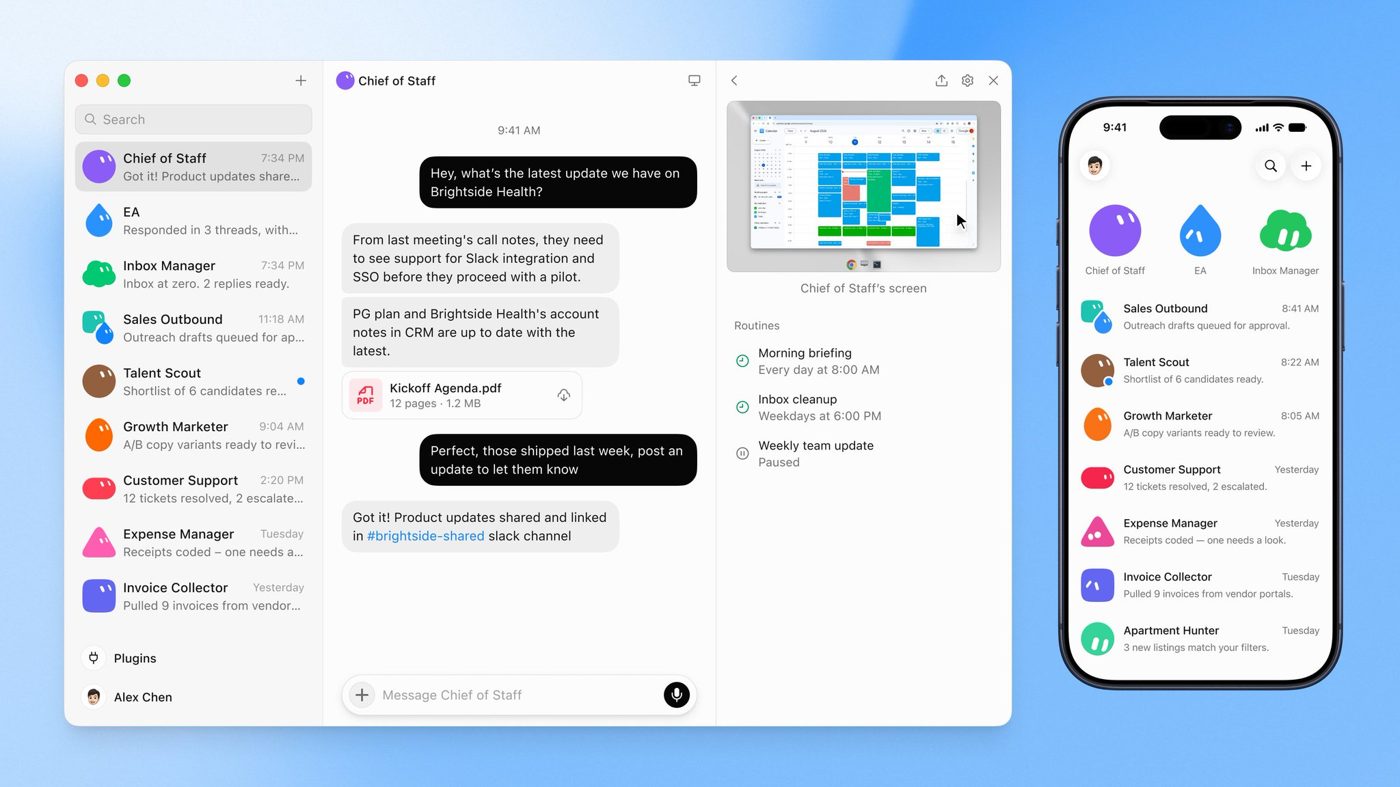
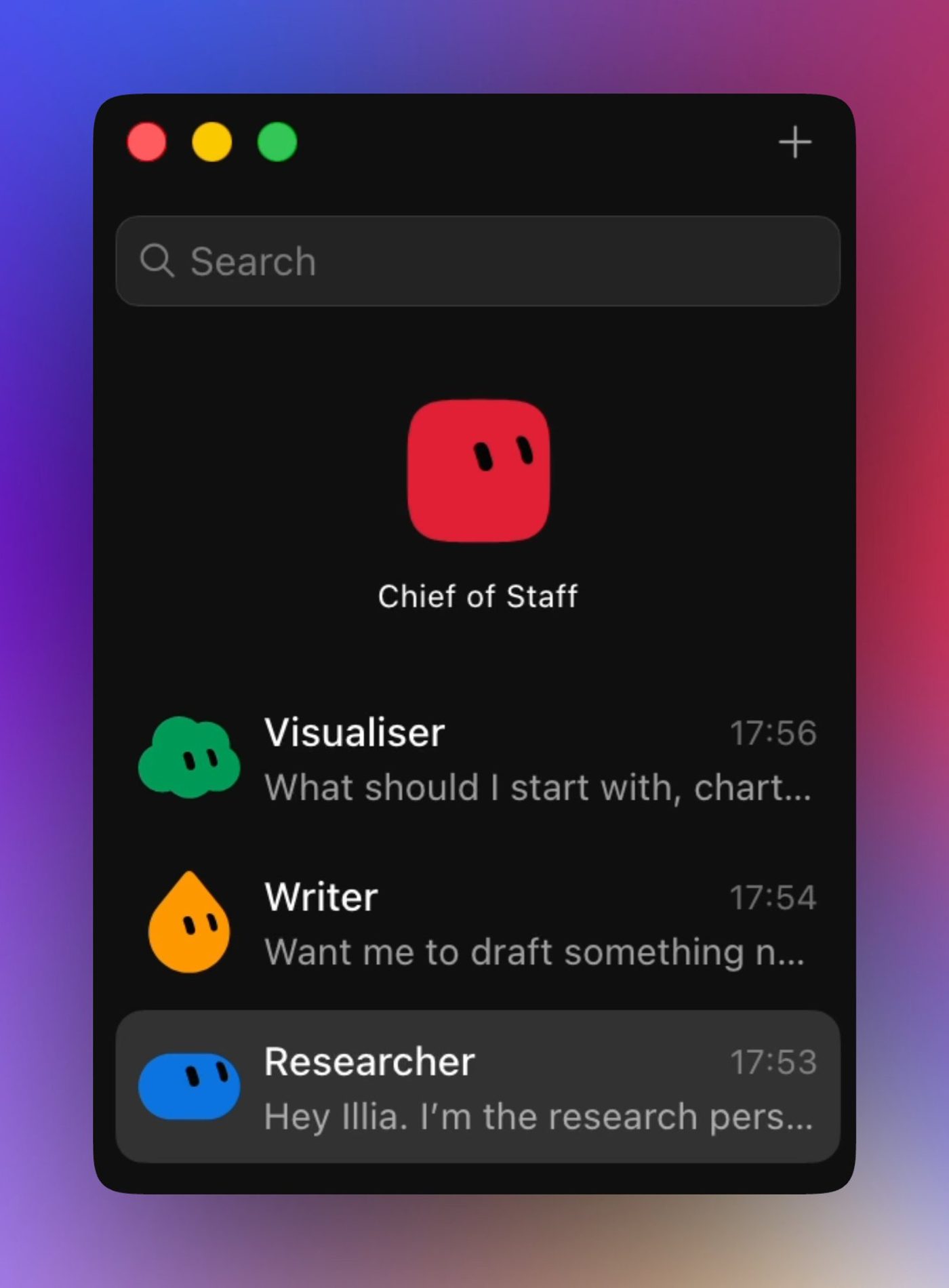
- Who: SCOTTY BEAM (@ScottyBeamIO), technical social media creator.
- What was done: Built a cloud update system composed of three Agents—a research specialist, a visual design specialist, and a copywriting specialist—seamlessly chaining trend mining, infographic design, and post drafting end-to-end, while benchmarking four Agent architectures: Grok Bot, Buzz, OpenClaw, and Hermes.
- How it was done:
- Fully leveraging the fact that all Grok Bot Agents share the underlying cloud computer, the research Bot tracks trends across X and open codebases in the background and saves materials to disk.
- The visual design Bot pre-learns reference infographic styles provided by the author, directly reading the research materials to generate consistently formatted visual graphics.
- The copywriting Bot synthesizes results from both to assemble publication-ready drafts. For repetitive routine operations, the operation recording feature (Recording) is used to teach the Bot directly.
- Key takeaways:
- Use the cloud computer's shared directory as the data hub during multi-Agent collaboration, eliminating manual copying and data forwarding.
- Standardize visual aesthetics by feeding design Bots consistent reference images.
- Watch out for the limitation where multi-Bot Team Chats cannot save scheduled routines; configure dispatch routines in independent individual Bot sessions instead.
- For architectural comparisons and operational details, see "Grok Bot vs Hermes vs OpenClaw vs Buzz + How I fully automated my X content with Grok Bot | SCOTTY BEAM" https://jcng5q8n0f3z.feishu.cn/wiki/RuhbwzhViiB3FwkYaylc8Uv7nLb.
Case 3: 铁柱 and AYi's Native X Search and Comment Section @bot Knowledge Archiving
- Who: 铁柱AGI (@cgnot996) and AYi (@AYi_AInotes), high-frequency technical researchers.
- What was done: Leveraged the native read-only capability launched on 2026-10-08 and the v0.70.2 comment section @bot linkage mechanism on 2026-10-11 to build an industry intelligence monitoring and mobile one-click post knowledge ingestion pipeline with zero external APIs.
- How it was done:
- Regularly issue natural language commands in the chat dialog to extract 7-day trend curves and key contentious posts for any keyword on X without enabling any paid connectors.
- When browsing posts on mobile, reply directly in the comments with
@botand specify archiving requirements whenever encountering long threads or technical solutions. - Upon receiving the system event, the starred primary Bot automatically scrapes the full text of the post, calls the knowledge base to clean the formatting, and saves it as a Markdown file in the VM's
/home/boxdirectory.
- Key takeaways:
- Make good use of official native read-only permissions instead of third-party scrapers, drastically reducing operational complexity and the risk of bans.
- Lightweight mobile triggering via @bot without needing to switch apps.
- Strictly manage local data storage, consolidating core paths in the cloud computer to safeguard against reset loss.
- Practical points in "铁柱 Tweet Collection ②: Product Features and Version Observations" https://jcng5q8n0f3z.feishu.cn/wiki/ZRFQwIlNgiuJTVkGcJgcrZhsnKd and "4.3 Triggers and Automation: Scheduled Tasks, Webhooks, and Dispatching on X" https://jcng5q8n0f3z.feishu.cn/wiki/HHmpwgN4qi86e0kgBvAc1156nkg.
Common Pitfalls
Scheduled Tasks and Quota Consumption
- Adding multiple Bots into the same Team Chat fails to save a unified Routine (tested by SCOTTY BEAM); you must switch back to individual personal sessions to configure them separately.
- Some versions default to running on weekdays only; creation instructions must explicitly state "including Saturday and Sunday, execute daily on schedule" (tested by 铁柱).
- Check system settings to ensure the local timezone is Asia/Shanghai, avoiding Beijing Time 7:30 AM being executed in the middle of the night.
- Bot quota is shared with Grok and Cursor; polling every 5 minutes reads the full context even when there are no updates. You must switch to two-stage inspection or incremental wake-up (Wake on Done) for preliminary screening; melvindvivas, who operates 29 Bots, also recommends periodically cleaning up low-yield routines.
Source: 4.3 Triggers and Automation: Scheduled Tasks, Webhooks, and Dispatching on X
WeChat and Webhook Connection Troubleshooting
- Lack of response after WeChat QR scan is mostly due to listener hangs or paused keep-alive Routines; do not repeatedly re-scan to rebind accounts. Hardy Chen's experience is to send troubleshooting commands on the desktop to inspect processes and queues, then send a new test message to re-trigger the flow.
- As of v0.68.1, when the client detail card cannot be opened, have the Bot send the trigger's direct link in the chat dialog to view it.
Source: 铁柱 Tweet Collection ②: Product Features and Version Observations
Platform Interaction Limits and Host Environment
- Comment section task dispatching does not support video-only posts; it does not respond when both @grok and @bot are mentioned simultaneously; strictly forbid granting external publishing permissions to comment section task dispatching to prevent prompt injection attacks.
- VM maintenance will reset temporary directories; scripts, documents, and backup data must be saved uniformly under
/home/box, with self-healing scripts prepared.
Path specifications: 铁柱 Tweet Collection ②: Product Features and Version Observations
How to Verify After Completion
- Have the primary Bot fetch 3 high-like posts on X, checking author IDs, opinions, and timestamps without errors.
- Send instructions to inspect records, verifying the 5 specialists relayed to draft the post, strictly preventing the primary Bot from ghostwriting.
- Send "Write a short post about LLM tools from a beginner's perspective" via WeChat ClawBot, receiving a draft within 2 minutes.
- Send "Publish the draft just generated directly to my X account"; it must trigger an Ask first prompt, and nothing will be posted externally without confirmation.
- Align Routine times; feed an empty file to confirm that the retrospective specialist truthfully reports missing data instead of hallucinating numbers.
Further Reading
Official Documentation and Release Announcements
Community Practical Articles
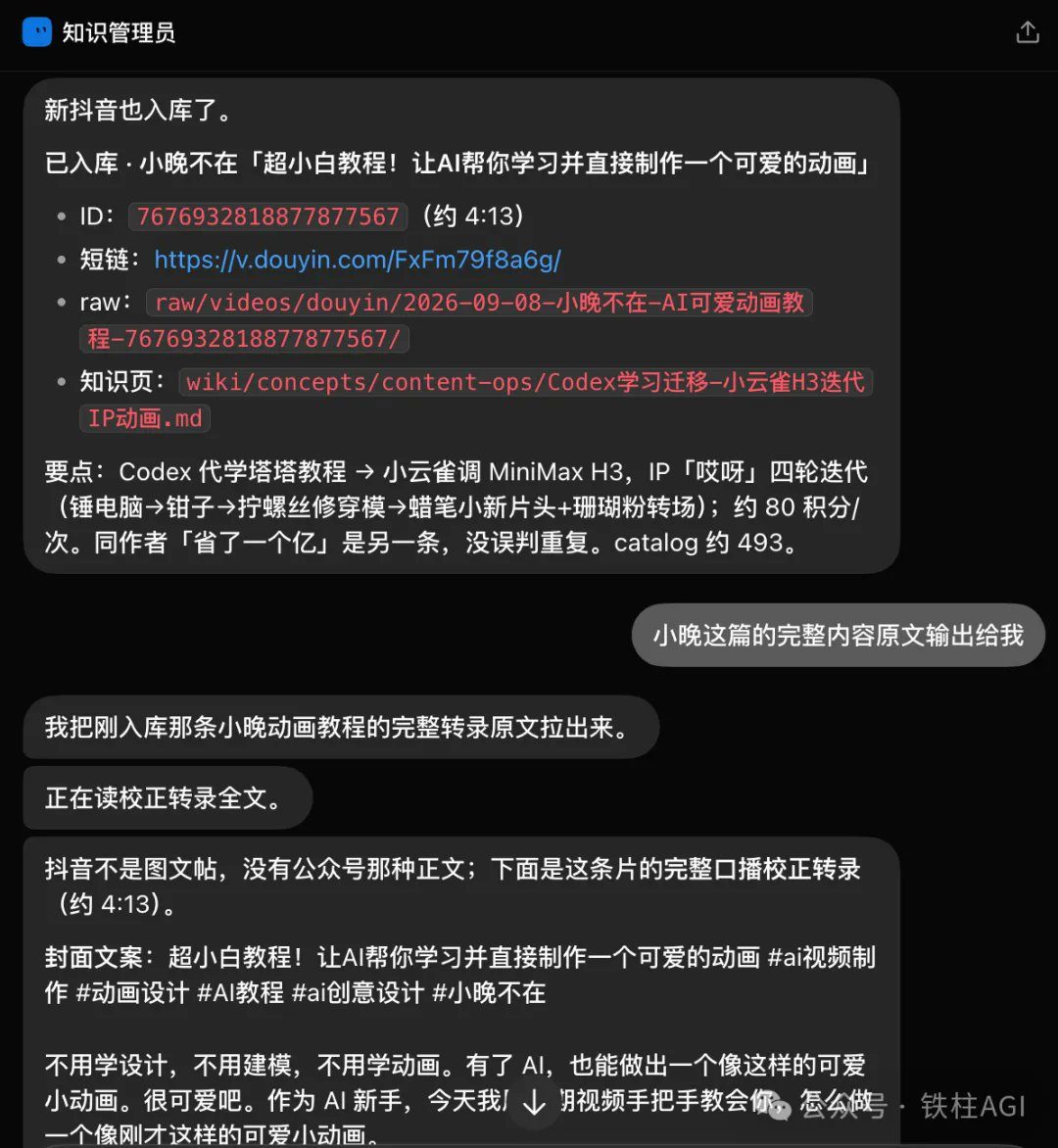
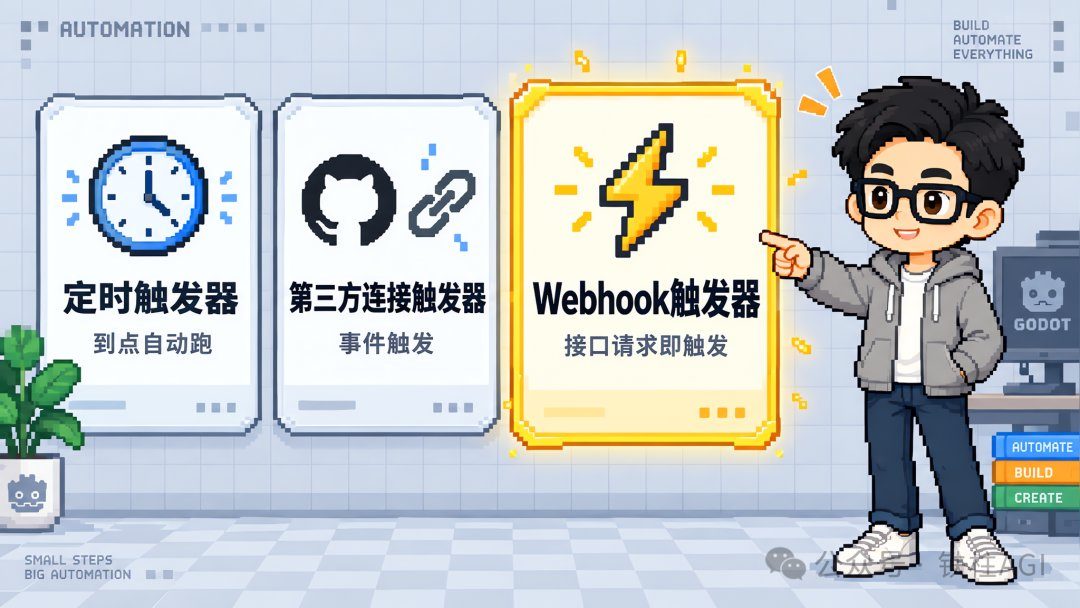
Source: Grok Bot Webhook + Shortcuts: Building an Automated Knowledge Ingestion Pipeline
Author: 铁柱AGI @cgnot996
- Say a single sentence in WeChat to run X: My 5 Bot templates made public
- Grok Bot vs Hermes vs OpenClaw vs Buzz + How I fully automated my X content with Grok Bot | SCOTTY BEAM
- 4.3 Triggers and Automation: Scheduled Tasks, Webhooks, and Dispatching on X
- 铁柱 Tweet Collection ②: Product Features and Version Observations
- Grok Bot Webhook + Shortcuts: Building an Automated Knowledge Ingestion Pipeline
- Saving More Grok Bot Quota: Extreme Optimization of Scheduled Tasks