Chapter 8 Skills and Routines: Turning a Single Success into Daily Automation
Don't just set up scheduled runs directly. Without human supervision, tasks easily get stuck, misfire at 3 AM, and idle away an entire week's quota.
Distill operations into Skills and assemble them into Routines:
- Calibrate time zones and standardize Webhooks.
- Restrict the Slack trigger scope.
- Add two-stage VM detection.
Set clear boundaries, and tasks will deliver reliably in the background even with your laptop closed.
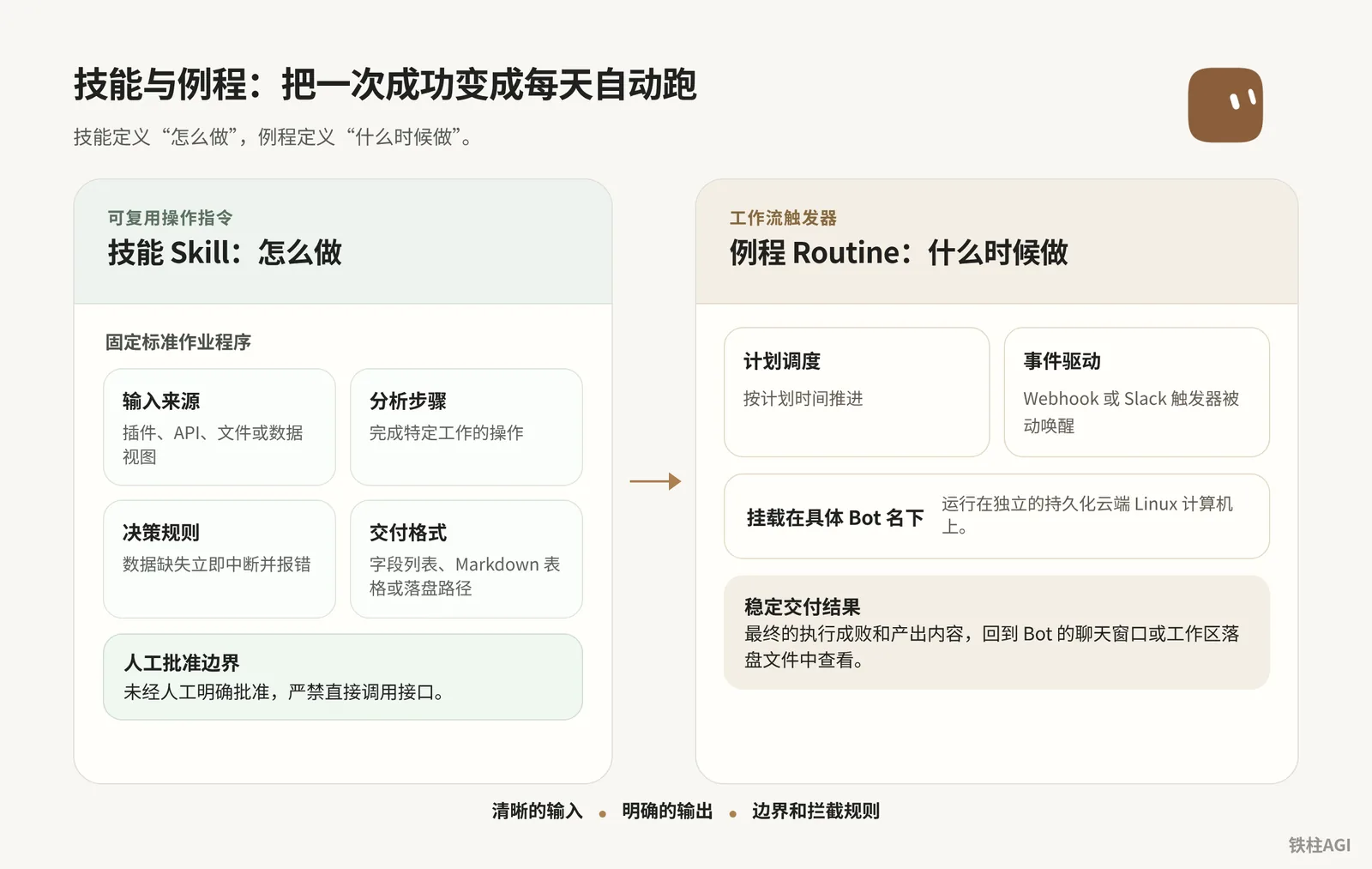
Distilling and Referencing Skills: Standardizing Your Operating Procedures
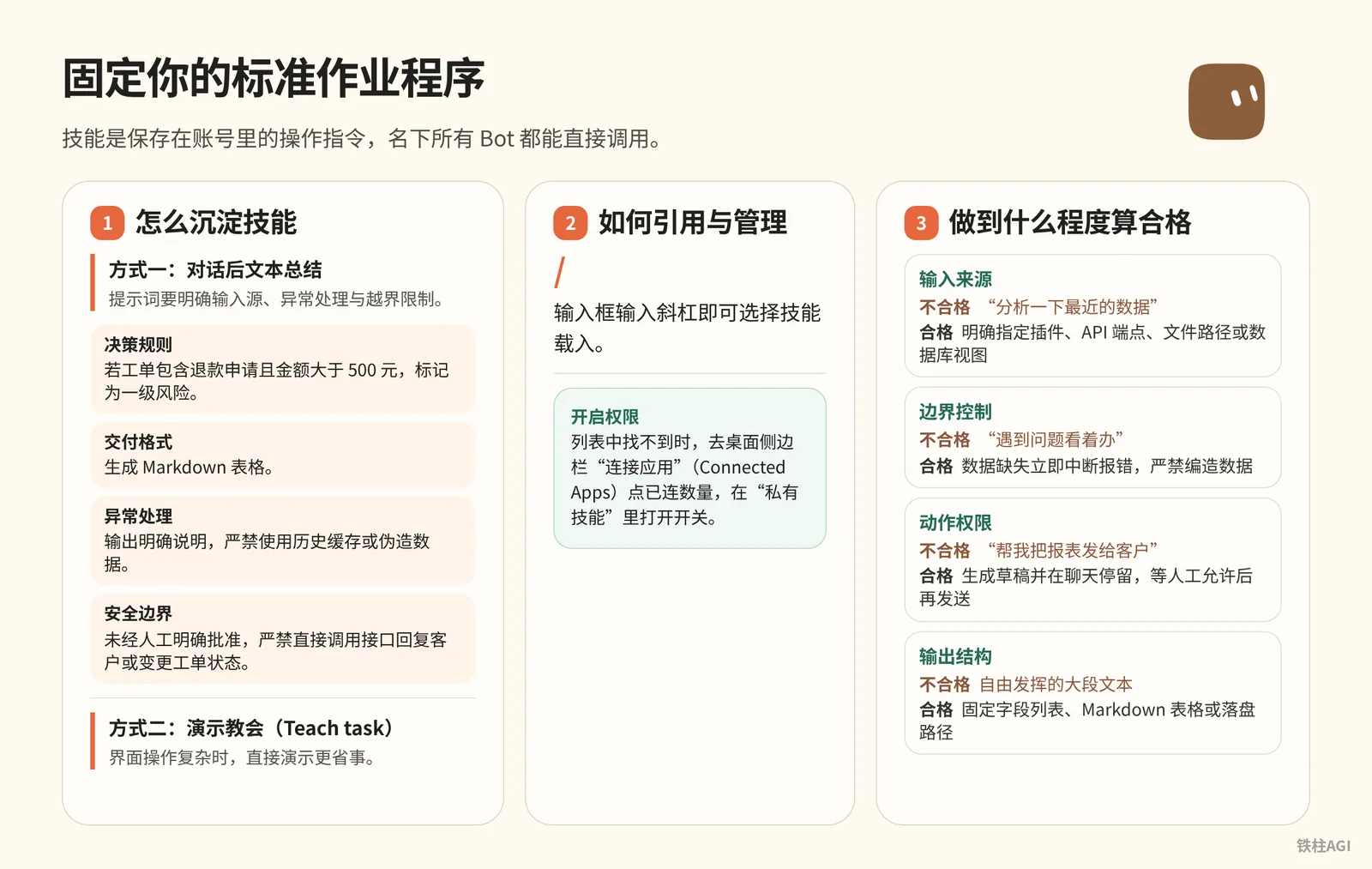
Skills are operational instructions saved in your account, which all Bots under your account can invoke directly.
How to Distill Skills
Method 1: Post-conversation text summarization Don't close the session right after a task runs successfully; ask the current Bot to extract and save it immediately. The prompt must clearly specify input sources, error handling, and out-of-bounds restrictions. Send this template directly:
How to distill skills
请把我们刚刚完成的这套流程保存为名为“每日工单异常审查”的技能。
技能内容必须包含以下要素:
1. 适用场景:工作日审查支持渠道中滞留超过 4 小时的工单。
2. 输入数据:从已连接的工单插件中读取状态为 Open 且优先级为 High 的列表。
3. 决策规则:若工单包含退款申请且金额大于 500 元,标记为一级风险;其余标记为二级跟进。
4. 交付格式:生成 Markdown 表格,列出工单编号、客户标识、滞留时长、风险等级与跟进建议。
5. 异常处理:若工单系统接口无响应或无符合条件的数据,输出明确说明,严禁使用历史缓存或伪造数据。
6. 安全边界:未经人工明确批准,严禁直接调用接口回复客户或变更工单状态。
Method 2: Teach by demonstration (Teach task) When UI operations are complex, demonstrating directly is more convenient.
- Open the computer preview on the right side of the chat window and select "Teach task".
- Briefly describe the goal and then perform the operations on the cloud computer. The system records the screen for up to 10 minutes without recording microphone audio. Never enter confidential information such as passwords; pass sensitive credentials through security cards.
- After the draft is automatically generated, you must fill in decision rules, error handling, and approval boundaries—never push it live immediately. If you do not see the entry point, it means it is still in gradual rollout; use Method 1 instead.
How to Reference and Manage Skills
- Input box reference: Type a slash
/in the input box to select and load a skill. - Enable permissions: If you cannot find it in the list, go to "Connected Apps" in the desktop sidebar, click the number of connected apps, and toggle on the switch under "Private Skills".
What Counts as Qualified
| Checklist Item | Unqualified Example | Qualified Example |
|---|---|---|
| Input Source | "Analyze the recent data" | Explicitly specify plugins, API endpoints, file paths, or database views |
| Boundary Control | "Play it by ear when encountering issues" | Interrupt and report errors immediately upon missing data; strictly forbid fabricating data |
| Action Permissions | "Send the report to the client for me" | Generate a draft and stay in the chat, waiting for human approval before sending |
| Output Structure | Freely generated large blocks of text | Fixed field list, Markdown table, or destination write path |
Source: Using Grok Bot
Core Mechanics of Routines: Setup, Viewing, and Testing
Routines are workflow triggers attached to a Bot, running in the /workspace directory of cloud Linux. Even if you close your laptop or exit the client, cloud tasks will continue according to schedule.
Specifications and Limitations
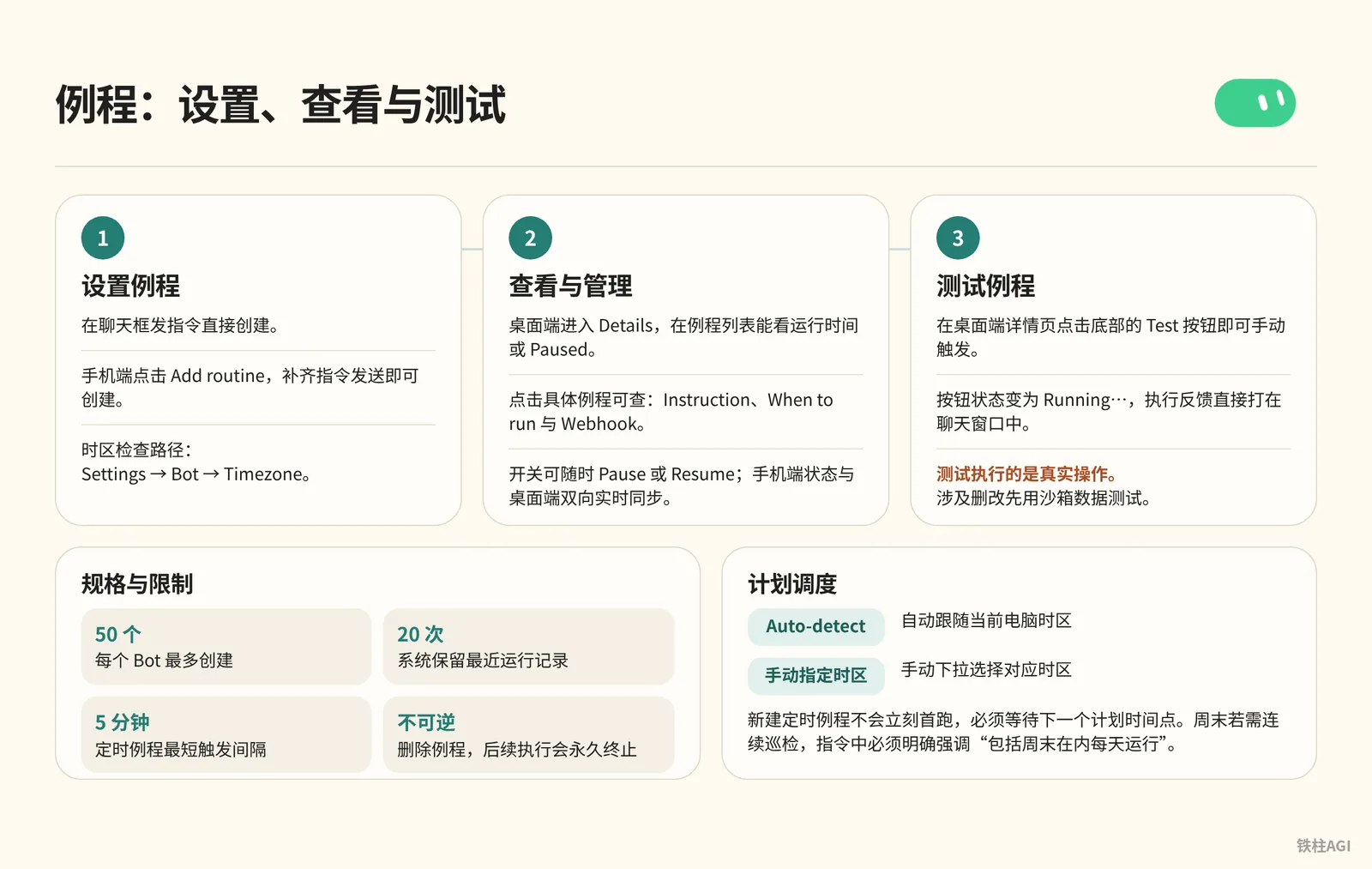
- Each Bot can create up to 50 routines; the system retains the last 20 run records.
- The minimum trigger interval for scheduled routines is 5 minutes; second-level scheduling is not supported.
- Deleting a routine is irreversible, and subsequent executions will permanently terminate; deleting a Bot will clear all its routines.
Source: 4.3 Triggers and Automation: Schedules, Webhooks, and Assigning Tasks on X.
Creating and Managing Routines
Create directly on the desktop client by sending instructions in the chat box:
每个工作日上午 8:30,调用“每日工单异常审查”技能,在此对话中输出审查清单。如果未检索到高风险工单,只发一行“今日无高风险工单”即可,不要刷屏。Desktop management:
- Click the Bot name at the top of the chat window to enter Details. In the Routines list, you can view the run time or Paused status, and toggle the switch on the right at any time to Pause or Resume.
- Click on a specific routine to inspect three properties: Instruction (execution prompt), When to run (schedule description), and Webhook (exclusive URL, secret key, and request headers).
- The bottom toolbar provides Test, Edit, and a red trash can (Delete routine). Clicking Edit will pre-fill "Edit your routine: [routine name]" in the dialogue box; add your modification requirements and send to update.
Mobile management:
- Open the Bot profile page to find Routines. Tapping Add routine pre-fills "Set up a routine to "; complete the instruction and send to create it.
- Tap an existing routine to view Schedule, Next run, and Instruction, as well as the Active switch and Run history.
- Turn off the Active switch to pause, or swipe left on the row to delete directly. Status is synchronized bidirectionally in real time with the desktop client.
Source: Routines.
Schedule Dispatch and Timezone Configuration
Timezone inspection path: Settings -> Bot -> Timezone.
| Mode | Operating Mechanism | Considerations |
|---|---|---|
| Auto-detect | Automatically follows the current computer's timezone | Suitable for fixed locations; international travel can easily cause changes in execution times |
| Manually specified timezone | Manually select the corresponding timezone from the dropdown | For specific regions (such as Beijing Time UTC+8 or US Eastern EST), manual specification is recommended |
- Newly created scheduled routines do not run immediately for the first time; they must wait for the next scheduled point in time. For example, if configured at 8:05 AM to run daily at 8:00 AM, the first execution will be at 8:00 AM tomorrow morning.
- If continuous inspection is required on weekends, the instruction must explicitly emphasize "run every day, including weekends". Without a special statement, the Bot executes by default from Monday to Friday.
Source: Routines, 4.3 Triggers and Automation: Schedules, Webhooks, and Assigning Tasks on X.
Testing Routines
Click the Test button at the bottom of the desktop Details page to trigger manually; the button status will change to Running…, and execution feedback will appear directly in the chat window.
Testing performs real operations: it launches the cloud computer browser, modifies workspace files, and deducts quota normally. Test with sandbox data first if deletions or modifications are involved. If it prompts "Couldn't start a test run", you need to check the cloud computer connection status or whether preceding tasks are blocking it.
Source: Routines.
Webhook and Slack Triggers: Moving from Polling to Passive Wake-up
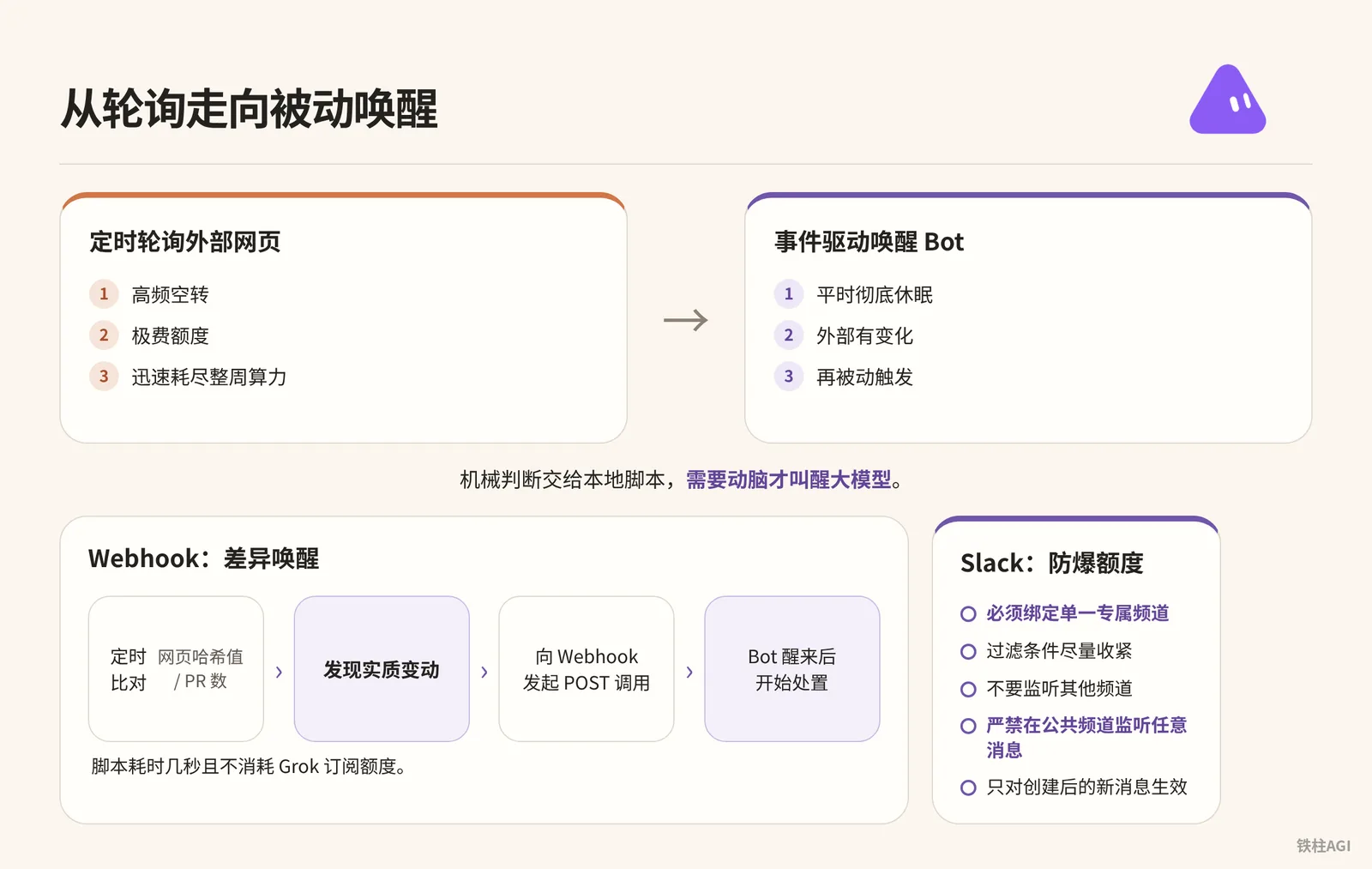
Scheduled polling of external web pages consumes quota heavily, and high-frequency idling quickly exhausts the entire week's computing power. Switch to event-driven wake-up for the Bot—let it sleep completely under normal circumstances and trigger passively only when external changes occur.
Starting from 2026-10-12, Grok Bot is incorporated into The X Subscription system, sharing a quota pool with Grok and Cursor:
| Subscription Tier | Price | Usage Multiplier | Bot Support |
|---|---|---|---|
| Premium | $30/month or $300/year | 4x base usage | Includes Bot |
| Super | $100/month or $1000/year | 15x usage | Includes Bot |
| Ultra | $200/month or $2000/year | 50x usage | Includes Bot |
| Plus | - | - | Does not include Bot |
Webhook Configuration and Asynchronous Acceptance
Sending an instruction in the chat window allows the Bot to create a Webhook trigger.
为当前 Bot 创建一个 Webhook 触发的例程,命名为“外部知识接收端”。
指令内容:读取请求体中的 JSON 数据,提取 url 和 note 字段,将其抓取整理为 Markdown 存入 /workspace/notes 目录。
Open the routine details on the desktop and expand Webhook to view the core fields:
- POST to: Unique public URL to receive external requests.
- key: Authentication secret key, which must be passed in the request header as
Authorization: Bearer <key>during calls. - header: The fully assembled request header text, which can be copied directly with a click.
The configuration must be saved by clicking Save before it takes effect on the gateway and generates the secret key. If the details page gets stuck and cannot be opened, ask the Bot to send a direct link.
4.3 Triggers and Automation: Schedules, Webhooks, and Assigning Tasks on X
External systems push data via POST requests, directly carrying a JSON request body.
{
  "url": "https://example.com/article/1024",
  "source": "ios_share",
  "note": "精读核心论点并归档"
}
The Bot will take the JSON as a context variable and send it into the model along with the preset Instruction. Routines
- HTTP 200 only represents that the gateway successfully received the request and started running; it does not mean the task executed successfully. Business success or failure must be checked in the chat window or output files in the workspace.
- A non-200 return indicates that the task was not created, usually because the routine is Paused or the secret key is invalid. Routines
Slack Triggers and Preventing Quota Burnout
The Slack plugin is a read/write tool invoked in real time along with conversations; Slack triggers are routine start conditions that must be authorized in Cursor account integrations before use.
Send instructions in natural language to establish listening.
创建一个 Slack 触发例程:当 #incident-response 频道中有人发消息提及 @bot 且包含短语 "needs repro" 时,在云电脑上拉取报错日志并尝试复现。不要监听其他频道,也不要在没有该短语时响应。Four types of listening are supported: Bot mentioned, matching specific phrases, adding emoji reactions, or receiving any message.
- Listening to arbitrary messages in public channels is strictly prohibited; casual chat and check-ins will trigger full matches, burning an entire week's quota in a single day.
- Must bind to a single dedicated channel; do not select "entire workspace".
- Tighten filter conditions as much as possible, such as limiting to specific prefixes or ticket links.
- Triggers only take effect on new messages after creation; historical messages are not retroactively processed. Routines
Automation Practice Cases: Three Typical Pipelines
Case 1: One-Click Knowledge Ingestion from Mobile (iOS Shortcuts + Webhook)
Community author Tiezhu (@cgnot996) built an archival pipeline. When coming across technical articles or videos on a mobile phone, tapping system share allows Grok Bot to automatically scrape full text, extract key points, format them into Markdown, and write them into /workspace/knowledge/inbox.md.
Configure following these steps:
- Create a new cloud routine: Create a "Mobile Knowledge Archival" routine on the Grok Bot side, select Webhook as the trigger condition, and obtain the exclusive POST URL and Authorization header.
- Write processing instructions: Set the instruction to receive the incoming URL and open it with a browser on the cloud computer; if it is a video, extract the transcript; after parsing, extract the title and tags according to the format, organize core points and related links, and append-write them into
/workspace/knowledge/inbox.md. - Create a mobile Shortcut: Open the "Shortcuts" app on iPhone, create a new shortcut, toggle on "Show in Share Sheet", and check "Web pages" and "Text" as received types.
- Add request action: Add the "Get Contents of URL" action, select
POSTfor Method, fill in the Webhook target address for URL, addAuthorizationwith the valueBearer [你的私钥]in Headers, selectJSONfor Request Body, and bindurlto "Shortcut Input". - Resolve sharing limitations: Apps like WeChat Official Accounts cannot directly invoke the share sheet with Shortcuts. Build an additional "Input Box Relay" shortcut bound to the Action Button; tap to open a pop-up, paste the link, and forward it to the Webhook.
The mobile side only performs lightweight parameter capture and HTTP dispatch, while heavy content scraping and formatting are entirely handled asynchronously in the cloud. This way, the phone consumes no extra battery and requires no waiting, allowing you to exit in seconds.
Source: Grok Bot Webhook + Shortcuts: Building an Automated Knowledge Ingestion Pipeline, 4.3 Triggers and Automation: Schedules, Webhooks, and Assigning Tasks on X.
Case 2: Two-Stage VM Inspection and Extreme Quota Optimization
Community author Tiezhu (@cgnot996) optimized 6 routine tasks for the "Marketing Director" Bot. He transformed the inspections for monitoring xAI replies and daily PR reviews—which purely wait for changes—into lightweight comparisons, waking up the model only when there is substantive progress, saving 8 to 10 invalid idle runs every week.
Tasks fall into two categories:
| Task Type | Typical Examples | Scheduling Strategy and Operating Characteristics |
|---|---|---|
| Mandatory deliverable at scheduled time | SEO daily report, PageRank/authority monthly report | Produce a complete report on time for review; retain native scheduled dispatch |
| Purely waiting for changes at scheduled time | Web page update monitoring, new PR checks | Scheduled idling consumes quota; needs to be converted to lightweight checks |
Implementation takes four steps:
- Deploy local sentry: Write a minimalist script locally in the Linux VM where Grok Bot runs (Python or Bash both work), without invoking LLMs at all.
- Configure scheduled comparison: Run the script using Linux's built-in
cronscheduler, checking every half hour on workdays. The script only compares web page hash values or queries the GitHub API for PR count, taking a few seconds and consuming no Grok subscription quota. - Implement difference-based wake-up: Only after substantive changes are found through comparison does the script execute
curlto make a POST call to the Webhook. - Model intervention and handling: After the Bot wakes up, it begins reading PR code or reply content, compiling decision recommendations, and pushing notifications.
Leave mechanical judgments to local scripts, and wake up the LLM only when thinking is required. This avoids wasting LLM context on a simple "nothing happened today".
Source: Saving a Bit More Grok Bot Quota: Extreme Optimization of Scheduled Tasks.
Case 3: Daily Customer Churn Risk Monitoring
The official team and author melvindvivas (who operates 29 Bots) adopted this solution to monitor customer fluctuations. Every morning, usage metrics and ticket indicators are automatically pulled to generate a warning watch list under strict end-to-end control.
Implementation takes four steps:
- Establish role charter contract: Create a dedicated Account Risk Bot, send the rule contract in the conversation and have it memorize it (for shared Bots, write it in About details), and set risk thresholds. For instance, API call volume dropping over 40% for three consecutive days accompanied by unresolved P1 tickets.
- Set scheduled fetch task: Configure a routine running at 8:00 AM on workdays to periodically pull source system metrics.
- Configure failure circuit breaker: If the data warehouse connection times out or data is not ready, report the missing failure cause directly; strictly forbid speculating with yesterday's snapshot or outputting unverified data.
- Set safety human-in-the-loop gate: In Custom Rules under Settings, set sending emails, modifying CRM fields, and distributing lists to "Ask first". The list organized by the Bot is silently displayed in the chat window, waiting for the account manager to verify and manually click the approval card.
High-value automation cannot just grant autonomy to the model; while granting execution capabilities, boundary contracts and human gates must be enforced.
Source: Using Grok Bot, 4.3 Triggers and Automation: Schedules, Webhooks, and Assigning Tasks on X.
Routine Troubleshooting Guide
Scheduled Time Arrived, but Bot Does Not Respond at All
- Check Details on desktop to confirm it is not Paused; check mobile to confirm Active is toggled on. If you have not logged in for a long time and timed out without replying to Bot confirmations, tasks will automatically pause.
- Verify When to run timezone and weekend settings. Newly created schedules only wait for the next natural cycle; click Test first to test the pipeline.
- Check "Run history" on mobile: showing "No runs yet" indicates the signal did not reach the gateway; showing "Failed" allows clicking to see specific error details.
Source: Routines
External Webhook Pushed, but Routine Did Not Start
- Check the return status code when calling the API: non-200 indicates the request was blocked by the gateway.
- Check the Bearer key in the
Authorizationrequest header; once regenerated, the old key is immediately invalidated. - After creating a new trigger, you must click Save in the bottom right corner for the endpoint and key to take effect on the gateway.
Source: Routines
Slack Trigger Does Not Fire
- Triggers only take effect on newly added messages after going live; editing historical messages will not trigger them.
- Confirm you did not post in the wrong channel; the account must have read permissions in the target channel, and keywords must match precisely.
Source: Routines
Task Suddenly Gets Stuck and Interrupted Mid-Run
- Unattended approval cards in the background only wait for about 10 minutes; once timed out to Expired, the task will abort and fail.
- Enable notifications, or allow trusted actions to execute automatically under "Custom Rules" in Settings > Bot > Auto-review mode.
- When encountering errors, right-click the bubble and select Copy request ID, and provide the error text to the official team to pull logs for troubleshooting.
Source: Grok Bot How-To Guide
Local Scripts and Cron Jobs Lost After Cloud Computer Update
| Update Type | Environment Retention Status |
|---|---|
| Software update | Cloud computer environment and files are unaffected |
| Computer update (Settings > Computer > Update Bot's Computer) | Rebuilds image; preserves /workspace and browser login sessions, wipes global apt packages (e.g., cron) |
Source: Grok Bot How-To Guide, Saving a Bit More Grok Bot Quota: Extreme Optimization of Scheduled Tasks
Common Pitfalls
Clicking Test executes for real: It will invoke tools and delete files; leave approval breakpoints in instructions before testing. Routines.
Polling and scheduling mechanics: Polling every 5 minutes exhausts an entire week's quota; use lightweight scripts for comparison, and wake up the model only when there are changes. "Daily at 9 AM" runs on workdays by default; specify "including weekends" and fix the timezone in Settings.
4.3 Triggers and Automation: Schedules, Webhooks, and Assigning Tasks on X.
Do not paste Webhook secret keys in the chat box: They will be recorded in cloud history. Credentials must be entered in the secure secret request card; if accidentally pasted, delete immediately.
Saving a Bit More Grok Bot Quota: Extreme Optimization of Scheduled Tasks.
Preventing silent failures from approval blocks: Setting interception requires enabling mobile notifications. Once an approval pops up, it times out and fails after 10 minutes without response. Grok Bot How-To Guide.
Bot shared environment: Deleting files in
/workspace/tempaffects other Bots; file writes must use dedicated subdirectories specified for each project.
How to Accept and Verify Completion
Go through these four steps in order; let it run unattended only after all four pass:
- Check time: Confirm on the details page that the Next run timestamp matches your local timezone completely.
- Test missing data: Disconnect the network or pass an empty file and click Test; the routine must error out and terminate, never fabricate content.
- Test approval interception: Intentionally send deletion or external transmission instructions; if executed directly without popping an approval card, a vulnerability exists and must be patched in Settings.
- Check logs and persisted files: Run normally once, check
/workspaceto confirm documents are written, and verify the chat window is not flooded.
Source: 4.3 Triggers and Automation: Schedules, Webhooks, and Assigning Tasks on X.