Chapter 10 Usage Limits & Costs: Making a Week of Allowance Last a Full Week
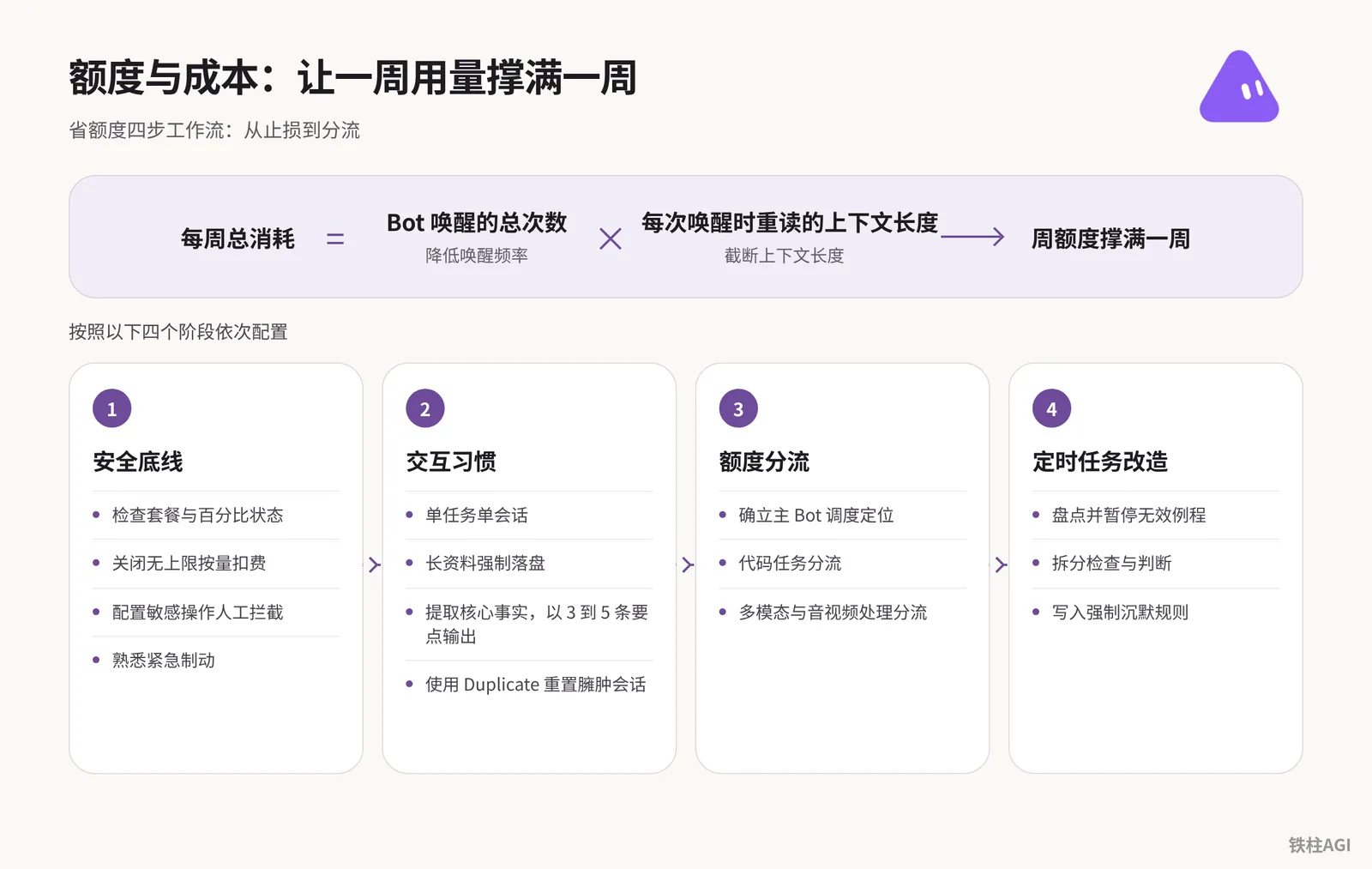
Running out of quota by Tuesday and getting billed hundreds of dollars is often caused by idling compute. Every time the Bot is awakened, it rereads the entire history, bloating to hundreds of thousands of tokens within hours.
To steadily make it through the week, do these three things well:
- Turn off on-demand billing in the background.
- Reduce high-frequency polling and multi-Bot cross-talk.
- Keep sessions tight and stop dumping large files into the chat box.
How Does Grok Bot Quota Billing Work?
Grok Bot bills based on tokens consumed per call. Its core mechanism is a single long-running conversation where every reply or wake-up rereads the entire historical context in full; total consumption equals the number of wake-ups multiplied by the context length reread each time.
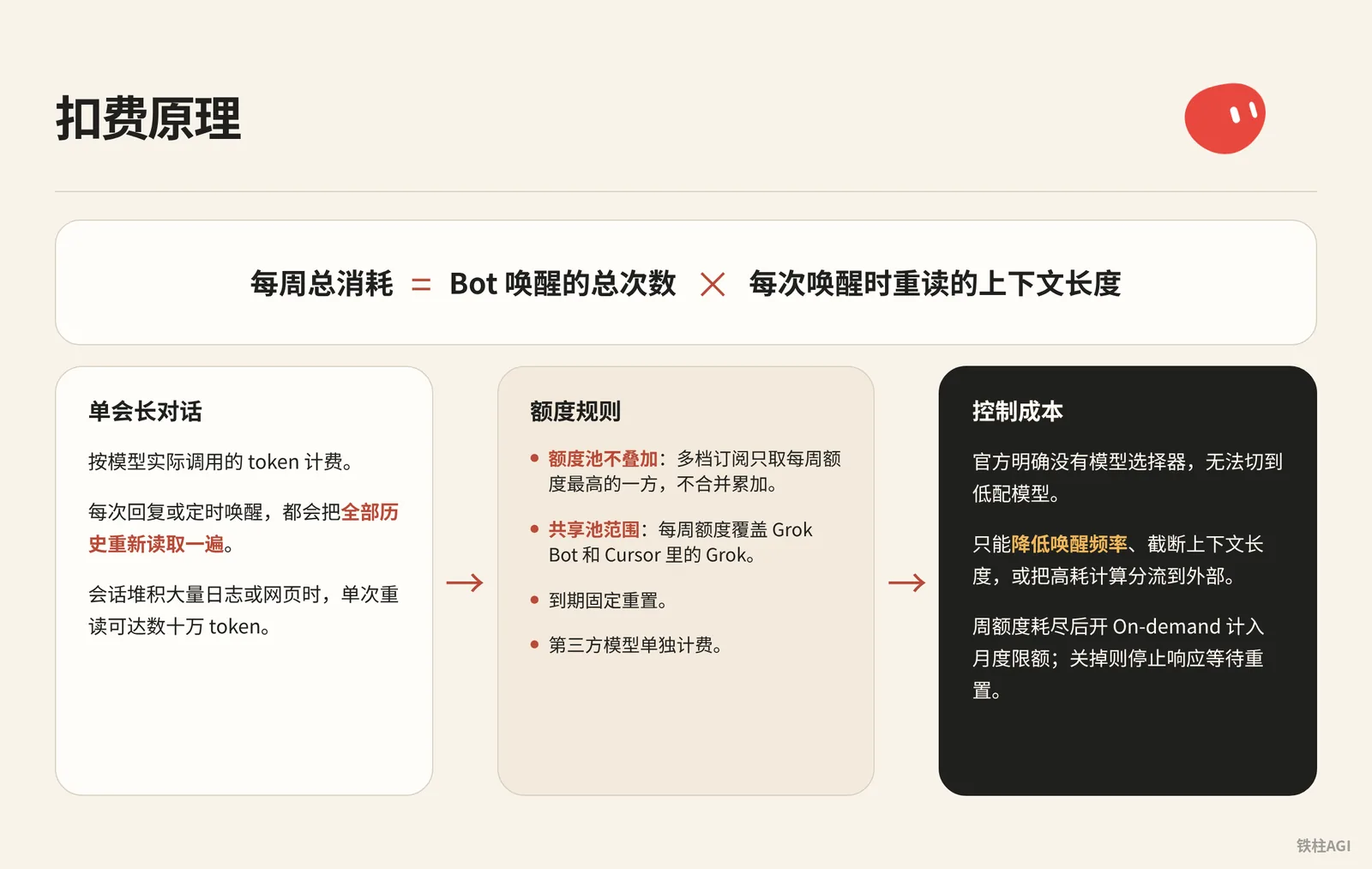
Grok Bot bills based on the tokens actually called by the model. Its core mechanism is a single long-running conversation: every reply or scheduled wake-up rereads the entire history from scratch.
每周总消耗 = Bot 唤醒的总次数 × 每次唤醒时重读的上下文长度When a session accumulates a massive amount of logs or web pages, a single reread can reach hundreds of thousands of tokens—replying with a single sentence is still billed at full context length.
For community teardowns, see How to Stop Your Grok Bot From Eating a Week of Usage in a Day|Fan Grok Bot Radar.
Starting October 12, 2026, The X Subscription unified subscription plan has been implemented. The tier standards are as follows:
| Plan Tier | Individual Subscription Price | Team Seat Price | Quota Multiplier & Grok Bot Access |
|---|---|---|---|
| Free | $0 | N/A | Limited, does not include full Bot |
| Plus | $8/mo ($80/yr) | N/A | Base, explicitly does not include Grok Bot |
| Premium | $30/mo ($300/yr) | $30/seat/mo | 4x, includes Grok Bot |
| Super | $100/mo ($1000/yr) | $100/seat/mo | 15x, includes Grok Bot |
| Ultra | $200/mo ($2000/yr) | $200/seat/mo | 50x, includes Grok Bot |
For quota rules, see Cursor Official Guide: Plans and Billing. There are several hard limitations in daily use:
- Quota pools do not stack: Across multiple subscription tiers, only the one with the highest weekly quota is used; they are not merged or accumulated.
- Shared pool scope: The weekly quota covers Grok Bot and Grok in Cursor, as well as the web client, mobile app, Imagine, and Voice, resetting at a fixed time upon expiration.
- Third-party models are billed separately: Calling non-Grok models within Cursor is billed directly on a pay-as-you-go basis.
- On-demand billing and monthly limits: Once the weekly quota is exhausted, enabling On-demand counts towards the Monthly Limit; tasks that exceed the limit will still finish running; turning it off stops responses until the reset.
The official stance clearly states that there is no model picker, making it impossible to switch to lower-tier models. The only ways to control costs are to reduce wake-up frequency, truncate context length, or offload compute-heavy tasks externally.
What Are the Common High-Quota Traps for Grok Bot?
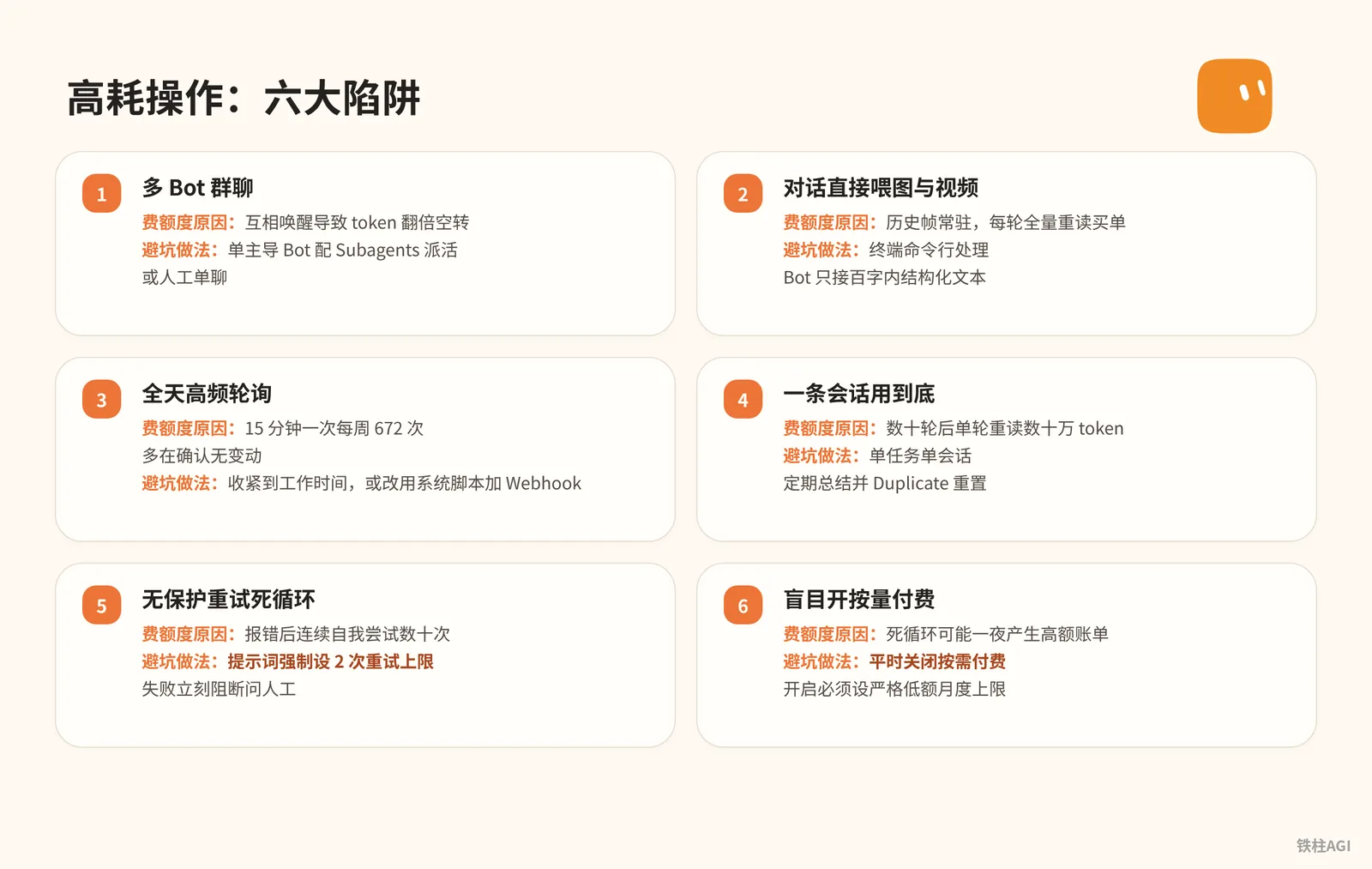
You must strictly avoid multi-Bot group chats, feeding images and videos directly into the conversation, 24/7 high-frequency polling, using a single long conversation indefinitely, unprotected retry deadloops, and blindly enabling on-demand billing without setting a monthly cap.
Reference sources: 4.1 Quota & Cost: Quota-Saving Checklist, Grok Bot Quota Ultra-Long Battery Life Step-by-Step Beginner's Guide (Send Directly to Bot!).
| High-Consumption Operation | Why It Burns Quota | Best Practice to Avoid |
|---|---|---|
| Multi-Bot group chat | Mutual wake-ups cause token multiplication and idling | Use a single leading Bot with Subagents to delegate tasks, or manual 1-on-1 chats |
| Feeding images and videos directly into conversation | Historical frames stay permanently; each turn pays for full context reread | Process via terminal command line; Bot only receives structured text under 100 words |
| 24/7 high-frequency polling | Every 15 minutes equals 672 times/week, mostly confirming no changes | Narrow down to working hours, or switch to system scripts plus Webhooks |
| Using a single session indefinitely | After dozens of turns, a single turn rereads hundreds of thousands of tokens | One task per session; regularly summarize and reset via Duplicate |
| Unprotected retry deadloop | Continuously retrying tens of times after an error | Strictly set a 2-retry limit in prompts; block immediately on failure to ask human |
| Blindly enabling pay-as-you-go | An infinite loop can rack up huge bills overnight | Keep on-demand billing off normally; if enabled, set a strictly low monthly limit |
Four-Step Quota-Saving Workflow: From Loss Prevention to Offloading
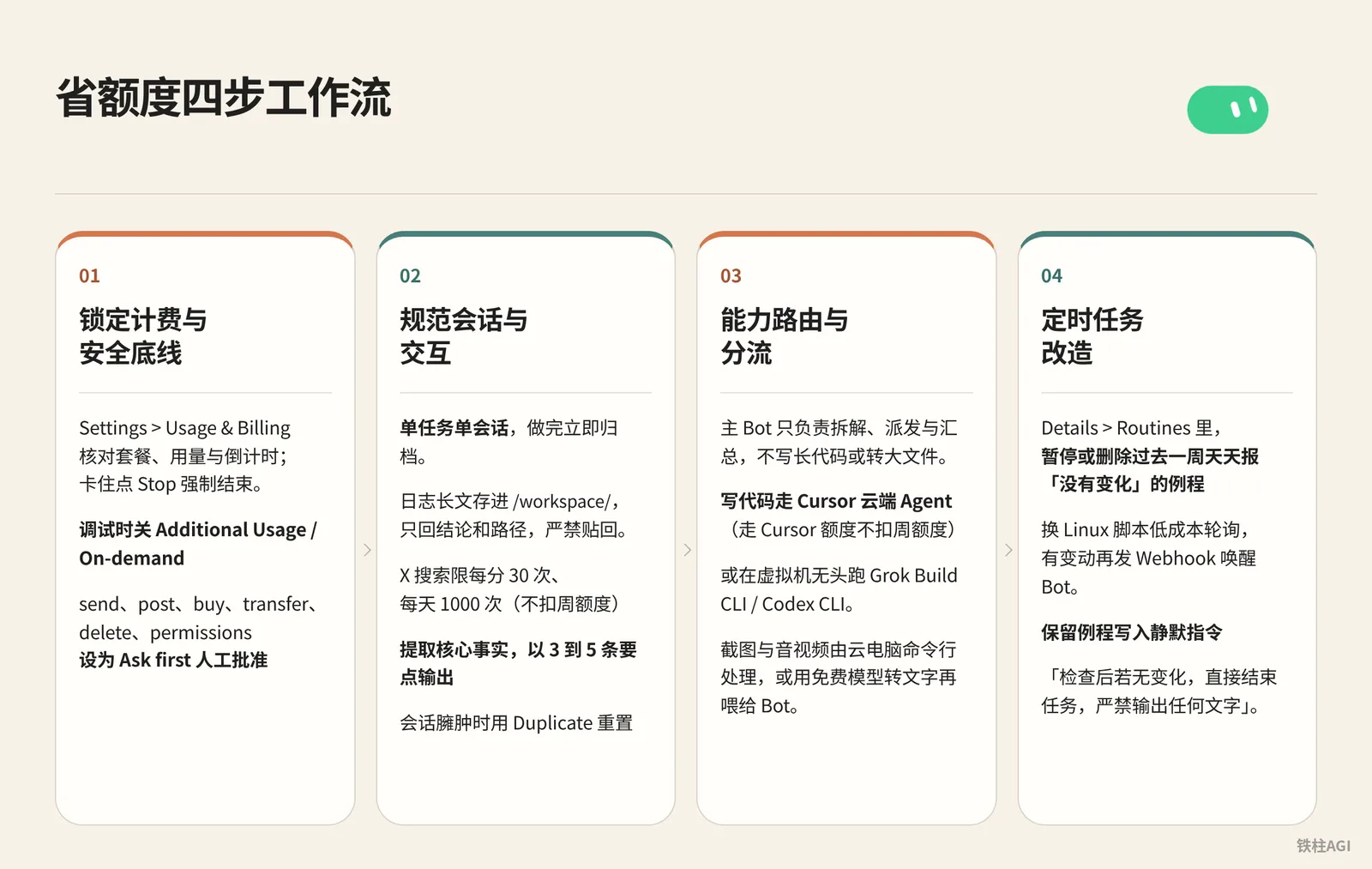
Lock In Billing and Safety Baselines
- Go to Settings > Usage & Billing to check your plan (Premium $30/mo or Super $100/mo), usage, and countdown; if stuck, click Stop to force-quit.
- Turn off Additional Usage / On-demand during debugging; if enabled, go to cursor.com/dashboard > Spending > Monthly Limit to set a monthly cap ($10–$20).
- Go to Settings > General > Auto-review, and set send, post, buy, transfer, delete, and permissions to Ask first for manual approval.
Standardize Sessions and Interactions
- One task per session, archive immediately once completed.
- Save long logs into
/workspace/, return only conclusions and paths, and strictly forbid pasting them back. - X search is limited to 30 times per minute and 1,000 times per day (does not consume weekly quota); constrain the Bot to "extract core facts and output in 3 to 5 key bullet points".
- When a session gets bloated, reset it using Duplicate: first have the old Bot write a summary within 10 lines, copy and send it to the new Bot to take over, and hide the old Bot.
Capability Routing and Offloading
- The primary Bot is only responsible for breakdown, dispatch, and aggregation; it does not write long code or convert large files.
- Write code via the Cursor cloud Agent (uses Cursor quota without deducting weekly quota), or run Grok Build CLI / Codex CLI headlessly in a virtual machine.
- Handle screenshots, audio, and video via the cloud computer command line, or transcribe them to text using free models before feeding them to the Bot.
Scheduled Task Refactoring
- In Details > Routines, pause or delete routines that reported "no change" every day over the past week.
- Switch to Linux scripts for low-cost polling, sending a Webhook to wake up the Bot only when changes occur.
- Add a silence directive to retained routines: "After checking, if there is no change, terminate the task directly; strictly forbid outputting any text."
Reference: 4.1 Quota & Cost: Quota-Saving Checklist
Deep Optimization of Routines and Polling: Say Goodbye to Ineffective Idling
Routines are hidden quota black holes; high-frequency polling can burn through an entire week's allowance in a single day.
Frequency Convergence and Execution Window Control
First check in the client whether the Bot's Timezone matches your local time. The consumption of different schedule settings is as follows:
| Schedule Setting | Weekly Runs | Applicable Scenarios |
|---|---|---|
| Every 15 minutes (24/7) | 672 runs | Highly prone to exhausting quota in 1–2 days; rarely needed |
| Once every hour (24/7) | 168 runs | Mission-critical infrastructure fault monitoring |
| Weekdays 9:00 to 17:00 hourly | 45 runs | Kanban tracking, ticket processing, and email sorting |
| 3 times per weekday | 15 runs | Daily inbox morning/noon/evening screening, progress follow-up |
| Once per week | 1 run | Industry weekly reports, tech trend summaries, and document archiving |
To limit to working hours, standard cron format can be used:
CRON_TZ=Asia/Shanghai 0 9-17 * * 1-5This single rule reduces wake-ups by 93%. Running on the hour from 9:00 to 17:00 on weekdays in the Shanghai time zone, it triggers only 45 times a week.
Point to Skills and Strictly Enforce Silence Rules
Routine prompts should only point to skills without elaborating details:
- Use slash commands to specify the concrete skill name and target of inspection
- Provide evaluation thresholds, stopping conditions, and single-retry limits
- Remain completely silent when there is no change, sending zero messages
Pure silence can easily mask mid-way failures. For combination strategies, see Cursor Official Guide: Routines: keep high-frequency routines silent; have low-frequency routines send a single-line heartbeat log at 18:00 daily to confirm normal execution over the past day.
Dual-Role Separation: Linux cron Script Inspection plus Webhook Wake-up
While the Bot sleeps, the underlying Linux cloud computer continues running—do not make large models do mechanical comparisons.
- Checker role: System-native cron schedules a Python or Shell script to compare, taking a few seconds and consuming zero quota.
- Decider role: Once the script detects a change, it sends a Webhook to wake up the Bot for logical judgment and reporting.
Webhook wake-up steps and acceptance criteria:
- Obtain the
POST toaddress andkeyin the routine's Webhook area. - Send a POST request with an
Authorization: Bearer <key>header to that URL. - Check the response status code; returning 200 indicates successful wake-up.
Practical Cases and Avoiding Pitfalls
TieZhu refactored 6 routines for the Marketing Director Bot: 4 delivery routines were kept unchanged; 2 idling tasks that purely waited for replies and reviewed PRs were replaced with system cron scripts plus Webhooks. The script checks every half hour during weekday daytime, waking up only when there are new changes.
The refactoring took about 23 minutes, reducing 8 to 10 unnecessary wake-ups per week, while accelerating discovery of new updates to within half an hour.
Case source: Saving Even More Grok Bot Quota: Extreme Optimization of Scheduled Tasks.
Craig Hewitt burned through the Ultra weekly quota in 24 hours: Subscribed to the $200/month Cursor Ultra plan, he exhausted his entire weekly quota in a single day on August 23, 2026.
While archiving 10 years of old emails on his primary daily supervisor Bot, the API fetched email bodies and continuously appended them to the session, swelling the context to hundreds of thousands of tokens and triggering a full-context reread storm.
Case source: How to Stop Your Grok Bot From Eating a Week of Usage in a Day|Fan Grok Bot Radar.
Key takeaways to avoid pitfalls under high load: Heavy one-off tasks must never be placed on the primary Bot you chat with daily; you must create a dedicated Bot or spawn a duplicate via Duplicate; filter spam with mailbox rules prior to processing; batch tasks must be validated with 1 to 2 samples before launching.
Group Chat and Multi-Bot Control: Eliminate Mutual Wake-ups
Never pull multiple Bots into the same group chat. New messages are broadcast to all members, and every Bot rereads the full history and responds. TieZhu reported that 4 Bots chatting with each other rapidly devoured 25% of the weekly quota (unverified).
Multi-Bot collaboration must adhere to a hub-and-spoke model with no lateral chaining.
- Sole leader: Keep only one leading Bot as the interaction entry point.
- One-way delegation: The lead Bot launches Subagents or executes A2A point-to-point handoffs; subagents exit automatically upon completion without chiming in the group chat.
- Persist deliverables: Upstream writes data to files under
/workspace/, which downstream reads directly instead of discussing back and forth in the chat box. - Clean up idle Bots: Promptly delete idle Bots after verifying no routines are attached, preventing accidental wake-ups.
Source: 4.1 Quota & Cost: Quota-Saving Checklist
How to Conduct Usage Audits and Handle Exhaustion Emergencies for Grok Bot?
Spend 15 minutes the day before the weekly reset to inspect routine logs and billing; if the quota is exhausted and the front end is locked, the underlying Linux cloud computer is not destroyed—you can directly open the terminal to take over code, commit, and push manually.
Weekly 15-Minute Audit Workflow
It is recommended to spend 15 minutes checking on the day before the weekly reset:
- Open Settings > Usage & Billing to view the percentage used. If consumption is running ahead of schedule, pull up tasks from preceding days to pinpoint the abnormal date.
- Go to Details > Routines to inspect the last 20 execution records (Running, Succeeded, or Failed) to identify routines that suffered error retries or frequent idling.
- For starred primary Bots from v0.66.0 onward, explicitly forbid proactive task-taking in the description to prevent it from taking on chores on its own.
- Visit cursor.com/dashboard to verify the Monthly Limit against actual on-demand charges and ensure there are no abnormal deductions.
Monitoring Blind Spots and Countermeasures
The system does not provide consumption breakdowns for individual Bots, routines, sessions, or models, nor do the 20 run history records log tokens or monetary costs. Testing new workflows must use the controlled variable method:
- Create or modify only one Bot or routine at a time.
- Check the percentage in Usage & Billing once before and once after execution to compare the increment; avoid launching multiple new routines simultaneously.
Cloud Computer Takeover Emergency When Quota Is Exhausted
Once 100% of the weekly quota is exhausted and the front-end chat is locked, the underlying Linux cloud computer is not destroyed; you can take over by opening the desktop or system terminal via the client:
- Check undelivered code and files under the
/workspace/directory. - Manually run
git commitandgit pushto push to the remote repository. - Use local command-line tools in the terminal to take over debugging—there is absolutely no need to spend money purchasing additional usage.
Source: 4.1 Quota & Cost: Quota-Saving Checklist, Grok Bot Quota Ultra-Long Battery Life Step-by-Step Beginner's Guide (Send Directly to Bot!)
Quota-Saving Prompt Library to Send Directly to Bot
Context Bloat Prevention
- Have the Bot distill and memorize rules to save on repeating instructions in chat; for shared Bots, these can be written into About details.
请回顾我们至今的协作流程,执行两项沉淀工作:
1. 把你需要长期遵守的行为边界、汇报格式与约束规矩,提炼成一段不超过 300 字的精简文本,我将直接粘贴到你的描述(Description)中;
2. 把我们刚才已经跑通的标准操作流程,封装为一个可复用的技能(Skill),供后续例程直接调用。
完成提取后直接在对话中给出文本,不要展开多余闲聊。- Mandate saving raw logs and long materials to disk, rather than pasting them directly into the session.
从现在起执行上下文瘦身规则:
所有抓取的长篇网页、接口调试日志、大批原始数据和阶段性中间产物,一律直接保存为 /workspace/ 目录下的文本文件。在聊天窗口中回复我时,严格只提供核心结论、关键变动要点以及对应的文件绝对路径。严禁将大段原始文本或日志代码贴回对话。- Convert multimodal images to command-line parsing to avoid high consumption in the chat box.
遇到查看多张截图、分析视频画面、逐帧拉片、音频转写或处理长扫描件的任务时,严禁在当前对话框中直接读取原始多模态文件。
你应当在云电脑终端中调用系统已配置的命令行工具(如 Grok Build 或相关转录 CLI)在后台执行,并输出简明的结构化文字摘要;你只需阅读生成的文字结论。如果当前环境无法执行命令行解析,请停下提醒我先在网页端转换成文字后再发给你。
Task and Code Offloading
- Silently exit monitoring routines when there are no changes.
请列出当前你名下的全部例行任务(Routines),注明每条任务的触发频率、每周预计运行次数以及没有变化时的处理逻辑。
找出其中运行最频繁、消耗最大的任务,向我提出降低频率的具体建议;同时为所有监控类例程添加硬性约束:执行检查后若目标无实质变动,立刻静默退出,严禁向我发送「一切正常」或「没有新消息」等无有效信息的通报。- Dispatch tasks via 1-on-1 chats, and strictly forbid Bots from creating group chats to talk among themselves.
严格执行独立单聊工作模式:
只接收并执行我本人下达的直接指令。严禁在没有得到我明确授权的情况下,主动在会话中唤醒、提及或联络其他 Bot 开展群聊协同;如果任务涉及多个专业环节,请将结果写成文件并由我来负责跨 Bot 调度,或者将其派发给云电脑内的后台 CLI 工具独立运行。- Keep Bot focused on orchestration, while long code writing and debugging are offloaded to the Grok Build background CLI.
明确你的角色定位是任务调度主管,核心职责是理解目标、拆解方案、组织逻辑和验收结果。
不要在聊天窗口中直接编写整段的长篇代码,也不要通读整个大型仓库做全量重构。涉及代码编写、项目调试和环境排查的工作,统一在后台调用云电脑内已经授权的 Grok Build 命令行工具执行。执行完毕后,你仅需检查其退出状态码并将最终结论同步给我。
Search, Risk Control, and Handoff
- Save X search results to disk, and only report concise bullet points in chat.
在检索 X 平台的推文、观点或动态时,使用你自带的免费搜索能力。
搜索到的批量推文原文,请直接写入 /workspace/ 下的对应 markdown 文件中保存。在聊天框中向我汇报时,严格限制为 3 到 5 条提炼后的核心事实与推文对应链接,严禁把多条推文的大段原文搬运回聊天中。- Automations and API calls must set retry caps, forcing interruption for manual approval upon anomalies.
在执行自动化任务、网络请求或文件排查时,严格执行防死循环规则:
同一操作或相似接口调用的重试上限为 2 次。如果连续 2 次重试均未成功,或者对下一步执行动作存在疑问,立刻中断自动化流程并向我发起提问,详细说明遇到的错误原因,严禁自行无限重试或在后台空转。- Have the old Bot prepare a handoff card before Duplicate cloning, strictly limited to within 10 lines.
Search, Risk Control, and Handoff
当前会话历史较长,需要进行交接重置。请为我梳理一份 10 行以内的结构化交接总结,严格包含以下五项内容:
1. 你的角色设定与核心职责;
2. 当前正在进行的任务目标;
3. 已经达成的关键结论与做过的核心决定;
4. 下一步必须立刻执行的动作;
5. 新会话需要优先读取的关键文件绝对路径。
输出完毕后不要执行任何新任务,等待我启动新会话。- Enter a free OpenRouter key in the secret box to directly offload lightweight tasks.
请协助配置 OpenRouter 免费模型调用环境,严格遵循以下安全执行流程:
1. 在聊天框中调出系统的密钥输入弹窗向我收取 API Key,严禁让我把密钥明文发送在普通对话中;
2. 将获取到的 Key 保存到 ~/.agents/secrets/openrouter.env 文件中,环境变量名指定为 OPENROUTER_API_KEY;
3. 对该密钥文件执行 chmod 600 设置安全权限;
4. 执行全程严禁在终端标准输出或聊天消息中打印该 Key 的明文内容;
5. 使用 curl 调用一个以 :free 结尾的免费模型进行一次最小文本测试,确认调用成功且费用为 0,并将测试结果告诉我。
Prototype reference: Grok Bot Quota Ultra-Long Battery Life Step-by-Step Beginner's Guide (Send Directly to Bot!)
Common Pitfalls
- Clicking Test in Details > Routines runs the actual pipeline, deducting real quota every time.
- Quotas for Cursor and SuperGrok do not stack; only the one with the higher weekly allowance counts, leaving the other idle.
- grok.com and Grok Bot are billed independently; top-ups on the web version cannot be deducted against usage and are non-refundable.
- Pasting API keys or Webhooks into the chat box consumes tokens and poses security risks; you must use the secure popup dialog to write environment variables.
- Clicking "Update Computer" wipes Linux cron jobs while preserving
/workspace/; cron must be reinstalled after updating. - Duplicate discards conversations, learned memory, and attachments; you must manually feed context to the new Bot.
- Once Monthly Limit is triggered, it does not kill running processes; long-running tasks will finish, so infinite loops can still exceed limits.
How to Verify Completion
- Go to Settings > Usage & Billing and cursor.com/dashboard to check billing, confirm you see the percentage used and the reset countdown, and turn off Additional Usage or set Monthly Limit to a safe low value.
- Have the Bot simulate file deletion or outbound network requests; it must pop up an Ask first approval card and suspend execution pending approval, never executing silently.
- Check the current session and dispatch a multi-tweet X search: ensure no dozens-of-turns long conversation lingers in the sidebar, only 3 to 5 summary points are returned, long text is saved to
/workspace/, and raw text does not flood the chat dialog. - Go to Details > Routines and click Test on a monitoring routine with no changes: verify that it silently exits after checking, without sending superfluous "no updates" chatter.
- Have the Bot write code with multi-file dependencies: verify that it calls Grok Build or the cloud Agent in the background, outputting only the final status and execution summary without pasting screenfuls of code into the chat box.
Further Reading
Related Chapters
- Chapter 2 Plans and Subscriptions: Choosing the Right Tier First
- Chapter 8 Skills and Routines: Turning a Single Success into Daily Automation
- Chapter 20 Reliable Automation: Scheduling, Webhooks, and Event Triggers
- Chapter 25 Frequently Asked Questions and Troubleshooting
Official Documentation and Help Center
Community Case Studies and Optimization Summaries
- 4.1 Quota & Cost: Quota-Saving Checklist
- Hangzhou Offline Meetup Playback: How I Made Grok Bot Quota Last Longer
- Saving Even More Grok Bot Quota: Extreme Optimization of Scheduled Tasks
- Grok Bot Quota Ultra-Long Battery Life Step-by-Step Beginner's Guide (Send Directly to Bot!)
- How to Stop Your Grok Bot From Eating a Week of Usage in a Day|Fan Grok Bot Radar