Chapter 1 What Is Grok Bot: An AI Colleague with Its Own Computer
Traditional web chats cannot accumulate assets—closing your laptop immediately interrupts the task. When facing cross-software tool calls and continuous monitoring, humans remain tethered to their computers, clicking mechanically.
This chapter covers four core topics:
- Its operational mechanism and the physical boundaries of the shared cloud computer;
- Task types suitable and unsuitable for it to undertake;
- Key differences in selection between it and other resident agents on the market;
- Writing standardized job descriptions and establishing human approval gates to prevent unauthorized actions.
What Is the Underlying Mechanism of Grok Bot?
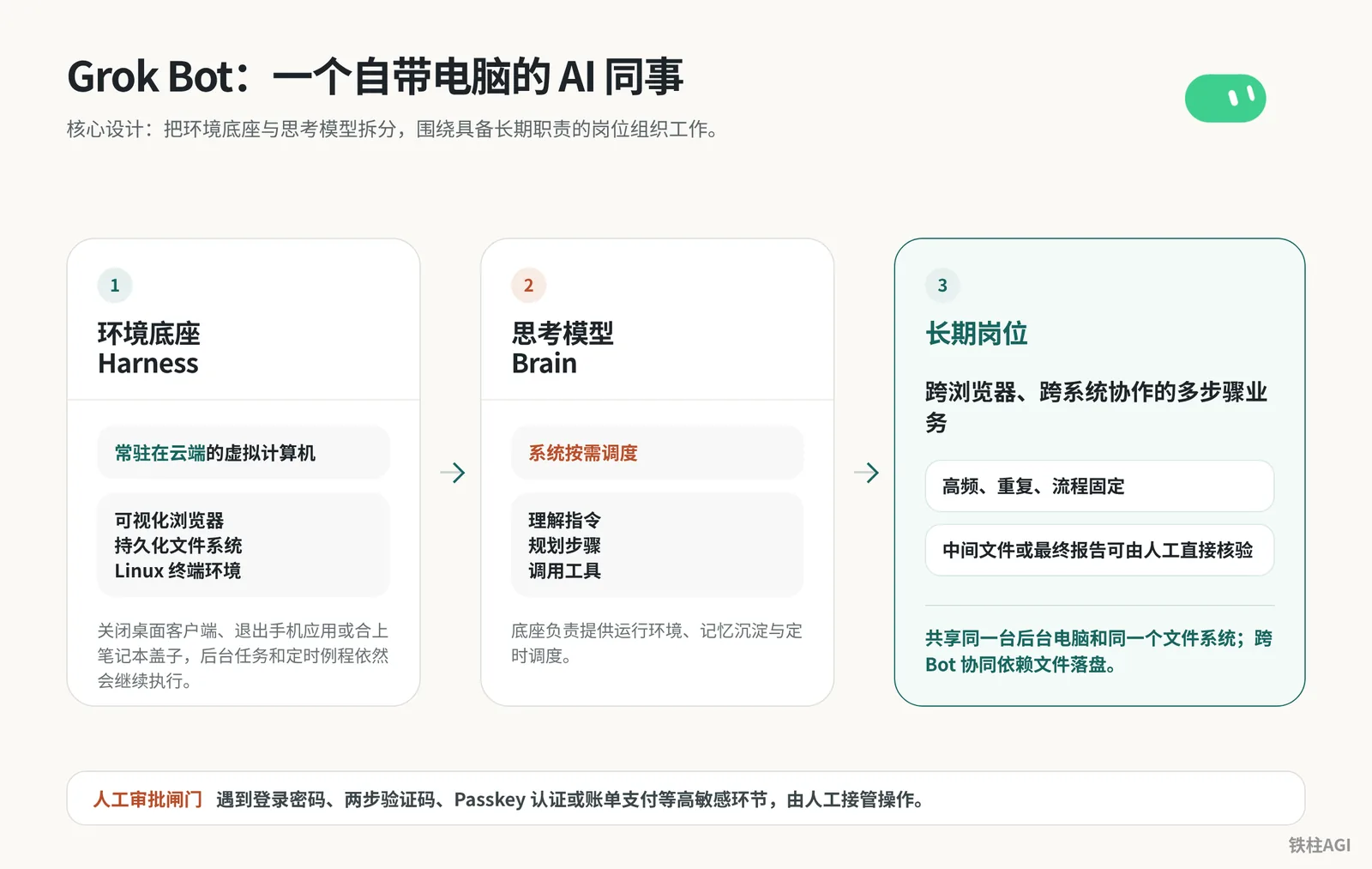
At its core, Grok Bot decouples a resident cloud-based Linux harness from an on-demand scheduled thinking model. Equipped with a terminal, a browser, and persistent files, background tasks can continue running on the cloud computer even when your computer is shut down and the lid is closed.
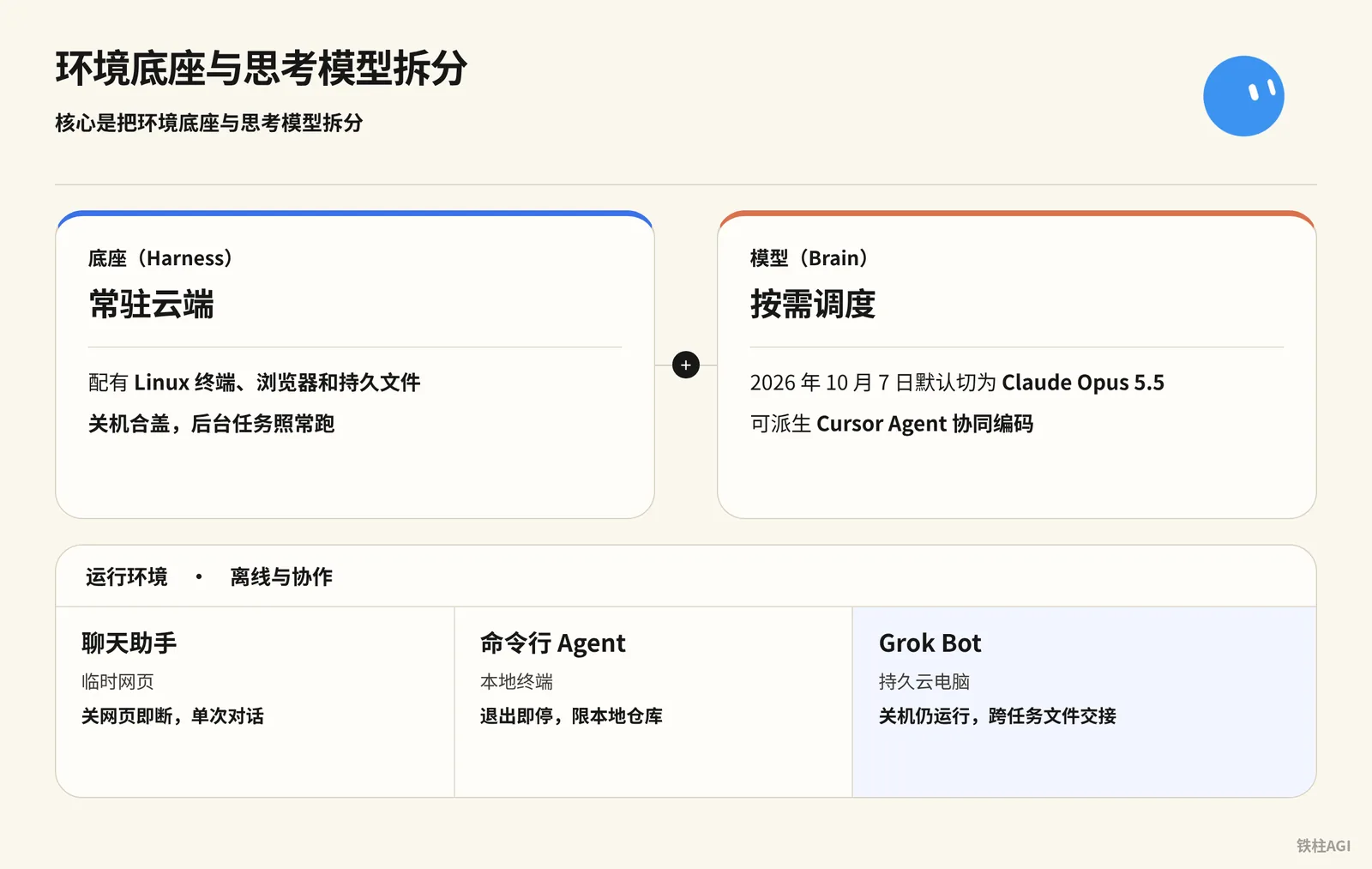
xAI and Cursor launched Grok Bot on August 11, 2026; its core lies in decoupling the environment harness from the thinking model.
- Harness (Base): Resident in the cloud, equipped with a Linux terminal, browser, and persistent files. Shut down and close the lid, and background tasks run as usual.
- Brain (Model): Scheduled on demand, not tied to a single model, and cannot be viewed or specified. Starting October 7, 2026, tasks may be routed to models such as Claude Opus 5.5, or spawn a Cursor Agent for collaborative coding.
| Tool | Runtime Environment | Offline & Collaboration |
|---|---|---|
| Chat Assistant | Ephemeral Webpage | Disconnects upon closing webpage, single session |
| Command-Line Agent | Local Terminal | Stops upon exit, limited to local repository |
| Grok Bot | Persistent Cloud Computer | Keeps running when powered off, cross-task file handoffs |
For mechanism details, refer to 1.1 What Is Grok Bot: At a Glance.
How Does the Grok Bot Shared Cloud Computer Handle Isolation and Takeover?
All Bots under the same account share the cloud computer and cannot isolate paths or cookies. Cross-task handoffs require saving files in /workspace. When encountering operations like password entry or payment, click Take over for manual takeover.
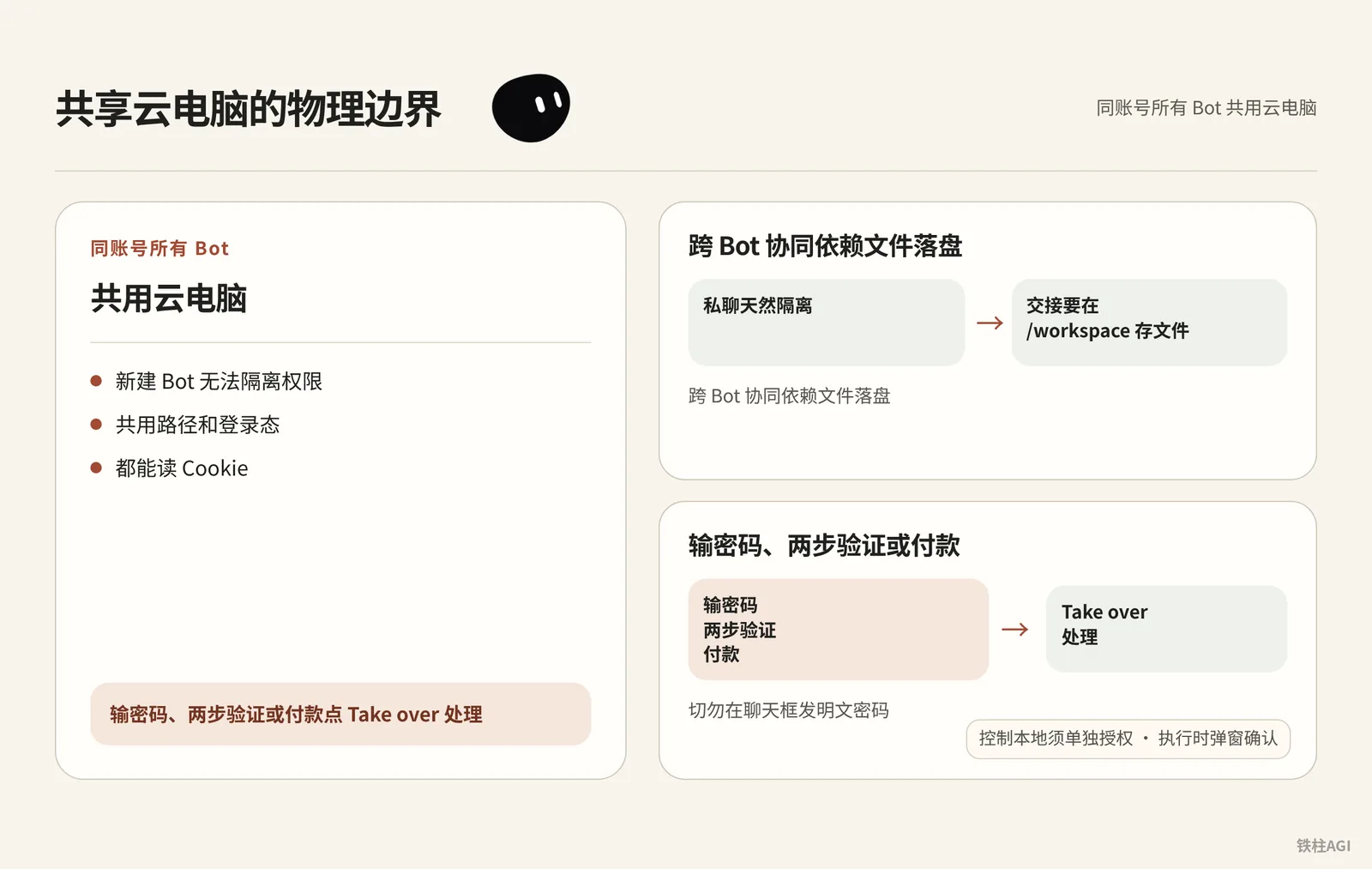
All Bots under the same account share the cloud computer. The Heavy tier was tested with a Xeon 8-core 8-thread processor, 16GB RAM, and a 128GB disk (unverified; subject to official specs). Version v0.68.1 upgraded the resolution to 1920×1200.
For specifications, see Grok Bot Computer and Apps Documentation.
- Creating a new Bot cannot isolate permissions. They share paths and login states, and all can read cookies.
- Cross-Bot collaboration relies on persisting files to disk. Private chats are naturally isolated; handoffs require saving files to
/workspace. - For password entry, 2FA, or payments, click Take over to handle them. Never send plaintext passwords in the chat box.
- Controlling the local machine requires separate authorization. Isolated from your local machine, enable it under Settings → General → Agent → Execution on Local Computer, which will prompt a pop-up confirmation during execution.
Which Tasks Are Suitable and Unsuitable for Grok Bot?
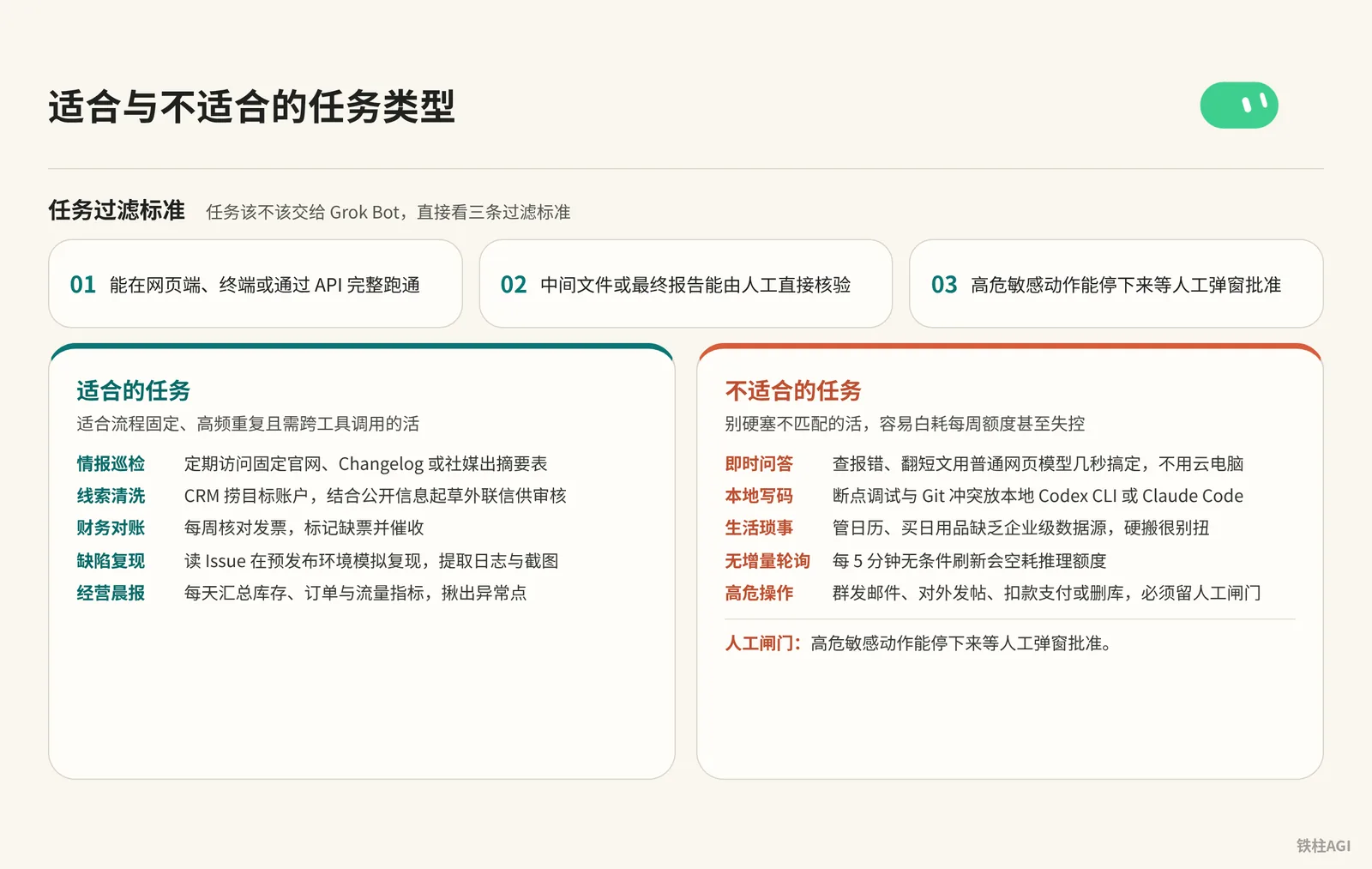
Grok Bot is well-suited for tasks with fixed workflows, high frequency, and cross-tool calls—such as intelligence monitoring and bug reproduction—but is unsuitable for instant Q&A, local coding, and high-risk operations without human gates.
Task Filtering Criteria
To determine whether a task should be assigned to Grok Bot, simply evaluate it against three filtering criteria:
- It can run completely end-to-end via web, terminal, or API;
- Intermediate files or final reports can be directly verified by humans;
- High-risk, sensitive actions can pause and wait for human pop-up approval.
Suitable Tasks
Suitable for work with fixed workflows, high repetition, and cross-tool calls.
- Intelligence monitoring: Periodically visit designated official websites to generate summary tables.
- Lead cleaning: Fetch target accounts from CRM, combine with public information to draft outreach emails for review.
- Financial reconciliation: Reconcile invoices weekly, flag missing invoices, and send payment reminders.
- Bug reproduction: Read issues, reproduce them in staging environments, and extract logs and screenshots.
- Morning business report: Aggregate inventory metrics daily and pinpoint anomalies.
Unsuitable Tasks
Do not force-fit incompatible tasks; they easily waste weekly quotas or even spiral out of control.
- Instant Q&A: Querying errors takes only seconds with standard web models; no cloud computer is needed.
- Local coding: Leave breakpoint debugging and Git conflicts to local Codex CLI or Claude Code.
- Daily personal chores: Calendar management lacks enterprise data sources and feels awkward to force into this setup.
- Non-incremental polling: Unconditionally refreshing every 5 minutes will waste inference quotas for nothing.
- High-risk operations: Mass mailing and deleting databases must retain human gates.
For planning methods, refer to 1.2 How to Choose Between Grok Bot, Muse, Hermes, dots, and Cue.
Selection Comparison: Horizontal Comparison of Grok Bot and Mainstream Resident Agents
Prebuilt vs. Custom-Built Systems
Choosing a resident agent mainly comes down to wanting peace of mind versus liking to tinker. Out-of-the-box prebuilt systems (Grok Bot, Muse) eliminate deployment headaches but are subject to platform quota limits; custom rigs (Hermes) connect to open-source models with no quota constraints, but you must fix environment errors yourself.
Mainstream Resident Agent Characteristics and Selection Comparison
| Product | Harness & Barrier to Entry | Features & Applicable Scenarios |
|---|---|---|
| Grok Bot | Shared Linux cloud computer. Implements The X Subscription unified plan starting 2026-10-12 (Premium $30/month, Super $100/month, Ultra $200/month); the Plus tier does not include Bot; client v0.70.2 supports standalone email and connection cards | 24/7 resident, supports routines and skills, asynchronous file handoffs across multiple Bots, and searches X. Suitable for zero-maintenance operations, multi-role collaboration, monitoring, and reconciliation |
| OpenAI dots | Personal resident cloud computer, ChatGPT Pro and Business Premium include the first dot | Powered by GPT-6 Astra (dots launched on 2026-09-29), runs in the background connected to over 4,000 apps, focusing on daily companionship and lightweight errands |
| Manus Cue | Dedicated cloud computer, currently in early access | Tested hands-on by Tiezhu on 2026-09-29; natively equipped with dedicated collaborative email, phone, and wallet; autonomously executes registrations and purchases; offers extremely high autonomy alongside operational risks |
| Meta Muse | Meta-hosted cloud agent, evaluated by Captain Nuoya as family-ecosystem oriented | Deeply tied to Meta's social network and hardware; suitable for daily family life and social assistance |
| Hermes | Local or private server, open-source self-hosted | Freely swap open-source models with no commercial quota limits. Suitable for local sensitive data pipelines, requires configuring the environment and troubleshooting on your own |
For a detailed tweet comparison, refer to Tiezhu's Tweet Collection #4: Community, Ecosystem, and Competitive Comparison.
Deconstruction of Typical Practical Cases
Jin Chenma's Director of Intelligence (Individual Research Role)
Jin Chenma (@jinchenma_ai) previously outlined long-term role rules in the Description under Edit Profile (this menu has been removed; see Chapter 3 for current practices), defining the role as an intelligence researcher. Tasks are dispatched covering five key elements—results, sources, constraints, format, and confirmation points—searching long posts on X while distinguishing video posts and noting impression metrics; fabricating data without first-hand sources is strictly prohibited.
After correcting the format the first time, instructed the Bot to consolidate the workflow into a Skill titled "AI Tutorial Intelligence Gathering".
After testing and validating with a second set of inputs, configured a Routine set to automatically run reports every weekday morning at 8:10 AM; created a new "Content Director" to review topics, with initial drafts saved to /workspace/grokbot-demo/.
Job descriptions institutionalize long-term rules, while ad-hoc requirements are sent via messages; multiple Bots decouple through file persistence in /workspace.
For details, see 10,000-Word Guide | Grok Bot from Beginner to Master | Jin Chenma.
Jin Chenma's E-commerce Operations Team (Multi-Role Pipeline)
The team is coordinated across 4 Bots. First, a "Store Operations Duty Bot" was created to read product tables, inventory tables, and order tables to generate morning reports, strictly enforcing a read-only redline: modifying prices or inventory is strictly forbidden, as is sending messages or issuing refunds.
The original duty bot was upgraded to "E-commerce Operations Supervisor," splitting out a Content Growth Specialist, Product Inventory Analyst, and Order After-Sales Assistant, with data saved to /workspace/ecommerce-ops/日期/. When a blockbuster product has only 3 days of inventory remaining, the content specialist pauses promotion, the after-sales assistant prepares delay communication scripts, and the supervisor compiles a decision list.
Do not start by building a massive team right away; lock all operations involving funds, inventory, and external messaging behind human approval.
Tiezhu's Open-Source Repository Admin Bot (Automated Operations and Maintenance Monitoring)
铁柱AGI (@cgnot996) built a resident Bot to maintain the awesome-grok-bot knowledge base. The system periodically monitors posts on X, official changelogs, and technical communities, categorizing and collecting new use cases, tutorials, official documentation, and events.
Relevant materials were automatically cataloged before promotional announcements, surpassing 130+ Stars in August 2026 (author's self-report, unverified), and received an application form invitation from official staff.
Getting Started: From Activation to Your First Dedicated Bot
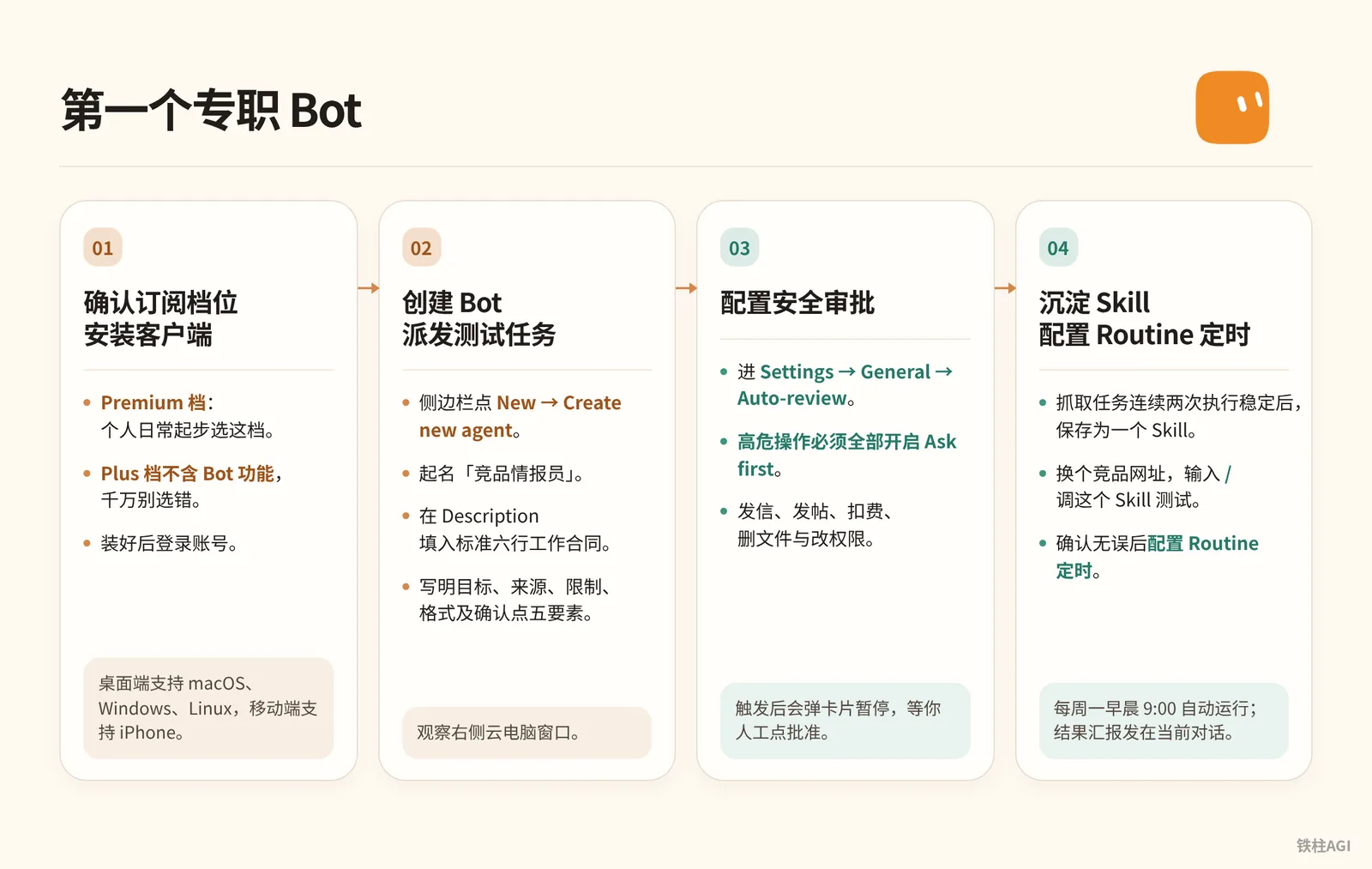
Confirming Subscription Tiers and Installing the Client
Select a tier according to The X Subscription unified plan implemented on October 12, 2026:
Premium Tier: $30/month ($300 billed annually), 4x quota pool; ideal starting choice for individual daily use.
Super Tier: $100/month ($1,000 billed annually), 15x quota pool; suitable for heavy research and multiple routines.
Ultra Tier: $200/month ($2,000 billed annually), 50x quota pool; suitable as the core workforce for high-frequency teams.
The $8/month ($80 billed annually) Plus tier does not include Bot features; make sure not to choose the wrong one. Those with an existing paid Cursor individual or team plan, a SuperGrok subscription, or a Grok Business seat can also use it directly.
The desktop client supports macOS, Windows, and Linux; mobile supports iPhone, iPad, and Android. Log into your account after installation.
Creating a Bot and Dispatching a Test Task
- Click + (or Cmd+N) in the sidebar to create a Bot, naming it "Competitor Intelligence Agent". Individual Bots no longer have a Description field, so send the following six lines in the conversation and have it remember them; for shared Bots, write them in the Description under the About details.
Own: 负责监控目标清单的每周功能更新与定价变动
Sources: Notion 中的关注名单、目标官网 Changelog 页面
Output: 不超过 8 条核心动态,附带日期与原始链接,存入 /workspace/scan.md
Approval: 严禁对外发布任何内容,严禁主动发送任何邮件
Failure: 若目标页面无法打开,在报告中明确标为数据缺失,严禁推测或编造内容
Never: 在源系统可访问时,严禁依赖自身记忆给出概括- Issue a test instruction in the chat box, specifying the five core elements: goal, sources, constraints, format, and confirmation points.
调研所附竞品清单中的前 3 个产品官网。
比对它们过去两周内的功能更新与价格调整。
跳过无任何变动的模块。
提取核心变动点,整理成 Markdown 表格,并直接保存到 /workspace/scan.md。
在对话框中仅回复处理状态与保存路径;不要对外发送任何通知,不要擅自更改系统设置。- Observe the cloud computer window on the right. The Bot will automatically launch the cloud browser to extract pages and write content to the specified file.
Configuring Safety Approvals and Scheduled Routines
Go to Settings → General → Auto-review; Ask first must be enabled for all high-risk operations.
Strictly gate sending messages (
send), posting (post), charges (buy), deleting files (delete, including/workspaceor local files), and modifying permissions (permissions). When triggered, a card will pop up to pause execution until you manually click approve.After the scraping task runs stably twice in a row, send the consolidation instruction in the chat box:
把刚才已经跑通的竞品页面抓取与格式整理流程保存为一个 Skill,名称叫「竞品动态巡检」。
写清调用条件、所需权限、抓取步骤、异常报错逻辑与产出文件格式。- Switch to another competitor URL and type
/to invoke and test this Skill. Once verified, configure a scheduled Routine set to run automatically every Monday at 9:00 AM, sending the summary report to the current chat and storing the detailed report in/workspace.
Common Pitfalls
Architecture and Safety
- Do not blindly follow the 29-Bot architecture circulating in the community (Melvin Vivas's self-report, unverified); homogeneous Bots easily become chaotic and waste quota. Do not create a second Bot until the first role is running smoothly.
- All Bots share the cloud computer and file system; scrapers can read
/workspaceand cookies. Security control relies entirely on the Ask first human approval gate. - Never send account credentials and passwords in the chat box. When encountering a login screen, bring up the right-side screen and click the Take over button to log in manually.
Resources and Expectations
- The $8/month Plus tier does not include Bot access; be sure to choose the Premium tier starting at $30/month.
- Setting a Routine to poll every 5 or 10 minutes will drain your weekly quota pool. Lengthen the interval between scheduled tasks and add exit logic when no updates are found.
- Do not uncritically believe Alex Finn's profitability or 0xkvro's cost reduction claims (self-reported, unverified); base your business decisions on verified, working metrics.
How to Verify Completion
- Click the Bot in the sidebar to enter chat, send a message to expand the 1920×1200 real-time desktop; go to Usage & Billing to confirm the plan is Premium, Super, or Ultra, and that the progress bar displays normally.
- The six-line contract must fully specify responsibilities, data sources, deliverables, approval redlines, and missing-data fallbacks (six-line hard constraints). For personal Bots, send it in chat for the Bot to remember; for shared Bots, enter it in the About details. Test it with dead links: it must honestly report missing data and never hallucinate numbers.
- In Settings → General → Auto-review, set
send,post,buy,delete, andpermissionsto Ask first. When testing message sending or file deletion, an approval card must pop up to wait for human confirmation. - Right-click Test run on the Routine; once it succeeds, close your laptop lid and exit the software. Reopen it when the scheduled time arrives to check alerts, enter
/workspaceon the cloud computer, and verify that the Markdown or CSV file is updated with the latest timestamp.
Further Reading
Related Chapters
- Chapter 5 Shared Cloud Computer: Files, Browser, and Takeover
- Chapter 6 Memory: Making the Bot Understand You Better Over Time
- Chapter 7 Connecting Apps: Plugins, Email, and Secrets
- Chapter 11 Permissions, Safety, and Human Gates
- What Is the Difference Between Grok and Grok Bot
- Chapter 2 Plans and Subscriptions: Choosing the Right Tier First
Official Pages and Documentation
- Grok Bot Quickstart Guide
- Using Grok Bot: Computers, Apps, and Tasks
- Grok Bot Use Cases and Typical Roles
- Grok Bot for Teams and Enterprises
- Grok Bot Plans and Billing Guide
- Team Bot Usage Guidelines
- Grok Bot Security Architecture and Auto-review Rules