Chapter 9 Group Chats & Team Bots: From One Bot to a Group of Bots
Don't cram all the work into a single Bot, and don't invite multiple Bots into a group chat. Multiple Bots tend to talk over each other, trigger cyclic wake-ups, and deplete your entire weekly quota. Furthermore, personal Bots cannot collaborate when added to Slack.
- Use a coordinator Bot as a single entry point, relying on shared files between local and cloud machines to hand off tasks.
- Publish a Team Bot when organizational experience needs to be shared across the entire team.
- Manage usage strictly according to the unified The X Subscription mechanism effective 2026-10-12.
Group Chat Mechanics and Interaction Rules: How Multiple Bots Collaborate in the Same Conversation
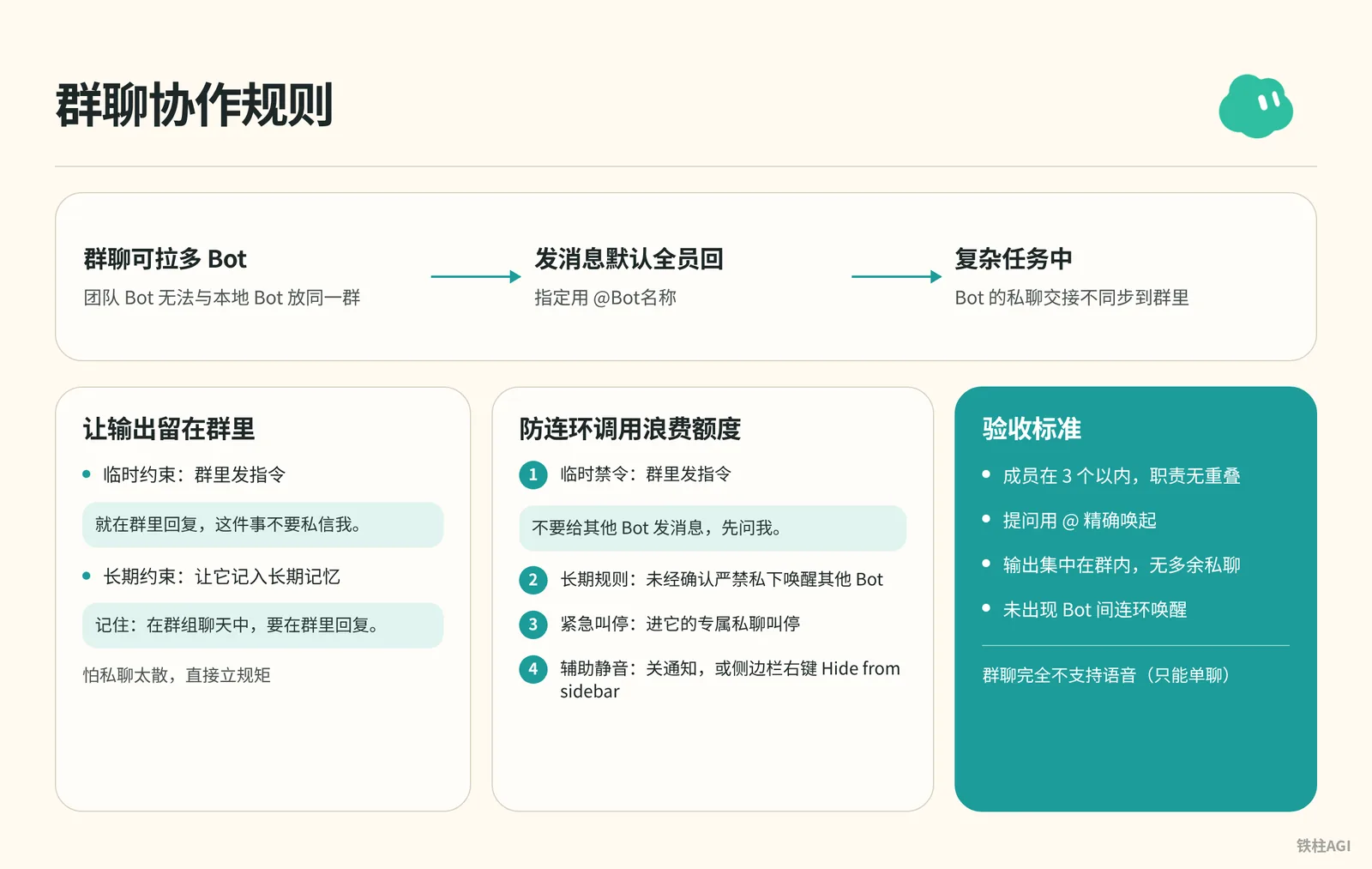
You can invite multiple Bots into a group chat, but Team Bots cannot be placed in the same group as local Bots.
By default, sending a message prompts all members to reply; use @Bot名称 to specify a recipient. For complex tasks, handoffs between Bots via direct messages are not synced to the group chat.
If you are worried about DMs becoming fragmented, set ground rules directly:
- Temporary constraint: Issue an instruction in the group chat.
就在群里回复,这件事不要私信我。- Long-term constraint: Have it record this into its long-term memory.
记住:在群组聊天中,要在群里回复。The system lacks a one-click toggle to disable Bot-to-Bot chats. Here are several tactics to prevent chained invocations from wasting quota:
- Temporary prohibition: Issue an instruction in the group chat.
不要给其他 Bot 发消息,先问我。- Long-term rule: Require that waking up other Bots privately without confirmation is strictly prohibited.
- Emergency stop: If it won't stop, enter its dedicated DM to stop it.
- Auxiliary muting: Turn off notifications, or right-click in the sidebar and select Hide from sidebar.
Management and limitations:
- Renaming and changing directions: Right-click Rename chat (on mobile, tap the group name and select Edit name); to change direction, explain directly in the group.
- Functional limitations: Group chats do not support voice at all (only available in 1-on-1 chats), and notifications cannot be toggled for individual Bots.
Acceptance criteria:
- Keep members to 3 or fewer, with no overlapping responsibilities.
- Questions use
@to wake up Bots precisely. - Outputs are consolidated within the group chat, with no superfluous DMs.
- No cascading Bot-to-Bot wake-ups occur.
Bot-to-Bot Communication and Slack Permission Routing
A Bot can only send cross-bot messages when representing a specific person. Personal Bots have no representative authority in public Threads and cannot wake up other Bots; when @mentioned, a Team Bot assumes the identity of the person asking the question, delegates the task to their dedicated personal Bot, and sends the results back to the same Thread.
| Bot Type | Query Location | Cross-Bot Permission | Represents | Reply Location |
|---|---|---|---|---|
| Personal Bot | In-app DM / Slack DM | Can send | Individual | In-app chat window (not Slack) |
| Personal Bot | Slack public Thread | Cannot send (prompts unable to execute) | No one | Original thread |
| Team Bot | Slack channel / DM | Can send (forwards to requester's dedicated Bot) | Questioning member | Sent back to the same Slack thread |
Detailed rules can be found in the official documentation.
Team Bot Integration and Pitfalls
- After the Team Bot is published, the owner clicks the Bot name at the top of the chat and clicks Connect under Bring to your team's Slack (displays a gray Connect after publishing when unpublished).
- If the interface prompts Awaiting admin approval, security controls are enabled; contact an administrator for approval. Once the status changes to Connected, binding is successful.
- Team members must click Link under Settings > General > Team Bots in the client to link their accounts before using it. If you send a message directly in Slack without linking, the Bot will only respond with a prompt to link.
Acceptance Criteria
- Multi-Bot collaboration within Slack channels is centrally orchestrated by the Team Bot.
- Team members have completed their account Link.
- Tasks close the loop within the Thread, without disruptions or permission errors.
End-to-End Team Bot Configuration: Creation, Publishing, and Sharing Across Members
Team Bots are created by members and shared across the entire team, with direct messages isolated from one another. It runs solely in the cloud and cannot be bound locally. Refer to the official guide.
Creating and Converting to a Team Bot
- Click New chat (+) in the sidebar and select Create new Team Bot.
- Explain your requirements, and configure public plugins, Secrets, and files.
- Rename it and fill out About. If you keep the default name and leave the description empty, other members will not be able to find the Bot in the search list.
- Click Publish to Team on the card.
For existing personal Bots, click Share > Publish to Team in the interface to clone an independent copy, generate a Slack account, and migrate secrets, memories, and routines as needed.
Searching and Invocation
- Search and list: Select Team Bots under New chat (+) to browse, or enter the first 3 characters of the name in the search box.
- Direct link: Right-click and select Copy link. All members share the same base and memory, rather than a cloned template.
- Batch distribution: Administrators check Auto-add under Manage Team Bots in the dashboard. The Bot is automatically pinned to the top of selected members' sidebars and cannot be hidden.
Permissions and Runtime Mechanics
Invoking a personal account triggers an Allow authorization prompt (Allow once for this time only, Always allow for permanent access, Skip to bypass). To reset, go to Settings > General > Team Bots and click Clear.
Approval cards only pop up in the owner's DM. In group chats and Slack, Bots can only run autonomously.
| Scenario | Runtime Environment |
|---|---|
| DMs | Default personal cloud machine (isolated machine if privacy requirements are strict) |
| Slack / Group chats | Dedicated shared virtual machine |
Acceptance Criteria
- Clear name and role description.
- Owner secrets are fully isolated.
- Can be summoned via 3-character search or direct link.
- Cross-member invocation triggers Allow authorization, with no privilege escalation risks.
1+N Primary Bot Task Delegation Pattern: Single Entry Point and Fulfillment Charters
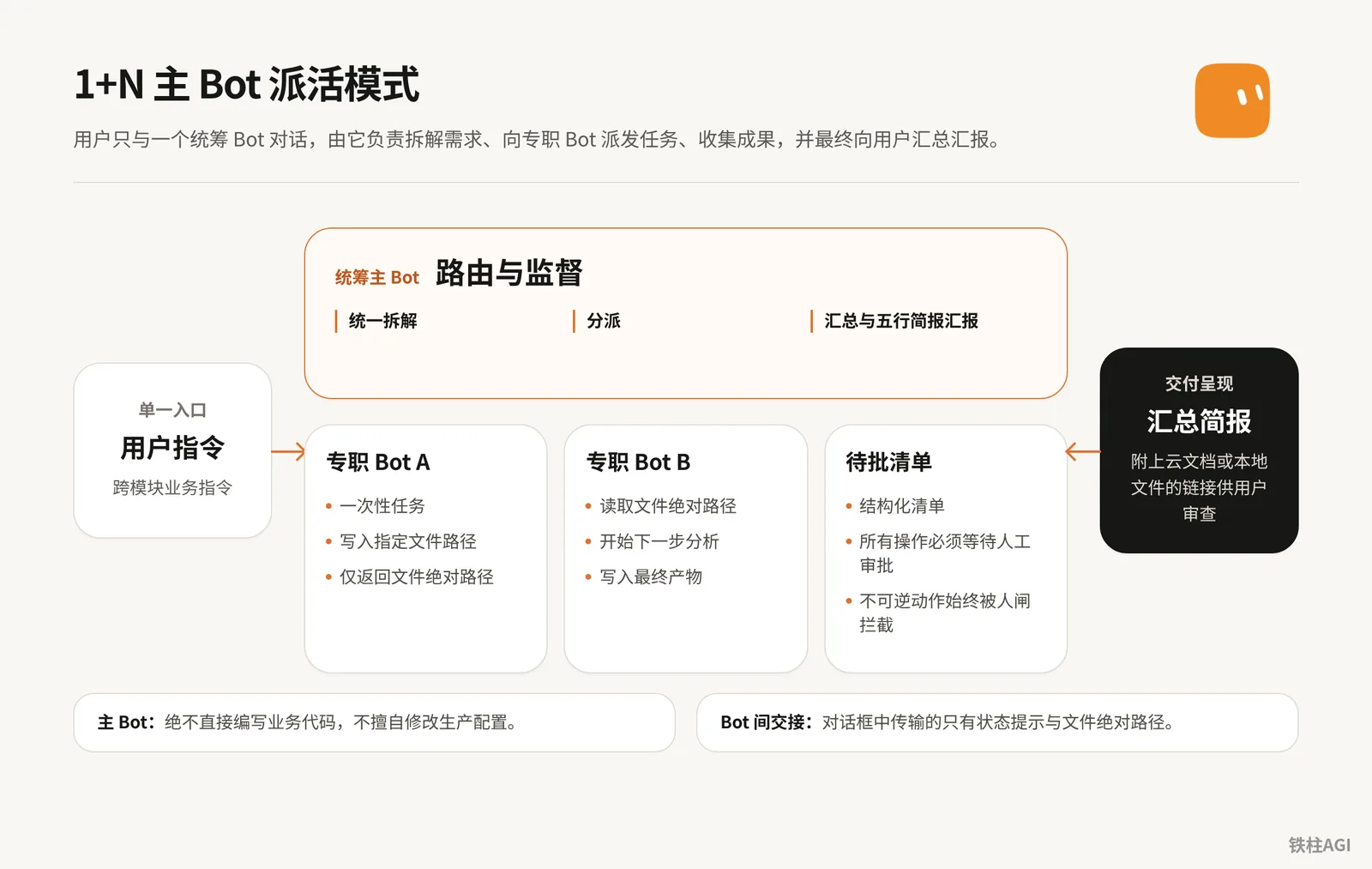
Don't let every Bot interface directly with the user. This avoids relaying messages between windows and wasting tokens in group chats.
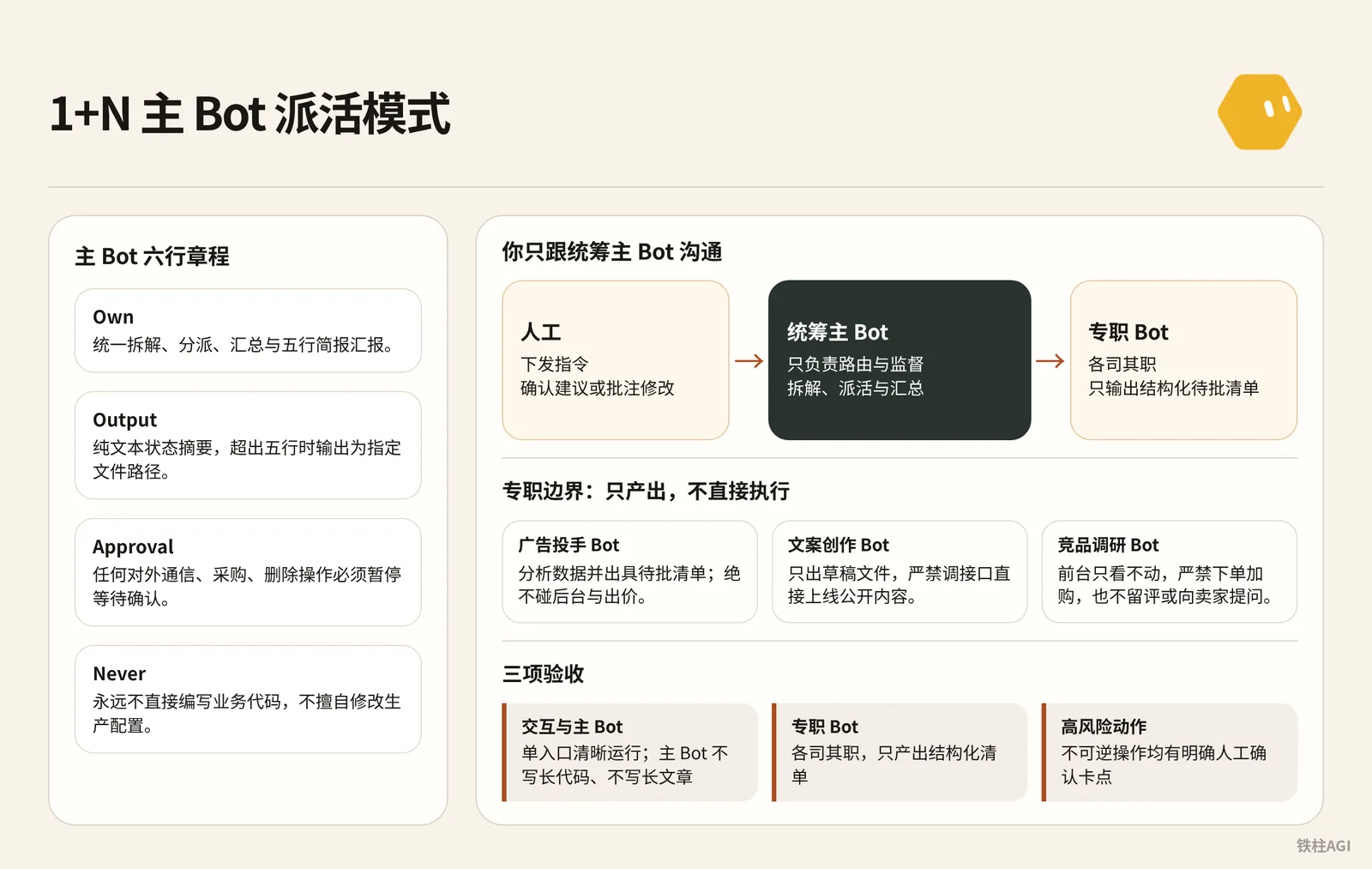
We recommend adopting the 1+N pattern where you only communicate with the primary coordinator Bot, which handles breakdown, delegation, and consolidation. See From a Single Bot to an Entire Organization: Advanced Grok Bot Usage on Connecting Local Machines, AI Division of Labor, and Knowledge Bases for details.
Six-Line Charter and Specialized Boundaries for the Primary Bot
The primary Bot is strictly responsible for routing and supervision; it must never write long code or long-form text itself. For personal Bots, send the six-line charter in chat and have it remember it; for shared Bots, write it into the Description under About. Remain silent when idle, delegate when active, and save lengthy reports as files.
For team organization standards, refer to 4.2 Team Orchestration: Charters, Roles, and Delegation.
Own: 负责需求的统一拆解、分派、汇总与五行简报汇报。
Sources: 人工下发的指令、项目看板文件。
Output: 纯文本状态摘要,超出五行时输出为指定文件路径。
Approval: 任何对外通信、采购、删除操作必须暂停等待确认。
Failure: 下游专职 Bot 报错时如实上报,不使用过期数据假装完成。
Never: 永远不直接编写业务代码,不擅自修改生产配置。
For specialized Bots, send negative boundaries in chat for them to remember (write in About details for shared Bots):
- Ad Optimizer Bot: Analyze data and issue a pending approval list, never touch the backend or bidding, never adjust budgets, and never add keywords or ad groups.
- Copywriting Bot: Only output draft files, strictly prohibited from invoking APIs to publish public content directly.
- Competitor Research Bot: Look only without taking actions on the frontend, strictly prohibited from placing orders, adding to cart, leaving reviews, or asking sellers questions, to prevent anti-scraping bans.
Media buyers can directly apply the prompt template.
Own: 负责广告投放数据诊断与策略输出。
Sources: 运营分析文件 /workspace/project/ad_data.json。
Output: 待批操作清单 /workspace/project/pending_actions.md,列出出价建议与预期影响。
Approval: 绝不直接写入广告后台,不修改出价,不修改预算,不加否定词,所有操作必须等待人工审批。
Failure: 数据缺失时明确标注缺失字段,不推测填充。
Never: 绝不执行任何后台写入与线上提交操作。
Pending Approval List and Acceptance
Specialized Bots only output structured pending approval lists, leaving decision-making to humans. For example, when the primary Bot aggregates 5 conflicting ad bid suggestions, the next step is triggered only after you reply "Confirm suggestions" or annotate revisions.
Once the system meets specifications, perform acceptance against three criteria:
| Acceptance Item | Passing Standard |
|---|---|
| Interaction & Primary Bot | Operates cleanly through a single entry point; primary Bot writes neither long code nor long articles |
| Specialized Bots | Perform their respective duties and only produce structured lists |
| High-Risk Actions | All irreversible operations have explicit human confirmation checkpoints |
File Handoff Conventions: Replacing Conversation History with a Shared File System
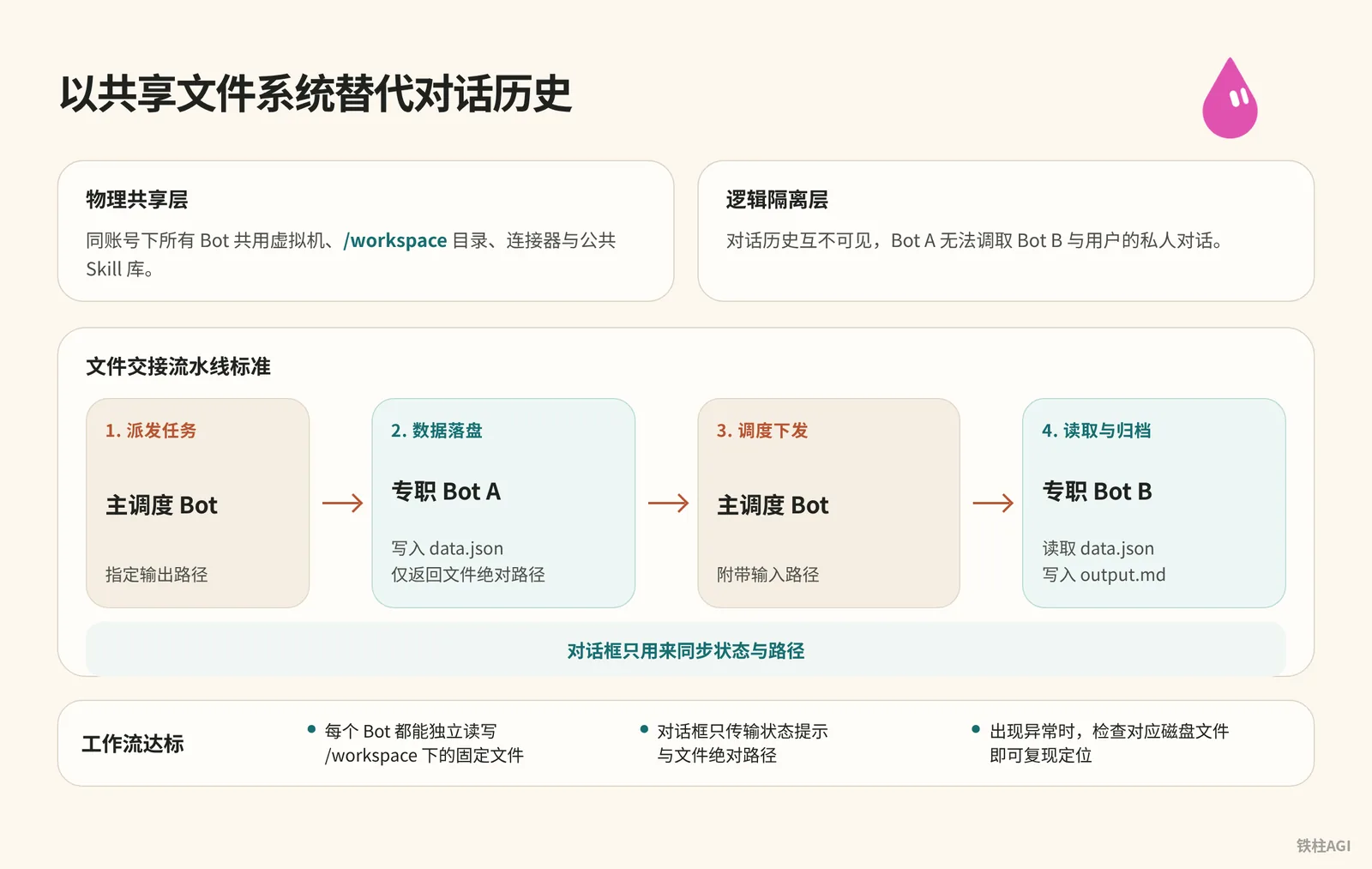
Don't have Bot A paste results into the chat window for Bot B to read. Chat window interactions quickly blow up the context window and easily lose history. Conversations across Bots are logically isolated underneath, making cross-search impossible.
| Dimension | Characteristics and Included Content |
|---|---|
| Physical Shared Layer | All Bots under the same account share the virtual machine, the /workspace directory, connectors, and public Skill libraries. |
| Logical Isolation Layer | Conversation histories are mutually invisible; Bot A cannot access private conversations between Bot B and the user. |
Since the physical disk is shared, tasks are passed via local structured files, while the chat window is only used to synchronize status and paths.
File Handoff Pipeline Standard
Standard handoff includes writing to disk, passing file paths, reading, and archiving.
File Handoff Pipeline Standard
[用户指令] ──> (主调度 Bot)
                   │
         1. 派发任务 (指定输出路径)
                   │
                   ▼
             [专职 Bot A] ──> 写入 /workspace/proj/data.json
                   │
         2. 交付:仅返回文件绝对路径
                   │
                   ▼
             (主调度 Bot)
                   │
         3. 调度下发 (附带输入路径)
                   │
                   ▼
             [专职 Bot B] ──> 读取 data.json ──> 写入 output.md
                   │
4. 汇总简报至用户- Task delegation: The primary Bot explicitly specifies an absolute delivery path, such as
/workspace/project-alpha/data.json. - Data persistence: Specialized Bot A finishes cleaning and writes to the file, replying in the chat window with only a single sentence notifying the save path.
- Path passing and reading: The primary Bot wakes up Bot B and passes the path; Bot B reads from the disk, analyzes, and writes its conclusions to
/workspace/project-alpha/report.md. - Delivery presentation: The primary Bot extracts a summary and attaches local or cloud document links for review.
The tweet profiling pipeline follows this exact same pattern: the curator scrapes and saves to tweets.md, the analyst reads the file to extract tags and writes to profile.md, the designer outputs design.md, and the engineer writes code based on it and provides preview screenshots.
For hands-on reference, see 4.2 Team Orchestration: Charters, Roles, and Delegation.
Integrating Feishu Docs for Traceable Delivery
When team collaboration or commenting is needed, configure the Feishu CLI on the virtual machine to publish Markdown as cloud documents. It comes with an independent link for easy distribution, supports paragraph-by-paragraph annotations, and guarantees enterprise data security.
A passing workflow must meet these requirements:
- Every Bot in the pipeline can independently read and write fixed files under
/workspace. - The chat window only transmits status notifications and absolute file paths.
- When an anomaly occurs, checking the corresponding disk file allows reproduction and troubleshooting.
Usage Impact and Quota Control: Multi-Bot Governance Under The X Subscription
Effective 2026-10-12, Grok Bot is integrated into The X Subscription, sharing quotas on a unified weekly basis.
| Tier | Price |
|---|---|
| Premium | $30/month |
| Super | $100/month |
| Ultra | $200/month |
Rules and Burn Prevention Strategies
- Both replies and handshake messages incur charges. Direct messages with a Team Bot deduct from your own quota, while group chats deduct from the initiator's quota; exhausting it early in the week results in downtime for the remainder of the week.
- Keep group chat Bots to 3 or fewer, and resolutely replace free-form group chats with serialized 1+N workflows.
- Use basic models for lightweight tasks like data cleaning, and reserve top-tier reasoning models strictly for core deductions.
- Do not configure half-hourly or hourly scheduled routines before workflows run stably, preventing hundreds of nighttime retries from burning through your quota.
Acceptance Criteria
- Weekly quota is consumed steadily, free of nighttime infinite loops.
- Clear model tiering, with costs attributed to specific questioners.
Real-World Case Studies: Solidifying Enterprise Expert Experience and 1+N Implementation in Cross-Border Teams
SpaceXAI Team Bot
The n2parko team had business experts configure Bot rules themselves, creating an assistant shared across the entire team.
- Target high-frequency friction points: The data team created Databot to query the data lake, avoiding repeated interruptions to experts.
- Expand roles: Configured 10x Engineer, Marketing, and a Sales Assistant querying Salesforce (assisting SDR/AE).
- Layered memory: Globally retain general rules while preserving personal preferences; see Meet your Team Bots | n2parko.
Cross-Border 1+12 Orchestration
Zach (@1999Zach22) orchestrates 12 roles with 1 captain: automated closed loops must implement pending approval lists, strictly controlling write permissions.
- Local deployment: Dedicated Skills are tuned and tested locally before unified deployment to cloud machines.
- Negative boundaries: Media buyers are strictly prohibited from touching the backend and only offer suggestions; research buyer accounts are strictly forbidden from adding to cart, asking questions, or leaving reviews.
- Single-entry interaction: Daily briefing summaries; if conflicts arise, output a pending approval list for the 5 conflict items and execute only upon confirmation.
- Report persistence: Use Feishu CLI to save reports as persistent cloud doc links; see From a Single Bot to an Entire Organization: Advanced Grok Bot Usage on Connecting Local Machines, AI Division of Labor, and Knowledge Bases.
Common Pitfalls
- If unique skills cannot be defined in three words, consolidate them into Skills for the primary Bot. Avoid creating seven or eight vaguely defined assistants all at once, which leads to spending the entire day switching between windows.
- All Bots under the same account share cloud virtual machines, local paths, and browser login sessions. Never store personal private credentials in a shared Bot.
- Don't make group instructions too broad. Bots exchanging courtesies and confirmations will drain quota rapidly, potentially exhausting a week's allowance in half a day.
- Don't leave the default name
New team botand publish without a description; other members won't be able to see it in search listings at all. - Team Bots and local Bots cannot enter the same group chat, and group chats have no voice feature. If you have such needs, you must switch to a 1-on-1 DM with a single Bot.
- Writing thousands of lines of code fills the context window and loses global visibility. The primary Bot must only handle scheduling and supervision, delegating execution actions to specialized Bots.
Verification and Acceptance
- Primary Bot routing: Issue a cross-module business instruction; the primary Bot must accurately restate the objective and list the paths to specialized Bots, remaining silent when there are no external state changes.
- Preventing group cross-talk: Issue an order stating "Do not send messages to other Bots"; the Bot must only reply within the group, never popping messages in DM windows or waking each other up privately.
- Search and authorization: Switch to a team member's Cursor account and search the first 3 characters under New chat > Team Bots; invoking plugins must trigger an authorization card containing Allow once, Always allow, and Skip.
- File handoff: Bot A saves intermediate files to
/workspace, and Bot B runs to completion independently relying solely on the absolute path, requiring no manual copying throughout the process. - Human-in-the-loop gating: When issuing publish, backend modification, or deletion instructions, the Bot must halt execution and output a pending approval list, never writing online without human approval.