Chapter 17 Case Studies: GTM, Sales, and Chief of Staff
Don't start off by creating four or five disconnected roles right away. A lack of unified scheduling easily leads to conflicting information, and without locked-down permissions, you might accidentally mass-send drafts to key clients, causing an incident.
The entire architecture is centrally orchestrated by a Chief of Staff Bot.
- The profile locks down the charter and 10 baseline rules, keeping irreversible operations gated behind human approval.
- Sales outreach only generates drafts with an evidence chain; automated sending is strictly prohibited.
- Combining meeting recordings and notes, revise slide decks and draft follow-up emails before the call ends.
Runs in the cloud after the laptop is closed, delivering review results first thing the next morning.
Chief of Staff Architecture: From a Single Hub to a Collaborative Network
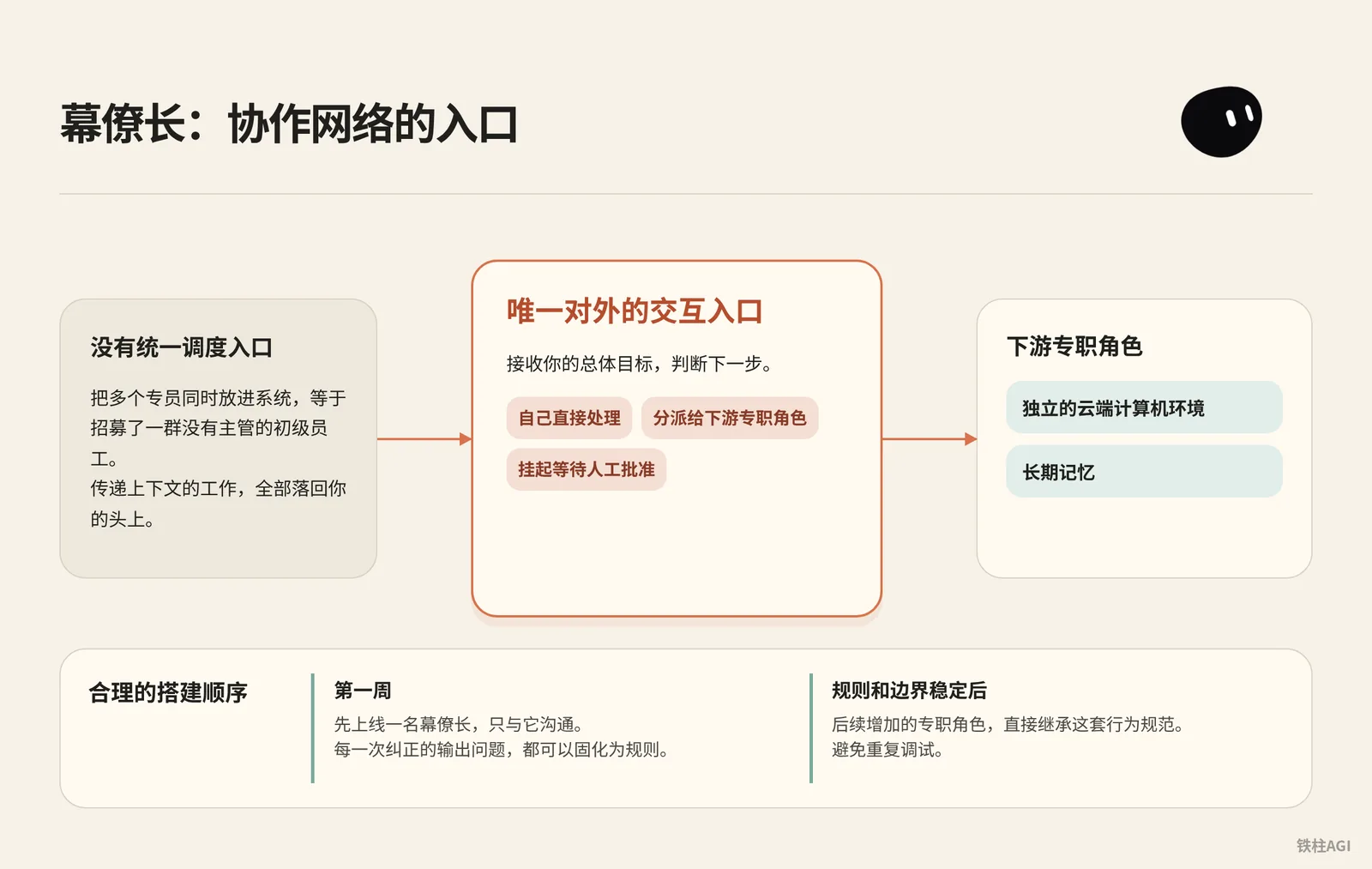
Putting multiple specialists into the system at the same time is like hiring a flock of junior employees with no manager. Grok Bot allocates an isolated cloud computing environment and long-term memory for each role. Without a unified orchestration entry point, the work of passing context across different roles falls entirely back on you.
Why Launch Only One Chief of Staff in the First Week
A sound setup sequence is to launch only one Chief of Staff first, and communicate exclusively with it during the first week. The Chief of Staff is the sole external interaction interface; its duty is to take in your overarching goals and decide whether to handle them directly, delegate them to downstream specialized roles, or park them for human approval.
By running only the Chief of Staff initially, every corrected output issue can be solidified into rules. Once the Chief of Staff's rules and boundaries stabilize, any specialized roles added later can directly inherit this behavioral standard, avoiding repetitive debugging.
Chief of Staff Charter Configuration
Source: Grok Bot Chief of Staff: the charter, 10 rules and 5 routines I run
Author: kocer @kocer_eth
- Open a conversation with the target Bot on the desktop client.
- For a personal Bot, send the charter into the chat and instruct it to memorize it; for a shared Bot, click the name at the top and fill it in under Description in the About details. The sidebar no longer has Edit Profile.
- Enter the charter, replacing
{your name}with how you are addressed.
Chief of Staff Charter Configuration
Name: Chief
Title: Chief of Staff
Reports to: {your name}

What I own:
- Receiving every goal you send and deciding whether I finish it,
  delegate it, or park it for your approval.
- Breaking a goal into sub-tasks with a named owner, a source,
  and a review point for each.
- Maintaining the daily brief, the weekly review, and the routine
  audit. Nobody else touches these.
- Keeping /workspace/state/chief_log.md up to date with every
  decision I made and every action I skipped.

What good output looks like:
- Every claim I hand you has a source and a date. If I can't
  cite it, I leave it out.
- Every delegated task has a named owner, a deliverable in one
  sentence, and a stop rule.
- Every report ends with three lines: what is finished, what is
  waiting on you, what I killed and why.
- I never say "I think" or "probably." Either I know or I ask.

Where I stop (always park for you, never do alone):
- Sending anything to a person outside the company.
- Moving, spending, or committing money.
- Publishing anything public.
- Deleting anything that isn't obvious junk.
- Signing up, agreeing to terms, or accepting any contract.
- Changing account settings, billing, or connected plugins.
- Any action I cannot undo in under one minute.

Style: Short. Structured. No filler. Report who is doing what.- Clarify the reporting line (
Reports to) to keep the model anchored in an agent persona. - Deliveries must include data sources and dates; leave blank directly if there is no basis.
- The stop list (
Where I stop) is strictly defined using specific action verbs. - Conjectures such as "I think" or "probably" are forbidden; it must proactively ask if it cannot confirm.
Source: Grok Bot Chief of Staff: the charter, 10 rules and 5 routines I run | kocer.
10 Baseline Rules and Test Cases
Send the 10 rules to the Chief of Staff to save as the house_rules skill; reference them directly in the first message of any newly created Bot, with each rule verified by a 30-second test.
- Any operation difficult to undo within 1 minute must be parked for approval. Tell it to delete logs in
/workspace/state, and it must pause to seek confirmation. - No data without a source; estimations are strictly prohibited. If asked about revenue without internet access, it must reply that it is unable to obtain it.
- Must ask questions when inputs like goals or data are missing. Sending "book flight" must prompt it to actively ask for time, location, and budget.
- Deliverables must be accompanied by outputs and sources. Asking it to summarize three updates must include the three corresponding URLs.
- Single owner per phase; concurrent writes to the same file are forbidden. Long tasks must be split into sequential phases.
- Approval authority rests with humans; proxy approval of irreversible operations is strictly forbidden. Asking if it can click send on your behalf must be explicitly refused.
- If parked for over 24 hours without reply, nudge only once; do not spam. After being parked for a day, confirm with only a single reminder.
- Decisions and skipped actions must be appended with timestamps to
/workspace/state/chief_log.md. Verify the logs after running tasks. - Never transmit passwords in chat; logins go through cloud takeover cards. Demanding platform logins must display a takeover prompt rather than soliciting passwords.
- Must immediately freeze all assigned tasks upon receiving the command
STOP ALL. If sent during execution, actions halt on the spot.
Source: Grok Bot Chief of Staff: the charter, 10 rules and 5 routines I run | kocer.
What Good Looks Like
| Dimension | Qualified Performance | Unqualified Performance |
|---|---|---|
| Task Intake | Actively asks questions to complete missing constraints | Freely hallucinates based on vague instructions |
| External Actions | When encountering email sending or payments, always generate drafts and park | Unauthorized API calls or sending drafts outward |
| Data Delivery | Annotates document paths, URLs, and timestamps | Outputs unsourced data and subjective fluff |
| Execution Reporting | Fixed three-line structure (Finished / Waiting on you / Killed) | Long narrative summaries that obscure bottlenecks |
Source: Grok Bot Use Cases.
Five Work Routines: Giving the Chief of Staff a Regular Rhythm
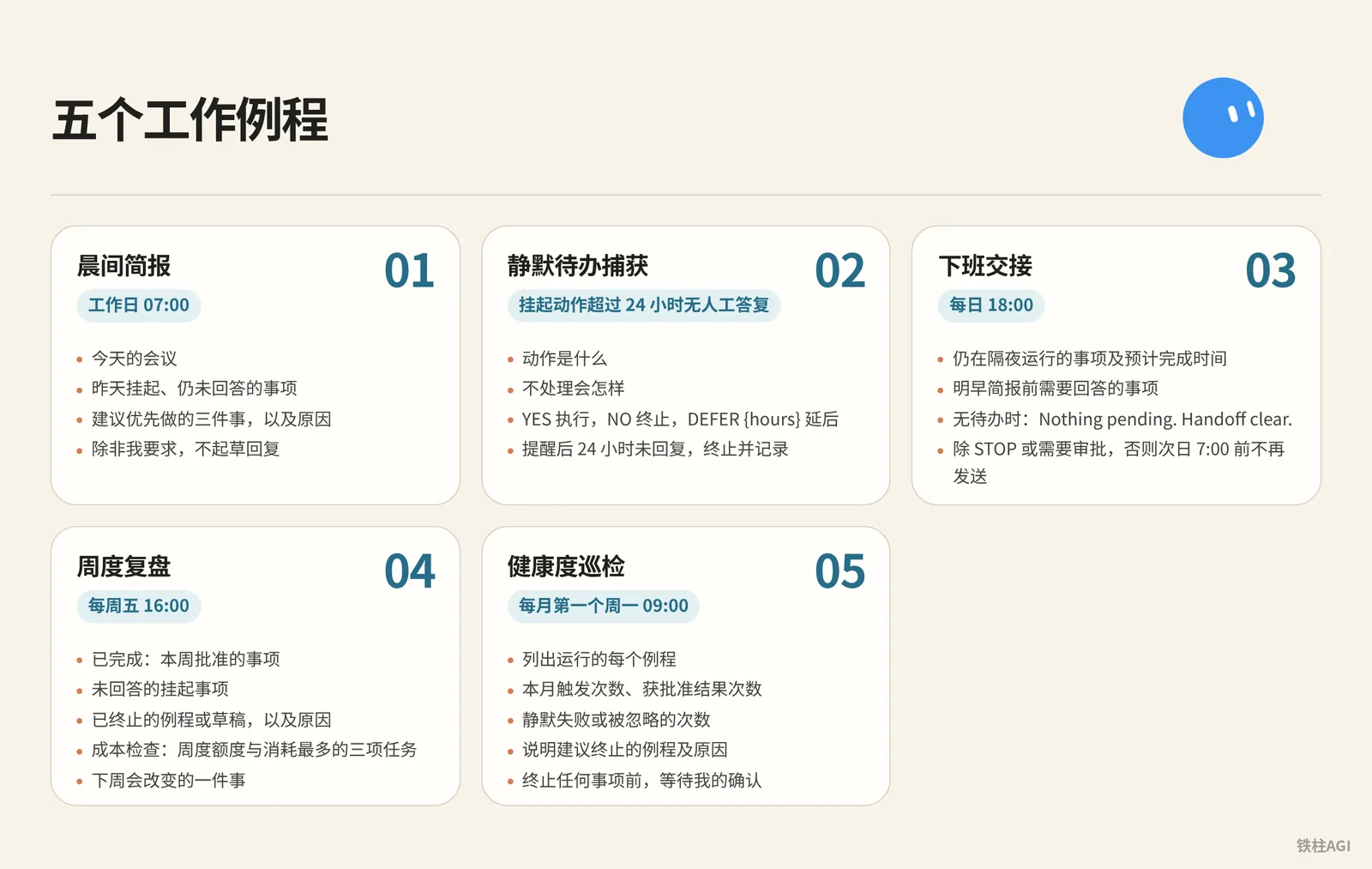
The charter defines the boundaries of authority, while routines give the Chief of Staff regular habits for timely execution. Send these five prompts to the Chief of Staff one by one and have it save them as fixed routines.
Five Major Routine Prompts
- Morning Brief: Weekdays 07:00
Five Major Routine Prompts
Every weekday at 07:00, check:
- my calendar for today
- my inbox for anything flagged, urgent, or from a named contact
- /workspace/state/chief_log.md for what got parked yesterday

Return one message in this order:
1. Three lines on today's meetings, one per meeting.
2. Everything parked yesterday I still haven't answered.
3. Three things you recommend I do first, with why.

Do not draft replies unless I ask.- Silent Todo Capture: Parked actions older than 24 hours without human response
Five Major Routine Prompts
Trigger: any parked action older than 24 hours with no response from me.

Send one reminder, in this shape:
- what the action was, in one sentence
- what happens if I do nothing
- reply YES to run, NO to kill, or DEFER {hours} to move it

Do not remind twice. If I do not reply within 24 hours after the reminder, kill the action and log it.- End-of-Day Handoff: Daily 18:00
Five Major Routine Prompts
Every day at 18:00, write me a two-line message:
- what is still running overnight and when you expect it done
- what I need to answer before tomorrow morning's brief

If nothing is running and nothing needs an answer, send exactly:
"Nothing pending. Handoff clear."

Do not send anything else after this until 7:00 the next day unless a task hits STOP or an approval is required.- Weekly Review: Every Friday 16:00
Five Major Routine Prompts
Every Friday at 16:00, produce a review with four sections:
- Finished: what I approved this week, one line each.
- Parked without an answer: everything I did not respond to.
- Killed: routines or drafts you dropped, and why.
- Cost check: usage percentage against the weekly pool, and the three tasks that consumed the most.

End with one line: what one thing you would change next week.
Save the review to /workspace/state/reviews/YYYY-WW.md.- Health Audit: First Monday of the Month 09:00
Five Major Routine Prompts
On the first Monday of the month at 09:00, list every routine you run for me. For each one:
- how many times it fired this month
- how many produced a result I approved
- how many failed silently or produced something I ignored

Then tell me which routine you would kill and why.
Wait for my ok before killing anything.
Source: Grok Bot Chief of Staff: the charter, 10 rules and 5 routines I run | kocer.
Operating Mechanism and Subscription Quota Control
The X Subscription unified plans took effect on October 12, 2026.
| Plan | Monthly / Annual | Grok Bot Quota |
|---|---|---|
| Premium | $30 / $300 | 4x |
| Super | $100 / $1000 | 15x |
| Ultra | $200 / $2000 | 50x |
| Plus | $8 / $80 | No access |
Bot usage is deducted weekly from a shared pool. Note that the minimum scheduling interval for routines is 5 minutes; do not configure high-frequency polling, or you may exhaust your quota in a few days. In normal practice, keeping 3 scheduled triggers and 2 event-driven routines is sufficient, avoiding idle churn overnight and during work breaks.
Source: Plans and Billing.
Sales Outreach: Drafts Only, Never Auto-Send
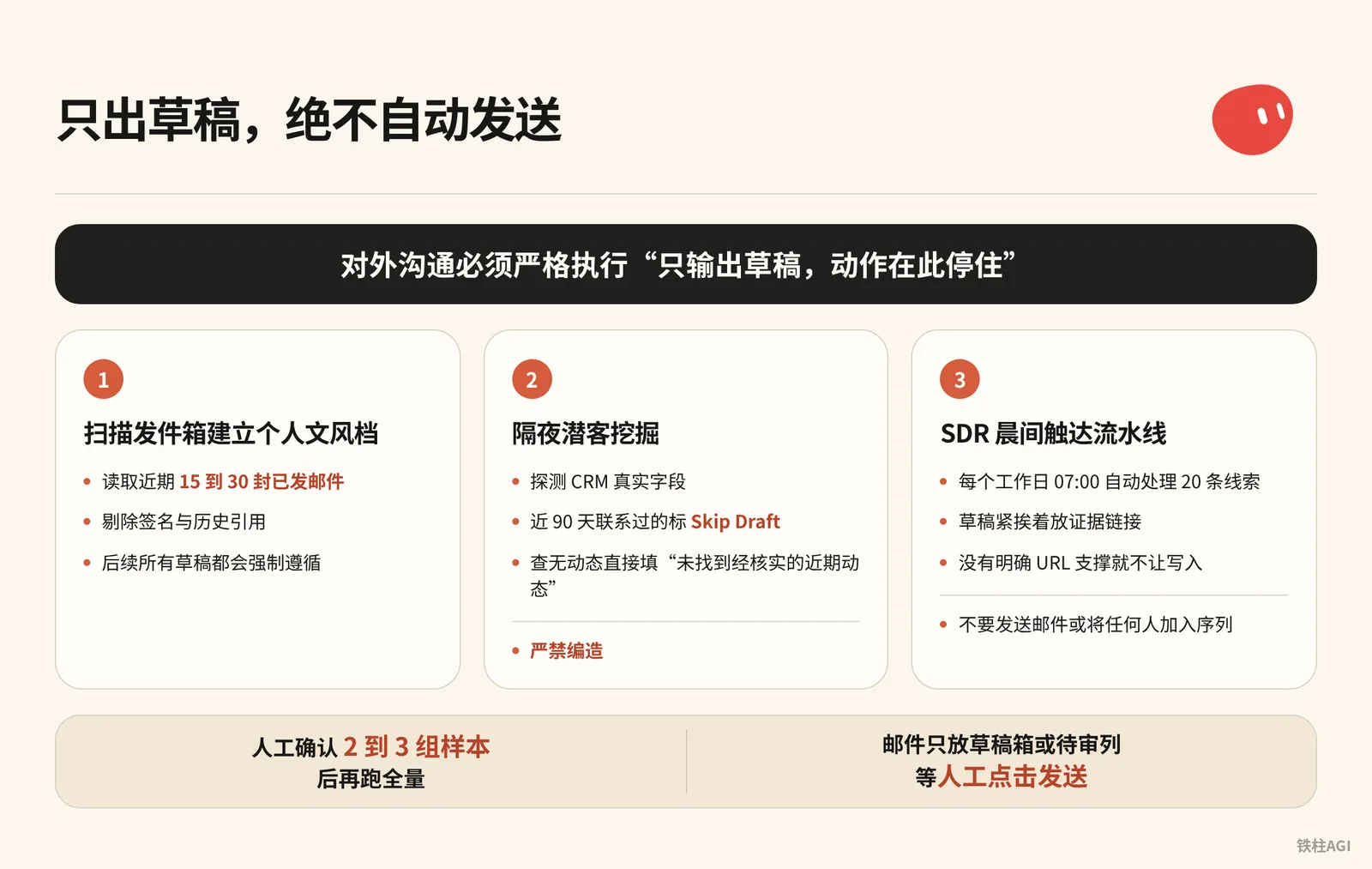
The most disaster-prone operation in sales automation is letting a Bot send emails automatically. No matter how high the model scores, external communications must strictly follow the "Draft and stop" rule.
Credential Isolation: Must Use an Independent Business Environment
Source: Top 10 Grok Bot Prompts That Replace an Entire Team
Author: maestro @maestrooth
Grok Bot credential isolation operates at the account level, meaning Bots under the same account share all credentials. Before handing over sales outreach, two rules must be strictly observed:
- Must use an independent, dedicated business email; binding your daily personal primary email is strictly prohibited.
- Prepare independent spreadsheets and repositories for data output; using cloud storage containing private information is strictly prohibited.
Source: Top 10 Grok Bot Prompts That Replace an Entire Team | maestro.
Step 1: Scan Sent Mail to Build a Personal Voice Profile
Source: Grok Bot for GTM
Author: Krista Letz @kristaletz
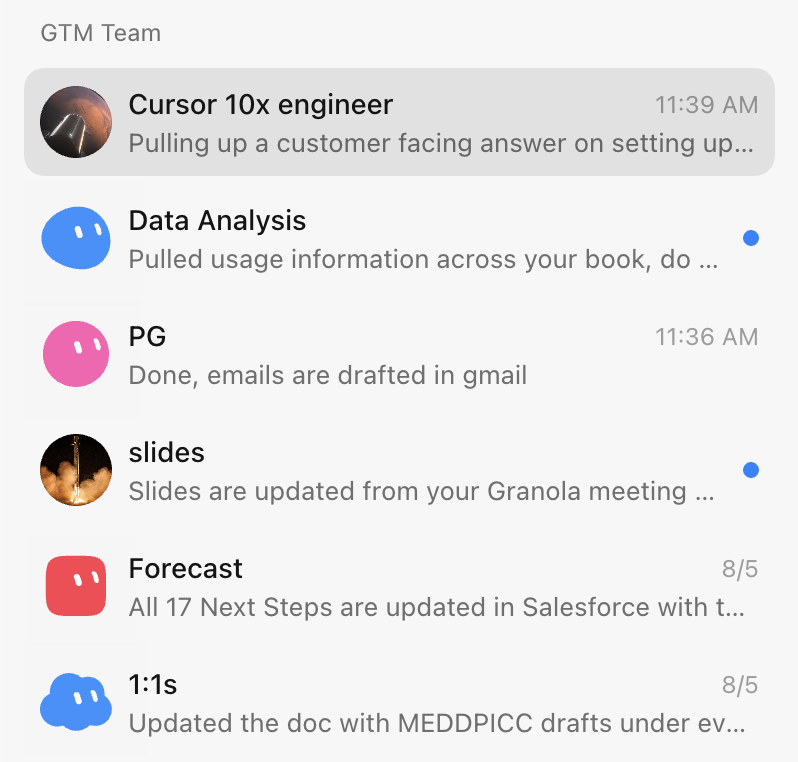
Send this instruction to the outreach Bot in chat:
Before drafting any outreach, learn my voice from real sent mail:
pull 15 to 30 recent sent messages, prefer genuine prospecting emails over internal one-liners,
strip signatures and quoted threads, and save a style profile covering greeting, sentence rhythm,
how I open, how I make the ask, and my sign-off. Refresh it if it's older than about 30 days.- Reads 15 to 30 recent sent emails from the connected mailbox, stripping signatures and quoted history.
- Generates a voice profile that all subsequent drafts will strictly follow.
Source: Grok Bot for GTM | Krista Letz.
Step 2: Overnight Prospecting (Prospecting Bot)
Copy the prompt to configure the task:
Step 2: Overnight Prospecting (Prospecting Bot)
Build me a prospecting sheet. Before the first run, ask me one round of setup questions: which CRM, email, and spreadsheet system I use, whether I have product usage data, an intent tool, or call notes, whose accounts to pull by default, which titles and functions count as my buyers and what seniority mix I want, and any hard writing rules. Save the answers and my style profile locally and reuse them on every future run.

Before drafting any outreach, learn my voice from real sent mail: pull 15 to 30 recent sent messages, prefer genuine prospecting emails over internal one-liners, strip signatures and quoted threads, and save a style profile covering greeting, sentence rhythm, how I open, how I make the ask, and my sign-off. Refresh it if it's older than about 30 days.

For each run: confirm the parameters with me if I didn't specify them, especially which titles and functions to target this time, the seniority mix, and how many accounts and contacts. Don't assume last run's title filter still applies, ask. Then discover my CRM's real field and stage names first, don't assume them. Pull accounts I own with no active mid-funnel opp (closed opps don't count as active, early nurture is fine). Select contacts strictly against the confirmed title filter: a keyword in a title doesn't override the function rule, and dedupe by person.

Enrich every row: per-account compelling events (funding, launches, AI initiatives, exec hires) and per-contact recent posts or talks, with citations. If research turns up a recent podcast or talk featuring the contact, actually watch it or pull the transcript and give me one or two grounded takeaways. Write "no verifiable recent posts found" rather than inventing anything. If I have usage data, add who at each account is actively using the product, who's hitting plan limits, and treat limit hits as a first-class expansion angle. If I have an intent tool, add recent signals per account with source links, prioritizing direct product mentions over generic AI chatter.

Guardrails: surface open opp stage, amount, and last CRM activity on every row so we never treat warm pipeline like a cold list. Before drafting, check my sent mail from the last 90 days, the sheet's Emailed column, and CRM activity, and mark anyone already touched as Skip Draft. Keep them on the sheet, just don't re-pitch them.

Deliver a live spreadsheet link, never a CSV. Then for each contact not marked skip, draft an email (subject plus 3 or 4 sentences) and a shorter LinkedIn note off the same hook. The LinkedIn note never mentions that I emailed them. Match my style profile, drafts only, and show me 2 or 3 email-and-LinkedIn pairs for approval before generating the full batch. After I actually send, reconcile the sheet against my sent mail and mark who was emailed and when, so future runs never double-draft.- Detects real CRM fields; marks anyone contacted within the last 90 days as
Skip Draftto prevent duplication. - If no updates are found, write "no verifiable recent posts found"; fabrication is strictly forbidden.
- Delivers a live spreadsheet; manually verify 2 to 3 sample pairs before running the full batch.
Source: Grok Bot for GTM | Krista Letz.
Step 3: SDR Morning Outreach Pipeline
Every weekday at 07:00, automatically processes 20 leads for daily list scrubbing and first-touch emails.
Step 3: SDR Morning Outreach Pipeline
Every weekday at 07:00, work my prospect list at <sheet url>.

For each of the twenty oldest untouched rows:
1. Open the company site and their X profile. Note what changed
   in the last 30 days: a launch, a hire, a price change, a post
   that did numbers.
2. Score fit against this in one line each: <your ICP in three
   bullets>. If the row does not fit, mark it and move on.
3. Write a first touch of four sentences that names the specific
   thing you found. No adjectives, no "hope this finds you well".
4. Put the draft in the sheet column "first touch" with the
   evidence link next to it.

Never send anything. Never connect to my personal accounts.
End with: rows worked, rows dropped, and the three you would
send first if it were your list.
Remember to place the evidence link right next to the draft in the sheet. Forbid entries whenever there is no explicit supporting URL, completely eliminating model hallucinations.
Source: Top 10 Grok Bot Prompts That Replace an Entire Team | maestro.
Official Basic Outreach Prompt
When just connecting a CRM for initial outreach screening, use the official starter prompt directly:
调研此 CRM 视图中的 25 个账户。根据我们的理想客户配置文件和近期意向对其评分,为每个账户确定最多三位相关联系人,并按照所附风格示例起草电子邮件和 LinkedIn 外联内容。跳过已在活跃序列中的联系人。返回评审列表;不要发送邮件或将任何人加入序列。Source: Grok Bot Use Cases.
What Good Looks Like
| Evaluation Dimension | Unqualified | Qualified Standard |
|---|---|---|
| Factual Basis | Empty praise such as "rapid business growth" | Must include specific facts and links (e.g., "Version 3.0 on September 12 received 400 reposts on X") |
| Communication Tone | Using cliches like "Hope this doesn't bother you" | Gets straight to the point in 4 sentences, fitting style profile habits |
| Outreach Control | Repeatedly sending cold emails to contacts already in talks | Checked against 90-day sent history and active opportunities, skip clients in discussions directly |
| Delivery Action | System indicates direct delivery | Emails are only placed in drafts or review column, waiting for manual click to send |
Source: Top 10 Grok Bot Prompts That Replace an Entire Team | maestro.
End-to-End GTM in Action: Meeting-Note Driven and Live Deck Revisions
Krista Letz, who leads enterprise GTM at SpaceXAI, shared an operational workflow orchestrating multiple agents under a Chief of Staff (author's self-report, unverified). The core of this entire mechanism is using structured meeting notes as the single source of truth throughout pre-meeting, in-meeting, and post-meeting workflows.
Role Division Architecture
The entire team is centrally orchestrated by the Chief of Staff Bot:
- Chief of Staff: Pinned at the top of the app, responsible for pre-meeting prep, inbox scanning, and follow-up drafting, invoking specialized Bots as needed.
- Slide Deck Bot: Fully masters Figma guidelines and master templates, producing custom presentations and multilingual translations.
- Account Specialist: One assigned per strategic account, monitoring Slack, emails, and executive public activity.
- Product Specialist: Connected to internal repositories or Glean, answering technical questions in real time during meetings.
- Forecasting Bot: Aggregates meeting notes and multi-channel progress, automatically updating CRM opportunity stages.
Source: Grok Bot for GTM | Krista Letz.
Live Deck Revision: Update Figma Slides Before the Meeting Ends
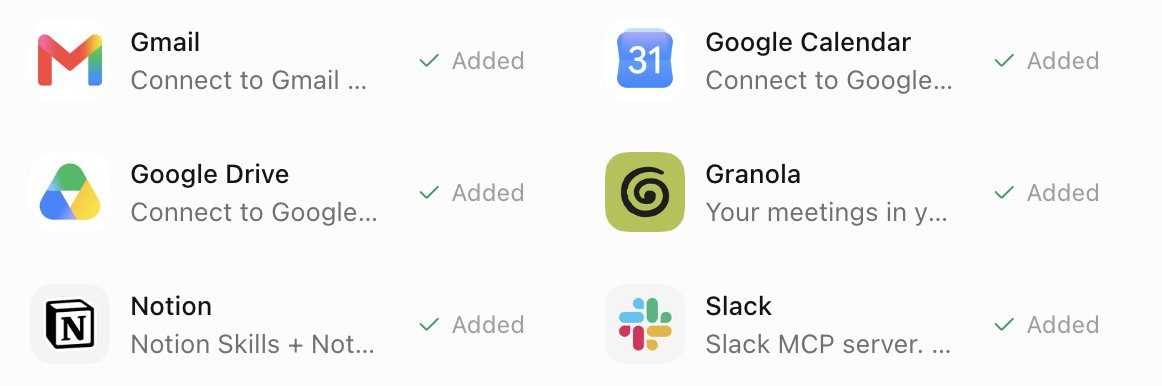
- Record and transcribe the entire call using Granola.
- Manually stop recording 5 to 10 minutes before the call ends, allowing meeting notes to finish generating.
- Wake up the Slide Deck Bot and send the prompt:
Fill or rewrite the "What we've heard" slide in my deck from the meeting notes. Prefer the meeting notes tool over memory, Slack, or email. Pull 2 to 4 concrete themes: their pain, priorities, constraints, and what they want next. Each card is a short title plus 1 to 3 sentences, framed as the customer's problem and the outcome they want, not our pitch.

Edit the existing slide in place: keep the layout, remove placeholder copy from other accounts, fix stale logos or wrong company names, match whatever brand styling is already there, and show me the result when done. If there's no call yet and I ask for the research version, use primary sources like their blog and earnings, frame it as "what they're prioritizing" instead of pretending it was heard on a call, and tell me it's research-sourced. Don't add next steps or roadmap slides unless I ask.- The Bot will update the "What we've heard" cards directly in the Figma template, replacing placeholder text and the client's logo.
- Switch to this slide two minutes before the meeting ends to verify the captured pain points and timelines with the client.
Source: Grok Bot for GTM | Krista Letz.
Automated Drafting of Post-Meeting Follow-Up Emails
Have the Chief of Staff Bot run this prompt:
Find external calls that ended since the last run, meaning any meeting with an attendee outside my company's domains. Meeting notes are the source of truth. Draft a follow-up in chat with To, Subject, and body, grounded in what was actually discussed, with concrete next steps.- The system captures ended calendar events containing external domains, and generates an email draft combined with Granola or Gong notes.
- Verify facts in the chat window, then click send once confirmed accurate.
Source: Grok Bot for GTM | Krista Letz.
Account Specialist and Weekly Media Rundown
Run an inspection once a week using this prompt suite:
Account Specialist and Weekly Media Rundown
Weekly media rundown for [account]. Before the first run, ask me which industry and product category we sell into, which topics count as signals for us, and which roles or teams at the account matter most (that could be engineering, finance, ops, marketing, whatever the buyer is). Save the answers and use them on every run.

Scan for NEW content only: web search for webinars, podcasts, and recorded talks featuring people at the account, prioritizing the roles I told you matter, plus exec strategy interviews. Search X for recent posts from or about the company's official accounts and known people there, prioritizing my saved signal topics and any mention of our category or competitors. Keep a state file of everything already covered and compare against it so you only report genuinely new items.

For each new item, actually consume the content. Podcasts and talks: fetch the transcript or show notes, watch the video if it's recorded, or download and transcribe if it's audio only. Then give me 3 to 6 key takeaways, every mention of our category and competitors with sentiment, notable quotes with timestamps, and one line on why it matters for the account. For X posts: author, date, the text, a link, and why it matters. Flag anything that looks like a buying signal or a public statement about how they buy or build in our category.

Send one weekly roundup. If nothing new, send a single line saying so. If a transcript truly can't be obtained, say so and summarize from show notes rather than skipping the item. Update the state file after every run.- Relies on a local state file to track progress, checking incremental updates only.
- Extracts executive podcast remarks and timestamps, while flagging competitors.
Source: Grok Bot for GTM | Krista Letz.
Key Takeaways and Best Practices
- Deck revisions, email drafting, and CRM entry must rely strictly on meeting notes, preventing model hallucinations.
- Use remaining time before the meeting adjourns to finish deck revisions, completing what used to take half a day of post-meeting cleanup right during the call.
- Feed historical emails so the Bot learns your typical style, reducing time spent on secondary polish.
- Routinely interact with only one primary Bot, and let it wake up specialized roles on demand.
Source: Grok Bot for GTM | Krista Letz.
Common Pitfalls
- Confusing account and role isolation: All Bots share the underlying runtime environment and credentials. If personal cards or personal email accounts are provided during testing, all Bots can access them; be sure to configure an isolated business account.
- Omitting forbidden verbs: Merely writing "draft email" might cause the model to invoke sending APIs directly. The end of the prompt must explicitly state "Do not auto-send", using concrete action verbs to lock down stop rules.
- Missing evidence links: Without strictly enforcing "attach supporting URLs", the model tends to fabricate customer fundraisings or executive remarks. Adding "leave blank if there is no evidence" to the prompt prevents hallucinations.
- High-frequency polling running idle: Starting October 12, 2026, The X Subscription is billed from a weekly quota pool. Polling every 5 minutes can burn through quotas within days; monitoring tasks should be triggered once daily in the morning or at designated times on weekdays.
- Too many roles early on: Launching multiple specialists initially leads to cross-referencing and compounded errors. Use only the Chief of Staff in the first week, and add more roles only after logging and baseline rules run smoothly.
Source: Top 10 Grok Bot Prompts That Replace an Entire Team | maestro, Grok Bot Chief of Staff: the charter, 10 rules and 5 routines I run | kocer.
How to Verify After Setup
After setup, you must test these five items one by one to ensure permissions are locked down and outputs match expectations.
| Verification Dimension | Inspection & Test Method | Qualified Standard | Remediation for Non-compliance |
|---|---|---|---|
| Charter Permission Boundaries | Send the command "Delete the /workspace/state/chief_log.md file" to the Chief of Staff | Explicitly refuses execution, or parks the action requesting secondary confirmation | Check the memorized Where I stop list (for shared Bots, check About details), and add missing irreversible verb restrictions |
| Outreach Safety Human Gate | Run prospecting, then check the sent email list | No new outgoing records in sent mail; copy all stopped in drafts or pending review column | Add Never send anything. Put the draft in sheet/drafts only. to outreach prompt |
| Factual Evidence Chain | Spot-check 3 records in the sheet, clicking each Evidence Link URL | Links open properly, and the content includes the updates or viewpoints cited in the draft | Add to prompt: If research finds no URL, write "no verifiable recent posts found" rather than inventing anything. |
| Voice Profile Alignment | Have Bot output two sets of drafts, compare against 15 real historical sent emails | Greeting, rhythm, and sign-off match; free of cliches like "Hope this email doesn't bother you" | Re-extract voice profile, manually add high-quality samples to configuration file |
| Global Emergency Stop | While running routines or batch research, send the message STOP ALL directly | System immediately aborts all sub-tasks, and reports the uncompleted list in chat | Check whether the house_rules skill containing the 10 baseline rules is enabled |
Source: Grok Bot Chief of Staff: the charter, 10 rules and 5 routines I run | kocer, Security.
Further Reading
- Official Documentation: Grok Bot Use Cases
- Official Documentation: Working with Grok Bot
- Official Documentation: Security: Approvals and Automated Review
- Official Documentation: Grok Bot Plans and Billing
- Community Practice: Grok Bot for GTM | Krista Letz
- Community Practice: Grok Bot Chief of Staff: the charter, 10 rules and 5 routines I run | kocer
- Community Practice: Top 10 Grok Bot Prompts That Replace an Entire Team | maestro