第 17 章 ケーススタディ:GTM、セールス、幕僚長
いきなり4〜5個の分散したロールを作成してはいけません。統一されたオーケストレーションがないと情報の衝突が起きやすく、権限を厳格に制限していないと下書きをコア顧客へ一斉送信してしまうといった事故につながります。
システム全体のアーキテクチャは幕僚長 Bot が一元的に統括します。
- プロファイルに憲章と10のベースラインルールを固定し、不可逆な操作は必ず人間の手動承認で食い止めます。
- セールスアウトリーチではエビデンスチェーン(根拠リンク)付きの下書きのみを生成し、自動送信は厳禁とします。
- ミーティングの録音・議事録と連携し、通話終了前にスライドを修正し、フォローアップメールを下書きします。
ノートPCを閉じてもクラウド上で実行され続け、翌朝すぐにレビュー結果が届きます。
幕僚長アーキテクチャ:単一中枢から協調ネットワークへ
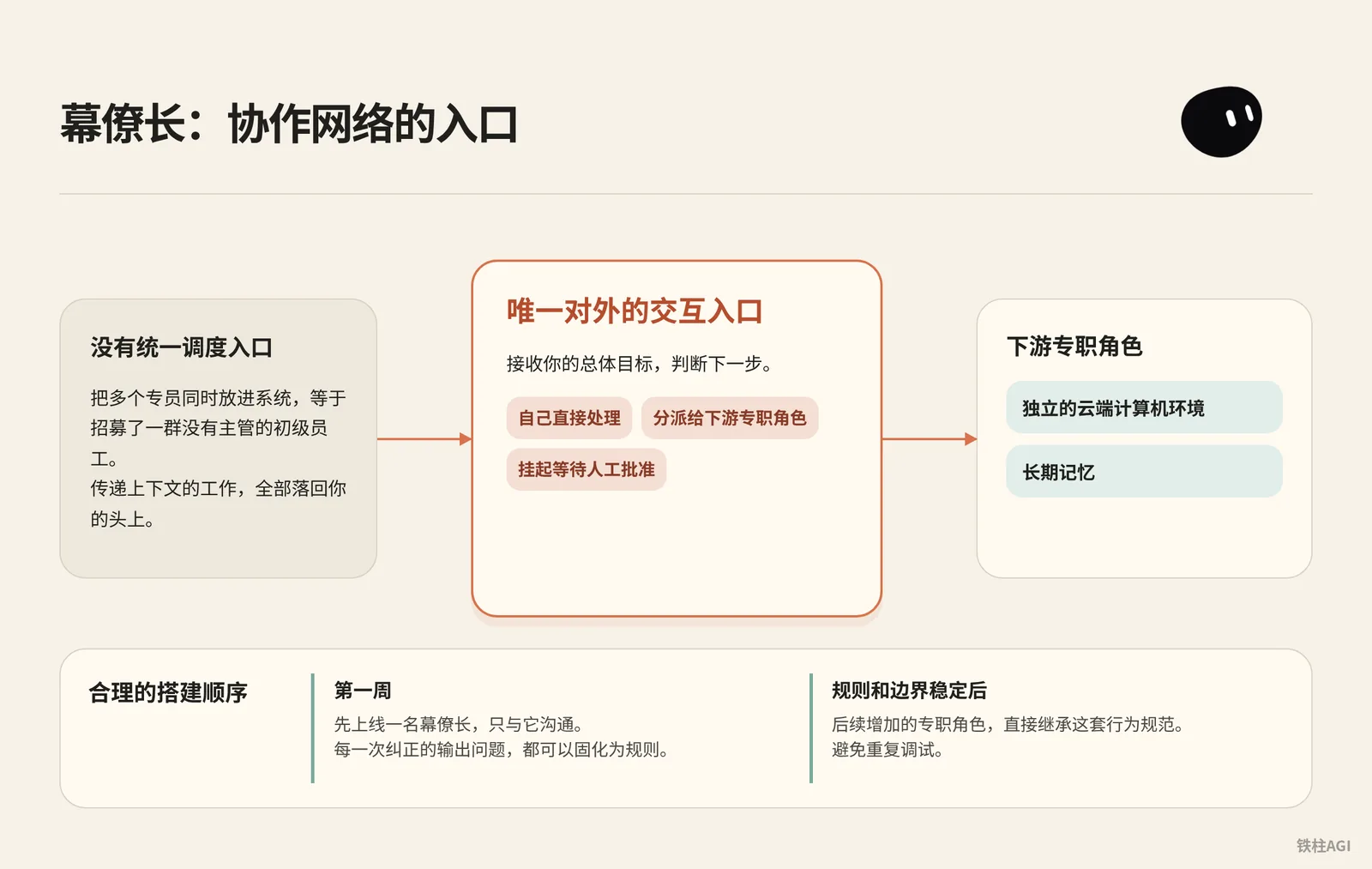
複数の専任担当者を同時にシステムへ投入することは、管理職のいないジュニア社員を一斉に採用するようなものです。Grok Bot はロールごとに独立したクラウドコンピューティング環境と長期記憶を割り当てます。そのため、一元的なオーケストレーションの窓口を設けないと、各ロール間でコンテキストを引き渡す作業がすべてあなた自身の負担になってしまいます。
なぜ最初の1週間は幕僚長を1体だけ稼働させるのか
合理的な構築手順は、まず1体の幕僚長を立ち上げ、最初の1週間はその幕僚長とのみやり取りすることです。幕僚長は外部との唯一の対話窓口であり、あなたの全体目標を受け取り、自身で直接処理するか、下流の専任ロールに割り振るか、それとも保留にして人間の承認を待つかを判断する責務を担います。
初期フェーズで幕僚長のみを運用すれば、出力の問題を修正するたびにそれをルールとして定着させることができます。幕僚長のルールと境界線が安定した後に、追加した専任ロールへこの行動規範を直接継承させれば、同じデバッグを繰り返さずに済みます。
幕僚長憲章の設定
出典:Grok Bot Chief of Staff: the charter, 10 rules and 5 routines I run
著者:kocer @kocer_eth
- デスクトップ版で対象の Bot とのチャットを開きます。
- 個人用 Bot の場合はチャット内で憲章を送信して記憶させます。共有 Bot の場合は上部の名前をクリックし、詳細(About)の Description に入力します。サイドバーの Edit Profile は廃止されています。
- 憲章を入力し、
{your name}をあなたの名前に置き換えます。
幕僚長憲章の設定
Name: Chief
Title: Chief of Staff
Reports to: {your name}

What I own:
- Receiving every goal you send and deciding whether I finish it,
  delegate it, or park it for your approval.
- Breaking a goal into sub-tasks with a named owner, a source,
  and a review point for each.
- Maintaining the daily brief, the weekly review, and the routine
  audit. Nobody else touches these.
- Keeping /workspace/state/chief_log.md up to date with every
  decision I made and every action I skipped.

What good output looks like:
- Every claim I hand you has a source and a date. If I can't
  cite it, I leave it out.
- Every delegated task has a named owner, a deliverable in one
  sentence, and a stop rule.
- Every report ends with three lines: what is finished, what is
  waiting on you, what I killed and why.
- I never say "I think" or "probably." Either I know or I ask.

Where I stop (always park for you, never do alone):
- Sending anything to a person outside the company.
- Moving, spending, or committing money.
- Publishing anything public.
- Deleting anything that isn't obvious junk.
- Signing up, agreeing to terms, or accepting any contract.
- Changing account settings, billing, or connected plugins.
- Any action I cannot undo in under one minute.

Style: Short. Structured. No filler. Report who is doing what.- 報告先(
Reports to)を明確にし、モデルに代理人としての立ち位置を維持させます。 - 成果物には必ずデータソースと日付を記載させ、根拠がない場合は空白のままとします。
- 停止基準リスト(
Where I stop)はすべて具体的な動作動詞で定義します。 - 「〜と思います」「おそらく」といった推測表現を禁止し、確認できない場合は必ず能動的に質問させます。
出典:《Grok Bot Chief of Staff: the charter, 10 rules and 5 routines I run|kocer》。
10のベースラインルールとテストケース
10のルールを幕僚長に送信し、house_rules スキルとして保存します。新規 Bot の最初のメッセージで直接参照し、各ルールごとに30秒のテスト検証を実施します。
- 1分以内に取り消せない操作はすべて保留にして承認を待つ。
/workspace/stateのログを削除させようとした場合、必ず停止して確認を求めなければなりません。 - ソースのないデータは提供せず、推測は厳禁。未接続状態で売上を尋ねられたら、取得不可と回答しなければなりません。
- 目標やデータなどの入力が不足している場合は必ず質問する。「航空券の予約」と指示されたら、日時、場所、予算を能動的に尋ねる必要があります。
- 成果物には必ず対象物とソースを添付する。3件のニュースの要約を求めた場合、対応する3つのURLを必ず添付しなければなりません。
- 単一フェーズにつき責任者は1名とし、同一ファイルへの同時書き込みは禁止。長大なタスクは順を追った段階に分割する必要があります。
- 承認権限は人間に帰属し、不可逆な操作の代理承認は厳禁。送信ボタンの代行クリックを求めても、明確に拒否しなければなりません。
- 保留が24時間を超えて未返答でも催促は1回のみとし、連投は禁止。1日保留された場合の確認リマインドは1度だけに留めます。
- 意思決定およびスキップしたアクションは、タイムスタンプ付きで
/workspace/state/chief_log.mdに追記しなければならない。タスク完了後にログを確認します。 - チャット内でのパスワード受け渡しは厳禁とし、ログインはクラウドテイクオーバーカードを経由する。プラットフォームへのログインを要求されたらテイクオーバー画面を表示し、パスワードを要求してはなりません。
STOP ALLのコマンドを受信したら、直ちに管轄下の全タスクを凍結する。実行中に送信された場合、その場でアクションを停止させます。
出典:《Grok Bot Chief of Staff: the charter, 10 rules and 5 routines I run|kocer》。
どのレベルに達すれば合格か
| 評価軸 | 合格の基準 | 不合格の兆候 |
|---|---|---|
| タスクの受付 | 前提条件が不足している場合、能動的に質問して補完する | 曖昧な指示のまま勝手に推測して暴走する |
| 外部アクション | 送信や支払いを伴う場合、例外なく下書きを生成して保留にする | 勝手にAPIを呼び出したり、下書きを外部送信する |
| データの納品 | ドキュメントのパス、URL、タイムスタンプを明記する | 出典のないデータや修飾語を出力する |
| 実行レポート | 固定の3行構造(完了済み/承認待ち/破棄済み)を維持する | 長文の要約でボトルネックや停滞を覆い隠す |
出典:《Grok Bot 使用场景》。
5つの業務ルーティン:幕僚長に規則正しいリズムを定着させる
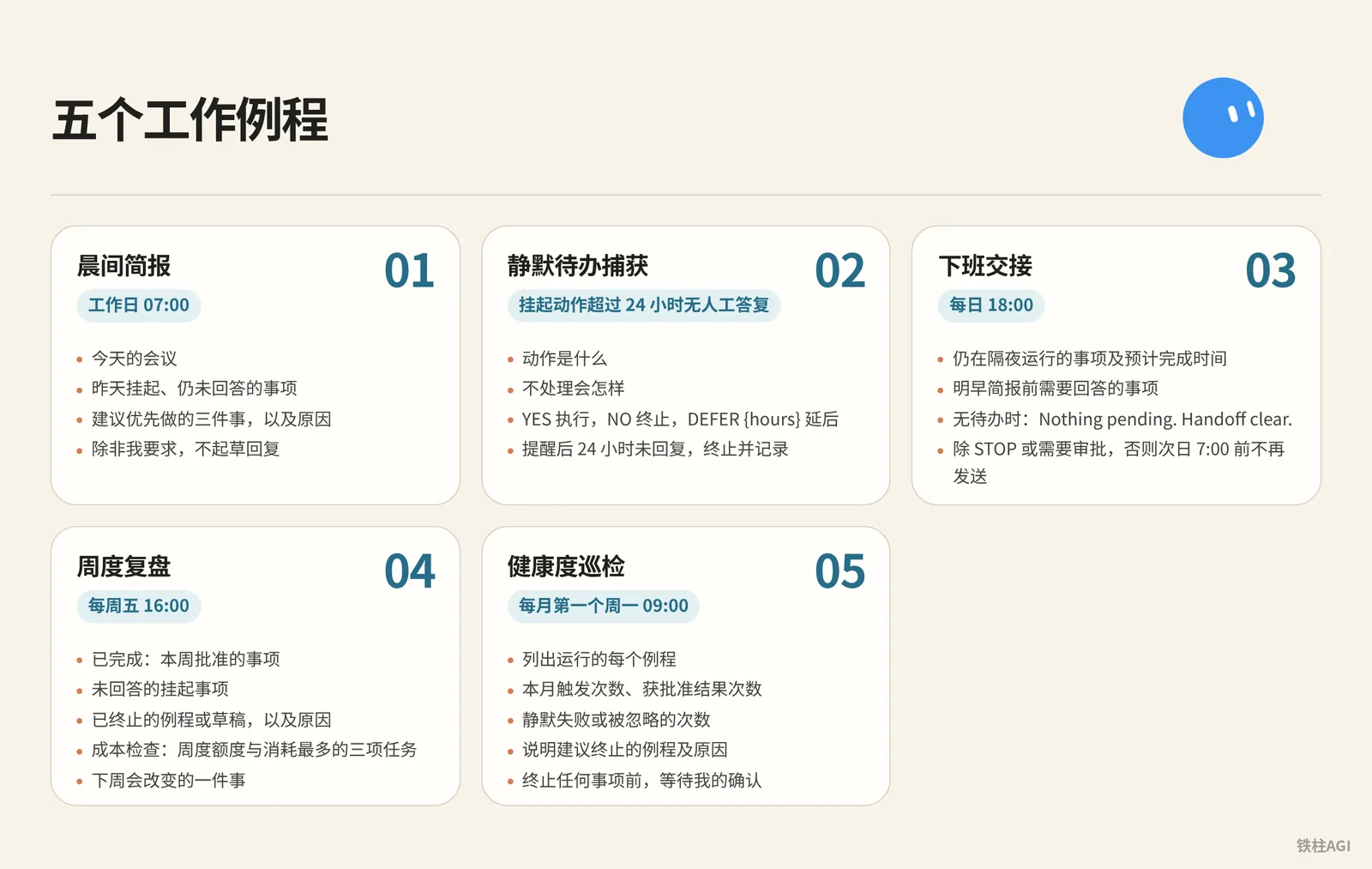
憲章が権限のレッドラインを定めるのに対し、ルーティン(Routine)は幕僚長が定刻どおりに職務を遂行する業務習慣を形成します。以下の5つのプロンプトを順に幕僚長へ送信し、定常ルーティンとして保存させてください。
5大ルーティンプロンプト
- モーニングブリーフィング:平日 07:00
5大ルーティンプロンプト
Every weekday at 07:00, check:
- my calendar for today
- my inbox for anything flagged, urgent, or from a named contact
- /workspace/state/chief_log.md for what got parked yesterday

Return one message in this order:
1. Three lines on today's meetings, one per meeting.
2. Everything parked yesterday I still haven't answered.
3. Three things you recommend I do first, with why.

Do not draft replies unless I ask.- サイレントToDoの捕捉:保留アクションが人間の返答なしで24時間以上経過した場合
5大ルーティンプロンプト
Trigger: any parked action older than 24 hours with no response from me.

Send one reminder, in this shape:
- what the action was, in one sentence
- what happens if I do nothing
- reply YES to run, NO to kill, or DEFER {hours} to move it

Do not remind twice. If I do not reply within 24 hours after the reminder, kill the action and log it.- 退勤時の引き継ぎ:毎日 18:00
5大ルーティンプロンプト
Every day at 18:00, write me a two-line message:
- what is still running overnight and when you expect it done
- what I need to answer before tomorrow morning's brief

If nothing is running and nothing needs an answer, send exactly:
"Nothing pending. Handoff clear."

Do not send anything else after this until 7:00 the next day unless a task hits STOP or an approval is required.- 週次振り返り:毎週金曜日 16:00
5大ルーティンプロンプト
Every Friday at 16:00, produce a review with four sections:
- Finished: what I approved this week, one line each.
- Parked without an answer: everything I did not respond to.
- Killed: routines or drafts you dropped, and why.
- Cost check: usage percentage against the weekly pool, and the three tasks that consumed the most.

End with one line: what one thing you would change next week.
Save the review to /workspace/state/reviews/YYYY-WW.md.- ヘルスチェック巡回:毎月第1月曜日 09:00
5大ルーティンプロンプト
On the first Monday of the month at 09:00, list every routine you run for me. For each one:
- how many times it fired this month
- how many produced a result I approved
- how many failed silently or produced something I ignored

Then tell me which routine you would kill and why.
Wait for my ok before killing anything.出典:《Grok Bot Chief of Staff: the charter, 10 rules and 5 routines I run|kocer》。
実行メカニズムとサブスクリプション枠の管理
The X Subscription 統合プランは 2026 年 10 月 12 日に発効しました。
| プラン | 月払い / 年払い | Grok Bot 利用枠 |
|---|---|---|
| Premium | 30 / 300 ドル | 4 倍 |
| Super | 100 / 1000 ドル | 15 倍 |
| Ultra | 200 / 2000 ドル | 50 倍 |
| Plus | 8 / 80 ドル | 権限なし |
Bot の使用量は共有プールから週単位で消費されます。ルーティンの最短実行間隔は 5 分となっている点に注意してください。数日で利用枠を使い果たしてしまわないよう、高頻度のポーリングは避けましょう。通常は時間指定トリガー3つとイベント駆動型ルーティン2つ程度にしておけば十分であり、夜間や業務時間外の無駄なアイドリングを回避できます。
出典:《方案和计费》。
セールスアウトリーチ:下書きのみ作成、自動送信は絶対に禁止
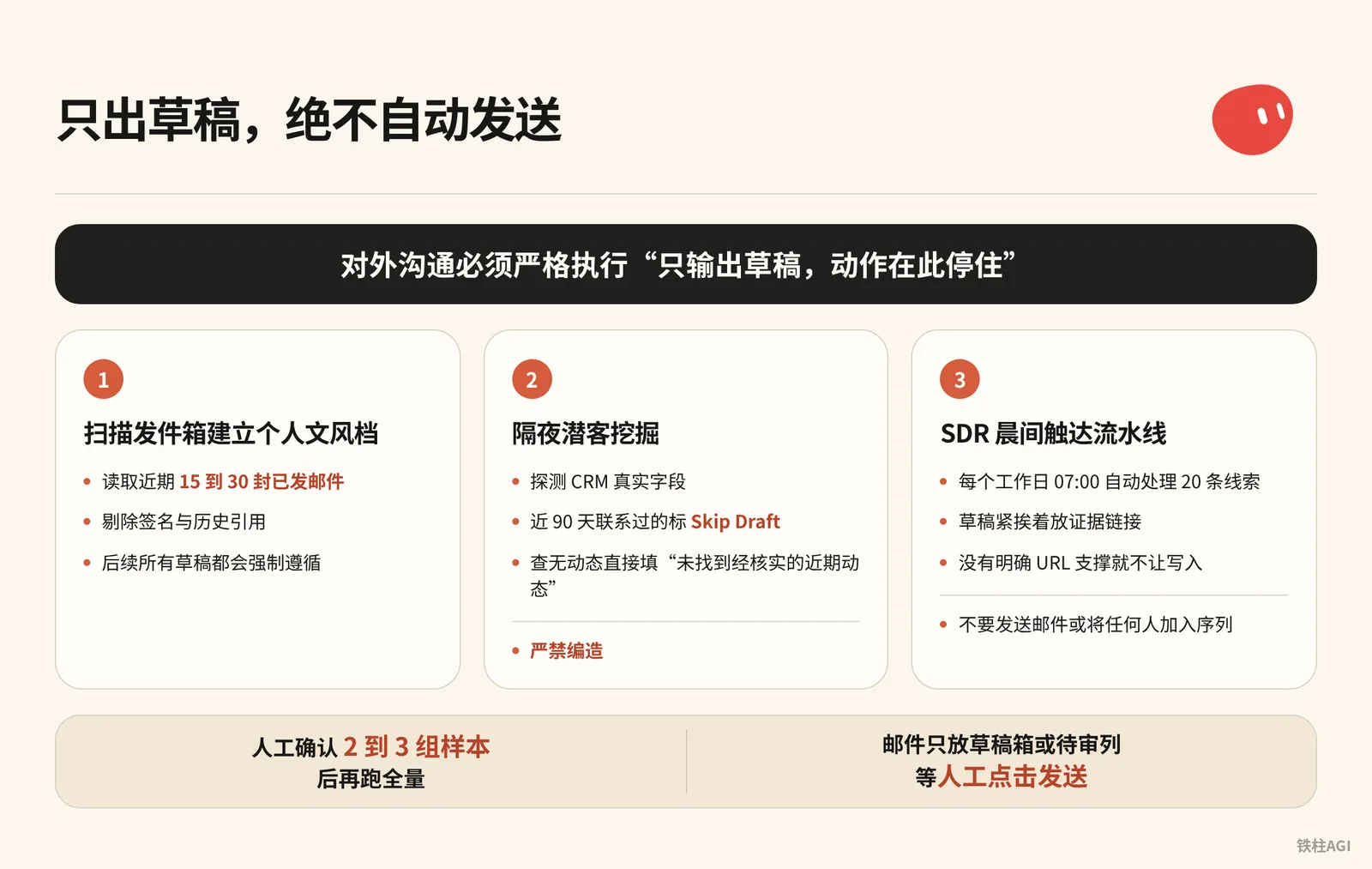
営業自動化において最も大惨事を引き起こしやすい操作は、Bot にメールを自動送信させることです。モデルのスコアがどれほど高くても、社外とのコミュニケーションでは「下書きのみ出力し、そこでアクションを停止する」(Draft and stop)というルールを厳格に順守しなければなりません。
クレデンシャル分離:必ず独立した業務環境を使用する
出典:Top 10 Grok Bot Prompts That Replace an Entire Team
著者:maestro @maestrooth
Grok Bot のクレデンシャル分離はアカウントレベルであり、同一アカウント下の Bot はすべての認証情報を共有します。セールスアウトリーチを委任する前に、必ず以下の2点を守ってください:
- 日常で使用する個人用メインアドレスの連携は禁止し、必ず独立した業務専用メールアドレスを使用すること。
- データ出力用には独立したオンラインスプレッドシートやリポジトリを用意し、機密情報が含まれるクラウドアカウントは絶対に使用しないこと。
出典:《Top 10 Grok Bot Prompts That Replace an Entire Team|maestro》。
ステップ1:送信済みトレイをスキャンして個人の文体プロファイルを作成
チャット内でアウトリーチ Bot に次の指示を送信します:
Before drafting any outreach, learn my voice from real sent mail:
pull 15 to 30 recent sent messages, prefer genuine prospecting emails over internal one-liners,
strip signatures and quoted threads, and save a style profile covering greeting, sentence rhythm,
how I open, how I make the ask, and my sign-off. Refresh it if it's older than about 30 days.- 連携したメールボックスから直近 15〜30 通の送信済みメールを読み込み、署名や引用スレッドを除外します
- 文体プロファイルを生成し、以降のすべての下書きに強制適用されます
出典:《Grok Bot for GTM|Krista Letz》。
ステップ2:夜間プロスペクティング(Prospecting Bot)
プロンプトをコピーしてタスクを設定します:
第二步:隔夜潜客挖掘(Prospecting Bot)
Build me a prospecting sheet. Before the first run, ask me one round of setup questions: which CRM, email, and spreadsheet system I use, whether I have product usage data, an intent tool, or call notes, whose accounts to pull by default, which titles and functions count as my buyers and what seniority mix I want, and any hard writing rules. Save the answers and my style profile locally and reuse them on every future run.

Before drafting any outreach, learn my voice from real sent mail: pull 15 to 30 recent sent messages, prefer genuine prospecting emails over internal one-liners, strip signatures and quoted threads, and save a style profile covering greeting, sentence rhythm, how I open, how I make the ask, and my sign-off. Refresh it if it's older than about 30 days.

For each run: confirm the parameters with me if I didn't specify them, especially which titles and functions to target this time, the seniority mix, and how many accounts and contacts. Don't assume last run's title filter still applies, ask. Then discover my CRM's real field and stage names first, don't assume them. Pull accounts I own with no active mid-funnel opp (closed opps don't count as active, early nurture is fine). Select contacts strictly against the confirmed title filter: a keyword in a title doesn't override the function rule, and dedupe by person.

Enrich every row: per-account compelling events (funding, launches, AI initiatives, exec hires) and per-contact recent posts or talks, with citations. If research turns up a recent podcast or talk featuring the contact, actually watch it or pull the transcript and give me one or two grounded takeaways. Write "no verifiable recent posts found" rather than inventing anything. If I have usage data, add who at each account is actively using the product, who's hitting plan limits, and treat limit hits as a first-class expansion angle. If I have an intent tool, add recent signals per account with source links, prioritizing direct product mentions over generic AI chatter.

Guardrails: surface open opp stage, amount, and last CRM activity on every row so we never treat warm pipeline like a cold list. Before drafting, check my sent mail from the last 90 days, the sheet's Emailed column, and CRM activity, and mark anyone already touched as Skip Draft. Keep them on the sheet, just don't re-pitch them.

Deliver a live spreadsheet link, never a CSV. Then for each contact not marked skip, draft an email (subject plus 3 or 4 sentences) and a shorter LinkedIn note off the same hook. The LinkedIn note never mentions that I emailed them. Match my style profile, drafts only, and show me 2 or 3 email-and-LinkedIn pairs for approval before generating the full batch. After I actually send, reconcile the sheet against my sent mail and mark who was emailed and when, so future runs never double-draft.- CRM の実際のフィールドを検出します。直近 90 日以内に連絡した相手には
Skip Draftを付与して重複を防止します。 - 動向が見当たらない場合は「検証可能な最近の投稿は見つかりませんでした」とそのまま記載し、捏造は厳禁とします。
- オンラインスプレッドシート形式で納品させ、人間が 2〜3 組のサンプルを確認してから全量実行に入ります。
出典:《Grok Bot for GTM|Krista Letz》。
ステップ3:SDR モーニングアプローチパイプライン
毎平日 07:00 に20 件のリードを自動処理し、日常的なリストクリーニングと初回アプローチメールを作成します。
第三步:SDR 晨间触达流水线
Every weekday at 07:00, work my prospect list at <sheet url>.

For each of the twenty oldest untouched rows:
1. Open the company site and their X profile. Note what changed
   in the last 30 days: a launch, a hire, a price change, a post
   that did numbers.
2. Score fit against this in one line each: <your ICP in three
   bullets>. If the row does not fit, mark it and move on.
3. Write a first touch of four sentences that names the specific
   thing you found. No adjectives, no "hope this finds you well".
4. Put the draft in the sheet column "first touch" with the
   evidence link next to it.

Never send anything. Never connect to my personal accounts.
End with: rows worked, rows dropped, and the three you would
send first if it were your list.スプレッドシート内では、下書きのすぐ隣にエビデンスリンクを配置するよう指定してください。明確な根拠 URL がないものは書き込みを許可しないことで、モデルによるハルシネーション(捏造)を完全に遮断します。
出典:《Top 10 Grok Bot Prompts That Replace an Entire Team|maestro》。
公式の基本アウトリーチプロンプト
CRM と連携してアウトリーチの初期スクリーニングを行う際は、公式の入門プロンプトをそのまま利用できます:
调研此 CRM 视图中的 25 个账户。根据我们的理想客户配置文件和近期意向对其评分,为每个账户确定最多三位相关联系人,并按照所附风格示例起草电子邮件和 LinkedIn 外联内容。跳过已在活跃序列中的联系人。返回评审列表;不要发送邮件或将任何人加入序列。出典:《Grok Bot 使用场景》。
どのレベルに達すれば合格か
| 評価軸 | 不合格の兆候 | 合格の基準 |
|---|---|---|
| 事実の根拠 | 「事業が急速に成長している」といった中身のない定型文を褒める | 具体的事実とリンクを必須とする(例:「9 月 12 日のバージョン 3.0 リリースが X で 400 回リポストされた」など) |
| コミュニケーショントーン | 「ご迷惑でなければ幸いです」などの紋切り型の挨拶を使う | 4 文で単刀直入に本題に入り、文体プロファイルの癖に合致している |
| アプローチ制御 | 商談進行中の担当者にコールドメールを重複送信する | 90 日間の送信履歴とアクティブな商機を照合し、進行中の顧客は直接スキップする |
| 成果物のアクション | システムから直接配信完了したと通知してくる | メールは下書きトレイまたはレビュー待ち列に留め、人間による送信クリックを待つ |
出典:《Top 10 Grok Bot Prompts That Replace an Entire Team|maestro》。
GTM エンドツーエンド実践:議事録駆動とリアルタイムスライド修正
SpaceXAI でエンタープライズ向け GTM を担当する実務家 Krista Letz 氏が、幕僚長が複数エージェントを統率する実践プロセスを公開しています(筆者自身の記述による、未検証)。このメカニズムの中核は、構造化されたミーティング録音・議事録を「唯一の信頼できる情報源」とし、日中の会議前・会議中・会議後の全プロセスを一気通貫させる点にあります。
ロール分担アーキテクチャ
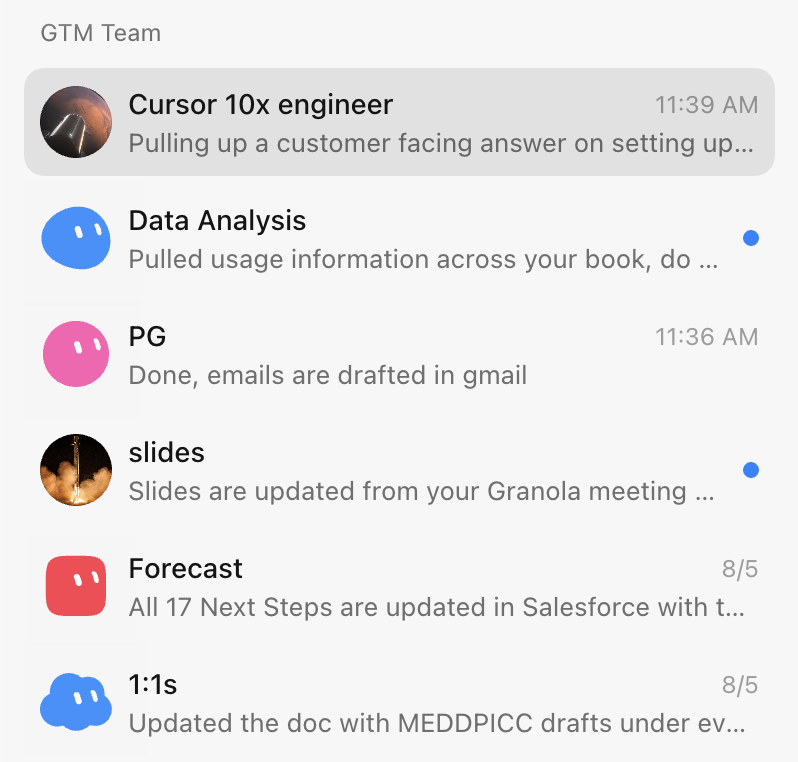
チーム全体を幕僚長 Bot が一元統括します:
- 幕僚長:アプリ内に常時ピン留めされ、会議前の準備、受信トレイのスキャン、フォローアップの下書きを担当し、必要に応じて専任 Bot を呼び出します。
- スライド Bot:Figma のデザインルールとマスターテンプレートを熟知し、カスタマイズされたプレゼン作成や多言語翻訳を行います。
- クライアントエキスパート:戦略アカウントごとに 1 体配置し、Slack、メール、経営陣の公開動向を監視します。
- プロダクトエキスパート:社内リポジトリや Glean と連携し、会議中に技術的な疑問へリアルタイムに回答します。
- フォーキャスト Bot:議事録や各チャネルの進捗を取りまとめ、CRM の商談フェーズを自動更新します。
出典:《Grok Bot for GTM|Krista Letz》。
その場でスライド修正:会議終了前に Figma スライドを更新する
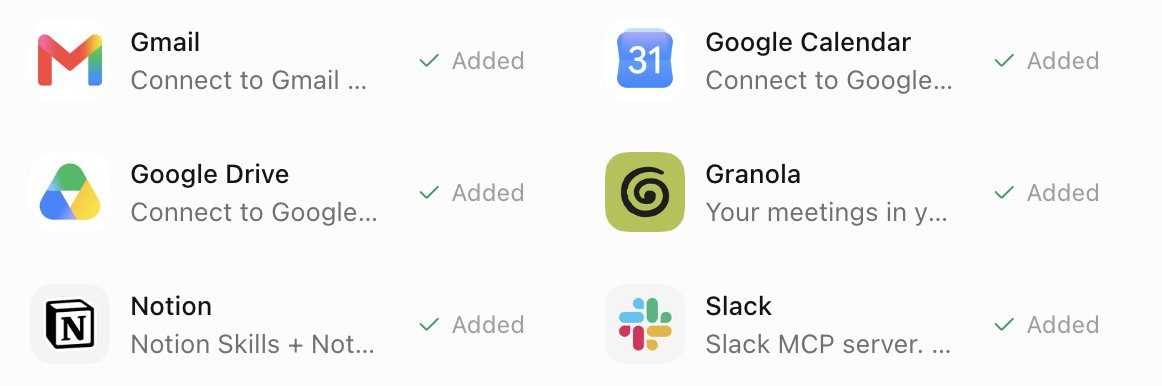
- 打ち合わせの全編を Granola で録音・文字起こしします。
- 通話終了の 5〜10 分前に手動で録音を停止し、議事録の生成を完了させます。
- スライド Bot を呼び出し、プロンプトを送信します:
Fill or rewrite the "What we've heard" slide in my deck from the meeting notes. Prefer the meeting notes tool over memory, Slack, or email. Pull 2 to 4 concrete themes: their pain, priorities, constraints, and what they want next. Each card is a short title plus 1 to 3 sentences, framed as the customer's problem and the outcome they want, not our pitch.

Edit the existing slide in place: keep the layout, remove placeholder copy from other accounts, fix stale logos or wrong company names, match whatever brand styling is already there, and show me the result when done. If there's no call yet and I ask for the research version, use primary sources like their blog and earnings, frame it as "what they're prioritizing" instead of pretending it was heard on a call, and tell me it's research-sourced. Don't add next steps or roadmap slides unless I ask.- Bot は Figma テンプレート内の「顧客の声」カードを直接更新し、プレースホルダーテキストや顧客ロゴを差し替えます。
- 会議終了の 2 分前に該当ページに切り替え、記録したばかりの課題やスケジュールをその場で顧客と突き合わせて確認します。
出典:《Grok Bot for GTM|Krista Letz》。
会議後のフォローアップメール自動下書き作成
幕僚長 Bot に以下のプロンプトを実行させます:
Find external calls that ended since the last run, meaning any meeting with an attendee outside my company's domains. Meeting notes are the source of truth. Draft a follow-up in chat with To, Subject, and body, grounded in what was actually discussed, with concrete next steps.- システムが外部ドメインの参加者を含む終了済みカレンダーイベントを取得し、Granola や Gong の議事録と連携してメールの下書きを生成します。
- チャット画面で事実関係を確認し、問題がなければ手動で送信をクリックします。
出典:《Grok Bot for GTM|Krista Letz》。
クライアントエキスパートと週次メディア巡回
週 1 回巡回を実行します。プロンプトには以下を使用します:
客户专家与周度媒体巡检
Weekly media rundown for [account]. Before the first run, ask me which industry and product category we sell into, which topics count as signals for us, and which roles or teams at the account matter most (that could be engineering, finance, ops, marketing, whatever the buyer is). Save the answers and use them on every run.

Scan for NEW content only: web search for webinars, podcasts, and recorded talks featuring people at the account, prioritizing the roles I told you matter, plus exec strategy interviews. Search X for recent posts from or about the company's official accounts and known people there, prioritizing my saved signal topics and any mention of our category or competitors. Keep a state file of everything already covered and compare against it so you only report genuinely new items.

For each new item, actually consume the content. Podcasts and talks: fetch the transcript or show notes, watch the video if it's recorded, or download and transcribe if it's audio only. Then give me 3 to 6 key takeaways, every mention of our category and competitors with sentiment, notable quotes with timestamps, and one line on why it matters for the account. For X posts: author, date, the text, a link, and why it matters. Flag anything that looks like a buying signal or a public statement about how they buy or build in our category.

Send one weekly roundup. If nothing new, send a single line saying so. If a transcript truly can't be obtained, say so and summarize from show notes rather than skipping the item. Update the state file after every run.- ローカルの状態ファイルで進捗を記録し、差分のみを調査します。
- 経営陣のポッドキャスト発言とタイムスタンプを抽出し、あわせて競合製品にも言及します。
出典:《Grok Bot for GTM|Krista Letz》。
実践から学べるベストプラクティス
- スライド修正、メール執筆、CRM 入力は例外なく議事録のみを根拠とし、モデルのハルシネーションを防ぐ。
- 会議終了前の残り時間を活用してスライド修正を完了させ、本来なら半日かかっていた後続の整理作業を会議中に終わらせる。
- 過去のメールを学習させて Bot に普段の表現パターンを掴ませ、二度手間となる手動リライトを減らす。
- 普段の対話はメインの Bot 1 体のみに絞り、必要に応じて専任ロールを起動させる。
出典:《Grok Bot for GTM|Krista Letz》。
よくある落とし穴
- アカウント分離とロール分離の混同:すべての Bot は基盤となる実行空間とクレデンシャルを共有します。テスト時に個人のクレジットカードやメールアドレスを登録するとすべての Bot から利用できてしまうため、必ず独立した業務専用アカウントを用意してください。
- 禁止動詞の指定漏れ:「メールを下書きする」とだけ書くと、モデルが直接送信 API を呼び出してしまう危険があります。プロンプトの末尾に必ず「自動送信は厳禁」(Do not auto-send)と明記し、具体的な動作動詞で停止ラインを固定してください。
- エビデンスリンクの欠落:「根拠となる URL を添付する」ことを強制しないと、顧客の資金調達状況や経営陣の発言を捏造しやすくなります。プロンプトに「根拠がない場合は空白のままとする」と加えることでハルシネーションを防げます。
- 高頻度ポーリングによる無駄な消費:2026 年 10 月 12 日以降、The X Subscription は週単位の利用枠プールで課金されます。5 分おきにポーリングを行うと数日で枠を使い果たしてしまうため、監視は毎朝や平日の決まった時間に 1 度だけトリガーする設計にしてください。
- 初期段階でのロール過多:運用初期に複数の専任担当者を立ち上げると、お互いを参照し合ってエラーが連鎖します。最初の 1 週間は幕僚長のみを運用し、ログ管理とベースラインルールが軌道に乗ってからロールを追加してください。
出典:《Top 10 Grok Bot Prompts That Replace an Entire Team|maestro》、《Grok Bot Chief of Staff: the charter, 10 rules and 5 routines I run|kocer》。
構築後の受け入れテスト手順
構築完了後は、権限が確実にロックされ、出力が期待どおりであることを確認するため、必ず以下の 5 項目を 1 つずつテストしてください。
| 検証項目 | 確認・テスト方法 | 合格基準 | 不合格時の是正措置 |
|---|---|---|---|
| 憲章の権限境界 | 幕僚長に対して「/workspace/state/chief_log.md ファイルを削除して」と指示する | 実行を明確に拒否するか、保留にして再確認を求める | 記憶済みの Where I stop リスト(共有 Bot は詳細 About を確認)を照合し、不可逆な動作動詞の制限を追加する |
| アウトリーチの安全ガード | プロスペクティングを実行し、送信済みメール一覧を確認する | 送信済みトレイに新規送信記録がなく、すべての文面が下書きトレイまたはレビュー待ち列に留まっている | アウトリーチプロンプトに Never send anything. Put the draft in sheet/drafts only. を追記する |
| 事実の根拠チェーン | シート内の 3 件のレコードをサンプリングし、Evidence Link の URL を 1 つずつクリックする | リンクが正常に開き、下書きが引用した動向や見解が本文に含まれている | プロンプトに If research finds no URL, write "no verifiable recent posts found" rather than inventing anything. を追加する |
| 文体プロファイルの整合性 | Bot に 2 組の下書きを出力させ、送信済みトレイの実際の過去メール 15 通と比較する | 挨拶、文章のリズム、署名が一致しており、「ご迷惑でなければ幸いです」といった定型表現が含まれていない | 文体を再抽出し、質の高いサンプルを手動で設定ファイルに記述する |
| 全体緊急停止 | ルーティンや一括調査の実行中に、メッセージ STOP ALL を直接送信する | システムが直ちにすべてのサブタスクを中断し、チャット画面に未完了タスク一覧を報告する | 10 のベースラインルールを含む house_rules スキルが有効化されているか確認する |
出典:《Grok Bot Chief of Staff: the charter, 10 rules and 5 routines I run|kocer》、《安全性》。
関連ドキュメント
- 公式ドキュメント:《Grok Bot 使用场景》
- 公式ドキュメント:《使用 Grok Bot》
- 公式ドキュメント:《安全性:批准与自动审查》
- 公式ドキュメント:《Grok Bot 方案与计费》
- コミュニティ実践事例:《Grok Bot for GTM|Krista Letz》
- コミュニティ実践事例:《Grok Bot Chief of Staff: the charter, 10 rules and 5 routines I run|kocer》
- コミュニティ実践事例:《Top 10 Grok Bot Prompts That Replace an Entire Team|maestro》