제17장 사례: GTM, 세일즈 및 비서실장
처음부터 4~5개의 분산된 역할을 마구 생성하지 마세요. 통합 조율이 부족하면 정보가 서로 충돌하기 쉽고, 권한을 철저히 제한하지 않으면 핵심 고객에게 초안을 단체 발송하는 사고가 발생할 수 있습니다.
전체 아키텍처는 비서실장 Bot이 통합 조율합니다.
- 프로필에 헌장(Charter)과 10가지 기본 원칙을 못 박아, 되돌릴 수 없는 작업을 인간의 승인 절차 밖으로 벗어나지 못하도록 차단합니다.
- 세일즈 아웃리치는 근거 링크가 포함된 초안만 생성하며, 자동 발송은 엄격히 금지합니다.
- 회의 녹음 회의록과 결합하여 통화가 끝나기 전에 슬라이드를 수정하고 팔로업 이메일 초안을 작성합니다.
노트북을 닫아도 클라우드에서 실행되며, 다음 날 아침 검토 결과를 바로 전달받을 수 있습니다.
비서실장 아키텍처: 단일 허브에서 협업 네트워크로
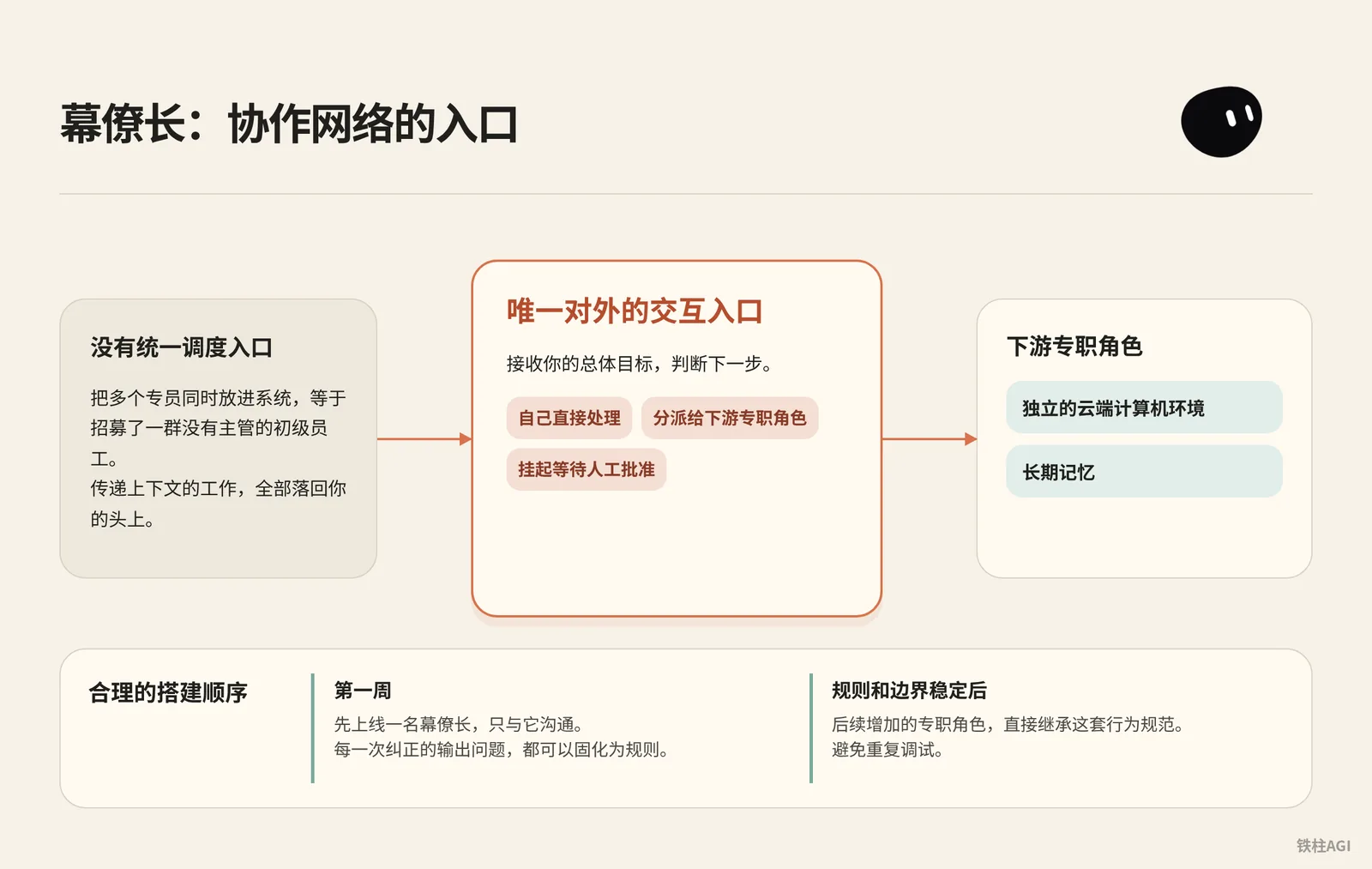
여러 담당자를 동시에 시스템에 투입하는 것은 관리자 없는 주니어 직원들을 대거 채용한 것과 같습니다. Grok Bot은 각 역할에 독립적인 클라우드 컴퓨터 환경과 장기 기억을 할당하므로, 통합 조율 창구를 두지 않으면 여러 역할 간에 컨텍스트를 전달하는 작업이 고스란히 사용자의 몫으로 돌아오게 됩니다.
첫 주에는 왜 비서실장 하나만 운영해야 하는가
합리적인 구축 순서는 먼저 한 명의 비서실장을 배포하고, 첫 주 동안은 이 비서실장과만 소통하는 것입니다. 비서실장은 유일한 대외 상호작용 창구이며, 사용자의 총괄 목표를 전달받아 직접 처리할지, 하위 전담 역할에 배분할지, 아니면 보류하고 사람의 승인을 기다릴지 판단하는 책임을 집니다.
초기에는 비서실장만 실행하여, 수정된 출력 문제들을 하나씩 규칙으로 정착시킬 수 있습니다. 비서실장의 규칙과 경계가 안정되면, 이후 추가되는 전담 역할들은 이 행동 규범을 그대로 상속받으므로 중복 디버깅을 피할 수 있습니다.
비서실장 헌장 구성
출처: Grok Bot Chief of Staff: the charter, 10 rules and 5 routines I run
작성자: kocer @kocer_eth
- 데스크톱 앱에서 대상 Bot과의 대화를 엽니다.
- 개인 Bot의 경우 헌장을 대화창에 전송하여 기억하도록 하고, 공유 Bot의 경우 상단 이름을 클릭한 후 상세 정보의 About 내 Description에 입력합니다. 사이드바에는 더 이상 Edit Profile이 없습니다.
- 헌장을 입력하고,
{your name}을 본인의 호칭으로 변경합니다.
비서실장 헌장 구성
Name: Chief
Title: Chief of Staff
Reports to: {your name}

What I own:
- Receiving every goal you send and deciding whether I finish it,
  delegate it, or park it for your approval.
- Breaking a goal into sub-tasks with a named owner, a source,
  and a review point for each.
- Maintaining the daily brief, the weekly review, and the routine
  audit. Nobody else touches these.
- Keeping /workspace/state/chief_log.md up to date with every
  decision I made and every action I skipped.

What good output looks like:
- Every claim I hand you has a source and a date. If I can't
  cite it, I leave it out.
- Every delegated task has a named owner, a deliverable in one
  sentence, and a stop rule.
- Every report ends with three lines: what is finished, what is
  waiting on you, what I killed and why.
- I never say "I think" or "probably." Either I know or I ask.

Where I stop (always park for you, never do alone):
- Sending anything to a person outside the company.
- Moving, spending, or committing money.
- Publishing anything public.
- Deleting anything that isn't obvious junk.
- Signing up, agreeing to terms, or accepting any contract.
- Changing account settings, billing, or connected plugins.
- Any action I cannot undo in under one minute.

Style: Short. Structured. No filler. Report who is doing what.- 보고 대상(
Reports to)을 명확히 하여 모델이 대리인 역할을 견지하도록 합니다. - 전달 내용에는 반드시 데이터 출처와 날짜가 포함되어야 하며, 근거가 없으면 빈칸으로 남깁니다.
- 작업 중단 목록(
Where I stop)은 모두 구체적인 동작 동사로 정의합니다. - "~라고 생각합니다" 또는 "아마도" 같은 추측 표현을 금지하며, 확인할 수 없는 내용은 반드시 먼저 질문해야 합니다.
출처: 《Grok Bot Chief of Staff: the charter, 10 rules and 5 routines I run|kocer》.
10가지 기본 원칙과 테스트 케이스
10가지 규칙을 비서실장에게 전송하여 house_rules 스킬로 저장하고, 새 Bot 생성 시 첫 메시지에서 바로 참조하도록 하며, 각 규칙마다 30초 테스트 검증을 거칩니다.
- 1분 내에 되돌리기 어려운 작업은 예외 없이 보류하고 승인을 대기합니다.
/workspace/state로그를 삭제하라고 지시했을 때, 반드시 멈추고 확인을 요청해야 합니다. - 출처가 없으면 데이터를 제공하지 않으며, 임의 추정을 엄격히 금지합니다. 인터넷 연결 없이 매출을 물어보면 반드시 가져올 수 없다고 답변해야 합니다.
- 목표나 데이터 등 입력 정보가 부족하면 반드시 질문해야 합니다. "항공권 예약해 줘"라고 보냈을 때, 시간, 장소, 예산을 자발적으로 되물어야 합니다.
- 결과물 전달 시 반드시 산출물과 출처를 첨부합니다. 소식 3건을 요약하라고 하면, 반드시 해당 URL 3개를 첨부해야 합니다.
- 단계별 단일 책임자를 지정하며, 동일 파일에 대한 동시 쓰기를 금지합니다. 긴 작업은 반드시 선후 단계로 분할해야 합니다.
- 승인 권한은 사람에게 있으며, 비가역적 작업을 대리 승인하는 것을 엄격히 금지합니다. 대신 발송 버튼을 눌러줄 수 있냐고 물으면 명확히 거절해야 합니다.
- 보류 상태가 24시간을 초과하여 응답이 없으면 1회만 재촉하고, 메시지를 도배하지 않습니다. 하루 동안 보류되어도 확인 알림은 단 한 번만 보냅니다.
- 결정 사항과 건너뛴 작업은 반드시 타임스탬프와 함께
/workspace/state/chief_log.md에 추가해야 합니다. 작업 완료 후 로그를 확인합니다. - 대화창으로 비밀번호를 전송하는 것을 엄격히 금지하며, 로그인은 클라우드 인계 카드를 통해 진행합니다. 플랫폼 로그인이 필요할 경우 반드시 인계 화면을 띄워야 하며, 비밀번호를 직접 요구해서는 안 됩니다.
STOP ALL명령 수신 시 즉시 산하의 모든 작업을 동결해야 합니다. 실행 중에 전송하면 해당 자리에서 즉시 동작을 멈춰야 합니다.
출처: 《Grok Bot Chief of Staff: the charter, 10 rules and 5 routines I run|kocer》.
어느 정도 수준이어야 합격인가
| 차원 | 합격 기준 | 불합격 기준 |
|---|---|---|
| 작업 접수 | 제약 조건이 부족하면 먼저 질문하여 보완함 | 모호한 지시를 바탕으로 자의적으로 상상하여 진행함 |
| 외부 작업 | 메일 발송, 결제 직면 시 예외 없이 초안을 생성하고 보류 | 임의로 API를 호출하거나 초안을 외부로 발송함 |
| 데이터 전달 | 문서 경로, URL 및 타임스탬프를 명기함 | 출처 없는 데이터와 수식어만 출력함 |
| 실행 보고 | 고정 3줄 구조(완료됨 / 승인 대기 / 중단됨) 준수 | 장황한 서술식 요약으로 병목 지점을 은폐함 |
출처: 《Grok Bot 활용 사례》.
5가지 업무 루틴: 비서실장에게 일정한 리듬 부여하기
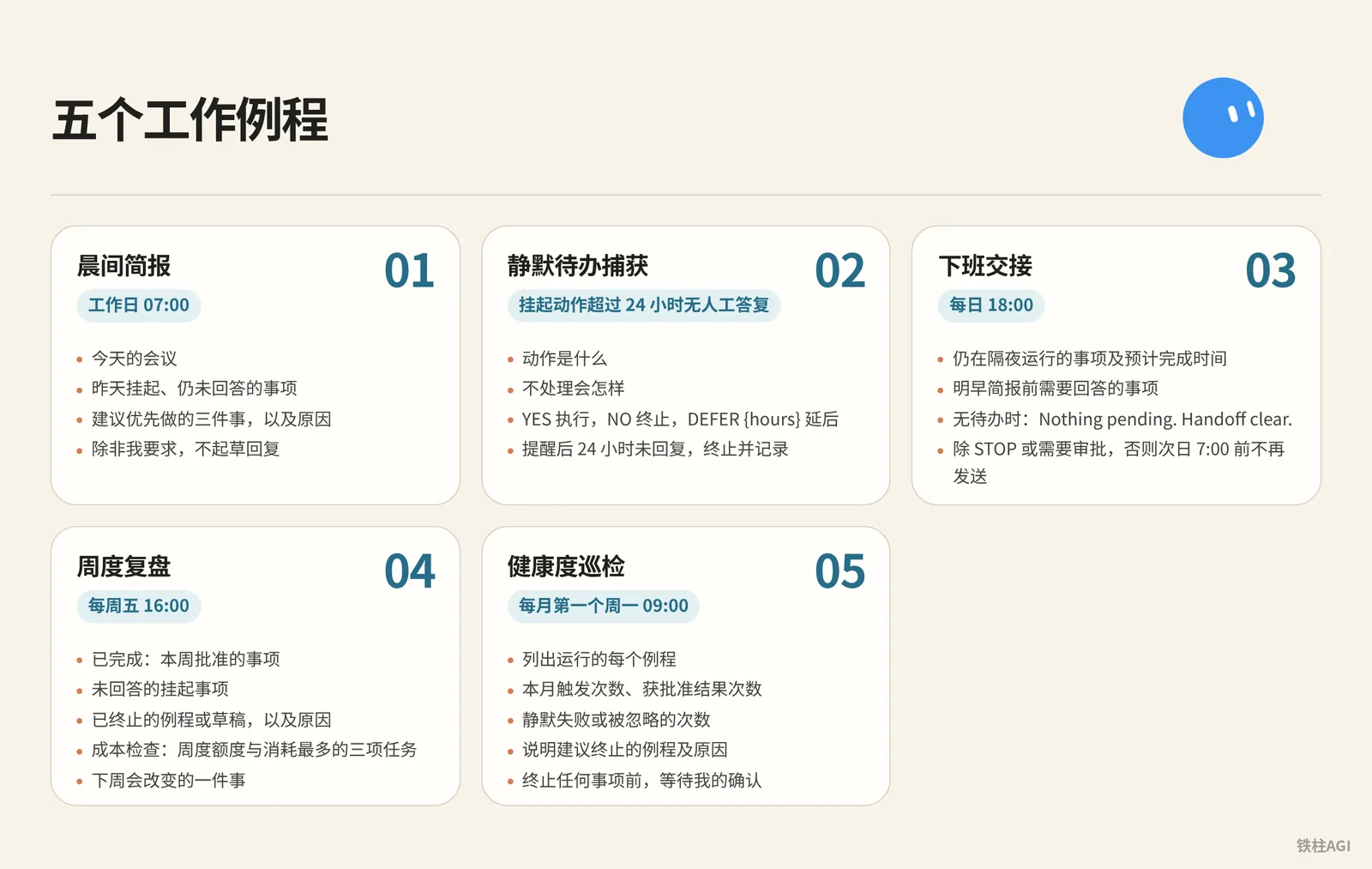
헌장이 권한의 한계선을 정한다면, 루틴(Routine)은 비서실장에게 정해진 시간에 직무를 수행하는 업무 습관을 부여합니다. 이 5가지 프롬프트를 비서실장에게 하나씩 전송하여 고정 루틴으로 저장하도록 하세요.
5대 루틴 프롬프트
- 모닝 브리핑: 평일 07:00
5대 루틴 프롬프트
Every weekday at 07:00, check:
- my calendar for today
- my inbox for anything flagged, urgent, or from a named contact
- /workspace/state/chief_log.md for what got parked yesterday

Return one message in this order:
1. Three lines on today's meetings, one per meeting.
2. Everything parked yesterday I still haven't answered.
3. Three things you recommend I do first, with why.

Do not draft replies unless I ask.- 미처리 보류 항목 감지: 보류된 작업이 24시간 동안 사람의 응답이 없을 때
5대 루틴 프롬프트
Trigger: any parked action older than 24 hours with no response from me.

Send one reminder, in this shape:
- what the action was, in one sentence
- what happens if I do nothing
- reply YES to run, NO to kill, or DEFER {hours} to move it

Do not remind twice. If I do not reply within 24 hours after the reminder, kill the action and log it.- 퇴근 인수인계: 매일 18:00
5대 루틴 프롬프트
Every day at 18:00, write me a two-line message:
- what is still running overnight and when you expect it done
- what I need to answer before tomorrow morning's brief

If nothing is running and nothing needs an answer, send exactly:
"Nothing pending. Handoff clear."

Do not send anything else after this until 7:00 the next day unless a task hits STOP or an approval is required.- 주간 회고: 매주 금요일 16:00
5대 루틴 프롬프트
Every Friday at 16:00, produce a review with four sections:
- Finished: what I approved this week, one line each.
- Parked without an answer: everything I did not respond to.
- Killed: routines or drafts you dropped, and why.
- Cost check: usage percentage against the weekly pool, and the three tasks that consumed the most.

End with one line: what one thing you would change next week.
Save the review to /workspace/state/reviews/YYYY-WW.md.- 상태 점검(헬스 체크): 매월 첫째 주 월요일 09:00
5대 루틴 프롬프트
On the first Monday of the month at 09:00, list every routine you run for me. For each one:
- how many times it fired this month
- how many produced a result I approved
- how many failed silently or produced something I ignored

Then tell me which routine you would kill and why.
Wait for my ok before killing anything.
출처: 《Grok Bot Chief of Staff: the charter, 10 rules and 5 routines I run|kocer》.
실행 메커니즘 및 구독 크레딧 제어
The X Subscription 통합 플랜은 2026년 10월 12일부터 적용됩니다.
| 플랜 | 월간 / 연간 | Grok Bot 한도 |
|---|---|---|
| Premium | 30 / 300달러 | 4배 |
| Super | 100 / 1000달러 | 15배 |
| Ultra | 200 / 2000달러 | 50배 |
| Plus | 8 / 80달러 | 권한 없음 |
Bot 사용량은 주 단위로 공유 풀에서 차감됩니다. 루틴의 최단 스케줄링 간격은 5분이므로 고주파 폴링을 설정하지 마세요. 며칠 만에 한도가 소진될 수 있습니다. 평소에는 정기 트리거 3개와 이벤트 기반 루틴 2개 정도만 유지해도 충분하며, 야간이나 근무 시간 사이의 헛돌기(공회전)를 방지할 수 있습니다.
출처: 《플랜 및 요금 체계》.
세일즈 아웃리치: 초안만 작성, 자동 발송은 절대 금지
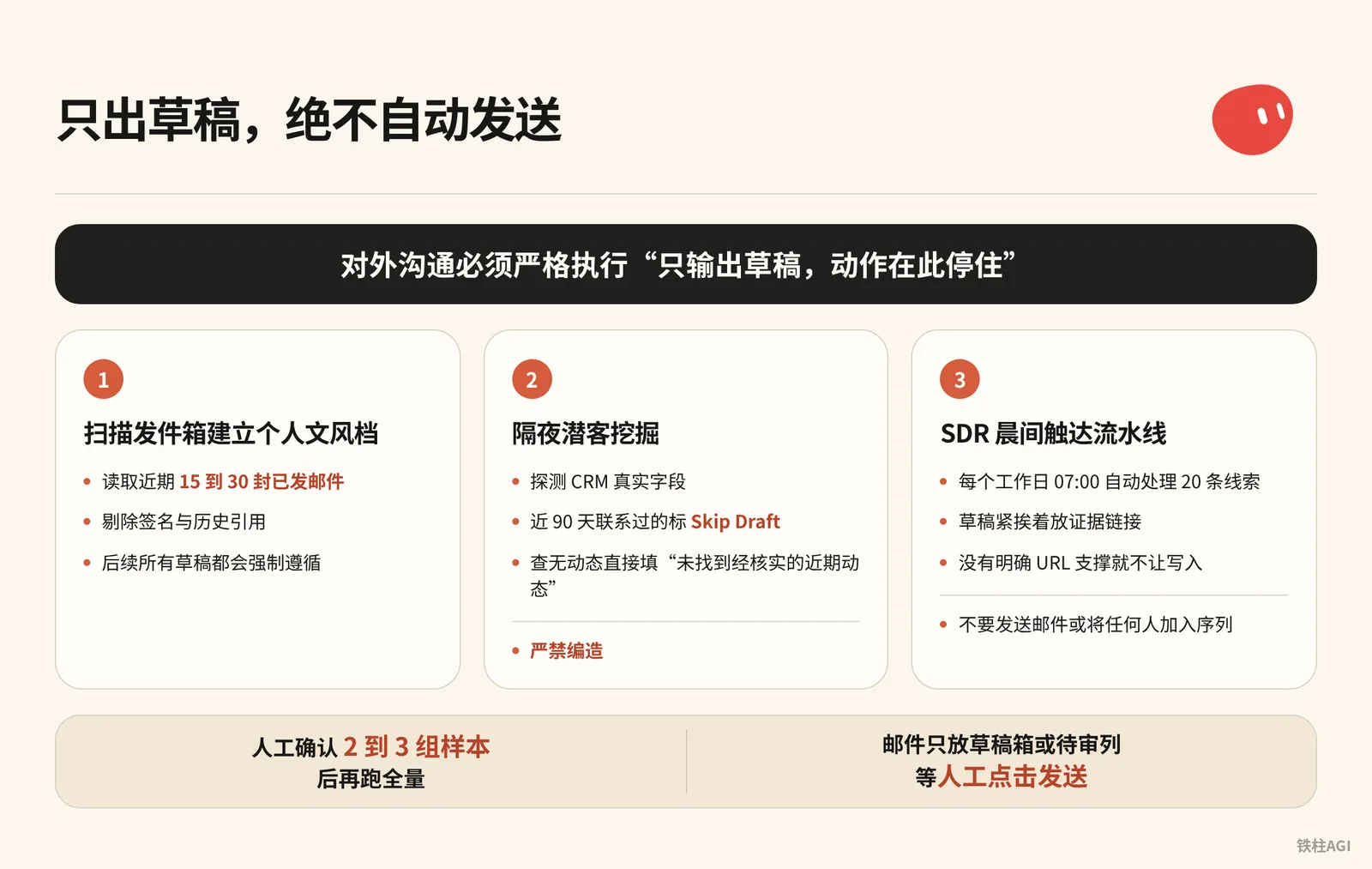
세일즈 자동화에서 가장 큰 사고를 유발하기 쉬운 작업은 Bot이 이메일을 자동으로 발송하게 두는 것입니다. 모델의 평가 점수가 아무리 높더라도, 대외 커뮤니케이션은 반드시 "초안만 출력하고 동작은 여기서 중단"(Draft and stop) 규칙을 엄격히 적용해야 합니다.
자격 증명 격리: 반드시 독립된 비즈니스 환경 사용
출처: Top 10 Grok Bot Prompts That Replace an Entire Team
작성자: maestro @maestrooth
Grok Bot의 자격 증명 격리는 계정 단위로 이루어지므로, 동일 계정 아래의 Bot들은 모든 자격 증명을 공유합니다. 세일즈 아웃리치를 맡기기 전에 반드시 다음 두 가지 원칙을 지켜야 합니다:
- 반드시 독립된 업무 전용 이메일을 사용해야 하며, 일상적인 개인 기본 이메일을 연동해서는 안 됩니다.
- 데이터 출력을 위해 독립된 온라인 스프레드시트 및 코드 저장소를 준비하고, 개인적인 비밀 정보가 저장된 클라우드 스토리지를 사용하지 마세요.
출처: 《Top 10 Grok Bot Prompts That Replace an Entire Team|maestro》.
1단계: 보낸편지함을 스캔하여 개인 작문 스타일 프로필 구축
출처: Grok Bot for GTM
작성자: Krista Letz @kristaletz
대화창에서 아웃리치 Bot에게 다음 지침을 전송합니다:
Before drafting any outreach, learn my voice from real sent mail:
pull 15 to 30 recent sent messages, prefer genuine prospecting emails over internal one-liners,
strip signatures and quoted threads, and save a style profile covering greeting, sentence rhythm,
how I open, how I make the ask, and my sign-off. Refresh it if it's older than about 30 days.- 연동된 이메일에서 최근 15~30통의 보낸 메일을 읽어 서명과 인용된 대화 기록을 제거합니다.
- 작문 스타일 프로필을 생성하며, 이후의 모든 초안 작성 시 이를 강제로 준수합니다.
출처: 《Grok Bot for GTM|Krista Letz》.
2단계: 야간 잠재 고객 발굴 (Prospecting Bot)
프롬프트를 복사하여 작업을 구성합니다:
2단계: 야간 잠재 고객 발굴 (Prospecting Bot)
Build me a prospecting sheet. Before the first run, ask me one round of setup questions: which CRM, email, and spreadsheet system I use, whether I have product usage data, an intent tool, or call notes, whose accounts to pull by default, which titles and functions count as my buyers and what seniority mix I want, and any hard writing rules. Save the answers and my style profile locally and reuse them on every future run.

Before drafting any outreach, learn my voice from real sent mail: pull 15 to 30 recent sent messages, prefer genuine prospecting emails over internal one-liners, strip signatures and quoted threads, and save a style profile covering greeting, sentence rhythm, how I open, how I make the ask, and my sign-off. Refresh it if it's older than about 30 days.

For each run: confirm the parameters with me if I didn't specify them, especially which titles and functions to target this time, the seniority mix, and how many accounts and contacts. Don't assume last run's title filter still applies, ask. Then discover my CRM's real field and stage names first, don't assume them. Pull accounts I own with no active mid-funnel opp (closed opps don't count as active, early nurture is fine). Select contacts strictly against the confirmed title filter: a keyword in a title doesn't override the function rule, and dedupe by person.

Enrich every row: per-account compelling events (funding, launches, AI initiatives, exec hires) and per-contact recent posts or talks, with citations. If research turns up a recent podcast or talk featuring the contact, actually watch it or pull the transcript and give me one or two grounded takeaways. Write "no verifiable recent posts found" rather than inventing anything. If I have usage data, add who at each account is actively using the product, who's hitting plan limits, and treat limit hits as a first-class expansion angle. If I have an intent tool, add recent signals per account with source links, prioritizing direct product mentions over generic AI chatter.

Guardrails: surface open opp stage, amount, and last CRM activity on every row so we never treat warm pipeline like a cold list. Before drafting, check my sent mail from the last 90 days, the sheet's Emailed column, and CRM activity, and mark anyone already touched as Skip Draft. Keep them on the sheet, just don't re-pitch them.

Deliver a live spreadsheet link, never a CSV. Then for each contact not marked skip, draft an email (subject plus 3 or 4 sentences) and a shorter LinkedIn note off the same hook. The LinkedIn note never mentions that I emailed them. Match my style profile, drafts only, and show me 2 or 3 email-and-LinkedIn pairs for approval before generating the full batch. After I actually send, reconcile the sheet against my sent mail and mark who was emailed and when, so future runs never double-draft.- CRM의 실제 필드를 탐지하며, 최근 90일 내에 접촉한 연락처는
Skip Draft로 표시하여 중복을 방지합니다. - 활동 내역이 없으면 그대로 "검증된 최근 게시물을 찾을 수 없음"을 기재하며, 날조를 엄격히 금지합니다.
- 온라인 스프레드시트로 전달하며, 사람이 2~3개 샘플을 확인한 후 전체 배치를 실행합니다.
출처: 《Grok Bot for GTM|Krista Letz》.
3단계: SDR 모닝 아웃리치 파이프라인
매 평일 07:00에 20개의 리드를 자동으로 처리하여 일상적인 리스트 정제 및 첫 터치(First Touch) 이메일을 작성합니다.
3단계: SDR 모닝 아웃리치 파이프라인
Every weekday at 07:00, work my prospect list at <sheet url>.

For each of the twenty oldest untouched rows:
1. Open the company site and their X profile. Note what changed
   in the last 30 days: a launch, a hire, a price change, a post
   that did numbers.
2. Score fit against this in one line each: <your ICP in three
   bullets>. If the row does not fit, mark it and move on.
3. Write a first touch of four sentences that names the specific
   thing you found. No adjectives, no "hope this finds you well".
4. Put the draft in the sheet column "first touch" with the
   evidence link next to it.

Never send anything. Never connect to my personal accounts.
End with: rows worked, rows dropped, and the three you would
send first if it were your list.
시트 내 초안 바로 옆에 근거 링크를 배치해야 합니다. 명확한 URL 뒷받침이 없으면 입력을 허용하지 않아, 모델의 환각 작성을 원천 차단합니다.
출처: 《Top 10 Grok Bot Prompts That Replace an Entire Team|maestro》.
공식 기본 아웃리치 지침
CRM을 연동하여 아웃리치 초기 선별을 진행할 때는 공식 스타터 프롬프트를 바로 사용하세요:
调研此 CRM 视图中的 25 个账户。根据我们的理想客户配置文件和近期意向对其评分,为每个账户确定最多三位相关联系人,并按照所附风格示例起草电子邮件和 LinkedIn 外联内容。跳过已在活跃序列中的联系人。返回评审列表;不要发送邮件或将任何人加入序列。출처: 《Grok Bot 활용 사례》.
어느 정도 수준이어야 합격인가
| 평가 차원 | 불합격 | 합격 기준 |
|---|---|---|
| 사실적 근거 | "사업이 급성장하고 있다" 등의 모호한 빈말 | 구체적인 사실과 링크가 반드시 포함되어야 함 (예: "9월 12일 버전 3.0이 X에서 400회 리트윗됨") |
| 대화 톤 | "바쁘실 텐데 연락드려 죄송합니다" 같은 판에 박힌 상투어구 사용 | 4문장으로 바로 본론으로 진입하며 스타일 프로필에 맞춤 |
| 접촉 제어 | 진행 중인 연락처에 중복으로 콜드 메일 발송 | 90일 발송 기록 및 활성 기회와 대조하여, 협의 중인 고객은 즉시 건너뜀 |
| 전달 동작 | 시스템이 이미 직접 발송했다고 안내함 | 사람이 직접 발송을 클릭할 수 있도록 이메일을 임시 보관함 또는 검토 대기 열에만 보관 |
출처: 《Top 10 Grok Bot Prompts That Replace an Entire Team|maestro》.
GTM 전체 프로세스 실전: 회의록 기반 실행 및 현장 슬라이드 수정
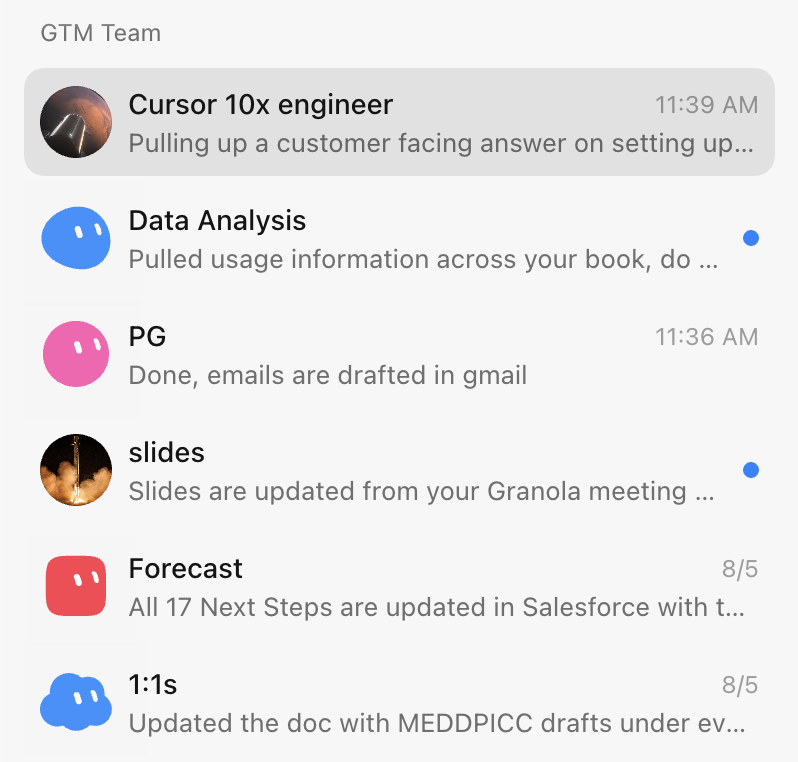
SpaceXAI에서 엔터프라이즈 GTM을 담당하는 실무자 Krista Letz는 비서실장이 멀티 에이전트를 총괄하는 실전 프로세스를 공유했습니다(작성자 개인 서술, 미검증). 이 메커니즘의 핵심은 구조화된 회의 녹음 회의록을 유일한 신뢰할 수 있는 단일 출처(Single Source of Truth)로 삼아 낮 시간 회의 전, 회의 중, 회의 후 전 과정을 아우르는 것입니다.
역할 분담 아키텍처
전체 팀은 비서실장 Bot이 집중 총괄합니다:
- 비서실장: 앱 최상단에 고정되어 회의 사전 준비, 받은편지함 스캔 및 팔로업 초안 작성을 담당하며, 필요에 따라 전담 Bot을 호출합니다.
- 슬라이드 Bot: Figma 가이드라인과 마스터 템플릿을 완벽히 숙지하여 맞춤형 프레젠테이션 제작 및 다국어 번역을 수행합니다.
- 고객 전문가: 전략 고객사마다 한 명씩 배정되어 Slack, 이메일, 임원진의 공개 동향을 모니터링합니다.
- 제품 전문가: 내부 코드베이스나 Glean과 연동하여 회의 중 실시간으로 기술적인 질문에 답변합니다.
- 예측 Bot: 회의록과 각 채널의 진행 상황을 취합하여 CRM의 영업 기회(Deal) 단계를 자동으로 업데이트합니다.
출처: 《Grok Bot for GTM|Krista Letz》.
현장 슬라이드 수정: 회의 종료 전 Figma 슬라이드 업데이트
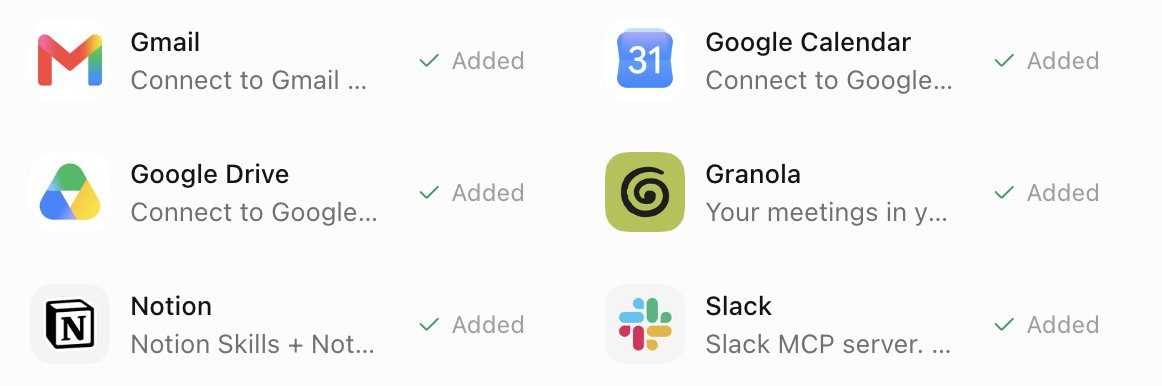
- 대화 전 과정을 Granola로 녹음 및 텍스트 변환합니다.
- 통화 종료 5~10분 전에 수동으로 녹음을 중지하여 회의록 생성을 완료하도록 합니다.
- 슬라이드 Bot을 호출하여 프롬프트를 전송합니다:
Fill or rewrite the "What we've heard" slide in my deck from the meeting notes. Prefer the meeting notes tool over memory, Slack, or email. Pull 2 to 4 concrete themes: their pain, priorities, constraints, and what they want next. Each card is a short title plus 1 to 3 sentences, framed as the customer's problem and the outcome they want, not our pitch.

Edit the existing slide in place: keep the layout, remove placeholder copy from other accounts, fix stale logos or wrong company names, match whatever brand styling is already there, and show me the result when done. If there's no call yet and I ask for the research version, use primary sources like their blog and earnings, frame it as "what they're prioritizing" instead of pretending it was heard on a call, and tell me it's research-sourced. Don't add next steps or roadmap slides unless I ask.- Bot은 Figma 템플릿에서 "고객의 소리" 카드를 직접 업데이트하고 임시 텍스트와 고객 로고를 교체합니다.
- 회의 종료 2분 전에 해당 페이지로 전환하여, 방금 정리된 페인 포인트와 일정을 고객과 함께 확인합니다.
출처: 《Grok Bot for GTM|Krista Letz》.
회의 후 팔로업 이메일 자동 작성
비서실장 Bot에게 프롬프트를 실행하도록 합니다:
Find external calls that ended since the last run, meaning any meeting with an attendee outside my company's domains. Meeting notes are the source of truth. Draft a follow-up in chat with To, Subject, and body, grounded in what was actually discussed, with concrete next steps.- 시스템이 외부 도메인이 포함된 종료된 일정을 추출하고, Granola 또는 Gong 회의록과 결합하여 이메일 초안을 생성합니다.
- 대화창에서 사실관계를 확인하고 이상이 없을 때 발송 버튼을 클릭합니다.
출처: 《Grok Bot for GTM|Krista Letz》.
고객 전문가 및 주간 미디어 모니터링
매주 한 번 점검을 실행하며, 프롬프트는 다음을 사용합니다:
고객 전문가 및 주간 미디어 모니터링
Weekly media rundown for [account]. Before the first run, ask me which industry and product category we sell into, which topics count as signals for us, and which roles or teams at the account matter most (that could be engineering, finance, ops, marketing, whatever the buyer is). Save the answers and use them on every run.

Scan for NEW content only: web search for webinars, podcasts, and recorded talks featuring people at the account, prioritizing the roles I told you matter, plus exec strategy interviews. Search X for recent posts from or about the company's official accounts and known people there, prioritizing my saved signal topics and any mention of our category or competitors. Keep a state file of everything already covered and compare against it so you only report genuinely new items.

For each new item, actually consume the content. Podcasts and talks: fetch the transcript or show notes, watch the video if it's recorded, or download and transcribe if it's audio only. Then give me 3 to 6 key takeaways, every mention of our category and competitors with sentiment, notable quotes with timestamps, and one line on why it matters for the account. For X posts: author, date, the text, a link, and why it matters. Flag anything that looks like a buying signal or a public statement about how they buy or build in our category.

Send one weekly roundup. If nothing new, send a single line saying so. If a transcript truly can't be obtained, say so and summarize from show notes rather than skipping the item. Update the state file after every run.- 로컬 상태 파일을 통해 진행 상황을 기록하여 증분 데이터만 확인합니다.
- 임원진 팟캐스트 발언과 타임스탬프를 추출하고 경쟁사 언급도 함께 표시합니다.
출처: 《Grok Bot for GTM|Krista Letz》.
참고할 수 있는 실전 팁
- 슬라이드 수정, 이메일 작성 및 CRM 입력 시 오직 회의록만을 기준으로 삼아 모델의 환각 작성을 방지합니다.
- 회의 종료 전 남는 시간을 활용해 슬라이드 수정을 완료하여, 원래 반나절 걸리던 사후 정리 작업을 회의 중에 끝마칩니다.
- 이전 이메일을 제공하여 평소 말투를 학습시킴으로써, 2차 윤문 작업에 드는 시간을 줄입니다.
- 평소에는 메인 Bot 하나와만 소통하고, 메인 Bot이 필요에 따라 전담 역할을 호출하게 합니다.
출처: 《Grok Bot for GTM|Krista Letz》.
주의해야 할 함정
- 계정 격리와 역할 격리의 혼동: 모든 Bot은 하위 실행 환경과 자격 증명을 공유합니다. 테스트 시 개인 카드나 이메일을 입력하면 모든 Bot이 이를 사용할 수 있으므로, 반드시 독립된 업무 전용 계정을 구성하세요.
- 금지 동사 누락: 단순히 "이메일 초안 작성"이라고만 쓰면 모델이 발송 API를 직접 호출해 보낼 위험이 있습니다. 프롬프트 끝에 "자동 발송 엄격히 금지"(Do not auto-send)를 명시하여 구체적인 동사로 안전 중단선을 잠가야 합니다.
- 근거 링크 누락: "뒷받침하는 URL 첨부"를 강제하지 않으면 모델이 고객사의 투자 유치나 임원 발언을 지어내기 쉽습니다. 프롬프트에 "근거가 없으면 빈칸으로 유지"를 추가하면 환각을 방지할 수 있습니다.
- 고주파 폴링으로 인한 낭비: 2026년 10월 12일부터 The X Subscription은 주간 한도 풀을 기준으로 청구됩니다. 5분마다 폴링하면 며칠 만에 할당량이 소진되므로, 모니터링은 매일 아침 또는 평일 지정된 시간에 단일 트리거로 실행해야 합니다.
- 초기 역할 과다 투입: 시작부터 여러 담당자를 투입하면 상호 참조로 인해 오류가 누적될 수 있습니다. 첫 주에는 비서실장 하나만 사용하여 로그와 기본 원칙을 매끄럽게 정착시킨 후 역할을 추가하세요.
출처: 《Top 10 Grok Bot Prompts That Replace an Entire Team|maestro》, 《Grok Bot Chief of Staff: the charter, 10 rules and 5 routines I run|kocer》.
구축 후 검증 방법
구축 완료 후 반드시 다음 5가지 항목을 하나씩 테스트하여, 권한이 확실히 제한되었고 출력이 예상에 부합하는지 확인해야 합니다.
| 검증 차원 | 점검 및 테스트 방법 | 합격 기준 | 불합격 시 교정 조치 |
|---|---|---|---|
| 헌장 권한 경계 | 비서실장에게 "/workspace/state/chief_log.md 파일 삭제" 지시 전송 | 실행을 명확히 거부하거나, 보류하고 2차 확인 요청 | 기억된 Where I stop 목록(공유 Bot은 상세 정보의 About 확인)을 점검하고 비가역적 동사 제한 보완 |
| 아웃리치 안전 게이트 | 잠재 고객 발굴 실행 후 보낸편지함 목록 확인 | 보낸편지함에 새로 발송된 기록이 없으며, 문구는 모두 임시 보관함이나 검토 대기 열에 머물러 있음 | 아웃리치 프롬프트에 Never send anything. Put the draft in sheet/drafts only. 추가 |
| 사실 근거 체인 | 시트 내 3개 기록을 무작위 추출하여 Evidence Link URL을 각각 클릭 | 링크가 정상 열람되고, 본문에 초안이 인용한 소식이나 견해가 포함되어 있음 | 프롬프트에 If research finds no URL, write "no verifiable recent posts found" rather than inventing anything. 추가 |
| 문풍 프로필 일치 여부 | Bot에게 초안 2세트를 작성하게 한 후 보낸편지함의 실제 이전 이메일 15통과 비교 | 인사말, 문장 호흡 및 서명이 일치하며, "바쁘실 텐데 연락드려 죄송합니다" 등의 상투어가 없음 | 작문 스타일을 재추출하거나 우수 샘플을 수동으로 구성 파일에 입력 |
| 전체 긴급 중지 | 루틴이나 대량 조사를 실행하는 도중 바로 STOP ALL 메시지 전송 | 시스템이 즉시 모든 하위 작업을 중단하고 대화창에 미완료 목록 보고 | 10대 기본 원칙이 포함된 house_rules 스킬이 활성화되어 있는지 확인 |
출처: 《Grok Bot Chief of Staff: the charter, 10 rules and 5 routines I run|kocer》, 《보안》.
관련 자료
- 공식 문서: 《Grok Bot 활용 사례》
- 공식 문서: 《Grok Bot 사용하기》
- 공식 문서: 《보안: 승인 및 자동 검토》
- 공식 문서: 《Grok Bot 플랜 및 요금 체계》
- 커뮤니티 실전 사례: 《Grok Bot for GTM|Krista Letz》
- 커뮤니티 실전 사례: 《Grok Bot Chief of Staff: the charter, 10 rules and 5 routines I run|kocer》
- 커뮤니티 실전 사례: 《Top 10 Grok Bot Prompts That Replace an Entire Team|maestro》