Chapter 22 Connecting Feishu and WeChat
Securely connect Grok Bot to Feishu and WeChat without a public IP or self-hosted server.
The X Subscription (effective October 12, 2026) deducts quotas on a weekly basis; group chats must be configured with message filtering, otherwise casual banter will deplete the entire week's quota.
- Feishu Multi-Bot Collaboration: Uses the official Python SDK persistent connection and the "Feishu App Manager" template.
- WeChat ClawBot Direct Connection: Relies on the official "WeChat ClawBot" plugin and the iLink interface.
- WeChat Shortcuts Archiving: Archives records via Apple Shortcuts and Webhooks.
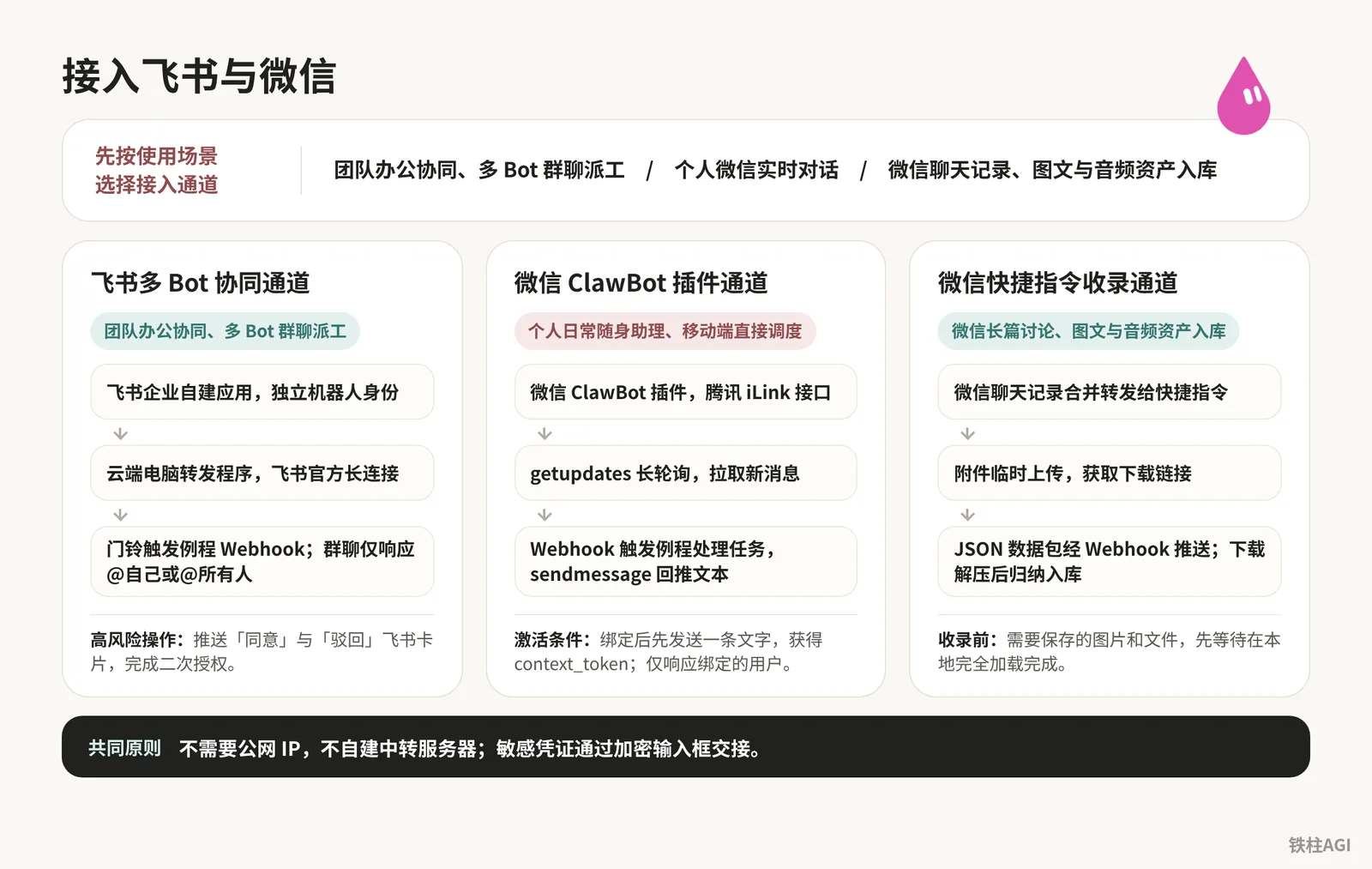
Access Channel Comparison and Technical Selection
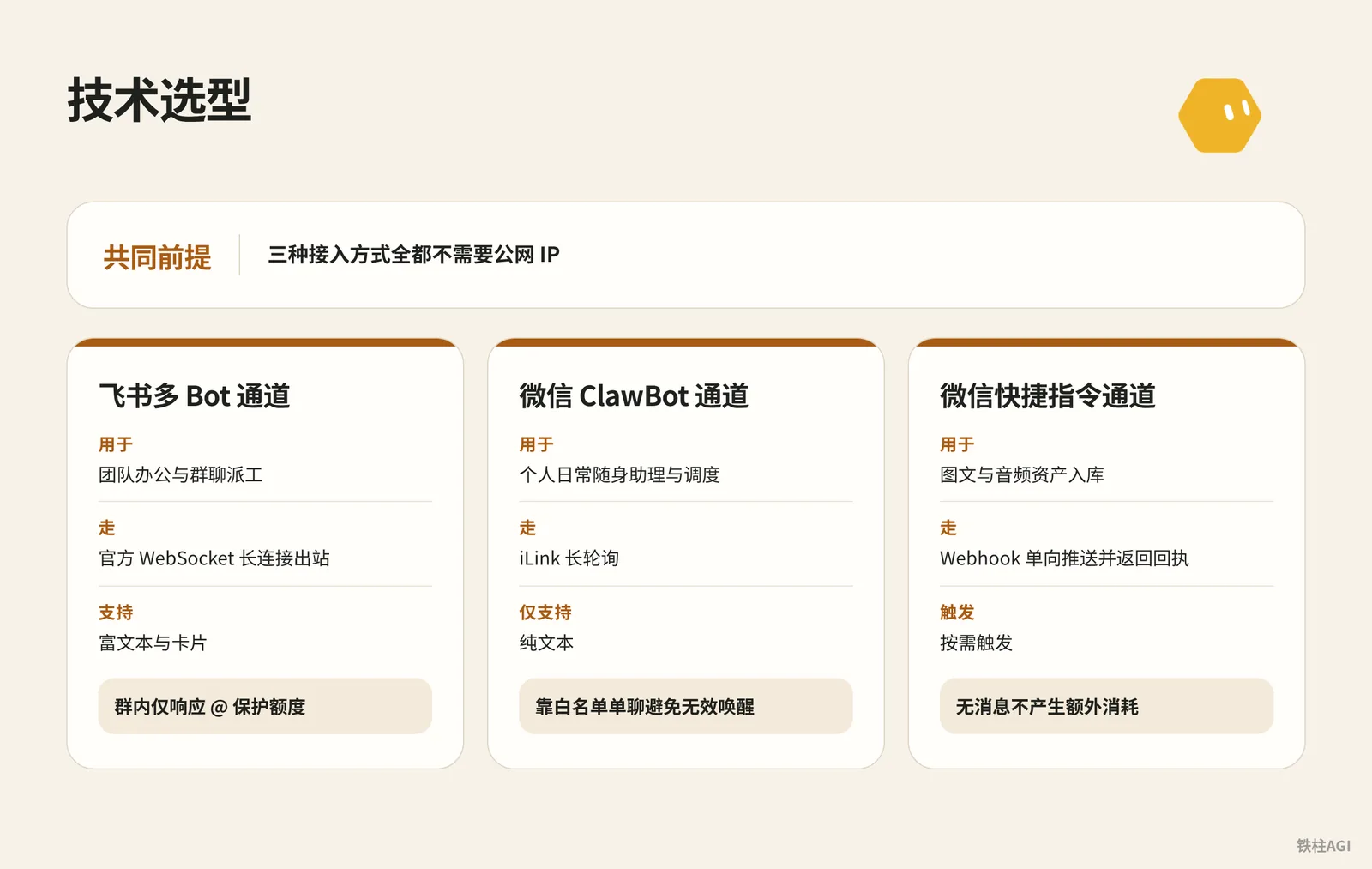
None of the three access methods require a public IP.
- Feishu Multi-Bot Channel: Used for team collaboration and group chat task dispatching. Uses official outbound WebSocket persistent connections, supports rich text and cards, and only responds to @mentions in groups to protect quota.
- WeChat ClawBot Channel: Used as a personal daily assistant and scheduler. Uses iLink long polling, supports plain text only, and relies on direct chat whitelisting to prevent unintended wake-ups.
- WeChat Shortcuts Channel: Used for archiving image, text, and audio assets. Uses one-way Webhook push with receipt confirmation, triggers on demand, and incurs no extra usage when there are no messages.
Team Feishu Integration: Multi-Bot Collaboration and Feishu App Manager
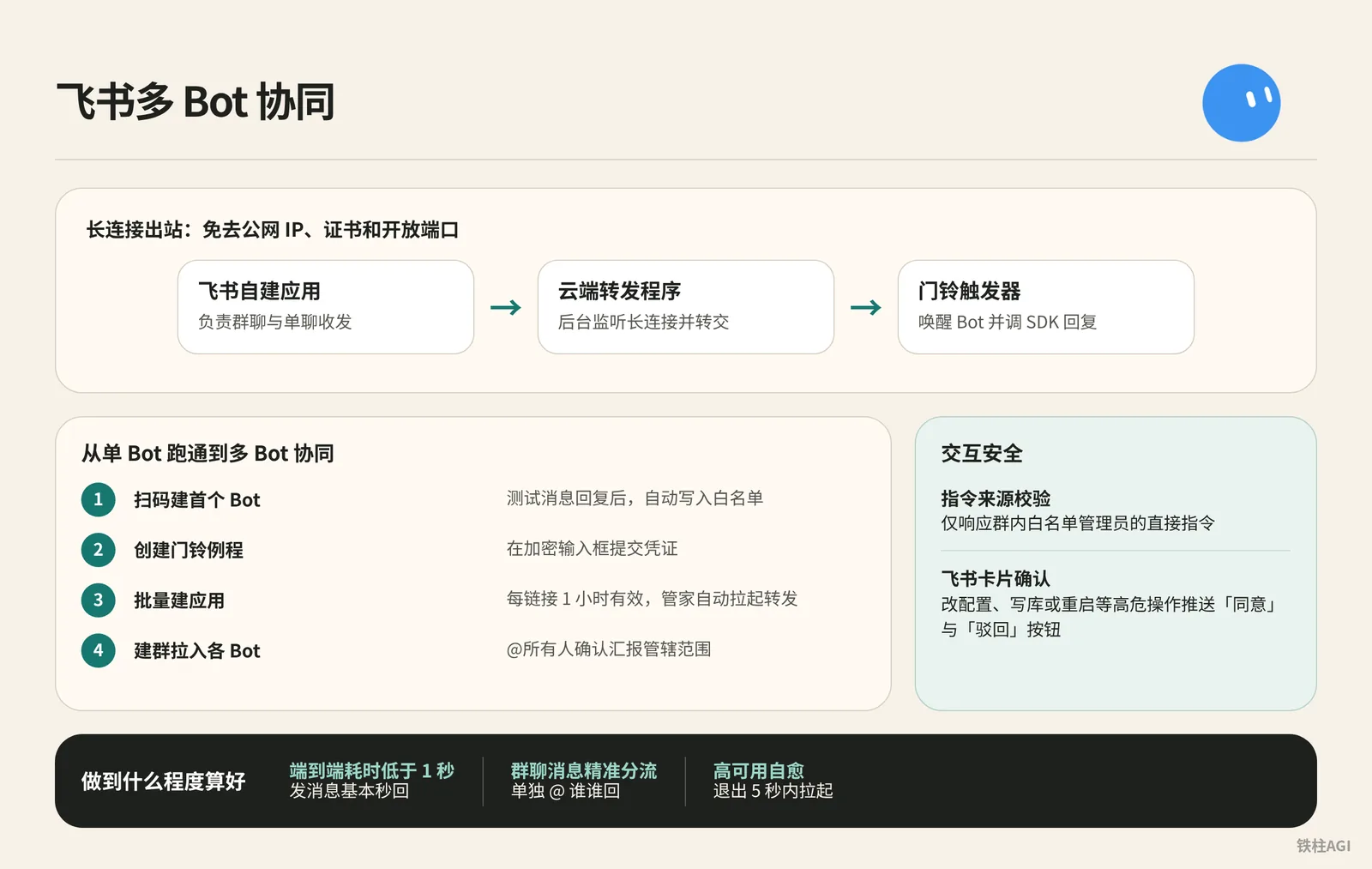
Feishu Persistent Connection and Doorbell Trigger Mechanism
Uses outbound persistent connections, eliminating the need for public IPs, certificates, and open ports.
- Feishu Custom App: Responsible for sending and receiving messages in group chats and direct chats.
- Cloud Forwarder: Listens to the persistent connection in the background and forwards messages.
- Doorbell Trigger: Wakes up the Bot and invokes the SDK to reply.
To avoid repetitive configuration, use the "Feishu App Manager" to scan a QR code and automatically create the app.
How-To: From a Single Bot to Multi-Bot Collaboration
Scan QR Code to Create the First Bot (Article Chief Editor)
- In a direct message, ask the Bot to invoke the Feishu SDK to create an app via QR code scan. This link is a one-time credential restricted to administrators; never click links from others or forward it.
- Open the link in a browser, click "Create", and confirm permissions; the credentials are automatically sent back.
- After receiving the Feishu test message, reply to it, and the Bot will automatically add your Open ID to the whitelist.
Create a Doorbell Routine
- Click the Bot name at the top of the conversation to open the Details panel. For steps, see Routines.
- Create a Webhook doorbell in routines to obtain the POST to URL and key.
- You must submit credentials in the encrypted input box popped up by the Bot to prevent plaintext leaks. Send a test message in a direct chat; if the Bot replies normally, the setup is verified.
Batch App Creation and Group Chat Collaboration
- Import the template
https://x.ai/bot/AJpUlCwa8tyMX7L5UHnuY. Store the registry table and recovery script in a private Git repository; do not store plaintext keys. - Instruct the Manager to batch-generate scan links (each link is valid for 1 hour), scan the code, and enter the key in the encrypted modal; the Manager will automatically start forwarding.
- Create a group, add each Bot, and send
@所有人to confirm and report their respective scopes of responsibility;@文章主编invokes虚拟机服务管家, and the service manager posts the registry table into the group to complete collaboration.
Interaction Security
- Command Source Verification: Responds only to direct commands from whitelisted administrators in the group.
- Feishu Card Confirmation: High-risk operations such as changing configurations, writing to databases, or restarting push cards with "Approve" and "Reject" buttons, allowing secondary authorization with a single click inside Feishu.
What "Done Well" Looks Like
- End-to-end latency under 1 second: Messages are replied to almost instantly.
- Accurate group chat message routing: Stays silent during casual banter, responds individually when @mentioned, and reports by role without competing responses when @All is tagged.
- High-availability self-healing: Restarts within 5 seconds of exit, performs health checks every 5 minutes for freezes, and recovers in approximately 9 seconds after a forced process kill.
For hands-on practice, refer to "Grok Bot Team Feishu Integration Step-by-Step Guide (with Feishu Manager Template)".
Personal WeChat Integration: WeChat ClawBot Plugin Direct Connection
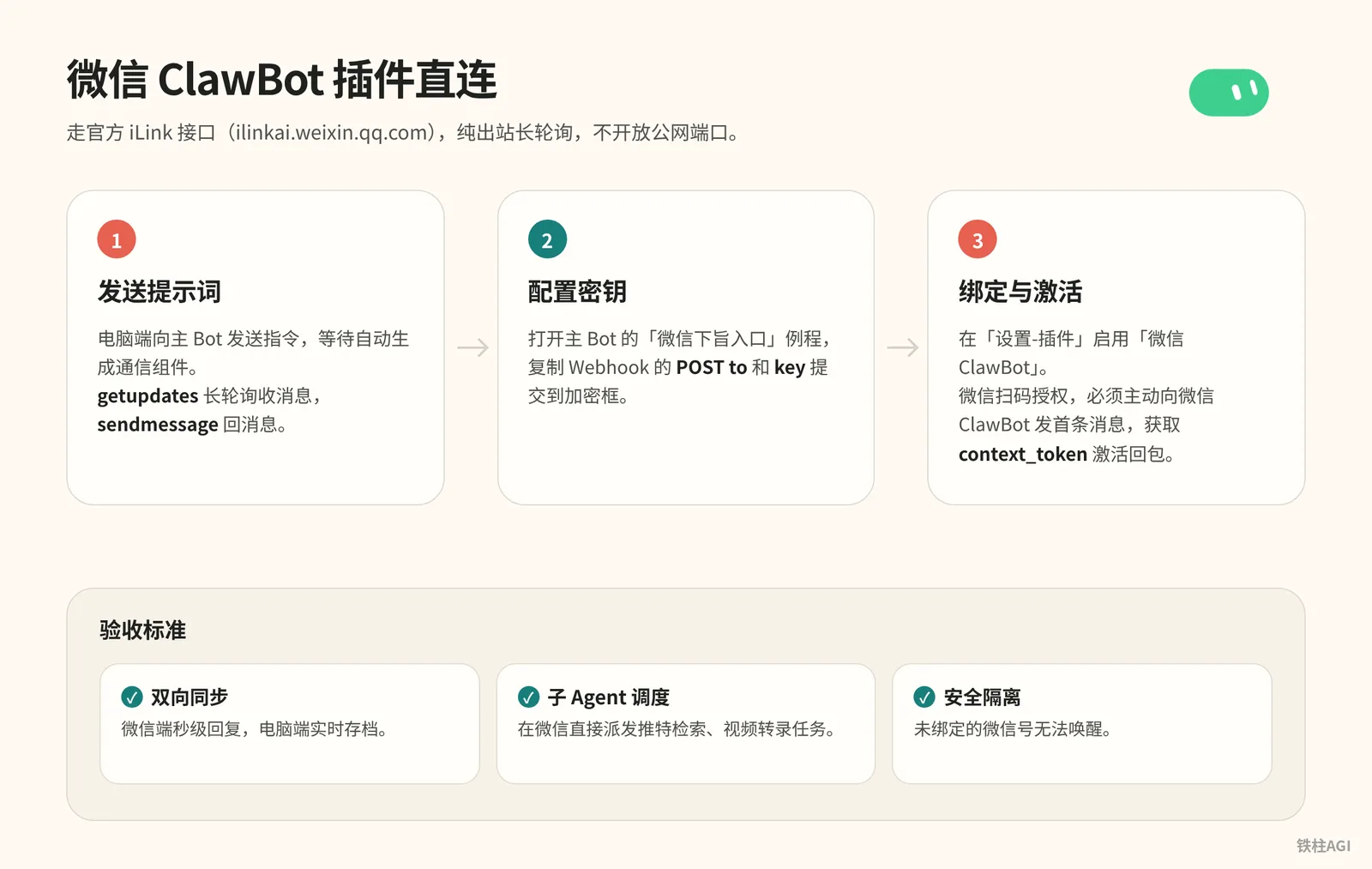
Uses the official iLink interface (ilinkai.weixin.qq.com), pure outbound long polling, without opening public ports, compliant, and free of account-ban risks.
Three Steps to Complete Integration
- Send Prompt: Send the command below to the main Bot on your desktop, and wait for the communication component to generate automatically.
Three Steps to Complete Integration
我想把你接到我的微信上,让我能在微信里直接给你发消息、收到你的回复。请按下面的思路做,每做完一步告诉我结果,需要我操作的地方停下来等我。

1、先调研方案:腾讯「微信ClawBot」插件用的是 iLink 接口(ilinkai.weixin.qq.com)。请确认怎么用 getupdates 长轮询收消息、怎么用 sendmessage 回消息。整个程序只走出站请求,不要开公网端口。

2、在 Grok Bot 里建一个由 webhook 触发的 routine,名字可以叫「微信下旨入口」。建好后告诉我去 routine 面板复制 Webhook URL 和 key,然后弹出加密弹框让我填进去,不要让我在聊天里发明文。

3、在你的云端电脑上写一个小转发程序:收到微信消息后 POST 给这个 routine;你处理完以后,用一个 reply 脚本把回复发回微信,同时在我们的主聊天里同步一份。

4、等我在手机微信里启用 ClawBot 插件以后,生成二维码让我用手机扫码确认,同时给我一个可以在微信里直接打开的备用链接。二维码大约 5 分钟有效。

5、绑定成功后,提醒我先在 ClawBot 对话里发一句话,因为回复要用到这条消息带的 context_token。

6、规则:只认绑定的这一个人,别人的消息不处理;回复一律用纯文本,不要用 Markdown,因为微信不渲染 Markdown。

7、最后告诉我:云端电脑重启以后,怎么把转发程序重新拉起来;如果遇到错误码 -14(凭证过期),提醒我重新扫码。- Configure Secret Key: Open the main Bot's "WeChat Command Entry" routine, copy the Webhook POST to URL and key, and submit them into the encryption dialog.
- Binding and Activation:
- WeChat version must meet iOS ≥ 8.0.70, Android ≥ 8.0.69; enable "WeChat ClawBot" under "Settings - Plugins".
- Send "Plugin enabled" to the desktop Bot, and scan the QR code in WeChat to authorize (QR code is valid for 5 minutes).
- You must proactively send the first message to WeChat ClawBot (e.g., "Hello") to retrieve
context_tokenand activate replies.
Acceptance Criteria
- Two-Way Synchronization: Sub-second responses on WeChat, real-time archiving on desktop.
- Sub-Agent Scheduling: Directly dispatch Twitter searches and video transcription tasks from WeChat.
- Security Isolation: Unbound WeChat accounts cannot wake up the bot.
For details, see "How to Connect Grok Bot to Your WeChat: A Beginner's Step-by-Step Guide (with Detailed Prompts) | Kin".
WeChat Content Archiving: Connecting Chat Logs and Multimedia via Shortcuts
Use Shortcuts to upload the combined forwarded ZIP archive to a temporary cloud drive, then push it to Grok Bot's Webhook for automatic archiving.
Configuration and Operation
- Send the prompt in the Grok Bot chat window to create a routine:
帮我创建一个 Webhook 触发的例行任务。快捷指令会用 POST 请求发来一个 JSON,里面只有一个字段 info。info 可能是我输入的文字,也可能是一个文件下载链接,比如微信聊天记录压缩包、截图、录音。收到后:如果是链接就先下载文件再读取,压缩包先解压;然后整理出要点,收录进知识库,最后给我一份回执,写清楚收录了什么、存在哪里。In the Routine list on the details page, copy the Webhook POST to URL and key secret.
Import the Shortcut:
https://www.icloud.com/shortcuts/2b77155d7c744110a0f0f9ef1bdc42bf.Fill in POST to, key, and image hosting ID.
filebin.netretains files for 7 days; the ID must be set to 8 or more random characters (such askb7x9q2m) to prevent overwrites or leaks; be sure to clear these three items before sharing.Multi-select chat messages in WeChat, choose Combined Forward to other apps, and select "Receive Forward" under the "Send to Knowledge Base Bot" shortcut. When not receiving forwarded messages, it will read the clipboard, or you can select "Screenshot" or "Voice Recording" for direct upload.
Acceptance Criteria
- Complete Multimedia Parsing: Extracts and categorizes images, documents, and voice recordings (e.g., indexing 13 design inspiration websites by full site, app, and components).
- Standardized Receipt: Clearly marks key topic points, note storage path, and original ZIP archive path.
Reference: "Connecting WeChat Chat History to Grok Bot: Shortcuts Advanced Edition".
Common Pitfalls and Troubleshooting
1. Insufficient Feishu Permissions Cause Group Messages to Be Missed
- Pitfall: Direct messages work normally, but
@in groups yields no response and no logs. This happens when selecting only 7 initial permissions and missing "Receive all messages that @mention the bot in group chats". - Solution: Use the SDK to generate a permission-expansion link via QR code scan. The administrator confirms expanding to 14 permissions, without needing to publish a new version.
2. Feishu Group Chat Filtering Misjudgments and Re-delivery on Reconnect
- Missed messages and competing responses: Feishu's
@所有人is not in the mention array; failing to verify IDs will cause all bots to respond simultaneously. The script must strictly match the target ID and only respond to "@自己" or "@所有人". - Duplicate replies: After network recovery, the platform will automatically re-deliver messages; never manually resend them a second time.
3. Missing Trust Chain and Authorization Cards for Cross-Bot Invocations
- When Bots in a group call each other with no response, it is because cross-bot messages are untrusted by default, getting stuck waiting for direct message confirmations.
- Configure whitelisting at the forwarding layer to recognize administrator Open IDs; push Feishu cards with Approve/Reject buttons for high-risk operations to confirm.
4. Incorrect Python Runtime Environment Path on Virtual Machine
- The script errors indicating
lark-oapicannot be found; this is usually caused by accidentally using the system default/usr/bin/python3when configuring daemon tasks. - In startup scripts, Supervisor, and cron jobs, you must hardcode the absolute path to the virtual environment (such as
/home/user/venv/bin/python3) instead of directly invoking the system global environment.
5. WeChat ClawBot QR Code Expiration and Error Code -14
- QR codes are valid for only 5 minutes; they expire once timed out, so scan promptly with your mobile phone once generated.
- Error code
-14reported in the backend indicates expired credentials; simply regenerate the QR code and have the administrator scan it again.
6. WeChat Message Formatting Glitches and Markdown Rendering Failures
- WeChat does not render Markdown; asterisks, backticks, and header symbols will be displayed literally.
- Add filtering in the integration prompt or forwarding script to standardize content into plain text with line breaks before sending to WeChat.
7. WeChat Combined Forwarded ZIP Missing Unloaded Multimedia Attachments
WeChat does not store original files permanently; items not opened and loaded are not included in the archive, leading to missing images upon decompression.
- Before forwarding, open and view each image and file you need to save.
- Wait until they are completely loaded locally before packing and forwarding.
8. Name Collisions and Privacy Leak Risks on Temporary Cloud Drives
filebin.net has no account system; overly simple IDs will collide, causing errors or downloading others' files. Take note when using it:
- The file hosting ID must be set to a random string of 8 or more characters.
- Do not upload passwords, ID cards, or other sensitive private information.
- Before sharing the Shortcut, delete your exclusive ID and Webhook secret key.
9. Quota Depletion Control Under The X Subscription Unified Plan
Casual group chatter can trigger idle routine runs, draining weekly quotas in one to two days and causing the Bot to stop responding.
Effective October 12, 2026, The X Subscription deducts quotas weekly from a shared pool.
The Plus tier ($8/month) does not include Grok Bot; only Premium ($30/month, 4x quota), Super ($100/month, 15x quota), and Ultra ($200/month, 50x quota) include it.
Two key measures to prevent quota drain:
- Trigger Webhooks only on precise mentions (
@自己) or specific administrator commands. - Strictly forbid indiscriminate listening across the entire group, and avoid configuring high-frequency short-interval polling.
For detailed rules, refer to Plans and Billing and Routines.
Real-World Case Studies
Feishu Multi-Bot Collaboration (铁柱AGI)
Collaboration runs smoothly without a public IP; the core is using outbound persistent connections to eliminate NAT traversal.
- Batch Registration: Feishu Python SDK QR code authorization; Manager Bot reads the Git backup table, hosting keys and Webhooks for 3 Bots: Chief Editor, Bookkeeping, and Virtual Machine.
- Security Confirmation: Responds only to
@自己or@所有人in groups. Highly sensitive operations require manual authorization via card buttons pushed by the Bot.
WeChat ClawBot Portable Console (Kin)
Schedule Twitter operations and copywriting extraction Bots within WeChat; using the official plugin's long polling prevents account bans.
- Send prompts to a 24/7 cloud PC to call Tencent iLink (
ilinkai.weixin.qq.com) to set upgetupdatespolling andsendmessagescripts. - Exchange Webhook and secret key via popup modal, scan QR code, and send the first message to obtain the initial
context_token. - Pitfall: WeChat replies must be forced to plain text, stripping out Markdown symbols.
WeChat Media Archiving Pipeline
The WeChat sandbox prohibits direct full-package transfers; using a temporary cloud drive as a relay bypasses this restriction.
- Relay Upload: Export chat ZIP archives using "Combined Forward" on Mac or iPhone; Shortcuts automatically uploads them to
filebin.net. - Automated Archiving: Shortcuts constructs a JSON payload to send to Grok Bot's Webhook, decompressing and archiving media like "13 design inspiration websites".
- Acceptance Criteria: Must output a structured receipt with paths and summaries.
Acceptance Verification
Feishu
- Message Response: Replies within 1 second in direct chat; stays silent for regular text in group chats, responds when individually tagging
@文章主编, and each Bot reports in sequence upon@所有人. - Permissions and Self-Healing: All 14 event permissions enabled in the backend with support for card authorization; manually kill the process, and it automatically restarts within 5 to 10 seconds.
WeChat
- Environment and Handshake: WeChat version higher than iOS 8.0.70 or Android 8.0.69 with plugin enabled; replies to the first message using
context_tokenafter scanning without Markdown formatting artifacts. - Interception and Errors: Unbound accounts are directly ignored; automatically restarts after reboot, and prompts to re-scan upon encountering error code
-14.
Shortcuts
- Archiving Operations: Fill in the Webhook, Bearer token, and image hosting ID of 8+ characters; open attachments in WeChat to load them before combined forwarding; can also be triggered independently.
- Output and Reconciliation: Receipt must contain summary, note path, and retention path; check usage on the plans page to avoid continuous idle run charges.
Further Reading
- Using Grok Bot (Official guide to Grok Bot workflows and skills)
- Routines User Guide (Official documentation for routine configuration, Webhook invocations, and scheduled tasks)
- Plans and Billing (The X Subscription tiers and usage instructions)
- Secrets and Key Management (Secure environment variables and encryption modal mechanisms)
- "Grok Bot Team Feishu Integration Step-by-Step Guide (with Feishu Manager Template)" (Original article by community author 铁柱AGI)
- "How to Connect Grok Bot to Your WeChat: A Beginner's Step-by-Step Guide (with Detailed Prompts) | Kin" (Original article by community author Kin)
- "Connecting WeChat Chat History to Grok Bot: Shortcuts Advanced Edition" (Original article by community author 铁柱AGI)