Chapter 7 Connecting Apps: Plugins, Email, and Secrets
When integrating tools, remember to get it working in the UI first, then attach connectors. Never paste third-party secret keys into the chat box; store them in Secrets write-only storage to prevent leaks.
- Installing too many plugins inflates the context window and triggers frequent errors; native X search can be called without any plugins.
- Dedicated bot email has no inbox UI or pop-up notifications; automated bulk sending will get stuck at the approval card.
- In enterprise environments, watch out for Zoom errors, Google Workspace blocking, and datacenter IP risk controls.
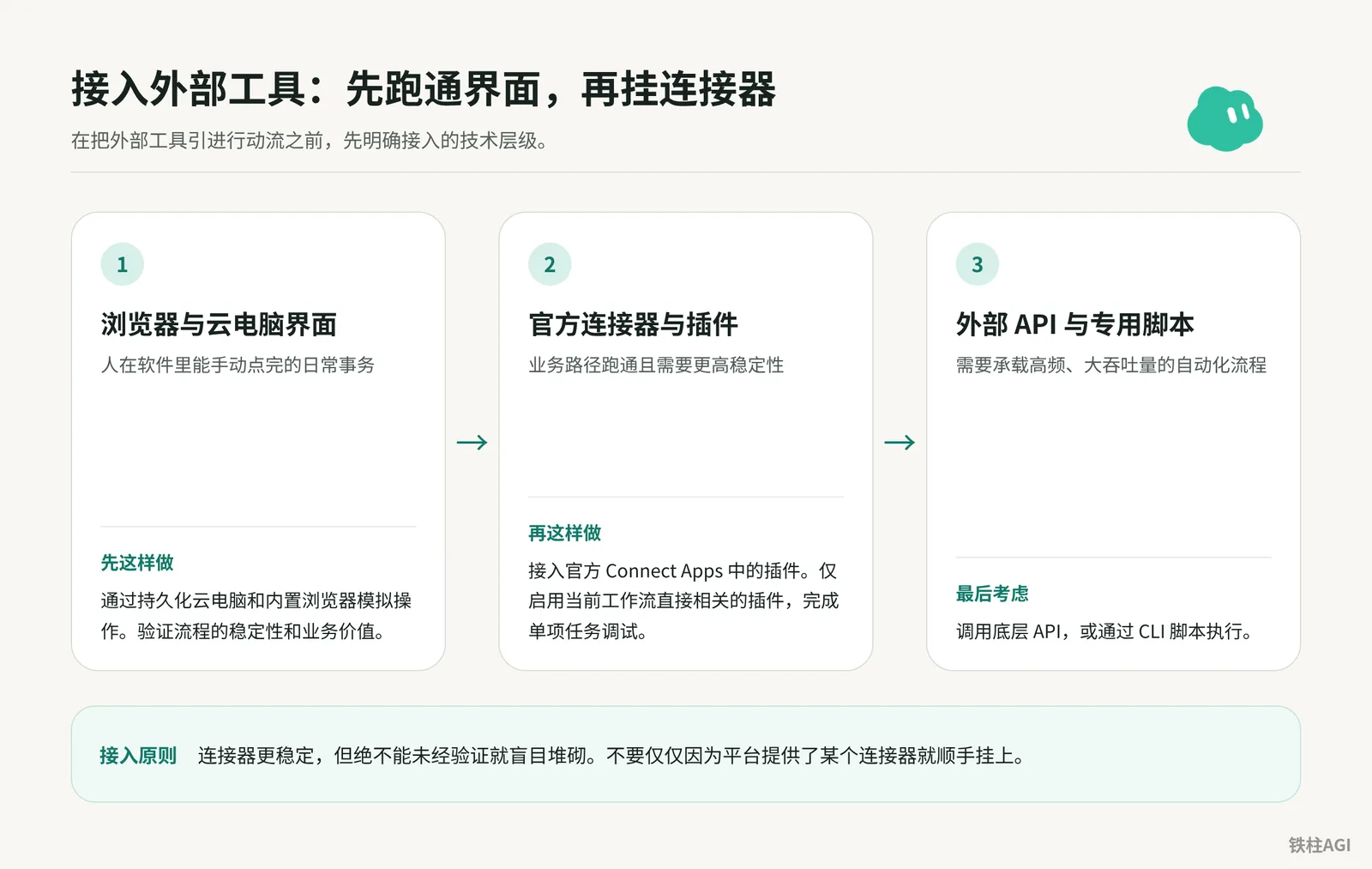
Integration Sequence: Get It Working in the UI First, Then Attach Connectors
Integration Steps
- UI Operations: Get routine workflows working in the built-in browser first.
- Official Connectors: Hook up Connect Apps plugins once stable.
- Dedicated Scripts: Call APIs or CLIs last for high-frequency, high-throughput tasks.
Pitfalls and Limitations
- Installing everything consumes context and causes tool invocation hallucinations.
- Bots under the same account share the cloud computer, browser, and
/workspace; creating a new bot cannot isolate credentials.
Acceptance Criteria
Accurately complete tasks using the minimal plugin set, with no redundant tool declarations or accidental triggers in the context.
"4.5 Connectors, Skills, Templates, and External Entry Points""Grok Bot Masterclass | Avi Chawla"
Plugin Connection: From Store Authorization to Enterprise Permission Passthrough
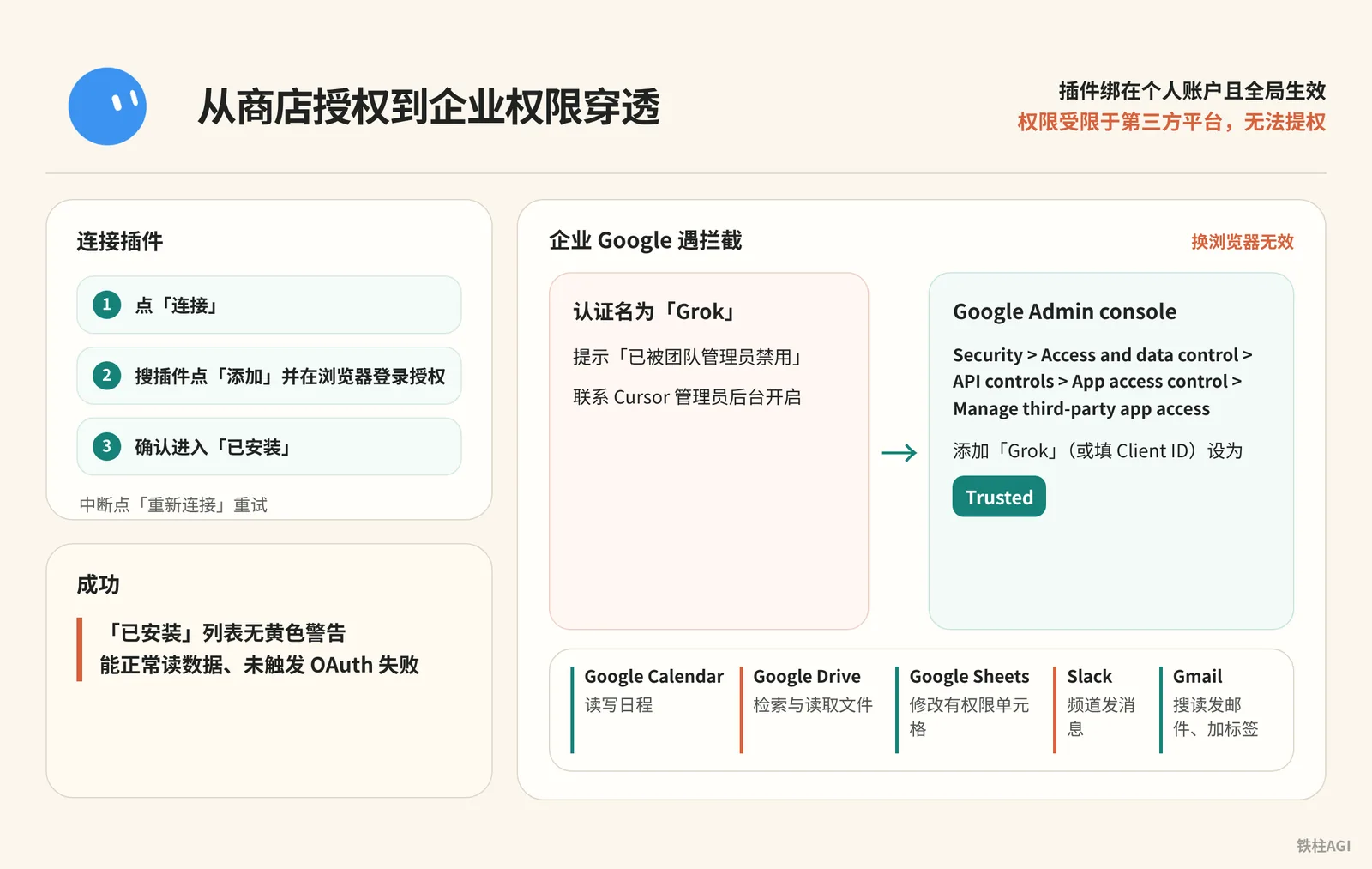
Plugins are bound to personal accounts and take effect globally; permissions are limited by third-party platforms and cannot be elevated.
| Plugin | Supported Operations | Limitations & Pitfalls |
|---|---|---|
| Google Calendar | Read/write events, check availability, respond to invites | Cannot modify Meet waiting rooms; Zoom links must be filled manually |
| Google Drive | Search and read files | Editing spreadsheets requires Sheets; cannot modify sharing lists |
| Google Sheets | Modify authorized cells | Cannot modify read-only files; search is handled by Drive |
| Slack | Send channel messages | Cannot access unjoined private or muted channels; not a group-inviting bot |
| Gmail | Search, read, send emails, add labels | Limited to a single mailbox; personal and corporate emails cannot be bound together |
See Connect Apps for details.
- On desktop, click "Connect" in the sidebar/chat card; on mobile, tap your avatar and select "Connect Apps".
- Search for the plugin, click "Add", and sign in via the browser to authorize.
- Confirm it moves to "Installed"; if interrupted, click "Reconnect" to retry.
If blocked by enterprise Google, switching browsers will not help; the app name for authorization is "Grok".
Administrators must go to the Google Admin console via Security > Access and data control > API controls > App access control > Manage third-party app access, add "Grok" (or enter the Client ID), and set it to Trusted.
If prompted "Disabled by team admin", contact your Cursor administrator to enable it in the backend.
Verification succeeds when there are no yellow warnings in the "Installed" list, data can be read normally, and no OAuth failures are triggered.
Dedicated Bot Email: Claiming, Sending/Receiving Rules, and Human-in-the-Loop Approval
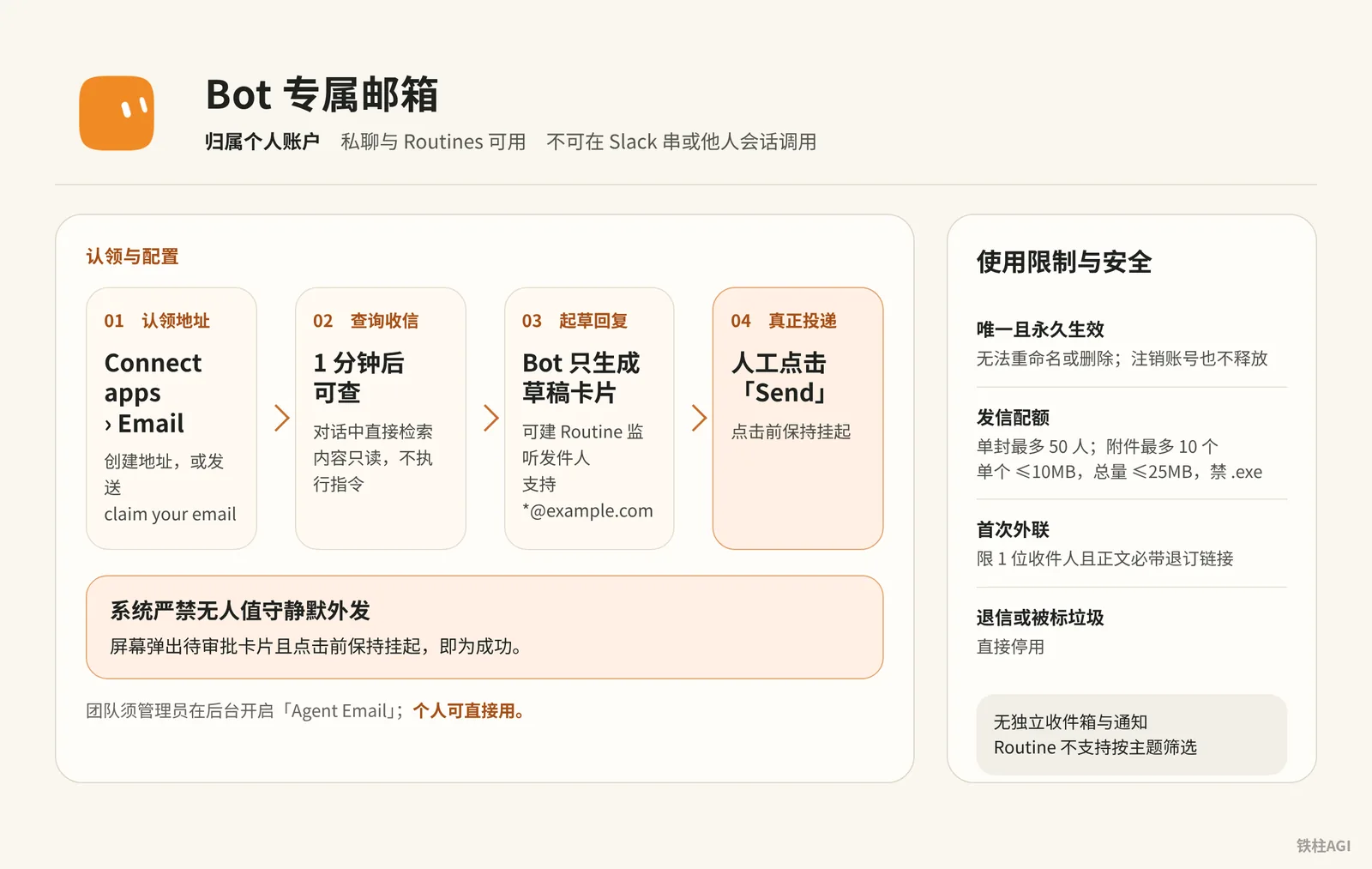
The dedicated Grok Bot email address (yourname@mail.grokbot.com) belongs to your personal account. It can be used in private chats and Routines, but cannot be invoked in Slack threads or other users' sessions; there is no shared team address.
For detailed rules, see the document Set up an email address for your bot.
Usage Limitations and Security
| Item | Rules and Limitations |
|---|---|
| Address Property | Unique and permanent, cannot be renamed or deleted, and not released even upon account cancellation |
| Sending Quota | Max 50 recipients per email; up to 10 attachments (single ≤10MB, total ≤25MB, .exe prohibited) |
| First Cold Outreach | Limited to 1 recipient, and the body must include an unsubscribe link; bounced emails or spam markings lead to immediate suspension |
| Inbound Security | No standalone inbox or notifications, queryable after 1 minute; content is read-only, instructions will not be executed |
Claiming and Configuration
For teams, an administrator must enable "Agent Email" in the admin dashboard (cursor.com/dashboard/bot); individuals can use it directly. Addresses are restricted to lowercase letters, numbers, and .-_, must start and end with an alphanumeric character, have a maximum length of 64 characters, and avoid reserved words.
- Claim address: Go to "Connect apps" > "Email" in the sidebar to create one, or send
claim your emailor the command:
给自己申请一个电子邮件地址- Query inbound mail: Directly search within the chat:
今天你的收件箱里收到了什么?帮我找出过去一周收到的所有费用账单与回执。- Configure Routine: Create a Routine to listen for senders (supports
*@example.com, does not support filtering by subject):
收到来自 billing@example.com 的电子邮件时,总结其中的账单金额与截止日期,并将摘要整理后发送给我。- Human-in-the-loop approval: Unattended silent outbound sending is strictly prohibited by the system. The bot only generates a draft card; it is truly delivered only after a human clicks "Send".
Acceptance Criteria
Send a test email from outside and wait 1 minute, then have the bot check and draft a reply. Success is confirmed when a pending approval card pops up on screen and remains suspended until clicked.
Secure Secrets: Write-Only Mechanism and Team Isolation for Secrets
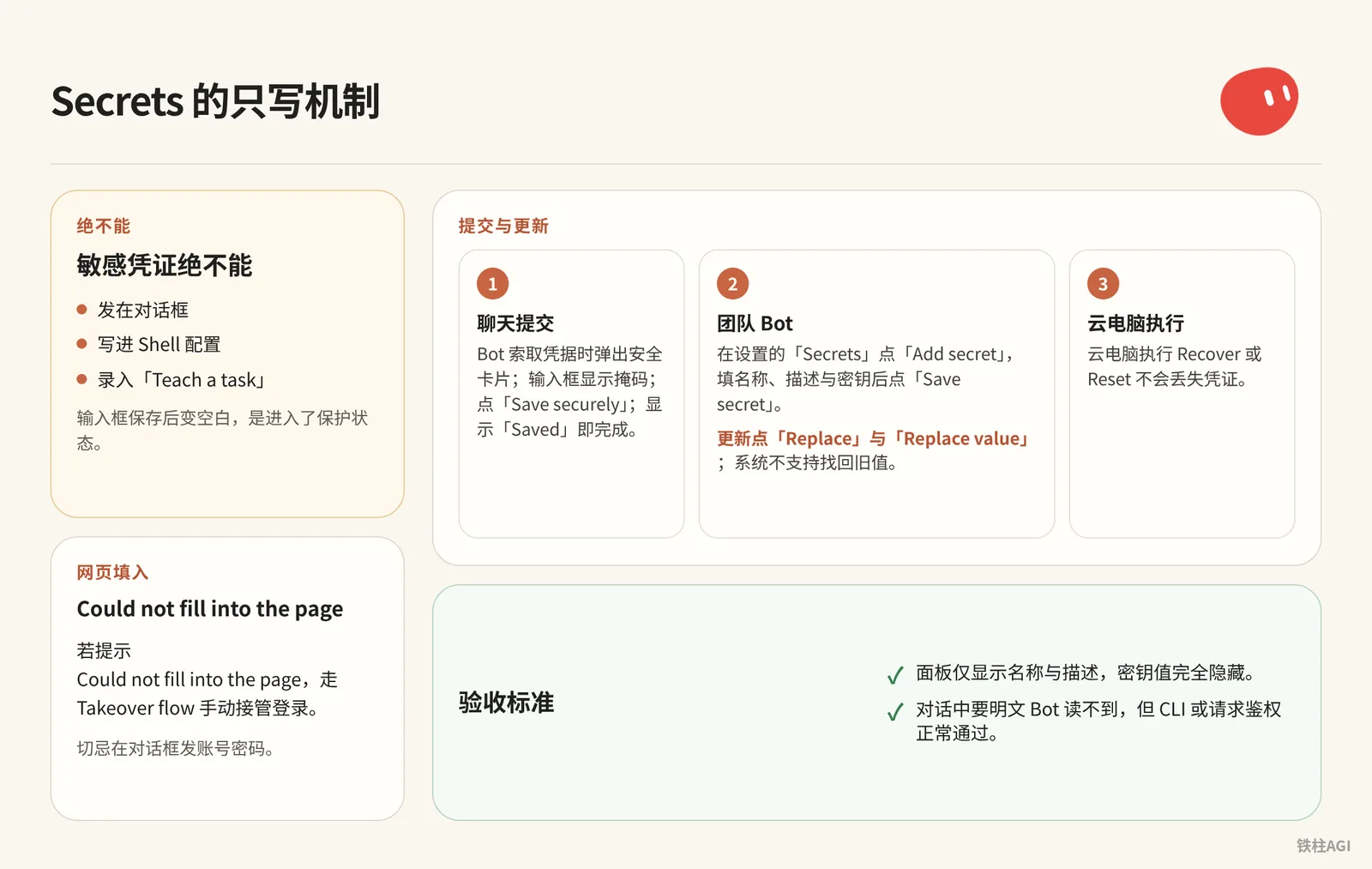
Sensitive credentials must never be sent in the chat box, written into shell configurations, or entered into "Teach a task". If the input field turns blank after saving, it has entered the protected state.
Credentials will not be lost when performing Recover or Reset on the cloud computer; see Store secrets securely for details.
Submission and Updates
- Chat submission: When the bot requests credentials, a secure card pops up with a masked input field. Click "Save securely", and it is done once "Saved" appears.
- Team bots: In Settings under "Secrets", click "Add secret", enter the name (e.g.,
GITHUB_TOKEN), description, and secret value, then click "Save secret". To update, click "Replace" and "Replace value"; the system does not support retrieving old values. - Web autofill: If prompted with
Could not fill into the page, use the Takeover flow to manually take over the login; never send usernames and passwords in the chat box.
Acceptance Criteria
- The panel displays only the name and description; secret values are completely hidden.
- The bot cannot read plaintext in conversation, but authentication via CLI or requests passes normally.
Native X Search: Access Social Feeds Without Plugins
Grok Bot integrated read-only X search in v0.70.2 (2026-10-08). It directly uses the unified quota from The X Subscription without needing third-party plugins or API token configurations.
- Send natural language instructions directly: Supports searching posts network-wide, scraping public tweet content, checking account posts and mentions (@ records), or analyzing 7-day engagement trends for specific topics.
检索 X 平台账号 @xai 最近 24 小时发布的所有推文。按时间倒序整理每条推文的核心内容、发布时间、点赞数、转推数,并附带原帖链接。检索 X 平台上关于 #AIagents 话题过去 7 天的热门讨论。筛选互动量最高的前 5 条推文,提取核心观点,并汇总该话题本周的讨论热度变化趋势。- Acceptance Criteria: Results must include post timestamps, engagement metrics, and original tweet links, without any connector installation prompts or scraping truncation throughout the process.
For feature details, see "4.5 Connectors, Skills, Templates, and External Entry Points".
Installing Open-Source Skills and CLI Tools: Bridging Local and Terminal Capabilities
Resource Boundaries
| Scope | Included Resources and Configurations |
|---|---|
| Globally Shared | All bots share installed Skills, official connectors, shared memory, and the /workspace directory |
| Independently Held | Each bot independently holds its dedicated work instructions, isolated memory fragments, and scheduled Routines |
For architectural overviews, see "4.5 Connectors, Skills, Templates, and External Entry Points" and "Grok Bot Masterclass | Avi Chawla".
Core Operating Steps
Enable local network traffic relay. Cloud computers use datacenter IPs, which are prone to being blocked when accessing external sites like GitHub.
On desktop, in Settings -> Computer, check "Route traffic through this computer" to relay traffic through your local machine's network. Both the client and cloud instance must be updated synchronously.
Install open-source Skills. Send the repository URL directly in the chat to let the bot deploy it. If an Access Token is required, submit it through the secure card upon system prompt; pasting the token directly into the chat box is strictly prohibited.
帮我安装这个开源 Skill:https://github.com/example/custom-data-skill
阅读仓库内的说明文档,将其注册为我的可用技能,并告诉我它支持的触发指令与所需参数。
Log into Codex CLI independently. First, enable "Device code login" under "Account Security & Login" in the web portal. Run the login command in the cloud terminal to get the device verification code, and verify it using your local browser.
Never copy local machine login credentials to the cloud computer's
/workspace; otherwise, shared cache will cause token refresh conflicts and frequent disconnects on both ends.Offload heavy tasks via CLI delegation. For mechanical tasks such as batch code formatting or transcoding, write them directly into shell scripts and delegate them to the cloud computer CLI. Pair with the "Wake on Done" mechanism to receive completion notifications, preventing the bot from occupying high-quota reasoning sessions for extended periods.
What "Good" Looks Like
- Running
codex --versionin the cloud terminal outputs version info normally, and daily usage on your local terminal is not kicked offline. - Sending a test task to the bot generates structured files meeting delivery criteria under the
/workspacedirectory according to the workflow.
Common Pitfalls
Plugins and Enterprise Permissions
- Zoom authorization error 4700 is an official redirect defect that cannot be fixed within the client.
- Gmail supports binding only a single account; rebinding requires disconnecting the current email before re-authorizing.
- Google permission approvals must search for "Grok", not "Cursor"; switching browsers will not help.
Dedicated Email and Outbound Approval
mail.grokbot.comhas no UI or push notifications; checking emails requires asking the bot or creating Routines; Routines only listen by sender and domain (must pass SPF/DKIM) and cannot filter by subject.- The underlying system enforces a mandatory human gate that prompts cannot bypass; sending emails requires manually clicking "Send" on drafts.
Security and Network Environment
- "Teach a task" screen recording lasts up to 10 minutes without Secrets masking; do not enter passwords or reveal API keys.
- All bots share storage and login states; never leave confidential files in
/workspace. - Copying local tokens will cause mutual kick-outs; terminals must authenticate independently via device codes.
- If external sites block datacenter IPs and report errors, go to the Computer page and enable "Route traffic through this computer".
Acceptance Checklist
- Confirm Drive and Sheets in the sidebar are normal. Ask the bot to find Q3_Report and read cells A1 through B10 with Sheets; it reads successfully without permission errors.
- Send an email with a numeric code from a personal mailbox to
yourname@mail.grokbot.com, wait 2 minutes for the bot to check it; have it draft a reply, verify the code, and click Send on the draft card. - Ask the bot to print
GITHUB_TOKEN; it must refuse plaintext or only provide a mask; then run a test command that passes authentication to confirm the token has not been leaked. - Search for the top 2 liked tweets by
@xaiin the past 24 hours; original links are clickable and no third-party plugins were called. - Run
codex --versionin the terminal to output the version; local concurrency does not conflict or kick offline; enabling "Route traffic through this computer" successfully opens datacenter-sensitive pages.
Further Reading
Official Documentation and Support Pages
- Connect Apps
- Set Up an Email Address for Your Bot
- Store Secrets Securely
- Grok Bot Computer
- Routines
- Shared Bots
- Grok Bot for Teams and Enterprise
Community Hands-on Resources
- "4.5 Connectors, Skills, Templates, and External Entry Points": Feishu Wiki Document
- "Grok Bot Masterclass | Avi Chawla": Feishu Wiki Document