Chapter 23 Team and Enterprise Deployment
When deploying Grok Bot for a team, common blockers typically include the following:
- Gateways intercepting during the handshake phase, causing cloud computers to fail to connect.
- Linux VMs without an MDM client installed, causing enterprise IdPs to classify them as untrusted devices.
- Risks of credential leakage and intranet penetration, along with a lack of silent client distribution methods.
By configuring SSO and security gateway exemptions according to the process and establishing private network access, you can master batch lifecycle management.
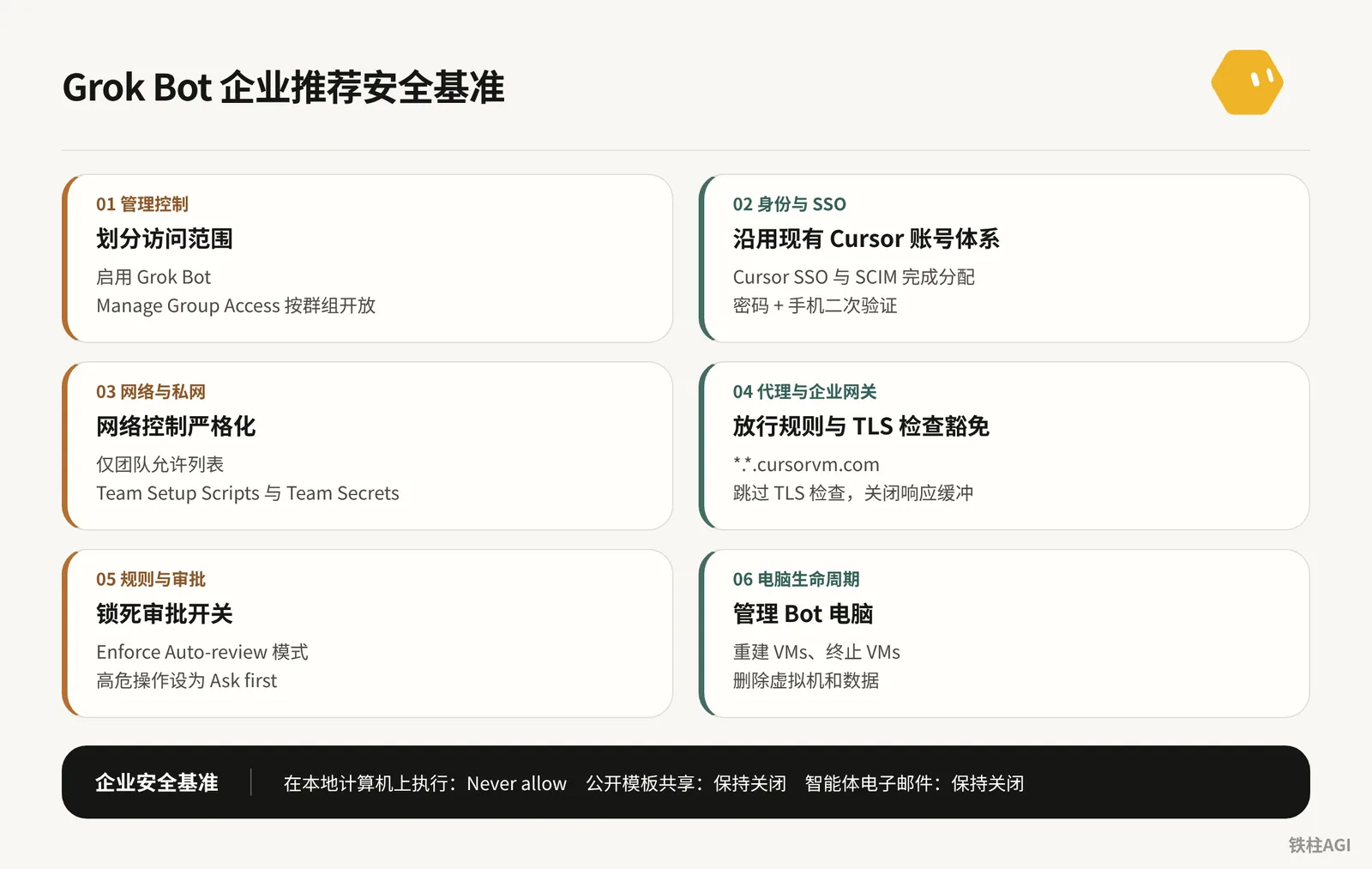
Team and Enterprise Administrative Controls: Architecture and Capability Boundaries
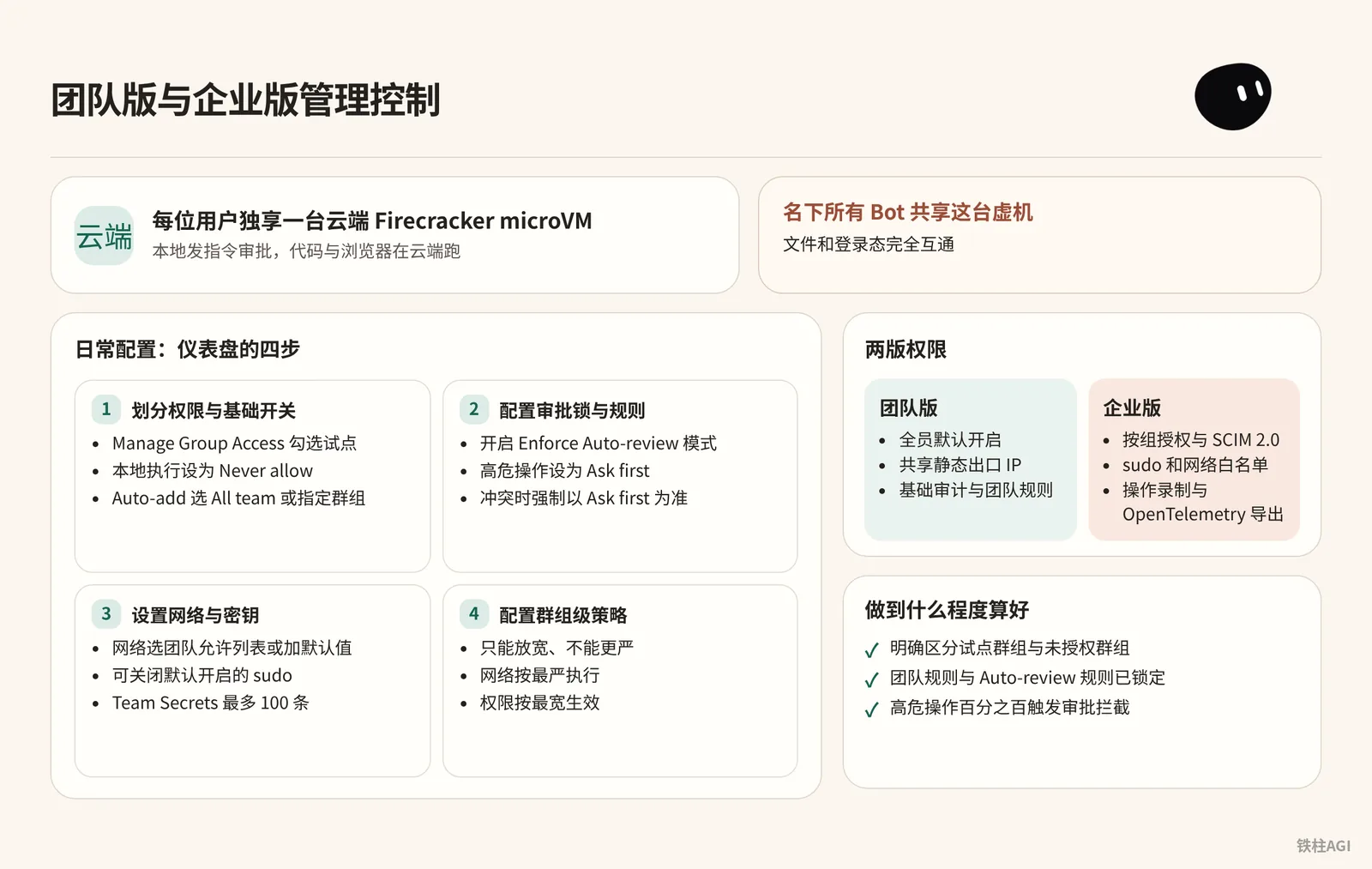
What It Is
Each user has a dedicated cloud Firecracker microVM, issuing instructions and approvals locally while code and browsers run in the cloud.
A heads-up on a common pitfall: all Bots under a user's account share this single VM, and files and login states are fully interoperable.
The 2026-10-12 The X Subscription plan divides permissions into two editions:
- Team Edition: Enabled for all members by default, uses a shared static egress IP, and includes basic auditing and team rules.
- Enterprise Edition: Supports group-based authorization and SCIM 2.0, allows sudo and network allowlists, and includes operation recording and OpenTelemetry export (tagged with
cursor.surface=grok_bot).
See documentation at Grok Bot for Teams and Enterprise.
How to Do It
Daily configuration is handled on the Grok Bot page of the Cursor Dashboard, mainly in four steps.
- Divide permissions and basic toggles
- During the rollout phase, click Manage Group Access to select pilot groups; disable Cloud Agents if cloud coding is not needed; keep public template sharing disabled to prevent leaks.
- Local execution is recommended to be set to Never allow, while disabling local egress routing to prevent detour forwarding.
- For sidebar Bots, select All team or specify groups in the Auto-add column to pin them.
- Configure approval locks and rules
- Enable Enforce Auto-review mode, so members cannot disable review on their own in the client.
- Set high-risk operations such as production deployments or sending external emails to Ask first, and limit read-only operations to Allow automatically.
- When team rules conflict with personal rules, the system strictly enforces Ask first as the priority.
- Set up network and secrets
- Set the network to Team allowlist only or add default values, specifying domain names and IP ranges; disable sudo (enabled by default) to prevent system tampering.
- Teams can add up to 100 Team Secrets, with a single secret limit of 32 KB and a total capacity limit of 96 KB; plaintext is not displayed after saving.
- Secret variable names are prohibited from using system reserved names such as
PATH,HOME, and prefixes starting withSAND_orLD_.
- Configure group-level policies
- Access groups from Members > Groups. The configuration principle is that policies can only be relaxed, not restricted further.
- Check Don't enforce for this group to unlock the auto-review lock.
- Network policy is an exception: group policies directly override team policies. If a member belongs to multiple groups, network policies enforce the strictest rule, while permissions apply the most permissive rule.
What Good Looks Like
- The dashboard clearly distinguishes between pilot groups and unauthorized groups, and unauthorized personnel cannot activate Bots in the client.
- Team rules and Auto-review rules are locked; members can view team rules in the client settings page, but edit and delete buttons are disabled.
- High-risk operations (external communications, file destruction, privileged commands) trigger approval interception 100% of the time.
Identity and SSO: Enabling Organization-Wide Access and Device Trust Compatibility
What It Is
Grok Bot inherits the Cursor account system, so there is no need to create a separate application in the IdP. Reference documentation: Configure Identity and Access.
Bots run in cloud Linux VMs without MDM installed, so they cannot satisfy FastPass or Hybrid Join requirements. Remember never to disable device compliance globally; instead, configure bypass policies for target groups before the block rules.
How to Do It
Expand Okta Assignment: Go to Assignments > Assign to Groups in the Cursor app and select business groups; when SCIM is enabled, assign and push groups (Push Groups) simultaneously.
Both SAML SSO and SCIM must be assigned simultaneously; omitting SSO will cause logins to be blocked.
Expand Entra ID Assignment: In the Cursor app under Users and groups, click Add user/group to add groups (requires P1/P2 license, nested groups are not supported); synchronize and assign the same groups in the provisioning application.
Allow Linux in Okta: Create a new rule
Grok Bot computer (Linux)before the authentication policy block rules.Restrict users to the Cursor group, set Device platform to Other Desktop (no dedicated Linux option), and set Device state to Any; select Password + Another factor for verification, leaving phishing-resistant restrictions unchecked.
Allow Linux in Entra ID: Create a high-priority policy specifying the Cursor group and target application; include Linux under Device platforms while excluding Windows and macOS; check Require multifactor authentication under Grant; the existing compliance policy must exclude this group or the Linux platform.
What Good Looks Like
- Business users log into the desktop client using enterprise SSO without encountering
User is not assigned to this application. - Accessing the intranet inside the Bot browser via password plus secondary authentication succeeds without FastPass or device non-compliance prompt blocks.
- When employees access from their personal computers, existing FastPass and device compliance rules remain strictly in effect.
Private Network Access: Desktop Routing and Automated Team Setup Scripts
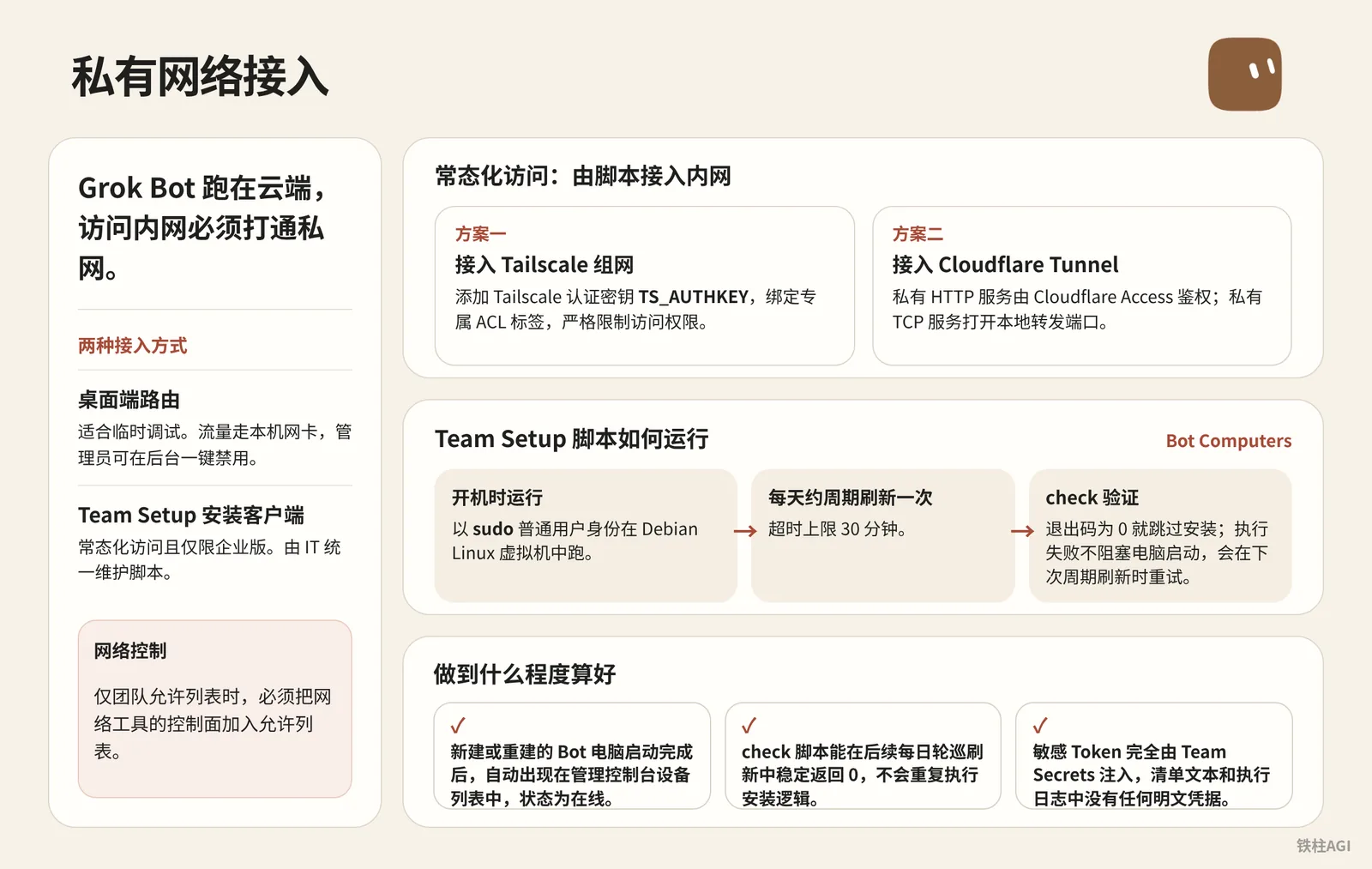
What It Is
Grok Bot runs in the cloud; accessing the intranet requires establishing a private network connection.
- Desktop routing: Suitable for temporary debugging. Enable
Settings > Computer > Route traffic through this computerin the client; traffic routes through the local network card, and administrators can disable this with one click in the backend. - Team Setup client installation: For persistent access and limited to Enterprise Edition only. IT centrally maintains scripts that automatically launch and join the intranet whenever the Bot starts or refreshes.
For details, see Connect to Private Networks.
How to Do It
Team environment setup scripts are located under Bot Computers in the dashboard and run as a non-root user with sudo inside the Debian Linux VM. The script runs at boot and refreshes periodically approximately once per day, with a 30-minute timeout limit.
- An exit code of 0 for
checkskips installation; after installation completes,checkruns again for verification. - Execution failures do not block computer startup; retries occur during the next periodic refresh.
Tailscale Networking Solution
- Open Team Secrets, add the Tailscale authentication key
TS_AUTHKEY(value formatted astskey-auth-...), and bind a dedicated ACL tag (such astag:grok-bot) in the Tailscale admin console to strictly restrict access permissions. - Go to team environment setup scripts, click + to create a new manifest, set the Manifest ID to
private-network-tailscale, and switch to JSON or form mode to enter the configuration:
Tailscale Networking Solution
{
  "manifestId": "private-network-tailscale",
  "entries": [
    {
      "id": "install-tailscale",
      "setup": "#!/usr/bin/env bash\nset -euo pipefail\ncurl -fsSL https://tailscale.com/install.sh | sh\nsudo tailscale up --authkey=\"$TS_AUTHKEY\" --accept-routes --hostname=\"grok-vm-${USER}\"",
      "check": "command -v tailscale && tailscale status"
    }
  ]
}
Cloudflare Tunnel Solution
- Private HTTP services: Directly access the tunnel routed domain, authenticated by Cloudflare Access with interactive login completed in the Bot browser.
- Private TCP services (such as databases, SSH): Install
cloudflaredin the manifest; run the command in the Shell to open a local forwarding port when connecting:
cloudflared access tcp --hostname db-internal.corp.com --url localhost:5432
Cloudflare Tunnel Solution
{
  "manifestId": "private-network-cftunnel",
  "entries": [
    {
      "id": "install-cloudflared",
      "setup": "#!/usr/bin/env bash\nset -euo pipefail\ncurl -fsSL https://pkg.cloudflare.com/cloudflare-main.gpg | sudo tee /usr/share/keyrings/cloudflare-main.gpg >/dev/null\necho 'deb [signed-by=/usr/share/keyrings/cloudflare-main.gpg] https://pkg.cloudflare.com/cloudflared bullseye main' | sudo tee /etc/apt/sources.list.d/cloudflared.list\nsudo apt-get update && sudo apt-get install -y cloudflared",
      "check": "command -v cloudflared"
    }
  ]
}
Coordinating with Network Policies to Allow Control Plane Endpoints
If the team enables Team allowlist only network controls, the control planes of networking tools must be added to the allowlist; otherwise, clients cannot complete authentication. For example, when using Tailscale, allow coordination servers and DERP relay server domains in the policy; policy changes propagate to virtual machines in about 1 minute.
What Good Looks Like
- Newly created or recreated Bot computers automatically appear in the Tailscale or Cloudflare admin console device list with an online status after startup completes.
- The
checkscript in the manifest consistently returns 0 during subsequent daily periodic refreshes, without repeating installation logic. - Sensitive tokens are injected entirely via Team Secrets, with no plaintext credentials appearing in manifest text or execution logs.
Proxies and Enterprise Gateway Pitfalls: Allowlist Rules and TLS Inspection Exemptions
Enterprise gateways (such as Zscaler or Palo Alto) frequently cause chats to function normally while failing to capture screenshots or control terminals.
The root cause is that the control plane uses HTTP/2 or SSE streaming persistent connections over second-level nested domains <computer>.<cluster>.cursorvm.com, which normal single-level rules fail to match.
See official instructions at Configure TLS Inspection Proxies.
Key Configuration Points
Gateways must allow the following domains while disabling response buffering and exempting TLS inspection to prevent end-to-end handshake failures and streaming timeouts:
*.cursor.sh: Core APIs*.cursorvm.comand*.*.cursorvm.com: Control channels; two-level wildcards must be supported*.cursor-cdn.com,*.cursorapi.com,downloads.cursor.com, and the main website: Static assets and download updates
After configuring policies, be sure to synchronize them to Off-Network roaming profiles to prevent employees from losing connection when working remotely or off-network.
Device Troubleshooting and Verification
Follow these troubleshooting steps in an employee's computer terminal:
- Verify whether certificates have been altered; the normal issuer must be Amazon RSA:
curl -v https://api2.cursor.sh |& grep -C1 issuer:- Verify multi-level DNS resolution; if it fails, compare with
nslookup test.us9.cursorvm.com 1.1.1.1:
nslookup test.us9.cursorvm.com- Check streaming data transmission: Data should output line by line. If it pauses for several seconds and then prints all at once, gateway buffering has not been disabled.
Acceptance criteria: Both office network and home roaming connect to cloud computers within 5 seconds, certificates pass through directly to Amazon RSA, and streaming long connections exhibit zero buffering latency.
Desktop Client Distribution and Version Control
Platforms and Update Mechanisms
| Platform | Installation Format | Update Logic |
|---|---|---|
| macOS | .dmg (Apple Silicon / Intel) | Automatically checks for updates on startup; disabling via policy is not supported |
| Windows | Setup .exe (x64 / Arm64) | Automatically checks for updates on startup; disabling via policy is not supported |
| Linux | .deb, .rpm, AppImage | deb and rpm are managed by package managers; AppImage checks for updates automatically |
| iOS | App Store | Requires iOS 18 or later |
| Android | Google Play | Requires Android 9 or later; supports managed push |
See official deployment instructions at Deploy Grok Bot to Your Organization.
Deployment and Version Control
- Obtain Installation Packages Do not download installation packages manually from web pages; fetch directly from the official JSON feed:
https://api2.cursor.sh/updates/api/download/stable/{platform}/sand.{platform}supports macOS (darwin-arm64,darwin-x64), Windows (win32-x64-user,win32-arm64-user), and Linux (linux-x64,linux-arm64).
curl -s https://api2.cursor.sh/updates/api/download/stable/win32-x64-user/sandThe endpoint returns version, commitSha, downloadUrl, as well as debUrl and rpmUrl for Linux. For macOS and Windows, package URLs can also be constructed directly according to the rules:
- Windows:
https://downloads.cursor.com/grokbot/stable/win32-x64/{version}/Grok_Bot_{version}_Setup.exe - macOS:
https://downloads.cursor.com/grokbot/stable/darwin-arm64/{version}/Grok_Bot_{version}.dmg
- MDM Push
Windows (Intune / SCCM): Add
/Sas the silent installation parameter. The installer writes to the current user's%LOCALAPPDATA%\Programsby default, so it must run in the User Context.Never use the local SYSTEM account, as it will install to the wrong path and employees will not find the application.
Grok_Bot_1.0.0_Setup.exe /S- macOS (Jamf / Kandji / Intune): Push the
.dmgmatching the architecture to the/Applicationsdirectory. - Linux (Ansible / Puppet): Install the
.debor.rpmpackage; the system will automatically configure official package repositories.
- Version Control and Pinning macOS and Windows cannot completely disable automatic updates via policy.
Linux versions can be locked via the package manager, or synchronized updates paused by setting Enabled: no in /etc/apt/sources.list.d/grok-bot.sources or enabled=0 in /etc/yum.repos.d/grok-bot.repo:
sudo apt-mark hold grok-botCursor establishes support lifetimes for older versions. Clients below the minimum supported threshold will encounter a full-screen Update required popup that blocks usage, and pinned Linux versions past this threshold will also be blocked. Operations teams need to roll out tested new stable releases every two to four weeks.
Acceptance Criteria
- Office devices complete silent installation via MDM, so desktops are ready immediately upon onboarding new employees.
- The IT team maintains a consistent version rotation cadence, completing internal organizational version upgrades before official cutoffs take effect.
Managing Bot Computers: Batch Operations and Lifecycle
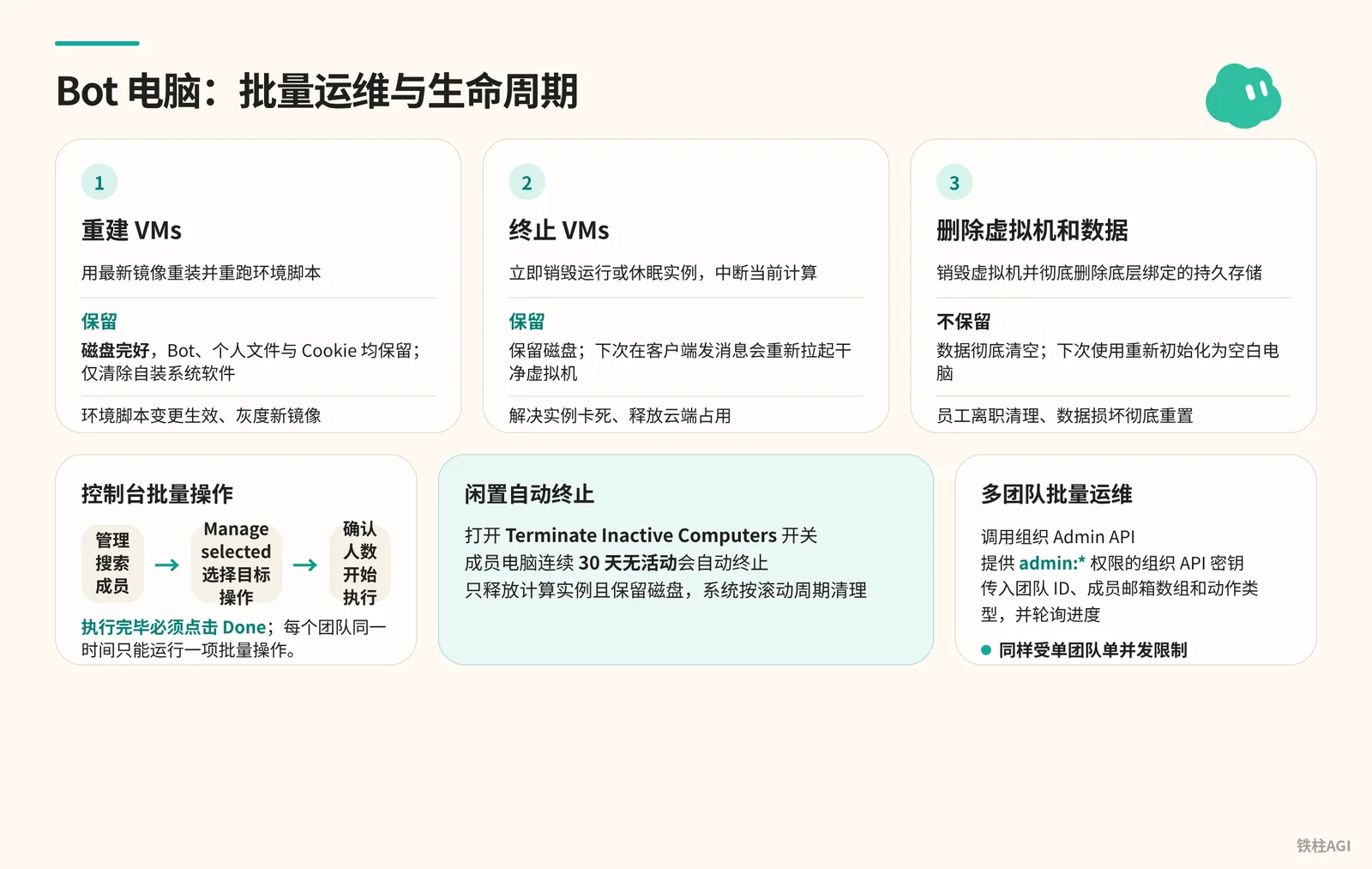
Core Operations and Permissions
Access this under the Bot Computers section of the Grok Bot page on the Cursor Dashboard by clicking Manage Bot Computers.
This feature is restricted to Enterprise Edition Organization Admins; standard team admins cannot see this entry point.
See documentation at Manage Grok Bot Computers.
| Operation Name | Underlying Behavior | Data and File Retention State | Applicable Scenarios |
|---|---|---|---|
| Recreate VMs | Reinstalls using the latest image and reruns environment scripts | Retained. Disk remains intact; Bots, personal files, and cookies are all preserved, only clearing self-installed system software | Applying environment script changes, rolling out new images |
| Terminate VMs | Immediately destroys running or hibernated instances, interrupting active compute | Retained. Disk is retained; sending a message from the client next time spins up a clean VM | Resolving frozen instances, freeing cloud resource usage |
| Delete VM and Data | Destroys the VM and completely deletes underlying bound persistent storage | Not Retained. Data is completely wiped; next use re-initializes as a blank computer | Offboarding employee cleanup, complete reset upon data corruption |
Console Operations and Troubleshooting
- Enter the page, click Manage, and search by name or email to filter members; supports single selection, multiple selection, or Select all.
- Select the target operation in the Manage selected dropdown, verify the count of affected users, and execute.
- After execution finishes, you must click the Done button on the card. Each team can only run one batch operation at a time; failing to click Done keeps subsequent action buttons locked.
When encountering skipped or failed statuses, handle them based on the receipts:
- Skipped (No VM / Operation cannot be completed): User has no VM or left the team while queued; no action needed.
- Failed (Another recreate is in progress / VM scan not completed): Another update has not finished or the backend temporarily failed to fetch state; retry after a few minutes.
- Failed (Operation cannot be completed): The Bot is running heavy tasks leading to a timeout; notify the user to let the Bot idle before retrying.
Automation and Acceptance Criteria
Toggle on the Terminate Inactive Computers switch above the action buttons. Computers inactive for 30 consecutive days will terminate automatically, freeing compute instances while retaining disks, cleaned up by the system on a rolling schedule.
For multi-team batch operations, invoke the Organization Admin API.
When calling, provide an Organization API key with admin:* permissions, pass the team ID, array of member emails, and action type (recreate or terminate), and poll for progress—similarly constrained by the single-concurrency-per-team limit.
Focus on two key metrics during acceptance:
- Seamless batch recreation of instances without data loss.
- Enabling 30-day idle auto-termination to prevent zombie VMs from consuming organizational cloud quotas.
Enterprise Security Baseline Configuration and Practical Prompts
Administrator Configuration
- Lock network to "Team allowlist only", and disable public templates and email channels.
- Enable Enforce Auto-review, and set local execution to Never allow to prevent unauthorized downgrades.
- For any actions calling production APIs, modifying databases, sending outbound emails, signing agreements, or merging into
main, require Ask first; allow log queries and compilation automatically.
Employee Guidelines
- Pass credentials through environment variables; never paste plaintext passwords into chat dialogs.
- Choose Allow once for sensitive authorizations; avoid selecting always allow, and exit promptly when finished.
Practical Prompts
Practical Prompts
你现在负责对内部服务进行接口与架构调研。
请遵循以下严格的安全限制:
1. 本次任务为纯只读模式,严禁对目标服务发起任何 POST、PUT、DELETE 请求。
2. 检查网络连通性:尝试向内部端点 http://api-monitor.corp.internal/health 发起 GET 请求并打印状态码。
3. 如果遇到证书问题或连接被重定向,记录错误日志,不要尝试使用任何提权手段。
4. 将调研结果汇总输出为 Markdown 表格,包含服务名称、响应耗时、健康状态。
5. 完成后暂停执行,等待我的进一步指令,不要擅自读取其他网段资产。
Practical Prompts
请按规范完成本周发版代码的对比检查与 PR 草稿创建:
1. 切换到工作区代码目录,拉取 origin/main 最新分支。
2. 比对 feature/sso-login 分支与 main 分支的改动差异,列出所有变动的文件列表。
3. 检查是否有硬编码的密钥、密码或私钥文件被提交。如果发现任何形如 'AKIA...' 或 'BEGIN PRIVATE KEY' 的文本,立即中断任务并向我告警。
4. 在本地运行静态检查脚本:npm run lint 和 npm run test。
5. 准备 PR 描述文本草稿,包含变更摘要与测试结果。
6. 注意:严禁直接推送到远程仓库。把 PR 描述保存为 local-pr-draft.md 后向我申请确认。得到明确授权前不得执行 git push。
Practical Prompts
请处理今天未分配的内部支持工单:
1. 打开浏览器,访问内部工单控制台 https://tickets.corp.internal。
2. 过滤出状态为 'New' 且优先级为 'High' 的所有工单。
3. 逐条提取工单的核心问题,按照以下类别打标签:[账号登录]、[权限申请]、[网络故障]。
4. 为每条工单生成标准回复模版,存入草稿区。
5. 涉及权限开通的工单,一律在回复中注明:'需直属主管在 OA 提交审批流,当前仅作信息预审'。
6. 严格要求:所有邮件和系统回复只保留在草稿状态,严禁点击 'Send' 或 'Submit'。生成处理清单供我逐条审查。
Common Pitfalls
- Missing multi-level wildcards in gateway: The hostname is
<vm-id>.<cluster-id>.cursorvm.com; configuring only*.cursorvm.comstalls at 99%, so*.*.cursorvm.commust also be added. - Proxy buffering truncating streams: Enabling Response Buffering in Zscaler causes disconnections. Buffering must be disabled for Cursor domains to pass through Server-Sent Events transparently.
- Missing allowlists in roaming policies: Inability to connect when working from home is due to Zscaler switching to Off-Network policies. Remember to synchronize domain allowlists and TLS exemptions to off-network profiles.
- Accidentally enabling legacy privacy mode: Enabling "Privacy Mode (Legacy)" in the backend completely disables Bots; turn it off in team settings.
- IdP strictly requiring compliant devices: Cloud Linux VMs are not managed by MDM and cannot run FastPass. Add high-priority rules for Linux (Other Desktop) in Okta/Entra ID to allow access via password plus mobile secondary authentication.
- Storing secrets in plaintext in scripts: Team Setup is plaintext JSON. Store tokens in Team Secrets and read them in scripts using
"$TS_AUTHKEY". - Application missing when installed with SYSTEM privileges: The program installs into
%LOCALAPPDATA%\Programs. The/Sinstallation command must be run in the current user context. - Mistaking termination for revoking access: Terminate only stops processes while preserving disks; sending a message spins it back up. To completely revoke access, unassign the user in the IdP or remove them via Manage Group Access.
- Losing secrets across multiple teams: Joining more than two teams configured with Team Setup will result in rejection of any Team Secrets; simply leave the extra teams.
- Pinned versions dropping below minimum support threshold: Versions locked via
apt-mark holdthat fall below the lifecycle minimum threshold will be blocked by an "Update required" screen; simply unlock and upgrade.
Acceptance and Verification
Network and Gateways
- Run
curl -v https://api2.cursor.sh |& grep -C1 issuer:on office computers to ensure the certificate issuer is Amazon RSA. - Run
nslookup test.us9.cursorvm.comto test multi-level domain resolution; switch to a mobile hotspot to connect to the cloud computer and verify there are no certificate warnings.
Identity and SSO
- Test logging into Grok Bot with a non-engineering account to confirm Cursor SSO succeeds on the first attempt.
- Log into internal SSO within the Bot browser using password + mobile verification code, confirming no FastPass blocking popups, while compliance policies on office machines remain in effect as usual.
Private Network and Environment Scripts
- Confirm in the Tailscale or Cloudflare console that new machines join the network automatically with correct tags.
- Ping or curl private hosts in the terminal to verify connectivity; verify Team Setup logs have no timeouts and secrets are masked.
Client and Security Baselines
- Silently install on Windows using a standard user account to
%LOCALAPPDATA%\Programsand verify desktop shortcuts are generated. - Global rules in "Settings > General > Auto-review" are locked and cannot be modified; test deleting root directory files or invoking unauthorized webhooks to confirm the system strictly pops up an approval prompt.
Computer Lifecycle
- Admins execute Recreate VMs in the console and confirm original files and history remain intact.
- Click Done after batch tasks finish to verify the system can normally start the next round.
Further Reading
- Official Documentation: Grok Bot for Teams and Enterprise
- Official Documentation: Configure Identity and Access
- Official Documentation: Connect to Private Networks
- Official Documentation: Configure TLS Inspection Proxies
- Official Documentation: Deploy Grok Bot to Your Organization
- Official Documentation: Manage Grok Bot Computers
- Official Help: Plans and Billing
- Official Help: Team Bots
- Official Help: Connect Apps
- Official Guide: Grok Bot Security Architecture Guide